Introduction
This manual provides essential instructions for the safe and effective operation of your Pentax Optio Z10 digital camera. Please read this manual thoroughly before using the camera and retain it for future reference.
Пакеттин мазмуну
Verify that all items are present in your package. The standard package for the Pentax Optio Z10 typically includes:
- Pentax Optio Z10 Digital Camera Body
- Кайра заряддалуучу литий-иондук батарейка
- Батарея заряддагыч
- USB кабели
- Билек боо
- Software CD-ROM (if applicable)
- Колдонуучунун Колдонмосу (бул документ)
- SD/SDHC Memory Card (may be included depending on retailer/bundle)
- Memory Card Reader (may be included depending on retailer/bundle)
- Camera Case (may be included depending on retailer/bundle)
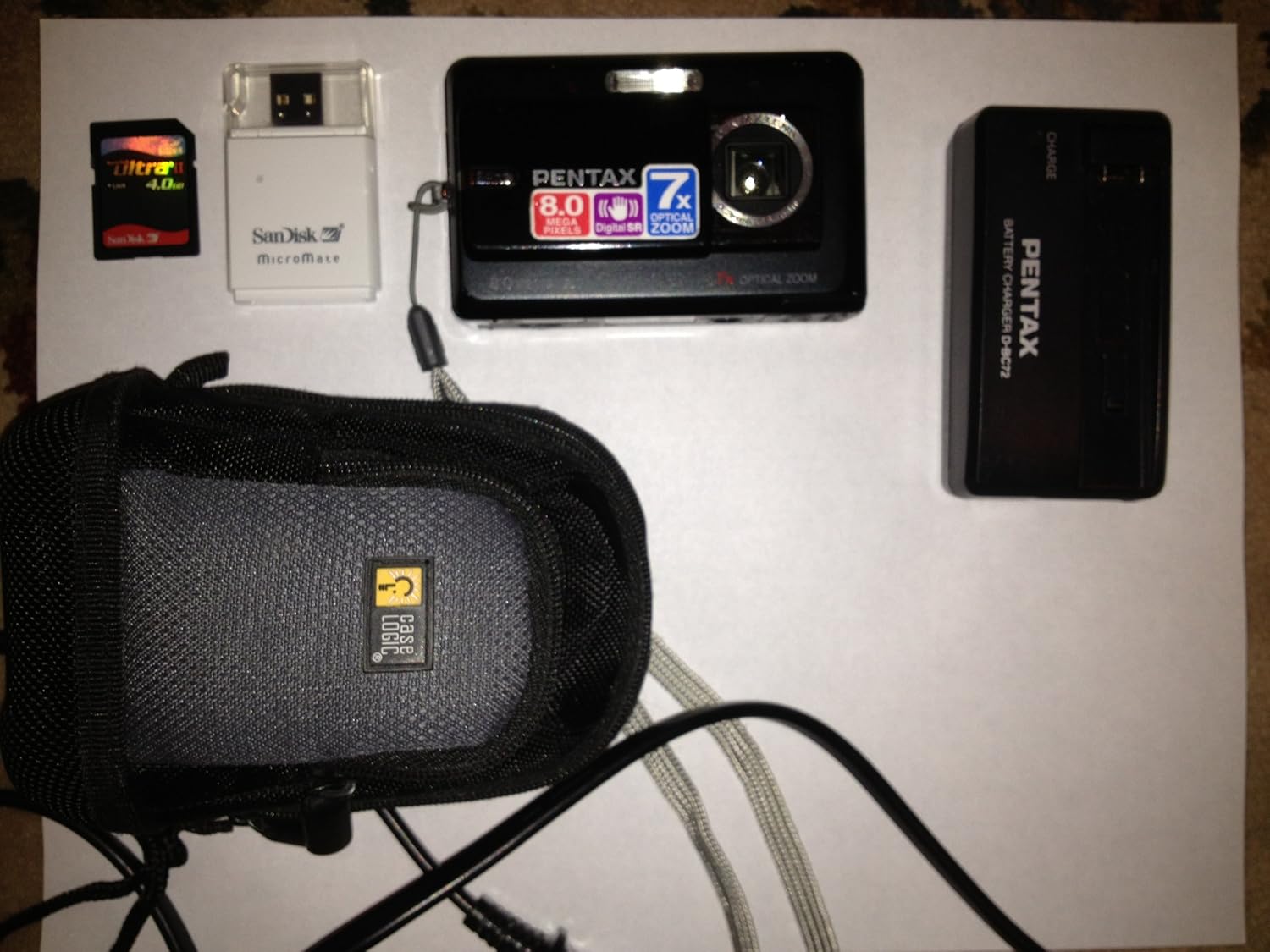
Figure 1: Pentax Optio Z10 Camera and Accessories. This image displays the Pentax Optio Z10 digital camera, an SD memory card, a SanDisk MicroMate USB card reader, a Pentax D-BC72 battery charger, and a Case Logic camera case. These items represent typical components that may be included with the camera.
Жайгашуу
1. Батареяны заряддоо
- Insert the rechargeable lithium-ion battery into the provided battery charger. Ensure correct orientation.
- Connect the battery charger to a power outlet using the appropriate power cable.
- The charging indicator light on the charger will illuminate (e.g., orange or red) during charging.
- Once charging is complete, the indicator light will change color (e.g., green) or turn off. Remove the battery from the charger.
2. Батареяны жана эстутум картасын салуу
- Open the battery/memory card compartment cover on the camera.
- Insert the charged battery into the compartment, ensuring the correct polarity.
- Insert an SD or SDHC memory card into the designated slot. Push until it clicks into place.
- Бөлүмдүн капкагын бекем жабыңыз.
3. Баштапкы камера жөндөөлөрү
Upon first power-on, you may be prompted to set the date, time, and language. Follow the on-screen instructions using the camera's navigation buttons and LCD monitor.
Камераны иштетүү
1. Күйгүзүү / Өчүрүү
басыңыз КҮЧ камераны күйгүзүү же өчүрүү үчүн баскыч. Линза күйгүзүлгөндө узартылат.
2. Сүрөт тартуунун негизги режимдери
The Pentax Optio Z10 features various shooting modes, accessible via the mode dial or menu:
- Auto Picture Mode: The camera automatically detects the scene type and applies optimal settings.
- Программанын AE режими: Allows manual adjustment of some settings while the camera sets aperture and shutter speed.
- Сахна режимдери: Pre-set modes for specific situations (e.g., Portrait, Landscape, Night Scene).
- Кино режими: Видео жаздыруу үчүн.
3. Сүрөт тартуу
- Камераны күйгүзүңүз.
- 2.5 дюймдук LCD мониторду колдонуп, сүрөтүңүздү кадрга алыңыз.
- Автофокусту жана экспозицияны иштетүү үчүн жапкыч баскычын жарымына басыңыз. Фокуска жеткенде фокустун кадры жашыл түскө айланат.
- Сүрөттү тартуу үчүн жапкычты толугу менен ылдый басыңыз.
4. Чоңойтуу операциясы
Use the zoom lever (typically around the shutter button) to adjust the 7x optical zoom. Push towards 'W' for wide-angle and 'T' for telephoto.
5. Ойнотуу режими
басыңыз ОЙНОО кайра баскычынview captured images and videos. Use the navigation buttons to scroll through files.
6. Компьютерге туташуу
Connect the camera to a computer using the supplied USB cable. The camera will appear as a removable disk, allowing you to transfer photos and videos.
Техникалык тейлөө жана кам көрүү
- Линзаны тазалоо: Камера линзалары үчүн атайын иштелип чыккан жумшак, түксүз кездемени колдонуңуз. Линзага манжаларыңыз менен тийбеңиз.
- Cleaning the LCD Monitor: Gently wipe with a soft, dry cloth. Do not use abrasive cleaners.
- Батареяга кам көрүү: Батареяларды салкын, кургак жерде сактаңыз. Ашыкча температурага дуушар кылбаңыз.
- Сактагыч: Узак мөөнөткө колдонулбаганда, батареяны чыгарып, камераны кургак, чаңсыз чөйрөдө сактаңыз.
- Суу каршылык: The Pentax Optio Z10 is сууга чыдамдуу эмес. Суунун же жогорку нымдуулуктун таасиринен алыс болуңуз.
Проблемаларды чечүү
| Көйгөй | Мүмкүн болгон себеп / Чечим |
|---|---|
| Камера күйбөйт. | Батарея заряды түгөнгөн. Батареяны заряддаңыз. Battery is inserted incorrectly. Reinsert with correct polarity. |
| Сүрөткө тартуу мүмкүн эмес. | Эстутум картасы толгон. Керексиз сүрөттөрдү жок кылыңыз же жаңы карта салыңыз. Memory card is not inserted. Insert an SD/SDHC card. Батареянын заряды аз. Батареяны кубаттаңыз. |
| Сүрөттөр бүдөмүк. | Subject is too close. Ensure minimum focus distance. Camera shake. Use Digital Shake Reduction or a tripod. Объектив кир. Линзаны тазалаңыз. |
| LCD monitor is blank. | Camera is in power-saving mode. Press any button to wake. Brightness setting is too low. Adjust in menu. |
Техникалык шарттар
- Сүрөт сенсору: 8.0 мегапикселдик CCD (1/2.5 дюйм)
- Натыйжалуу пикселдер: 8.0 мегапиксел
- Объектив: Pentax Zoom Lens, 7x Optical Zoom (equivalent to 38-266mm in 35mm format)
- Digital Zoom: Болжол менен 5.1x
- ЖК монитор: 2.5-inch TFT color LCD, approx. 230,000 dots
- Сактоочу медиа: SD/SDHC memory card, 52 MB built-in memory
- File Формат: Still images: JPEG (Exif 2.21), Movies: AVI (Motion JPEG)
- Видеонун чечилиши: 640 x 480 / 320 x 240, 30 fps
- ISO сезгичтиги: Auto, Manual (80-3200)
- Жабык ылдамдыгы: 1/1440 - 4 секунд
- Кубат булагы: Кайра заряддалуучу литий-иондук батарейка
- Өлчөмдөрү (W x Y x D): Болжол менен 97 x 58 x 22 мм (3.8 x 2.3 x 0.9 дюйм)
- Салмагы: Approximately 145g (5.12 oz) without battery and memory card
- Байланыш: USB 2.0
- Өзгөчөлүктөр: Digital Shake Reduction, High-speed Face Recognition, Auto Picture mode
Кепилдик жана колдоо
This Pentax Optio Z10 camera, if purchased as "Renewed," typically comes with a 90-day limited warranty. Please refer to your purchase documentation or contact your retailer for specific warranty terms and conditions.
For technical support or service inquiries, please visit the official Pentax support website or contact their customer service department. Keep your proof of purchase handy when seeking support.
Note: As this is a renewed product, warranty terms may differ from new products.


