Introduction
The Vorago Portable Air Conditioner is a versatile 4-in-1 device designed to provide personal cooling, humidification, and fan functions, along with a soothing LED night light. This compact and rechargeable unit is ideal for use in various personal spaces such as offices, desks, homes, bedrooms, camping, and cars. Enjoy fresh, cool air powered by just water and ice.
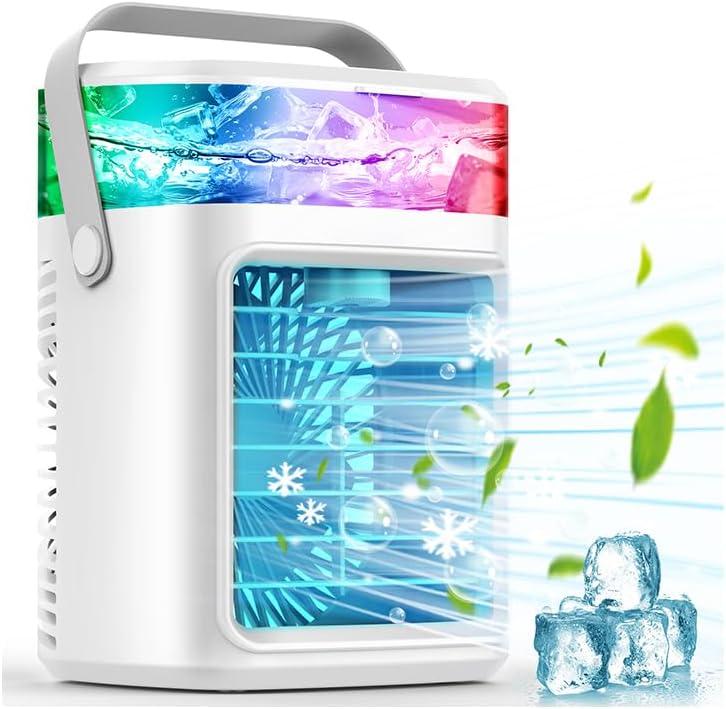
Image: The Vorago Portable Air Conditioner, showcasing its compact design and colorful LED lighting, with cool air and ice cubes depicted.
Продукт өзгөчөлүктөрү
- 4-in-1 Multifunction Design: Combines portable air conditioner, humidifier, fan, and LED night light. Includes an aromatherapy tray for essential oils.
- Adjustable Speeds & Energy-Saving: Offers 3 wind speeds (high, medium, low). Can be used as a standard fan or with water/ice for evaporative cooling. Designed for energy efficiency.
- Чоң кубаттуулуктагы суу багы: Features a 450ml top-fill water tank for 6-8 hours of continuous cooling. Automatic mist shut-off when water runs out for safety.
- 7 Colorful LED Night Light: Built-in LED light with 7 cycling colors or a fixed color option, creating a calming ambiance.
- Quiet Operation & Built-in Timer: Operates quietly for undisturbed sleep or work. Includes 2-hour or 4-hour timer options.
- Портативдик жана заряддалуучу: Powered by a 2200mAh rechargeable battery, providing 3-5 hours of use on a full charge. USB charging compatible with power banks, laptops, car chargers, or adapters. Equipped with a hand strap for easy portability.

Image: Visual representation of the product's four main functions: normal fan, cool humidifier, air conditioner with ice water, and LED mood light.
Кутуда эмне бар
- 1 x Portable Air Cooler
- 1 x USB кабели
- 1 x User Manual
Жайгашуу
- Агрегатты таңгактан чыгаруу: Аба муздаткычын жана бардык аксессуарларды таңгактан этияттык менен алып чыгыңыз.
- Агрегатты заряддоо: Connect the provided USB cable to the unit's charging port and plug the other end into a compatible USB power source (e.g., power bank, laptop, USB adapter). Ensure the unit is fully charged before first use for optimal battery life.
- Суу резервуарын толтуруңуз:
- Бирдиктин үстүнкү капкагын алып салыңыз.
- Fill the 450ml water tank with clean tap water. For enhanced cooling, add ice cubes to the water. Do not fill with only ice; a small amount of water is necessary for the cooling mechanism.
- Үстүнкү капкакты коопсуз ордуна коюңуз.
- Бирдикти жайгаштырыңыз: Place the air cooler on a flat, stable surface in your desired personal space. Ensure there is adequate airflow around the unit.

Image: The large capacity water tank being filled with ice and water for up to 8 hours of cooling.
Video: A demonstration of setting up and using the portable air conditioner, including filling the water tank and activating the cooling function.
Иштөө нускамалары
- Күйгүзүү/өчүрүү: Кубат баскычын басып, кармап туруңуз (●) on the top panel for a few seconds to turn the unit on or off.
- Желдетүүчү ылдамдыгын жөндөө: Short press the fan speed button (●●●) to cycle through 3 fan speeds: Low, Medium, and High.
- Муздатууну/нымдандырды иштетүү: Press the mist/cool button (●●) to activate the humidifying and cooling mist function. The unit will draw air over the ice water to produce a cooler, humidified breeze.
- Таймерди коюу: Таймер баскычын басыңыз (●●●●) to set the automatic shut-off timer for 2 hours or 4 hours.
- Control LED Night Light: жарык баскычын басыңыз (●●●●●) to cycle through the 7 colorful LED light options or to fix it on a single color.

Image: The control panel of the unit, illustrating the various buttons for operation.

Image: The unit's LED night light function, showing a vibrant color display.
Техникалык тейлөө
- Суу багын тазалоо:
- Regularly empty and clean the water tank to prevent mold and mildew buildup.
- The detachable design allows for easy access. Use a soft cloth and mild detergent, then rinse thoroughly.
- Ensure the tank is completely dry before refilling or storing.
- Тышкы тазалоо: Агрегаттын сыртын жумшак менен сүртүңүз, гamp кездеме. Абразивдүү тазалагычтарды же эриткичтерди колдонбоңуз.
- Аба чыпкасын тазалоо: While not explicitly mentioned as replaceable, regularly check the air intake area for dust buildup and gently clean with a soft brush or vacuum cleaner.
- Сактагыч: When not in use for extended periods, empty the water tank, clean the unit, and store it in a cool, dry place away from direct sunlight.
Проблемаларды чечүү
| Көйгөй | Мүмкүн себеп | Чечим |
|---|---|---|
| Түзмөк күйбөйт. | Кубат жок же батареясы аз. | Ensure the USB cable is securely connected and the unit is charged or plugged into a power source. |
| No mist/cooling effect. | Water tank empty or mist function not activated. | Refill the water tank. Press the mist/cool button to activate the function. Ensure water is cold and ice is present for optimal cooling. |
| Алсыз аба агымы. | Fan speed set too low or air intake/outlet blocked. | Increase fan speed. Check for and clear any obstructions around the air intake (back) and outlet (front). |
| Unit making unusual noise. | Unit not on a stable surface or internal component issue. | Түзмөктү тегиз, туруктуу бетке коюңуз. Эгерде ызы-чуу улана берсе, кардарларды тейлөө кызматына кайрылыңыз. |
| Суунун агып чыгышы. | Water tank not properly sealed or overfilled. | Ensure the top cover is securely closed. Do not overfill the water tank beyond the MAX line. |
Техникалык шарттар
- Бренд: Вораго
- Модель аты: H2202
- Түсү: Боз
- Сыйымдуулугу: 450 миллилитр (суу багы)
- Материал: Acrylonitrile бутадиен Styrene
- Элемент Салмагы: 2.33 фунт
- Пакеттин өлчөмдөрү: 9.84 x 7.36 x 6.18 дюйм
- Иштөө режими: Стандарт
- Өзгөчөлүктөр: Portable air conditioner, aromatherapy machine, air humidifier, fast cooling, adjustable speed, timer, LED screen, leak-proof water tank, low noise, LED night light.
Кепилдик жана колдоо
This product comes with a standard limited warranty. For specific warranty details, please refer to the warranty card included in your product packaging or contact Vorago customer support. If you encounter any issues or have questions regarding your Portable Air Conditioner, please reach out to the retailer or manufacturer's customer service for assistance.
For further support, you may visit the official Vorago webсайтына кириңиз же продуктуңуздун документтеринде берилген байланыш маалыматын колдонуп, алардын кардарларды тейлөө бөлүмүнө кайрылыңыз.


