1. Киришүү
Thank you for choosing the Angrox Voice Remote Control. This remote is specifically designed as a replacement for Philips Google Smart TVs, offering enhanced functionality including voice control and dedicated shortcut buttons for popular streaming services. Please read this manual carefully to ensure proper setup and operation.

Сүрөт: алдыңкы жана каптал view of the Angrox Voice Remote Control, showcasing анын эргономикалык дизайны жана баскычтардын жайгашуусу.
2. Орнотуу
2.1 Батареяны орнотуу
The remote requires two (2) AAA batteries (not included). Ensure correct polarity when inserting the batteries.
- Remove the battery cover on the back of the remote by sliding it downwards.
- Insert two AAA batteries, matching the positive (+) and negative (-) terminals as indicated inside the battery compartment.
- Батареянын капкагын бекем чыккыча ордуна жылдырыңыз.

Image: A three-step diagram illustrating how to remove the battery cover, insert two AAA batteries, and replace the cover.
2.2 Телевизоруңуз менен жупташуу
Before using the remote, it must be paired with your Philips Google Smart TV. This remote supports both infrared and Bluetooth technology for optimal performance.
- Ensure your Philips Google Smart TV is powered on.
- Hold down the "VOL-" button and the "Mic" (Google Assistant) button simultaneously for 5 seconds.
- The remote will initiate the pairing process. All pairing transactions occur in the background, and no further setup is typically required once the pairing is successful.

Image: A hand holding the remote, with an arrow pointing from the 'VOL-' and 'Mic' buttons to a TV screen, illustrating the pairing process.

Image: A visual guide showing the remote and a TV screen with on-screen instructions for pairing, emphasizing holding the VOL- and Mic buttons.
2.3 Туура келген сыналгы моделдери
This voice replacement remote is compatible with the following Philips Google Smart TV series:
- 7000 Сериялар: 75PUL7552/F7, 65PUL7552/F7, 55PUL7552/F7, 50PUL7552/F7, 43PUL7652/F7
- 7600 Сериялар: 65PUL7672/F7, 55PUL7672/F7, 50PUL7672/F7, 43PUL7672/F7

Image: The remote control centered between two Philips Google Smart TVs, with lists of compatible 7000 and 7600 series models.
3. Иштөө нускамалары
3.1 Баскыч функциялары бүттүview
Familiarize yourself with the various buttons and their functions on your Angrox remote control:
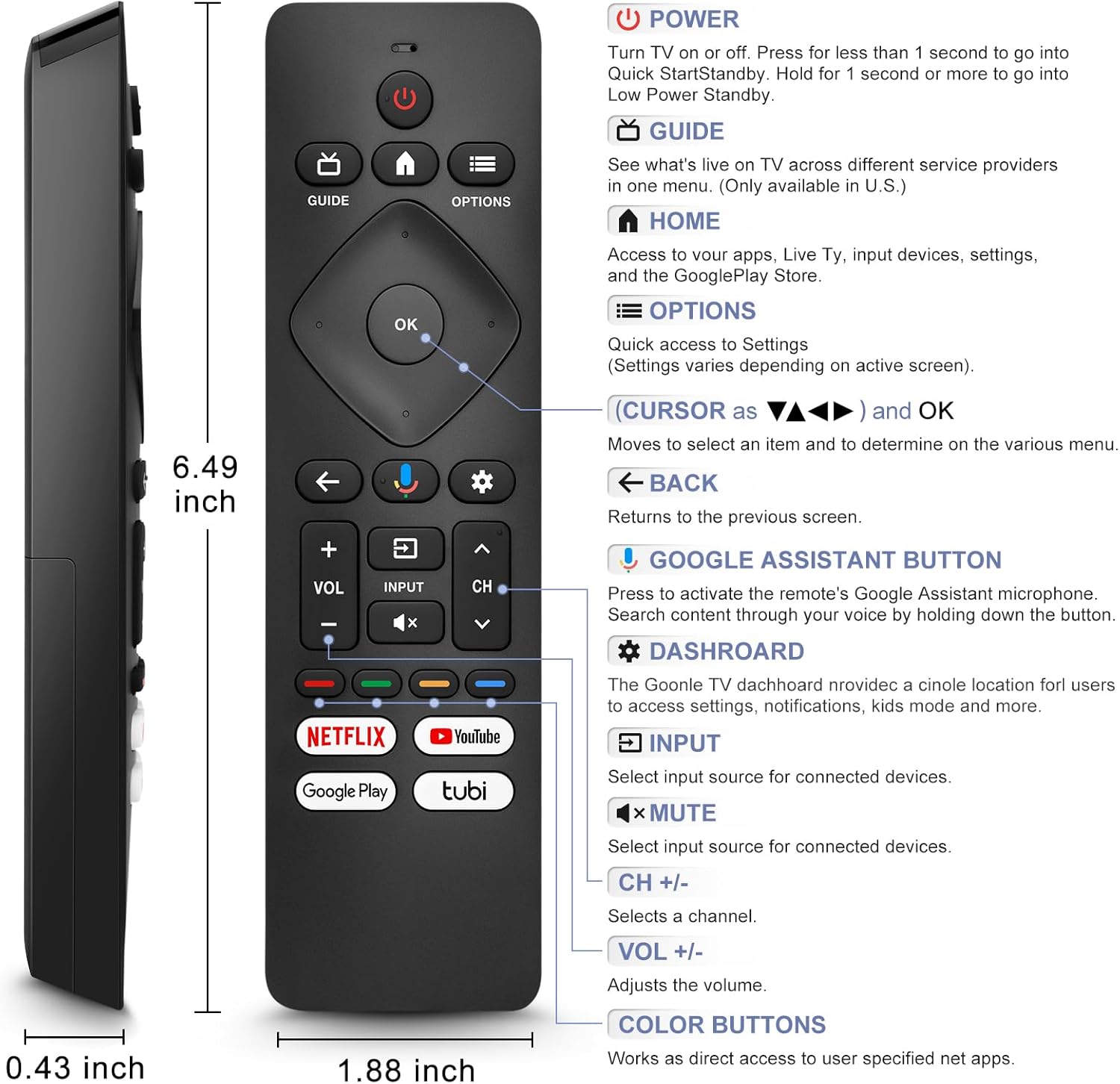
Image: A detailed diagram of the remote control with labels and descriptions for each button, including Power, Guide, Home, Options, Cursor/OK, Back, Google Assistant, Dashboard, Input, Mute, Volume, Channel, and Color Buttons.
- Күч: Press to turn TV on or off. Hold for 1 second for Quick Start Standby, or longer for Low Power Standby.
- Гид: Access live TV service providers (availability may vary by region).
- Үй: Access apps, Live TV, input devices, settings, and the Google Play Store.
- Параметрлер: Quick access to settings (settings vary based on active screen).
- Cursor (Up/Down/Left/Right) & OK: Менюларды чабыттап, тандоолорду ырастаңыз.
- Артка: Мурунку экранга кайтуу.
- Google Жардамчы баскычы: Press and hold to activate the remote's microphone for voice search.
- Куралдар тактасы: Access the Google TV dashboard for settings, notifications, and kids mode.
- Киргизүү: Туташкан түзмөктөр үчүн киргизүү булагын тандаңыз.
- Үнсүз: Mute or unmute the TV audio.
- VOL +/-: Үн деңгээлин тууралаңыз.
- CH +/-: Select the next or previous channel.
- Түс баскычтары: Provide direct access to user-specified net apps.
3.2 Voice Search Function
The integrated voice function allows for easier and more intuitive interaction with your smart TV. Simply press and hold the Google Assistant button and speak your command or query.
- басып, кармап туруңуз Google Жардамчы баскычы (микрофондун сүрөтчөсү).
- Speak clearly into the remote's microphone.
- Сүйлөп бүткөндөн кийин баскычты коё бериңиз.
Examples of voice commands include: "What's the weather today?", "Turn down the volume", "Open YouTube", or searching for specific content.
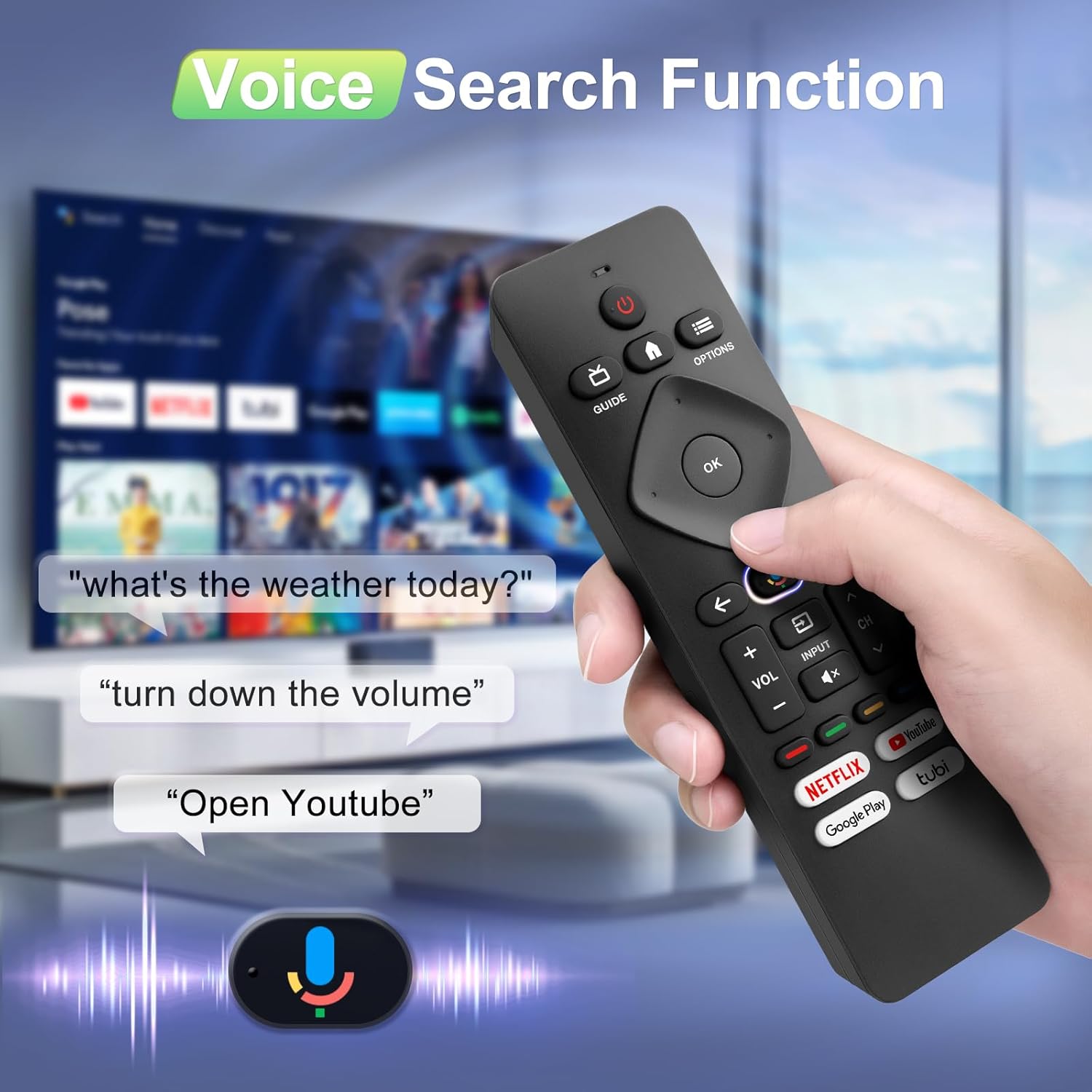
Image: A hand holding the remote, with speech bubbles showing example voice commands like "what's the weather today?" and "Open Youtube", demonstrating the voice search capability.
3.3 Жарлык баскычтары
The remote features four dedicated shortcut buttons for quick access to popular streaming channels:
- Netflix
- YouTube
- Google Play
- Tubi
Pressing these buttons will directly launch the respective application on your TV, provided they are installed and configured.

Image: The remote control highlighting the four dedicated shortcut buttons for Netflix, YouTube, Google Play, and Tubi, with their respective logos.
4. Техникалык тейлөө
Алыстан башкаруу пультуңуздун узак мөөнөттүү жана оптималдуу иштешин камсыз кылуу үчүн, төмөнкү техникалык тейлөө көрсөтмөлөрүн аткарыңыз:
- Тазалоо: Пультту жумшак, кургак чүпүрөк менен сүртүңүз. Суюк тазалоочу каражаттарды же абразивдүү материалдарды колдонбоңуз.
- Батареяны алмаштыруу: Replace batteries when the remote's response becomes sluggish or it stops functioning. Always replace both batteries at the same time with new ones.
- Сактагыч: Пультту күн нурунан жана экстремалдык температурадан алыс, салкын, кургак жерде сактаңыз.
- Тамчылардан качуу: Пультти физикалык таасирден коргоңуз, анткени тамчылар ички компоненттерге зыян келтириши мүмкүн.
5. Кыйынчылыктарды
If you encounter issues with your remote control, please refer to the following common solutions:
- Алыстан жооп бербейт:
- Батареялар туура полярдуулук менен туура салынганын текшериңиз.
- Эски батареяларды жаңы AAA батареялары менен алмаштырыңыз.
- Пульт менен телевизордун инфракызыл кабыл алгычынын ортосунда эч кандай тоскоолдуктар жок экенин текшериңиз.
- Үн функциясы иштебейт:
- Ensure the remote is properly paired with your TV via Bluetooth. Refer to Section 2.2.
- Make sure you are pressing and holding the Google Assistant button while speaking.
- Үн менен башкаруу функциясы иштетилгенин текшерүү үчүн сыналгыңыздын жөндөөлөрүн текшериңиз.
- Buttons Unresponsive or Sticky:
- Clean the remote surface, especially around the buttons, to remove any dirt or debris.
- If buttons remain unresponsive after cleaning and battery replacement, the remote may require replacement.
- Short Remote Distance:
- The remote supports infrared and Bluetooth. Ensure no physical obstructions are blocking the signal.
- The remote is designed for optimal performance within 10 meters (approximately 33 feet) and is available up to 12 meters (approximately 39 feet).
6. Техникалык шарттар
| Бренд | Angrox |
| Модель номери | URMT26CND002 |
| Шайкеш түзмөктөр | Philips Google Smart TVs (7000 & 7600 Series) |
| Байланыш технологиясы | Инфракызыл, Bluetooth |
| Өзгөчөлүктөр | Ergonomic, Voice Search, Shortcut Buttons |
| Power Source | 2 x AAA Батареялар (киргизилген эмес) |
| Элемент Салмагы | 2.39 унция (болжол менен 67.7 грамм) |
| Пакеттин өлчөмдөрү | 6.73 x 1.93 x 1.02 дюйм |
| Button Durability | Tested for 5,000-8,000 clicks per button |
7. Кепилдик жана колдоо
Angrox is committed to providing excellent after-sale service. We focus on the compatibility and quality of our replacement remotes. If you have any questions or concerns regarding your order or the product, please do not hesitate to contact us directly. Our professional after-sale service team is available to assist you.
For support, please refer to the contact information provided with your purchase or visit the Angrox store on Amazon.
