1. Киришүү
Welcome to the user manual for your DOOGEE Blade GT Pro 5G Rugged Smartphone. This guide provides essential information to help you set up, operate, maintain, and troubleshoot your device. Please read this manual thoroughly to ensure optimal performance and longevity of your smartphone.

Сүрөт 1.1: Алдыңкы жана арткы view of the DOOGEE Blade GT Pro 5G Rugged Smartphone.
2. Пакеттин мазмуну
Продукцияңыздын таңгагында бардык элементтер бар экенин текшериңиз:
- 1 x DOOGEE Blade GT Pro Rugged Smartphone
- 1 x Type-C USB кабели
- 1 x 18W кубаттагыч
- 1 x Экранга басылган коргоочу пленка (алдын ала колдонулган)
- 1 x жарылууга каршы пленка
- 1 Phone ишти х
- 1 x Packing Box
- 1 x Колдонуучунун колдонмосу жана кепилдик картасы

Image 2.1: Illustration of the DOOGEE Blade GT Pro package contents.
3. Түзмөк бүттүview
Familiarize yourself with the physical components and features of your DOOGEE Blade GT Pro smartphone.
3.1 Physical Dimensions and Durability
The Blade GT Pro features a slim 10.5 mm body and weighs approximately 260 grams, designed for a comfortable grip. It is built with aerospace-grade metal for enhanced durability.

Image 3.1: Device thickness and weight for ergonomic handling.
3.2 LED Light Effect
The device includes a customizable LED light bar on the back that provides visual alerts for calls, messages, and music synchronization. It supports various effects triggered by scenarios such as charging, gaming mode, or party mode. Brightness and lighting styles (constant-on, strobe) are adjustable.

Image 3.2: Customizable RGB lighting effects.
4. Орнотуу
4.1 SIM картаны жана MicroSD картасын орнотуу
- Түзмөгүңүздүн капталындагы SIM карта салгычын табыңыз.
- SIM чыгаруучу куралды лотоктун жанындагы кичинекей тешикке киргизип, лоток чыгып кеткенче бекем басыңыз.
- Nano-SIM картаңызды(ларыңызды) жана/же MicroSD картаңызды лотоктогу белгиленген уячаларга салыңыз. Алтын контакттары ылдый карасын.
- Лотокту телефонго түзмөктүн корпусу менен тегиз болгонго чейин этияттык менен кайра салыңыз.

Image 4.1: Dual-card slot for SIM and MicroSD.
4.2 Баштапкы күйгүзүү
- Press and hold the Power button (located on the side of the device) until the DOOGEE logo appears on the screen.
- Тил тандоо, Wi-Fi туташуусу жана Google каттоо эсебин орнотуу сыяктуу баштапкы орнотууну аяктоо үчүн экрандагы көрсөтмөлөрдү аткарыңыз.
5. Иштөө нускамалары
5.1 Дисплей жана навигация
The Blade GT Pro features a 6.72-inch FHD+ IPS display with a 120Hz refresh rate for smooth visuals. Navigation is primarily via touchscreen gestures and on-screen buttons.

Image 5.1: High refresh rate display for smooth visuals.
5.2 Камераны колдонуу
The device is equipped with a 108MP main camera, an 8MP wide-angle lens, a 2MP macro camera, and a 32MP selfie camera. Various modes are available for different photographic needs.
- Негизги камера: Жогорку чечилиштеги сүрөттөр үчүн.
- Кең бурчтуу объектив: Кеңири көрүнүштөрдү тартып алыңыз.
- Макро камера: Деталдаштырылган жакындан тартуу үчүн.
- Селфи камерасы: For self-portraits and video calls.
- Атайын режимдер: HDR, Night Mode, 360° Panorama, and Underwater Mode.

Image 5.2: Camera features and example shots.
5.3 Коопсуздук өзгөчөлүктөрү
The Blade GT Pro offers multiple security options:
- Капталдан манжа изи менен ачуу: Тез жана коопсуз кирүү үчүн манжа изиңизди каттаңыз.
- Face ID: Түзмөгүңүздүн кулпусун ачуу үчүн бетти таанууну колдонуңуз.
- PIN/Үлгү/Парол: Стандарттык Android коопсуздук параметрлери.
5.4 NFC функциясы
NFC (Near Field Communication) allows for contactless transactions and quick pairing with compatible devices. Enable NFC in your phone's settings to use features like Google Pay.
6. Техникалык тейлөө
6.1 Аппаратыңызды тазалоо
To clean your smartphone, use a soft, lint-free cloth. Avoid abrasive materials or harsh chemicals that could damage the screen or casing. Өжөр кир үчүн, бир аз dampчүпүрөктү суу менен.
6.2 Water, Dust, and Drop Resistance
The DOOGEE Blade GT Pro is certified with IP68/IP69K and MIL-STD-810H standards, indicating strong resistance to water, dust, and drops. While designed for rugged use, proper care is still recommended:
- Аппаратты сууга же чаңга тийгизүүдөн мурун бардык порттун капкактары бекем жабылгандыгын текшериңиз.
- Avoid intentional submersion in water beyond specified depths or durations.
- Эгерде телефон туздуу сууга же башка дат басуучу суюктуктарга тийип калса, аны таза суу менен чайкап, андан кийин жакшылап кургатыңыз.
- While drop-resistant, extreme impacts can still cause damage.
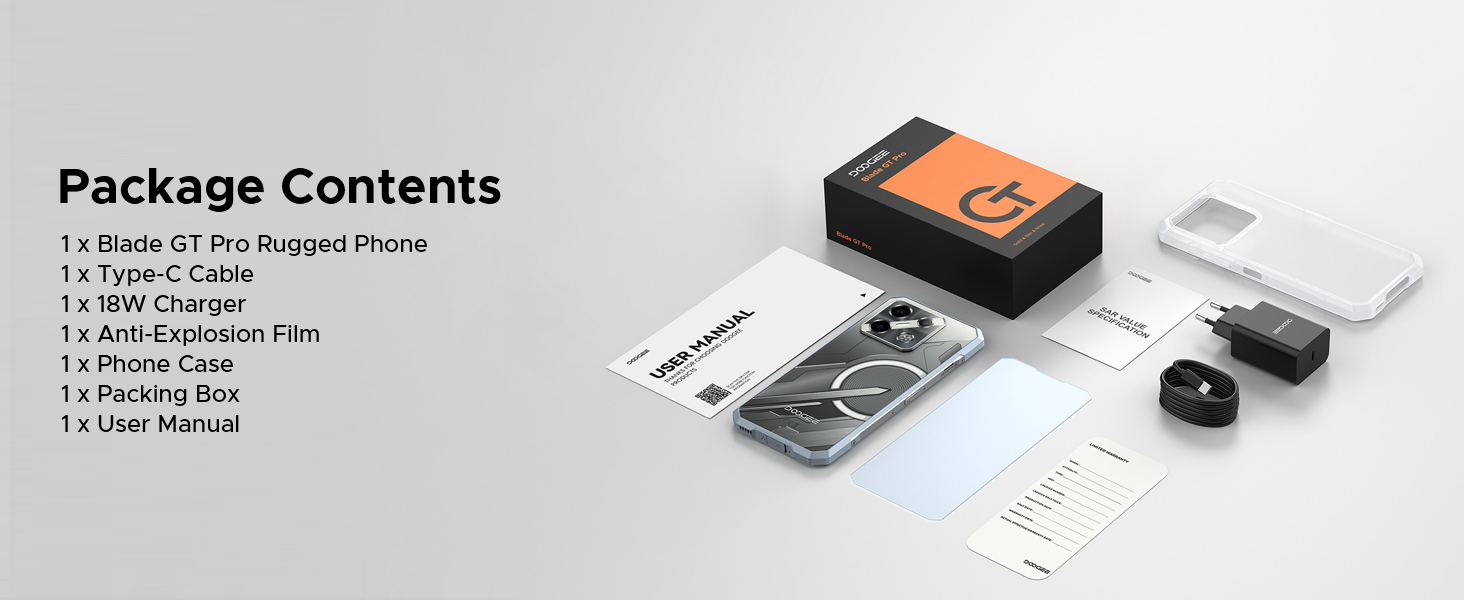
Image 6.1: Durability features for outdoor use.
6.3 Программалык камсыздоо жаңыртуулары
Regularly check for and install software updates to ensure your device has the latest features, security patches, and performance improvements. You can usually find this option in the 'Settings' menu under 'System' or 'About Phone'.
7. Кыйынчылыктарды
This section addresses common issues you might encounter with your DOOGEE Blade GT Pro.
| Маселе | Мүмкүн чечим |
|---|---|
| Түзмөк күйбөйт | Батарея заряддалганын текшериңиз. Заряддагычты туташтырыңыз жана кайра күйгүзүү аракетинен мурун бир нече мүнөт күтүңүз. Эгер жооп бербесе, Кубат баскычын 10-15 секунд кармап туруу менен мажбурлап өчүрүп күйгүзүңүз. |
| Poor network connectivity | Check if the SIM card is correctly inserted. Verify that you are within network coverage. Restart the device. Ensure your carrier supports the device's frequency bands (Note: Does not support Verizon and AT&T networks). |
| Батарея бат эле түгөнөт | Reduce screen brightness. Close unused applications running in the background. Disable Wi-Fi, Bluetooth, or GPS when not in use. Check for power-intensive apps in battery settings. |
| Колдонмолор бузулуп же катып жатат | Clear the cache of the problematic app. Update the app to its latest version. If the issue persists, uninstall and reinstall the app. Ensure the phone's operating system is up to date. |
| Манжа изинин сканери иштебей жатат | Ensure your finger is clean and dry. Re-register your fingerprint. Check for any physical obstruction or damage to the sensor. |
8. Техникалык шарттар
Key technical specifications for the DOOGEE Blade GT Pro 5G Rugged Smartphone:
| Өзгөчөлүк | Деталь |
|---|---|
| Модел | Blade GT Pro |
| Операция системасы | Android 14 |
| Процессор | MediaTek Dimensity 7250, 6nm Octa-core |
| RAM | 32GB (12GB physical + 20GB extended) LPDDR5 |
| Ички сактагыч | 256 ГБ (MicroSD аркылуу 2 ТБ чейин кеңейтүүгө болот) |
| Дисплей | 6.72-inch FHD+ IPS, 1080x2408 resolution, 120Hz Refresh Rate, 380 nits brightness |
| Арткы камера | 108MP Main, 8MP Wide-Angle, 2MP Macro |
| Алдыңкы камера | 32MP |
| Батарея | 5800mAh, 18W Fast Charging, OTG Support |
| Байланыш | 5G, Wi-Fi 6, Bluetooth, NFC, USB Type-C |
| Туруктуу | IP68/IP69K, MIL-STD-810H (Waterproof, Dustproof, Drop-resistant) |
| Коопсуздук | Side Fingerprint Unlock, Face ID |
| Өлчөмдөр | 10.5 мм калыңдыгы |
| Салмагы | 260 грамм |
9. Кепилдик жана колдоо
9.1 Кепилдик маалыматы
Your DOOGEE Blade GT Pro smartphone comes with a limited manufacturer's warranty. Please refer to the 'User Manual and Warranty Card' included in your package for specific terms, conditions, and duration of the warranty. Keep your proof of purchase for warranty claims.
9.2 Кардарларды колдоо
For further assistance, technical support, or service inquiries, please contact DOOGEE customer service through their official webсайтты же кепилдик документтериңизде көрсөтүлгөн байланыш маалыматын.


