1. Киришүү
Сатып алганыңыз үчүн рахматasinг Рampage HYDRA PRO Wireless Gamepad. This device is designed to provide a versatile gaming experience across multiple platforms, featuring both 2.4 GHz wireless and Bluetooth connectivity, along with a convenient charging station. This manual provides detailed instructions on setup, operation, maintenance, and troubleshooting to ensure optimal performance and longevity of your gamepad.
2. Пакеттин мазмуну
Сураныч, пакеттин мазмунун текшерип, бардык буюмдар бар экенин текшериңиз:
- Rampage HYDRA PRO Wireless Gamepad
- Кубаттоочу станция
- USB-C заряддоо кабели
- 2.4 ГГц зымсыз кабылдагыч
- User Manual
3. Продукт бүтүп калдыview
3.1 Gamepad and Charging Station

Figure 3.1: The Rampage HYDRA PRO Gamepad resting on its dedicated charging station, showcasing its white finish and RGB lighting accents.

Сүрөт 3.2: Алдыңкы view of the gamepad and charging station, highlighting the ergonomic design and the charging indicator light on the station.
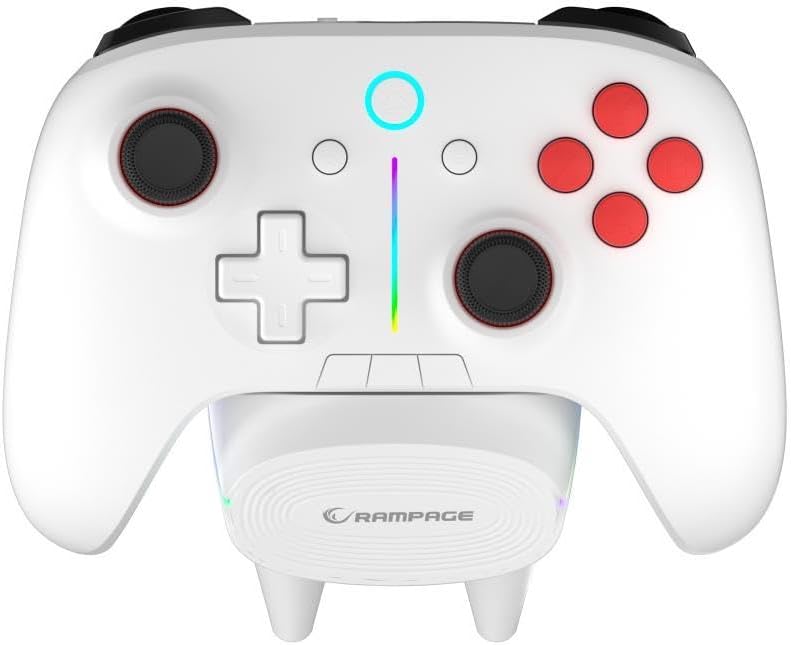
3.3-сүрөт: жогорудан ылдыйга view illustrating the full button layout, including analog sticks, D-pad, action buttons, and central function buttons, with the RGB light bar visible.
3.2 Арткы жана каптал Views
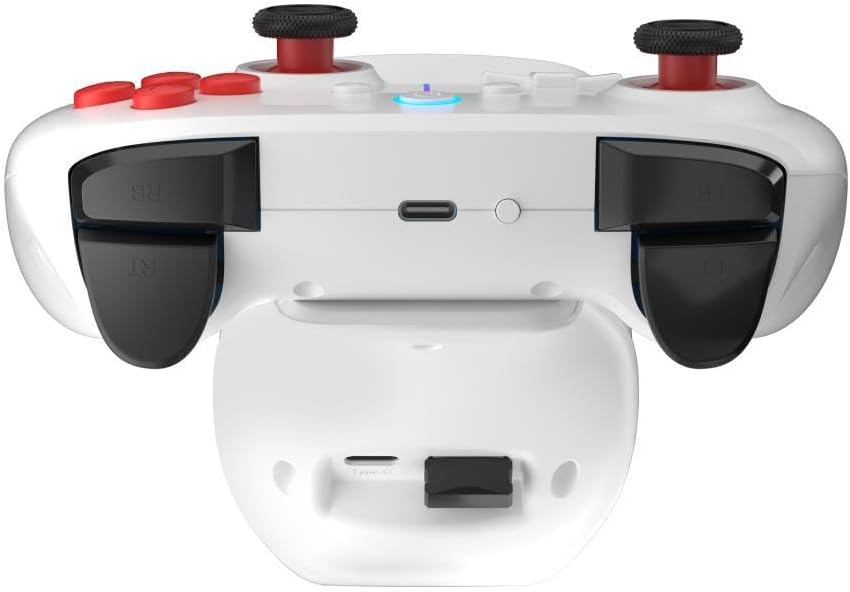
3.4-сүрөт: Арткы view of the gamepad, detailing the placement of the LB/RB shoulder buttons, LT/RT triggers, and the USB-C charging port at the top edge.

Figure 3.5: Side-rear perspective of the gamepad, providing a clearer view of the USB-C port for wired connection or direct charging.
4. Орнотуу жана туташуу
4.1 Геймпадды заряддоо
Before first use, fully charge the gamepad. You can charge it by placing it on the charging station or by connecting the USB-C cable directly to the gamepad and a power source (e.g., PC USB port, USB wall adapter).
- Заряддоо станциясы: Align the gamepad with the charging pins on the station. The indicator light on the gamepad or station will show charging status.
- Direct USB-C: Connect the provided USB-C cable to the gamepad's port and the other end to a USB power source.
4.2 2.4 GHz Wireless Connection (PC/Console)
- Insert the 2.4 GHz wireless receiver into an available USB port on your PC or compatible console.
- "Башкы бет" баскычын басуу менен геймпадды күйгүзүңүз.
- The gamepad will automatically attempt to connect to the receiver. The indicator light on the gamepad will become solid when connected.
4.3 Bluetooth Connection (PC/Mobile Devices)
- Ensure Bluetooth is enabled on your device (PC, smartphone, tablet).
- On the gamepad, press and hold the Bluetooth pairing button (refer to button layout for exact location, usually a small button near the Home button) until the indicator light starts flashing rapidly.
- On your device, search for new Bluetooth devices and select "Rampage HYDRA PRO" from the list.
- Once paired, the indicator light on the gamepad will become solid.
4.4 Зымдуу туташуу
Connect the USB-C cable directly from the gamepad to a USB port on your PC or compatible device. The gamepad will be recognized as a wired controller. This mode also charges the gamepad.
5. Иштөө нускамалары
5.1 Баскыч функциялары
- Үй баскычы: Powers on/off the gamepad, returns to home screen (console dependent).
- A/B/X/Y баскычтары: Стандарттык аракет баскычтары.
- D-Pad: Багыттуу киргизүү.
- Сол/оң аналогдук таякчалар: Provide precise 360-degree movement. Press down for L3/R3 functions.
- LB/RB (Ийин баскычтары): Оюндагы ар кандай аракеттер үчүн үстү жагына орнотулган баскычтар.
- LT/RT (Триггерлер): Analog triggers for precise control (e.g., acceleration, braking).
- Тандоо/Артка баскычы: Accesses menus or specific in-game functions.
- Баштоо/Меню баскычы: Accesses pause menus or game options.
- Бөлүшүү баскычы: Captures screenshots or video clips (platform dependent).
5.2 RGB жарыкты башкаруу
The HYDRA PRO features customizable RGB lighting. Specific button combinations or dedicated buttons (if present) allow you to cycle through different lighting modes, colors, or turn the lighting off. Refer to the quick start guide or product page for specific RGB control instructions.
5.3 Батареянын абалы
The gamepad's indicator light will typically flash slowly when the battery is low. During charging, the light will indicate charging status (e.g., solid while charging, off when fully charged, or a specific color change).
6. Техникалык тейлөө
- Тазалоо: Use a soft, dry cloth to clean the gamepad and charging station. For stubborn dirt, slightly dampчүпүрөктү суу менен. Катуу химиялык заттарды же абразивдүү тазалагычтарды колдонбоңуз.
- Сактагыч: Геймпадды күн тийбеген жана экстремалдуу температурадан алыс, салкын, кургак жерде сактаңыз.
- Батареяга кам көрүү: Батареянын иштөө мөөнөтүн узартуу үчүн, геймпадды тез-тез толук зарядсыздандырбаңыз. Аны көпкө чейин колдонбосоңуз да, үзгүлтүксүз кубаттап туруңуз.
- Тамчылардан качуу: Геймпадды ички компоненттерге зыян келтирүүчү тамчылардан жана таасирлерден коргоңуз.
7. Кыйынчылыктарды
| Көйгөй | Мүмкүн себеп | Чечим |
|---|---|---|
| Геймпад күйбөйт. | Батарея аз. | Геймпадды толугу менен кубаттаңыз. |
| Геймпад зымсыз туташпайт. | Receiver not properly inserted; Bluetooth not enabled/paired; interference. | Ensure receiver is fully inserted. Re-pair Bluetooth. Move closer to the receiver/device. Check for other wireless devices causing interference. |
| Buttons/sticks are unresponsive or drifting. | Software glitch; physical damage; dust/debris. | Restart the gamepad. Clean around buttons/sticks. If problem persists, contact support. |
| Charging station not charging. | Gamepad not properly seated; power cable issue. | Ensure gamepad is correctly aligned on the pins. Check USB-C cable connection to the station and power source. |
8. Техникалык шарттар
| Өзгөчөлүк | Деталь |
|---|---|
| Бренд | Rampжашы |
| Модел | HYDRA PRO |
| Байланыш | 2.4 GHz Wireless, Bluetooth, Wired (USB-C) |
| Салмагы | 0.4 килограмм |
| Өндүрүүчү | Rampжашы |
| Өзгөчөлүктөр | RGB Lighting, Charging Station Included |
9. Кепилдик жана колдоо
Рampage HYDRA PRO Gamepad comes with a standard manufacturer's warranty. Please refer to the warranty card included in your package for specific terms and conditions. For technical support, product inquiries, or warranty claims, please contact Rampage customer service through their official webсайтка же продуктуну сатып алган сатуучуга.
Сураныч, кепилдик максаттары үчүн сатып алганыңыздын далилин сактап коюңуз.


