1. Киришүү
Datacolor LightColor өлчөгүчү – бул ар кандай фото, видео жана кино чөйрөлөрүндө жарыктын жана түстүн температурасын так өлчөө үчүн иштелип чыккан, Bluetooth аркылуу иштетилген көп функциялуу түзмөк. Бул компакттуу жана көчмө өлчөгүч мобилдик тиркемеге реалдуу убакыт режиминде маалыматтарды агым менен камсыз кылат, бул колдонуучуларга оптималдуу натыйжаларга жетүү үчүн жарыктандыруу шарттарын так баалап жана тууралоого мүмкүндүк берет. Ал айланадагы жарыкты, жаркылдоочу жарыкты, люксту, хроматикалыкты, түс температурасын (CCT) жана жашыл-кызгылт көк балансты (DUV) өлчөйт.

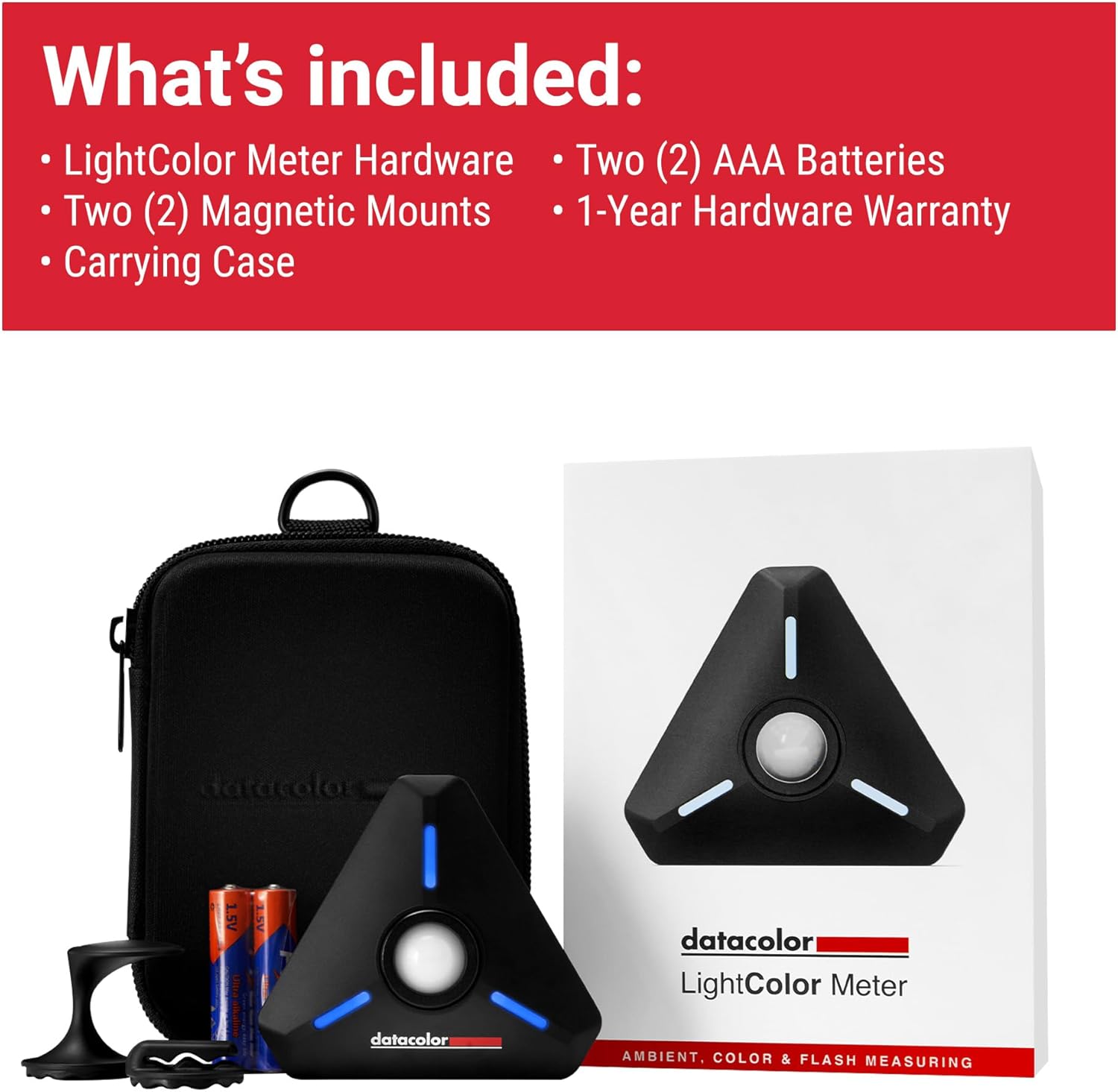
Сүрөт 1.1: Datacolor LightColor өлчөгүчү, анын ичиндеги көтөрүүчү сумкасы жана AAA батарейкалары менен көрсөтүлгөн. Бул сүрөттө кошумча маалымат берилгенview буюмдун жана анын негизги аксессуарларынын мүнөздөмөсү.
2. Кутуда эмне бар
Datacolor LightColor өлчөгүчүңүздү кутудан чыгарганда, төмөнкү компоненттердин бардыгы бар экенин текшериңиз:
- LightColor өлчөгүч жабдыгы
- Эки (2) магниттик бекиткич
- Ташуу кутусу
- Эки (2) AAA Батарейки
- 1 жылдык жабдык кепилдиги жөнүндө маалымат

Сүрөт 2.1: Datacolor LightColor Meter пакетине кирген бардык буюмдардын визуалдык чагылдырылышы, колдонуучулар бардык компоненттерди алганын ырастай алышат.
3. Продукт бүтүп калдыview жана өзгөчөлүктөрү
LightColor өлчөгүчү колдонууга оңой жана бышык болуу үчүн иштелип чыккан. Анын негизги компоненттери жана функциялары менен таанышып алыңыз:

Сүрөт 3.1: LightColor өлчөгүчүнүн ар кандай функцияларын жана бөлүктөрүн, анын ичинде куполду, баскычтарды жана орнотуу параметрлерин көрсөткөн деталдуу диаграмма.
- Майдаланбай турган пружиналуу купол: Сенсорду коргойт жана бир жарык булагын өлчөө үчүн көтөрүлүшү же бир жарык булагын өлчөө үчүн төмөндөтүлүшү мүмкүн.
- Кубат жана өлчөө баскычы: Түзмөктү күйгүзүү/өчүрүү жана өлчөөлөрдү баштоо үчүн колдонулат.
- Сейрек кездешүүчү магнит: Металл беттерге бекем орнотуу үчүн арткы бетинде жайгашкан.
- 1/4"-20 орнотуучу тешиги: Көп функциялуу жайгаштыруу үчүн стандарттуу штатив орнотмосу.
- 3.5 мм уяча: Синхрондоштуруу кабелин туташтыруу үчүн, адатта, флэш синхрондоштуруу үчүн.
- RGB диоддору: Туташуу абалын жана жарыкты көрсөтүүчү ойготкучтарды көрсөтүңүз.
- Боо жана бекитүү үчүн тешиктер: Кошумча бекитүүчү пункттарды камсыз кылат.
Сүрөт 3.2: LightColor өлчөгүчү өзүнүн компакттуу өлчөмүн жана колсуз жайгаштыруу мүмкүнчүлүгүн капюшонго бекитилген сейрек кездешүүчү жер магнитин колдонуп көрсөтөт.
4. Орнотуу
4.1. Батареяларды салуу
LightColor өлчөгүчүнө эки (2) AAA батарейка керек. Батарея бөлүмү оңой жетүү үчүн магниттер менен бекитилген. Батареяларды бөлүмдүн ичиндеги полярдуулук көрсөткүчтөрүнө ылайык салыңыз.
4.2. Мобилдик тиркемени жүктөп алуу
Datacolor LightColor Meter акысыз Datacolor LightColor Meter мобилдик тиркемеси менен бирге иштейт. Тиркемени түзмөгүңүздүн тиешелүү колдонмолор дүкөнүнөн жүктөп алыңыз:
- iOS түзмөктөрү үчүн (iPhone, iPod touch): iOS 12.0 же андан жогорку версиясы талап кылынат.
- Android түзмөктөрү үчүн: Android™ 6.0 же андан жогорку версиясы талап кылынат.
4.3. Bluetooth Жупташтыруу
Эсептегичти мобилдик түзмөгүңүзгө туташтыруу үчүн:
- Мобилдик түзмөгүңүздө Bluetooth иштетилгенин текшериңиз.
- LightColor өлчөгүчүндөгү кубат баскычын RGB LED жарыктары күйгөнгө чейин басып туруңуз, бул жупташтырууга даяр экенин билдирет.
- Datacolor LightColor Meter колдонмосун ачыңыз. Колдонмо Bluetooth 4.0 LE аркылуу эсептегичти автоматтык түрдө издеп, ага туташат.
- Туташкандан кийин, колдонмо реалдуу убакыт режиминде жарык жана түс маалыматтарын көрсөтөт.

Сүрөт 4.1: LightColor Meter мобилдик тиркемеге зымсыз туташып, Bluetooth 4.0 LE аркылуу маалыматтардын үзгүлтүксүз агылышын көрсөтөт.
5. Иштөө нускамалары
LightColor өлчөгүчү ар кандай жарыктандыруу сценарийлери үчүн комплекстүү өлчөө мүмкүнчүлүктөрүн сунуштайт.
5.1. Өлчөөлөрдү алуу
Өлчөө үчүн, эсептегич колдонмого туташтырылганын текшериңиз. Эсептегичти жарык булагына каратып, объекттин абалына коюңуз. Эсептегичтеги кубат/өлчөө баскычын басыңыз же өлчөөнү түздөн-түз колдонмо интерфейсинен иштетиңиз. Колдонмо көрсөткүчтөрдү заматта көрсөтөт.
5.2. Мобилдик тиркеменин интерфейси жана режимдери
Мобилдик тиркеме өлчөөлөрүңүздү ылайыкташтыруу үчүн ар кандай режимдерди жана жөндөөлөрдү камсыз кылат:
- Экспозиция режими: Тийиштүү экспозиция жөндөөлөрүн аныктоо үчүн ISO, диафрагма жана жапкыч бурчун/ылдамдыгын орнотууга мүмкүндүк берет.
- Жөнөкөй түс режими: Негизги түс температурасынын (CCT) жана жашыл-кызгылт көк балансынын (DUV) көрсөткүчтөрүн көрсөтөт.
- Түс балансы режими: Хроматикалык диаграммада түстүн четтөөсүн визуалдык түрдө көрсөтөт.
- Сүрөт/Видео/Кино экспозициясынын режимдери: Видео/кинотеатр үчүн кадр жыштыгы, жапкыч бурчу жана ND чыпкасынын компенсациясы сыяктуу белгилүү бир медиа түрлөрү үчүн көрсөткүчтөрдү оптималдаштырыңыз.
- Монитордун жаркылдашы/Айлана-чөйрө: Үзгүлтүксүз айлана-чөйрө жарыгын же жаркылдагычтын көрсөткүчтөрүн көзөмөлдөөнүн ортосунда которулуңуз.

Сүрөт 5.1: Datacolor LightColor Meter колдонмосунун интерфейси, ал сүрөт жана видео режимдери үчүн ар кандай өлчөө параметрлерин жана жөндөөлөрүн көрсөтөт.
5.3. Куполду тууралоо
Эсептегичтин куполун ар кандай өлчөө муктаждыктарына ылайыкташтырууга болот:
- Көтөрүлгөн купол: Бир нече жарык булактарын же жалпы жарыкты өлчөө үчүн, жарыктын кең бурчтан киришине мүмкүндүк берет.
- Төмөнкү күмбөз: Бир гана, белгилүү бир жарык булагын өлчөө үчүн, көбүрөөк фокусталган окууну камсыз кылуу.
6. Мультиметрди колдонуу
Datacolor LightColor өлчөгүчү бир нече өлчөгүчтөрдү бир эле мобилдик түзмөккө бир убакта туташтырууну колдойт. Бул функция, айрыкча, ири масштабдуу өндүрүштөр же татаал жарыктандыруу орнотуулары үчүн пайдалуу, бул 80 футка чейинки ар кандай чекиттерден синхрондоштурулган өлчөөлөрдү жүргүзүүгө мүмкүндүк берет. Бул жумуш агымдарын жөнөкөйлөтөт жана көрүнүш боюнча ырааттуу жарыктандырууну камсыз кылат.

Сүрөт 6.1: Аралаш жарыктандыруу кырдаалдарында бир эле учурда өлчөө мүмкүнчүлүгүн көрсөткөн, бир комплектке жайгаштырылган бир нече LightColor өлчөгүчтөрүнүн иллюстрациясы.
7. Техникалык тейлөө
7.1. Батареяны алмаштыруу
Колдонмодогу батареянын индикатору кубаттуулуктун төмөндүгүн көрсөтсө же түзмөктүн LED жарыктары туруксуз иштеп жатса, AAA батареяларын алмаштырууга убакыт келди. Жөн гана магниттик батарея бөлүмүн ачып, эски батареяларды жаңыларына алмаштырыңыз, бул туура полярдуулукту камсыз кылат.
7.2. Тазалоо жана сактоо
Оптималдуу аткарууну жана узак өмүрдү камсыз кылуу үчүн:
- Эсептегичтин сыртын жумшак, кургак чүпүрөк менен сүртүңүз. Абразивдүү тазалоочу каражаттарды же эриткичтерди колдонбоңуз.
- Сенсордун күмбөзүн таза жана чаңдан же тактардан таза кармаңыз.
- Эсептегичти чаңдан, нымдуулуктан жана физикалык зыяндан коргоо үчүн колдонулбай турган учурда берилген сумкасында сактаңыз.
- Аппаратты экстремалдык температурага же түз күн нуруна узак убакытка калтыруудан сактаңыз.
8. Кыйынчылыктарды
Эгер сиз Datacolor LightColor өлчөгүчүңүз менен көйгөйлөргө туш болсоңуз, төмөнкү кеңири таралган көйгөйлөрдү жана чечимдерди караңыз:
| Көйгөй | Мүмкүн себеп | Чечим |
|---|---|---|
| Эсептегич күйбөйт. | Өлүк же туура эмес салынган батарейкалар. | Туура полярдуулукту камсыз кылуу менен батарейкаларды жаңы AAA батарейкалары менен алмаштырыңыз. |
| Мобилдик тиркемеге туташа албай жатат. | Bluetooth өчүк; эсептегич байланыш аймагынан тышкары; колдонмодо көйгөй бар. | Bluetooth күйүк экенин текшериңиз. Эсептегичти түзмөккө жакындатыңыз (80 фут аралыкта). Колдонмону жана эсептегичти өчүрүп-күйгүзүңүз. Колдонмонун уруксаттарын текшериңиз. |
| Туура эмес же дал келбеген окуулар. | Кир сенсордун куполу; куполдун туура эмес абалы; тышкы тоскоолдук. | Сенсордун куполун тазалаңыз. Зарылчылыкка жараша бир/бир нече жарык булактары үчүн куполду тууралаңыз. Күчтүү электромагниттик тоскоолдуктарды азайтыңыз. |
| Колдонмо башка тилде. | Мобилдик түзмөктүн система тилинин жөндөөсү. | Мобилдик түзмөгүңүздүн система тилинин жөндөөлөрүн текшериңиз. Колдонмо, адатта, системанын тилин демейки боюнча орнотот. |
Эгерде бул чечимдерди колдонуп көргөндөн кийин да көйгөй чечилбесе, Datacolor кардарларды колдоо кызматына кайрылыңыз.
9. Техникалык шарттар
Datacolor LightColor өлчөгүчүнүн толук техникалык мүнөздөмөлөрү:

Сүрөт 9.1: LightColor өлчөгүчүнүн техникалык мүнөздөмөлөрүнүн толук тизмеси, анын ичинде өлчөө диапазондору жана туташуу чоо-жайы.
- Продукциянын өлчөмдөрү: 3.15 x 2.76 x 1.38 дюйм (8 x 7 x 3.5 см)
- Элемент Салмагы: 1.73 унция (49 г / 0.05 кг)
- Модель номери: LCM200
- Батареялар: 2 AAA батарейка талап кылынат (кошулган)
- Байланыш: Bluetooth 4.0 LE
- Түс температурасынын диапазону: 1,600K - 20,000K
- Жарыктык диапазону: 1.0 - 1 000 000 люкс
- Өлчөө түрлөрү: Айлана-чөйрө жана жаркылдоо, люкс, хроматикалык, CCT жана +/- жашыл үчүн инциденттерди өлчөө (Duv)
- Экспозиция режимдери: Сүрөт, видео, кинотеатр (кадр жыштыгы, жапкыч бурчу/ылдамдыгы жана ND чыпкасынын компенсациясы менен)
- Флэштин өзгөчөлүктөрү: HSS жаркылдатуу жана жаркылдатуу узактыгын өлчөө
- Кошулган китепканалар: Profoto, LEE жана Rosco компанияларынын гель чыпкалары китепканалары
- Мультиметрдик колдоо: 80 футка чейинки бир нече метрден бир убакта өлчөө
- Монтаждоо: Колсуз иштөө функциясы - магнитти кошо алганда, ¼"-20 орнотуу
- Компьютерди синхрондоштуруу: Зым аркылуу туташуу (PC синхрондоштуруу) мүмкүнчүлүгү
- Profiles: Ыңгайлаштырылган экспозиция боюнча адисfiles
10. Кепилдик жана колдоо
10.1. Аппараттык кепилдик
Datacolor LightColor өлчөгүчү төмөнкүлөр менен келет 1 жылдык жабдык кепилдиги. Бул кепилдик нормалдуу колдонуудагы материалдардагы жана жасалгадагы кемчиликтерди камтыйт. Кепилдик дооматтары үчүн сатып алганыңыздын далилин сактап коюңуз.
10.2. Кардарларды колдоо кызматы
Техникалык жардам, кепилдик боюнча суроолор же кошумча маалымат алуу үчүн, расмий Datacolor колдоо кызматына кайрылыңыз webсайтына кириңиз же алардын кардарларды тейлөө бөлүмүнө кайрылыңыз. Таңгактоону же Datacolor сүрөтчөсүн караңыз webакыркы байланыш маалыматы үчүн сайт.


