1. Продукт бүтүп калдыview
This manual provides instructions for the Fanttik F2 Master Mini Cordless Rotary Tool Kit and the Fanttik D2 PLUS Laser Level. These tools are designed for precision tasks and accurate leveling applications.

Image 1.1: The Fanttik F2 Master Mini Cordless Rotary Tool (left) and D2 PLUS Laser Level (right).
1.1 F2 Master Mini Cordless Rotary Tool
The F2 Master is a compact, cordless rotary tool featuring a brushless hollow cup motor for reduced noise and enhanced performance. It offers 5 adjustable speed settings for various precision tasks such as grinding, polishing, drilling, and engraving. The tool includes a Revostor Hub for organized accessory storage and a durable aluminum case with a pop-up mechanism for easy access.
1.2 D2 PLUS Laser Level
The D2 PLUS is a high-precision laser level utilizing advanced high-brightness green laser technology. It provides a projection range of up to 100 ft with an accuracy of 3/32 inches at 30 ft. It features independent or combined vertical and horizontal line projection, a wide-angle expansion for vertical lines, and a pulse mode for extended working range with an optional receiver.
2. Коопсуздук маалыматы
Жараат жана буюмга зыян келтирбөө үчүн ар дайым төмөнкү коопсуздук чараларын сактаңыз.
- Колдонуудан мурун бардык нускамаларды окуп чыгыңыз.
- Wear appropriate personal protective equipment, such as safety glasses, when operating the rotary tool.
- Жумушчу жерди таза жана жакшы жарыктандырыңыз.
- Жарылуучу чөйрөдө, мисалы, күйүүчү суюктуктар, газдар же чаң бар жерде электр шаймандарын иштетпеңиз.
- Электр шайманын иштетип жатканда балдарды жана жанында тургандарды алыс кармаңыз.
- Куралдарды балдар жетпеген жерде сактаңыз.
2.1 Лазердик коопсуздук
The D2 PLUS Laser Level is a Class II laser product. Observe the following precautions:
- ЭСКЕРТҮҮ: Лазердик нурга тике карабаңыз.
- Лазер нурун атайылап адамдарга же жаныбарларга багыттабаңыз.
- Avoid exposing the eyes to direct or reflected laser beams.
- Лазердик түзүлүштү өзгөртпөңүз.
- Бул колдонмодо сүрөттөлгөндөй гана колдонуңуз.
3. Пакеттин мазмуну
Төмөндө тизмеленген нерселердин баары пакетиңизге камтылганын текшериңиз:

Image 3.1: Contents of the D2 PLUS Laser Level package.
- D2 PLUS Лазердик деңгээл
- USB-C Cable
- Магниттик кашаа
- Максаттуу плита
- Тартуу сумкасы
- User Manual
- F2 Master Mini Cordless Rotary Tool
- F2 Master Revostor Hub with 35 accessories (3/32" / 2.3mm)
- F2-M2 Magnetic Wrench
4. F2 Master Rotary Tool - Setup & Operation
4.1 Компоненттер бүттүview
- Rotary Tool Body: Main unit with motor and battery.
- Коллет: Holds the accessory bits.
- Speed Indicator Lights: Display current speed setting.
- Кубат/Ылдамдык баскычы: Controls power and speed.
- Revostor Hub: Magnetic stand for organizing accessories.
- Aluminum Case: Protective case with pop-up mechanism.
4.2 Charging the Rotary Tool
The F2 Master is battery-powered. Ensure it is fully charged before first use.
- Connect the USB-C charging cable to the charging port on the rotary tool.
- Кабелдин экинчи учун ылайыктуу USB кубат адаптерине туташтырыңыз (кошулмада жок).
- The indicator lights will show charging status. Once fully charged, disconnect the cable.
4.3 Аксессуарларды тиркөө
The Revostor Hub provides organized storage and easy access to various accessories.

Image 4.1: The Revostor Hub for organized accessory storage.
- Ensure the rotary tool is turned off.
- гайканы бурап алыңыз.
- Insert the desired accessory bit (3/32" / 2.3mm shank) into the collet.
- Tighten the collet nut securely using the F2-M2 Magnetic Wrench to hold the bit in place. Do not overtighten.
4.4 Күйгүзүү/өчүрүү жана ылдамдыкты жөндөө
The F2 Master features a brushless motor for efficient and quiet operation.

Image 4.2: The F2 Master operates quietly at 32 dB when idle.
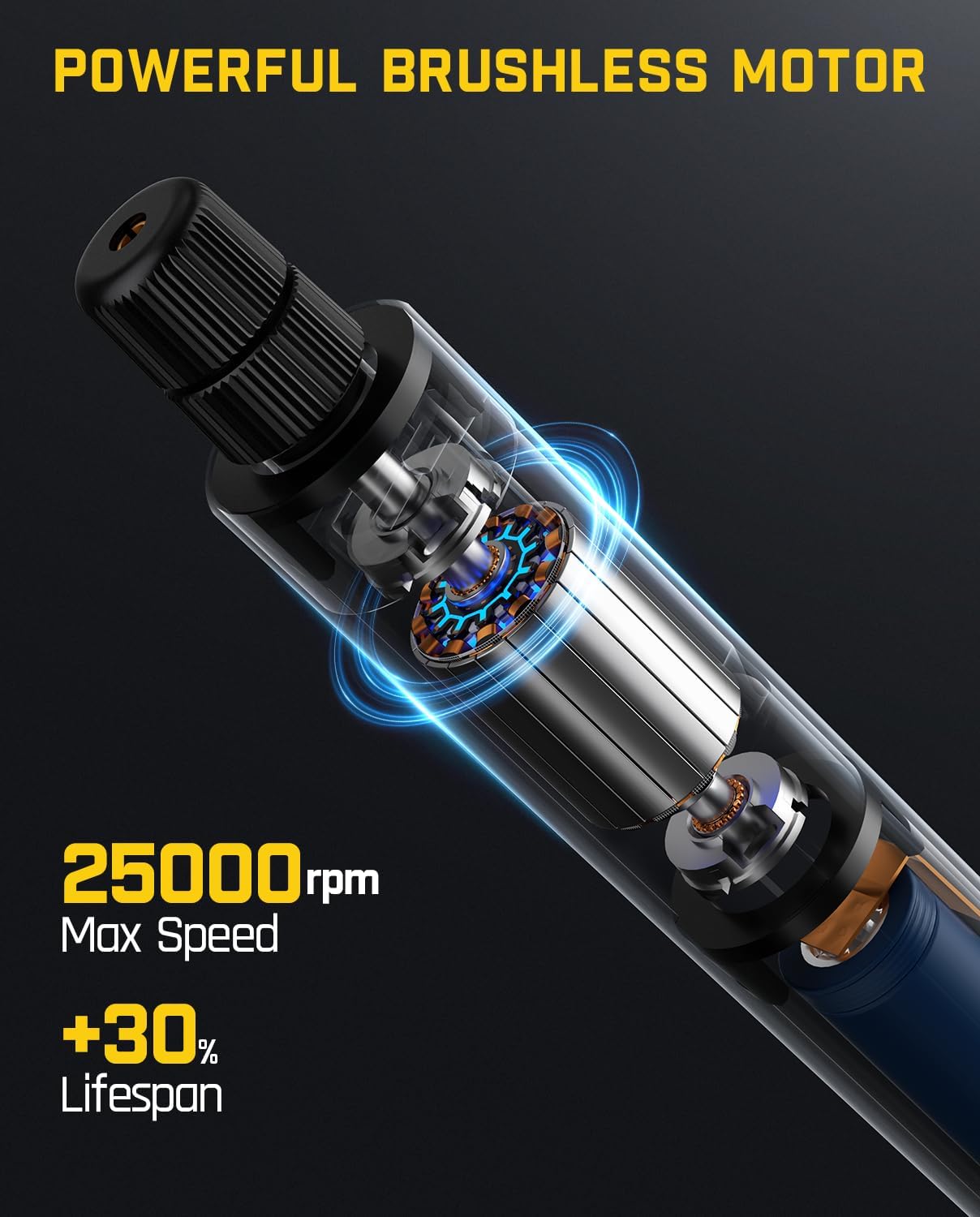
Image 4.3: The F2 Master's powerful brushless motor provides up to 25,000 RPM.
- Күйгүзүү үчүн: Press and hold the Power/Speed button until the indicator lights illuminate. The tool will start at the lowest speed setting.
- Ылдамдыкты жөнгө салуу үчүн: Briefly press the Power/Speed button to cycle through the 5 available speed settings. The indicator lights will show the selected speed.
- Өчүрүү үчүн: Press and hold the Power/Speed button until the indicator lights turn off.
5. D2 PLUS Laser Level - Setup & Operation
5.1 Компоненттер бүттүview
- Лазердик эмиттерлер: Project horizontal and vertical green laser lines.
- Башкаруу панели: Buttons for power, mode selection, and pulse mode.
- Маятник кулпу: Secures the pendulum for manual mode or transport.
- Батарея көрсөткүчү: Калган батареянын иштөө мөөнөтүн көрсөтөт.
- USB-C заряддоо порту: Ички батареяны кайра заряддоо үчүн.
5.2 Charging the Laser Level
The D2 PLUS has a 2600 mAh rechargeable battery, providing 7-14 hours of continuous use.

Image 5.1: The D2 PLUS Laser Level features a USB-C charging port.
- Connect the provided USB-C charging cable to the charging port on the side of the laser level.
- Кабелдин экинчи учун ылайыктуу USB кубат адаптерине туташтырыңыз (кошулмада жок).
- The battery indicator lights will show charging status. Disconnect once fully charged.
5.3 Күйгүзүү/өчүрүү жана режимди тандоо
The D2 PLUS uses an OSRAM green laser, which is four times brighter than traditional red lasers.

Image 5.2: The D2 PLUS utilizes a bright OSRAM green laser.

Image 5.3: The D2 PLUS offers three distinct line modes.

Image 5.4: Manual Mode (left) and Self-Leveling Mode (right) applications.
- Өзүн-өзү тегиздөө режими: Unlock the pendulum by sliding the pendulum lock switch to the 'unlocked' position. Press the power button to turn on the laser. The laser will self-level within 4 degrees. If the tilt exceeds 4 degrees, the laser will flash rapidly to indicate it is out of level. Press the power button to cycle through horizontal line, vertical line, or both.
- Кол режими: Lock the pendulum by sliding the pendulum lock switch to the 'locked' position. Press and hold the power button for 3 seconds to turn on the laser. The laser lines can now be projected at any angle without self-leveling. Press the power button to cycle through horizontal line, vertical line, or both.
- Импульс режими: In self-leveling mode, briefly press the pulse mode button (often indicated by a 'P' or wave icon) to activate pulse mode. This mode extends the working range up to 200 ft when used with a compatible laser receiver (not included), especially useful in bright environments.

Image 5.5: Pulse Mode extends the working range of the D2 PLUS Laser Level.
5.4 Лазердик деңгээлди орнотуу
The D2 PLUS can be mounted using its integrated magnetic bracket or a tripod.

Image 5.6: The D2 PLUS offers high precision, up to ±3/32 in at 30 ft.
- Магниттик кашаа: Attach the magnetic bracket to metallic surfaces for stable positioning.
- Tripod орнотуу: The laser level has a standard tripod thread (1/4"-20) on its base for mounting to a tripod (not included).
6. Техникалык тейлөө
Proper maintenance ensures the longevity and optimal performance of your tools.

Image 6.1: The D2 PLUS Laser Level is designed for durability against dust, water, and minor impacts.
- Тазалоо: жумшак колдонуу, damp cloth to clean the tool surfaces. Do not use abrasive cleaners or solvents. For the laser level, gently wipe the laser windows with a clean, lint-free cloth.
- Сактагыч: Store both tools in their original packaging or a protective case in a dry, cool place, away from direct sunlight and extreme temperatures. Ensure the pendulum lock on the laser level is engaged during storage and transport.
- Батареяга кам көрүү: For optimal battery life, charge the tools regularly, even if not in frequent use. Avoid fully discharging the batteries for extended periods.
- Текшерүү: Periodically inspect the tools for any signs of damage, loose parts, or wear. Do not operate damaged tools.
7. Кыйынчылыктарды
Жалпы маселелер жана аларды чечүү үчүн төмөнкү таблицага кайрылыңыз.
| Көйгөй | Мүмкүн себеп | Чечим |
|---|---|---|
| F2 Master does not turn on. | Батарея аз. | Charge the rotary tool using the USB-C cable. |
| F2 Master accessory bit is loose. | Collet nut not tightened sufficiently. | Ensure the collet nut is securely tightened with the magnetic wrench. |
| D2 PLUS laser lines are flashing rapidly. | Laser level is out of its self-leveling range (>4 degrees). | Place the laser level on a flatter surface or adjust its position until the flashing stops. |
| D2 PLUS laser lines are dim or not visible outdoors. | Жарык чөйрө жарыгы. | Activate Pulse Mode and use a compatible laser receiver (not included). |
| D2 PLUS laser lines are not self-leveling. | Маятник кулпусу иштетилген (Кол менен башкаруу режими). | Slide the pendulum lock switch to the 'unlocked' position for Self-Leveling Mode. |
If you encounter issues not covered here, please contact Fanttik customer support.
8. Техникалык шарттар
8.1 Fanttik F2 Master Mini Cordless Rotary Tool
| Өзгөчөлүк | Спецификация |
|---|---|
| Мотор түрү | Brushless Hollow Cup Motor |
| Максималдуу айлануу ылдамдыгы | 25,000 RPM |
| Ылдамдык орнотуулары | 5 жөнгө салынуучу орнотуулар |
| Noise Level (Idle) | 32 дБ |
| Салмагы | 0.22 фунт |
| Accessory Shank Size | 3/32" / 2.3mm |
| Power Source | Батарея менен иштейт |
| Өзгөчөлүктөр | Portable, Cordless, Revostor Hub, Aluminum Case |
8.2 Fanttik D2 PLUS Laser Level
| Өзгөчөлүк | Спецификация |
|---|---|
| Лазердик түрү | Green Laser (OSRAM) |
| Лазердик классификация | Class II, <1 mW |
| Проекция диапазону | 100 футка чейин |
| Тактык | 30 фут бийиктикте ±3/32 дюйм |
| Өз алдынча тегиздөө диапазону | ±4 градус |
| Тик сызык бурчу | 130° |
| Батарея сыйымдуулугу | 2600 мАч |
| Үзгүлтүксүз колдонуу убактысы | 7-14 саат |
| Заряддоо порту | USB-C |
| Туруктуу | Dust Resistance, Water Resistance, Resistant to fall from 1m |
9. Кепилдик жана колдоо
Fanttik products are manufactured to high-quality standards. For warranty information or technical support, please refer to the warranty card included in your package or visit the official Fanttik webсайт. Колдоо кызматына кайрылганда моделиңиздин номерин жана сатып алган күнүңүздү көрсөтүңүз.
For further assistance, you may contact Fanttik customer service through their official channels.


