1. Киришүү
Thank you for choosing the Livoo WASH'UP DOH145 Robot Vacuum Cleaner and Mop. This device is designed to simplify your daily cleaning routine by sweeping, vacuuming, and mopping your floors simultaneously. This manual provides essential information for safe operation, setup, maintenance, and troubleshooting to ensure optimal performance of your robot cleaner.
2. Коопсуздук нускамалары
Сураныч, шайманды колдонуудан мурун бардык коопсуздук нускамаларын кылдаттык менен окуп чыгыңыз жана бул колдонмону келечекте маалымат алуу үчүн сактап коюңуз. Бул нускамаларды аткарбоо электр шокуна, өрткө же олуттуу жаракатка алып келиши мүмкүн.
- Бул шайман физикалык, сенсордук же акыл-эс жөндөмү начар же тажрыйбасы жана билими жок адамдар (анын ичинде балдар) тарабынан колдонууга арналбайт, эгерде алардын коопсуздугуна жооптуу адам тарабынан шайманды колдонуу боюнча көрсөтмө болбосо .
- Балдар шайман менен ойнобошу үчүн аларды көзөмөлгө алуу керек.
- Only use the original power adapter and charging base provided with the robot.
- Роботту нымдуу чөйрөдө же сууга жакын жерде колдонбоңуз.
- Ensure the robot is placed on a stable, flat surface during operation and charging.
- Remove any loose cables, small objects, or fragile items from the cleaning area before operation to prevent entanglement or damage.
- Do not block the robot's air vents or exhaust ports.
- Turn off the robot and unplug it from the power source before cleaning or performing maintenance.
3. Продукт бүтүп калдыview
Familiarize yourself with the components of your Livoo WASH'UP DOH145 robot cleaner.
3.1 Пакеттин мазмуну
- Livoo WASH'UP DOH145 Robot Vacuum Cleaner and Mop
- Заряддоо базасы
- Кубаттуу адаптер
- Алыстан башкаруу
- Каптал щеткалар (4x)
- Microfiber Cloth (1x)
- Тазалоочу щетка (1x)
- Dust Tank (1x)
- Water Tank (1x)

Image: All included accessories for the Livoo WASH'UP DOH145.
3.2 Роботтун компоненттери
- Жогорку View: Power button, Wi-Fi indicator, charging indicator.
- Side View: Charging port, exhaust vent, water tank release.
- Төмөнкү View: Driving wheels, side brushes, main brush (if applicable), infrared sensors, mop attachment area.

Сүрөт: Жогорку view of the Livoo WASH'UP DOH145 robot cleaner with remote and mop.

Сүрөт: каптал view of the Livoo WASH'UP DOH145 robot cleaner.

Сүрөт: Төмөнкү view of the Livoo WASH'UP DOH145 robot cleaner.
4. Орнотуу
4.1 Алгачкы заряддоо
- Заряддоочу негизди ачык жерге дубалга такап коюңуз, капталдарынан 1 метр жана алды жагынан 2 метр аралыкта эч кандай тоскоолдуктар жок экенин текшериңиз.
- Кубат адаптерин кубаттоочу базага туташтырып, аны розеткага сайыңыз.
- Place the robot onto the charging base. Ensure the charging contacts on the robot align with those on the base. The charging indicator will illuminate.
- Allow the robot to charge completely before first use (approximately 4-5 hours).
4.2 App Connection (Smart Life)
The Livoo WASH'UP DOH145 can be controlled via the Smart Life app (available on Android and iOS).
- Download the 'Smart Life' app from your device's app store.
- Smart Life аккаунтуңузга катталыңыз же кириңиз.
- Ensure your smartphone is connected to a 2.4GHz Wi-Fi network. The robot does not support 5GHz Wi-Fi.
- Follow the in-app instructions to add your device. You may need to put the robot into pairing mode (refer to the app's specific instructions for your device model).
4.3 Voice Assistant Integration (Alexa & Google Home)
Once connected to the Smart Life app, you can integrate your robot with Amazon Alexa or Google Home for voice control.
- Смартфонуңузда Alexa же Google Home тиркемесин ачыңыз.
- "Көндүмдөр" же "Google менен иштейт" бөлүмүнө өтүңүз.
- Издөө and enable the 'Smart Life' skill/service.
- Link your Smart Life account when prompted.
- Discover devices. Your Livoo WASH'UP DOH145 should now be controllable via voice commands.
5. Роботту иштетүү
The robot offers various cleaning modes and control options for flexible cleaning.
5.1 Тазалоо режимдери
The robot features 4 cleaning modes:
- Кокус режим: The robot cleans in a random pattern, covering the entire area.
- Along Walls Mode: The robot cleans along the edges and corners of the room.
- Spiral Mode: The robot cleans in a spiral pattern, ideal for concentrated cleaning of a specific dirty area.
- Кол менен башкаруу: You can direct the robot's movement using the remote control or the Smart Life app.

Image: Robot operating in Random Mode.

Image: Robot operating in Along Walls Mode.
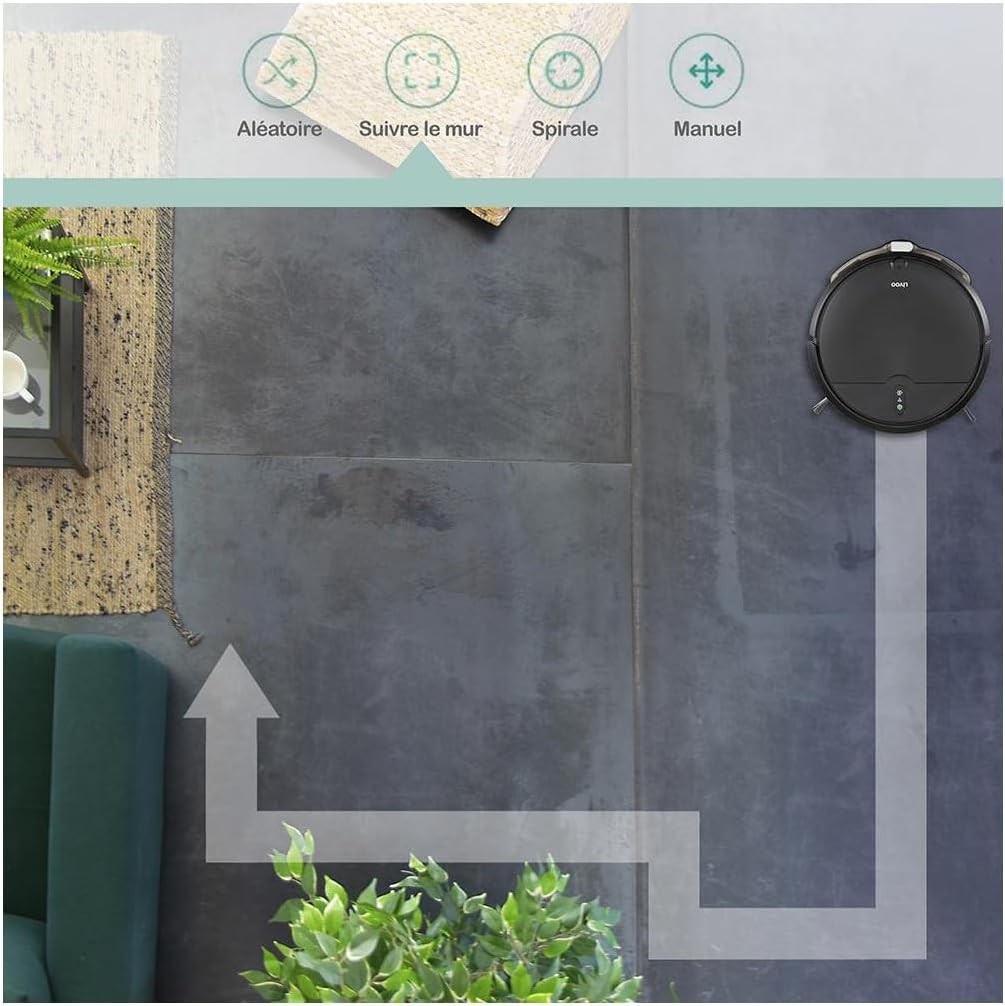
Image: Robot operating in Spiral Mode.

Image: Robot operating with Manual Control via app.
5.2 Тазалоону баштоо жана токтотуу
- Робот аркылуу: Press the power button on the robot to start or pause cleaning.
- Алыстан башкаруу аркылуу: Use the designated buttons on the remote to start, pause, or select cleaning modes.
- Via Smart Life App: Use the app interface to start, pause, select modes, or schedule cleaning.
5.3 Тазалоону пландаштыруу
Use the Smart Life app to set up cleaning schedules for automated cleaning sessions.
- Open the Smart Life app and select your Livoo WASH'UP DOH145 device.
- "График" же "Таймер" бөлүмүнө өтүңүз.
- Set your desired cleaning times and days.
- Confirm the schedule. The robot will automatically start cleaning at the programmed times.
5.4 Automatic Return to Charging Base
The robot will automatically return to its charging base when its battery is low or when a cleaning cycle is complete. You can also manually send it back using the remote control or the app.
6. Техникалык тейлөө
Regular maintenance ensures the longevity and optimal performance of your robot cleaner.
6.1 Таштанды кутусун бошотуу
Empty the dustbin after each cleaning cycle or when the 'full' indicator (if available) illuminates.
- Таштанды урнасын чыгаруу баскычын басып, таштанды челектерин чыгарыңыз.
- Таштанды челектин капкагын ачып, анын ичиндегисин таштанды челекке төгүңүз.
- Clean the dustbin with a dry cloth. Do not wash the dustbin with water unless specified in the product's detailed instructions.
- Reinsert the dustbin until it clicks into place.
6.2 Фильтрди тазалоо
The removable filter should be cleaned regularly to maintain suction power.
- Жогоруда сүрөттөлгөндөй, таштанды челекти алып салыңыз.
- Чыпканы таштанды челекинен чыгарыңыз.
- Tap the filter gently to remove dust and debris. You can also use the provided cleaning brush.
- Фильтрди суу менен жуубаңыз.
- Фильтрди жана таштанды челекти кайра орнотуңуз.
6.3 Maintaining the Water Tank and Microfiber Cloth
For mopping functionality, maintain the water tank and cloth.
- Роботтон суу сактагычты алып салыңыз.
- Open the water tank cap and fill it with clean water. Do not use detergents or harsh chemicals.
- Attach the microfiber cloth securely to the water tank.
- After mopping, remove the microfiber cloth and wash it by hand or machine. Allow it to air dry completely before reattaching.
- Empty any remaining water from the tank and allow it to dry.
6.4 Каптал щеткаларды тазалоо
Inspect and clean the side brushes regularly to remove tangled hair or debris.
- Роботту оодарыңыз.
- Каптал щеткаларды алып салуу үчүн акырын өйдө тартыңыз.
- Remove any hair or debris tangled around the brushes or their shafts. Use the cleaning brush if necessary.
- Reattach the brushes, ensuring they click into place. Replace worn brushes with new ones from the accessory kit.
6.5 Сенсорлорду жана заряддоо контакттарын тазалоо
Wipe the infrared sensors and charging contacts on both the robot and the charging base with a clean, dry cloth.
7. Кыйынчылыктарды
If you encounter issues with your Livoo WASH'UP DOH145, refer to the following common problems and solutions.
| Көйгөй | Мүмкүн себеп | Чечим |
|---|---|---|
| Робот күйбөйт | Батареянын аздыгы; Кубат баскычы туура басылган жок | Charge the robot; Press and hold the power button for a few seconds. |
| Робот заряддалбай жатат | Charging contacts dirty; Power adapter not connected; Robot not properly aligned on base | Clean charging contacts; Ensure adapter is plugged in; Reposition robot on base. |
| Соруу күчү начар | Dustbin full; Filter clogged; Suction inlet blocked | Empty dustbin; Clean filter; Check and clear suction inlet. |
| Робот бат-баттан тыгылып калат | Obstacles in cleaning path; Side brushes tangled | Clear floor of cables and small objects; Clean side brushes. |
| Wi-Fi туташуу маселелери | Incorrect Wi-Fi band (5GHz); Weak signal; Incorrect password | Ensure 2.4GHz Wi-Fi; Move robot closer to router; Re-enter Wi-Fi password in app. |
8. Техникалык шарттар
| Өзгөчөлүк | Спецификация |
|---|---|
| Модель номери | DOH145 |
| Өлчөмдөр | 31.5 x 29 x 7.8 см |
| Салмагы | 2.94 кг |
| Материал | Пластик |
| Батарея | 2000 мАч литий батареясы |
| Runtime | 70 мүнөткө чейин |
| Камтуу аймагы | 60 м² чейин |
| Таштанды кутусунун сыйымдуулугу | 370 мл |
| Суу резервуарынын сыйымдуулугу | 150 мл |
| Соруу күчү | 1000 Па |
| Ызы-чуу деңгээли | Макс 64 дБ |
| Obstacle Climbing Ability | 1.5 см чейин |
| Байланыш | Wi-Fi 2.4G, Alexa, Google Home |
| Тазалоо режимдери | Random, Along Walls, Spiral, Manual |
9. Кепилдик жана колдоо
For warranty information, please refer to the warranty card included with your product or contact your retailer. For technical support or further assistance, please visit the official LIVOO webсайтка же кардарларды тейлөө бөлүмүнө кайрылыңыз.


