Introduction
This manual provides essential information for setting up, operating, maintaining, and troubleshooting your PELADN WI6 N150 Mini PC. Please read this guide thoroughly before using your device to ensure optimal performance and longevity.
The PELADN WI6 N150 Mini PC is a compact and powerful desktop computer designed for various tasks, from office work and online education to home theater and light gaming. It features a 13th Gen Twin Lake N150 processor, 8GB DDR4 RAM, and a 256GB SSD, offering efficient performance in a small form factor.
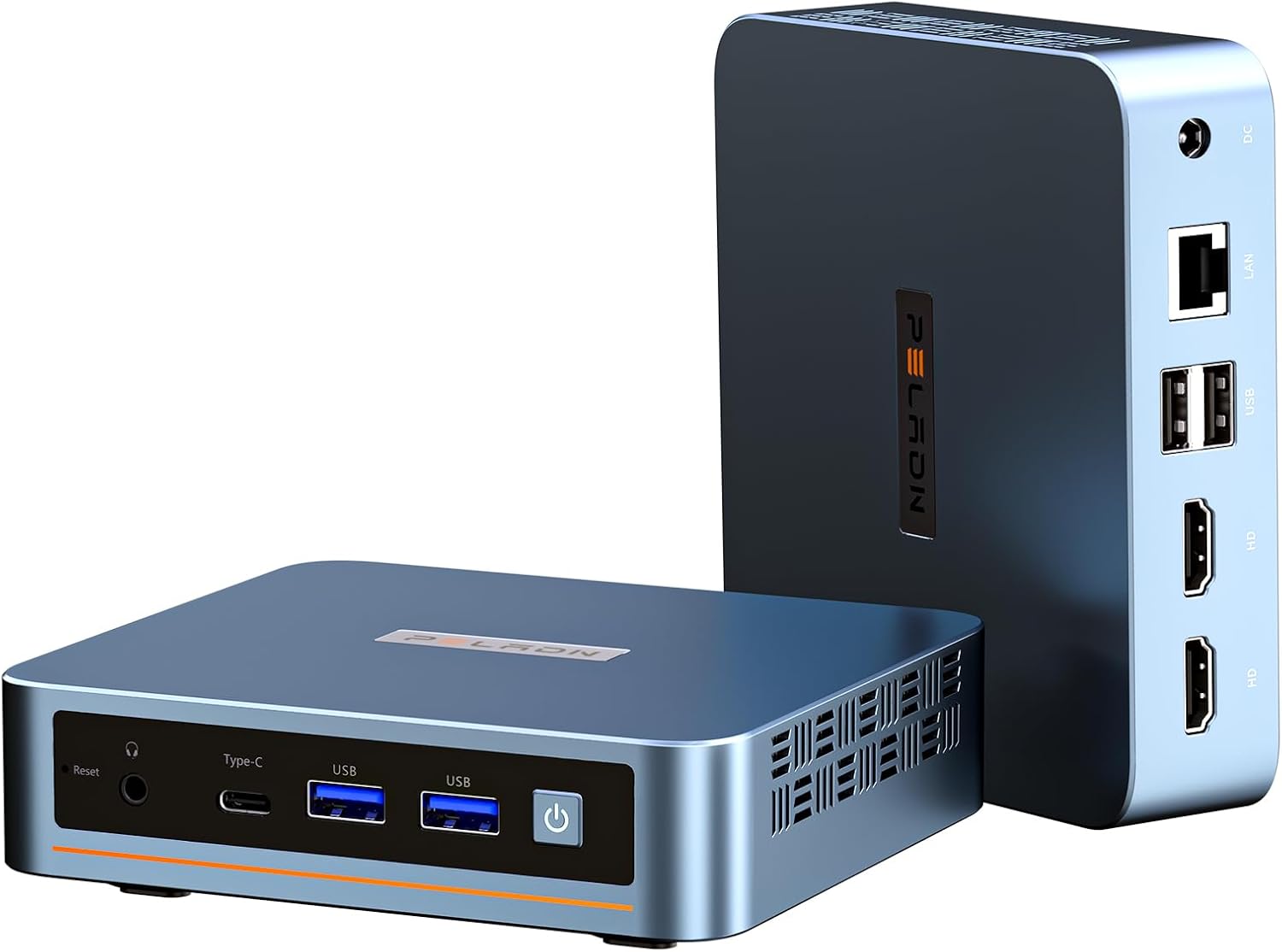
Алдыңкы жана арткы view of the PELADN WI6 N150 Mini PC, showcasing анын компакттуу конструкциясы жана ар турдуу порттору.
Баштоо
Пакеттин мазмуну
Орнотууну улантуудан мурун, пакетте бардык элементтер бар экенин текшериңиз:
- PELADN WI6 N150 Mini PC
- Кубат адаптери жана кабель
- HD кабели
- Колдонуучунун Колдонмосу (бул документ)
- VESA Mount with Screws

Image showcasing the accessories included in the package: power adapter, HD cable, user manual, and VESA mount with screws.
Перифериялык түзүлүштөрдү туташтыруу
Негизги перифериялык түзүлүштөрдү туташтыруу үчүн бул кадамдарды аткарыңыз:
- Дисплейди туташтыруу: Use the provided HD cable to connect your monitor to one of the two HDMI 2.0 ports on the back of the Mini PC. Alternatively, you can use the Type-C port for display output.
- Баскычтоп менен чычканды туташтыруу: Plug your USB keyboard and mouse into the available USB ports (USB 3.2 or USB 2.0) on the Mini PC. For wireless peripherals, ensure their dongles are connected or pair via Bluetooth.
- Туташуу кубаты: Insert the power adapter cable into the DC Power port on the back of the Mini PC, then plug the adapter into a power outlet.

Detailed diagram of the mini PC's multiple interfaces, including USB 3.2, USB 2.0, HDMI, Type-C, 3.5mm Audio Jack, RJ45 LAN, and DC Power port.
Күйгүзүү жана баштапкы орнотуу
After connecting all peripherals:
- Mini PCтин алдыңкы бетинде жайгашкан кубат баскычын басыңыз.
- The system will boot up. The PELADN WI6 N150 Mini PC comes with Windows 11 Pro pre-installed.
- Follow the on-screen instructions to complete the initial Windows setup, including language, region, network connection, and user account creation.
Операция
Негизги колдонуу
The PELADN WI6 N150 Mini PC is suitable for a variety of daily computing tasks:
- Web Серептөө: Enjoy smooth internet browsing with dual-band WiFi 5 and Gigabit Ethernet.
- Өндүрүмдүүлүк: Run office applications, manage documents, and handle emails efficiently.
- Агым: Stream 4K content to your display with ease.
- Light Gaming: The N150 processor with 1000 MHz UHD Graphics supports casual gaming.
Тармактарга туташуу
Your Mini PC offers both wired and wireless network connectivity:
- Зымдуу туташуу: Connect an Ethernet cable to the RJ45 LAN port for a stable 1000Mbps wired connection.
- Зымсыз туташуу: The Mini PC supports dual-band WiFi 5 (5GHz/2.4GHz) for fast and stable wireless internet access. To connect, navigate to the network settings in Windows and select your desired WiFi network.
- Bluetooth: Bluetooth 4.2 is available for connecting wireless peripherals such as keyboards, mice, and headphones.

Diagram illustrating stable network connections with dual-band WiFi 5 (5GHz/2.4GHz) and Bluetooth 4.2, showing the mini PC wirelessly connected to peripherals.
Multi-Display Setup
The PELADN WI6 N150 Mini PC supports up to three displays simultaneously, enabling enhanced multitasking and productivity:
- Connect up to two monitors using the HDMI 2.0 ports (max 4K 60Hz).
- Connect a third monitor using the Type-C port (which supports DP1.4 output).
- Configure display settings within your operating system to extend or duplicate your desktop across multiple screens.

Visual representation of the 4K triple-screen display capability, showing the mini PC connected to three monitors for office, gaming, and design tasks.
Using USB and Type-C Ports
The Mini PC is equipped with various ports to meet your connectivity needs:
- USB 3.2 (x2): For high-speed data transfer with compatible devices, up to 10Gbps.
- USB 2.0 (x2): For connecting standard USB peripherals like keyboards, mice, and printers.
- Тип-C Port: This versatile port supports USB 3.2 data transfer (10Gbps), DP1.4 video output, and PD power input.
- 3.5 мм аудио уячасы: Наушниктерди же тышкы динамиктерди туташтыруу үчүн.

Close-up of the mini PC's front panel, emphasizing the all-in-one Type-C port for data transmission, power supply, and screen display.
Аппараттык камсыздоо бүттүview & Жаңыртуулар
Процессор жана аткаруу
The PELADN WI6 N150 Mini PC is powered by the 13th Gen Twin Lake N150 Processor, featuring 4 cores and 4 threads with a max turbo frequency of 3.6GHz. It includes 1000 MHz UHD Graphics, providing a performance boost over previous N-series processors for smooth operation.
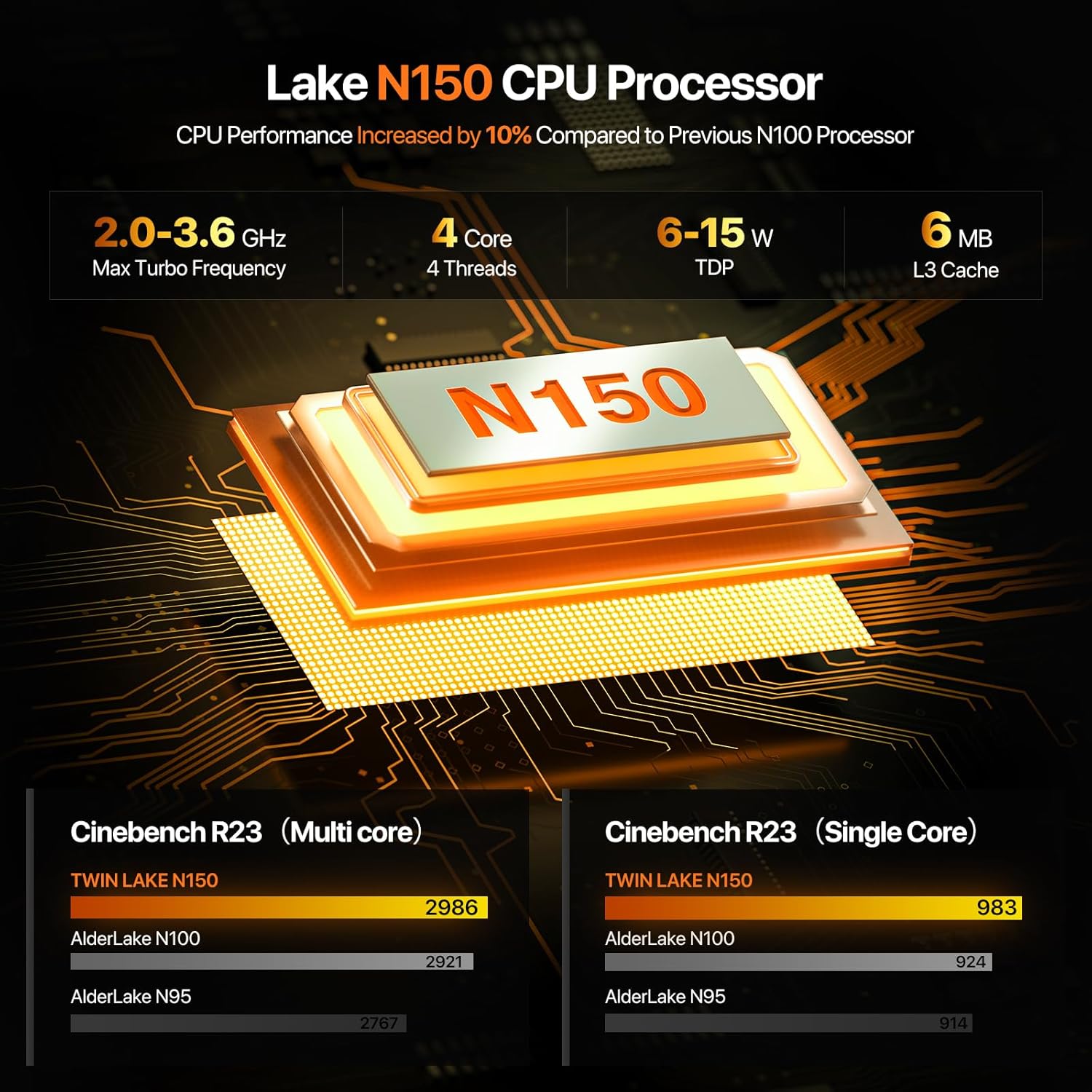
Diagram illustrating the N150 CPU Processor's specifications, including max turbo frequency, cores, threads, TDP, and L3 cache, with performance comparison to N100 and N95.
Memory (RAM) Upgrade
The Mini PC comes with 8GB DDR4 3200MHz RAM pre-installed. The system supports memory expansion up to 32GB. To upgrade, locate the SO-DIMM slot and replace or add compatible DDR4 memory modules.
Storage (SSD) Upgrade
A 256GB M.2 2280 SSD is pre-installed. The Mini PC supports storage expansion via PCIe 3.0 or SATA, with a maximum capacity of 4TB. This allows for significant storage upgrades for movies, photos, and files.

Ички view of the mini PC showing the pre-installed 8GB DDR4 RAM and 256GB SSD, highlighting upgradeability up to 32GB RAM and 4TB SSD.
Муздатуу системасы
The PELADN WI6 N150 Mini PC incorporates an innovative design with a silent cooling fan and strategically placed cooling vents to ensure efficient heat dissipation and stable performance during operation.

жарылды view diagram of the mini PC, highlighting innovative components and design elements like the silent cooling fan, cooling vents, DDR4 RAM, and M.2 SSD.
Техникалык шарттар
| Өзгөчөлүк | Description |
|---|---|
| Процессор | 13th Gen Twin Lake N150 (4C/4T, 6MB Cache, up to 3.6GHz, 15W TDP) |
| Графика | 1000 MHz UHD Graphics (24EUs) |
| RAM | 8GB DDR4 3200MHz SO-DIMM (Expandable up to 32GB) |
| Сактагыч | 256GB M.2 2280 SSD (PCIe 3.0 or SATA, Expandable up to 4TB) |
| Операция системасы | Compatible with Windows 11 Pro, 11, 10 Pro, 10, Ubuntu, Linux, Firewall Server |
| Video Output | 2 x HDMI 2.0 (4K@60Hz), 1 x Type-C (DP1.4 output) - Supports Triple Display |
| USB порттору | 2 x USB 3.2 (10Gbps), 2 x USB 2.0 |
| Network | Dual-Band WiFi 5 (5GHz/2.4GHz, MU-MIMO), Bluetooth 4.2, 1 x RJ45 Gigabit LAN (1000Mbps) |
| Аудио | 1 x 3.5mm Audio Jack (HP&MIC) |
| Башка өзгөчөлүктөр | LAN wake-up, PXE boot, RTC wake-up, Auto power-on |
| Өлчөмдөрү (LxWxH) | 4.88 x 4.41 x 1.38 дюйм |
| Салмагы | 1.52 фунт |
| Түс | Көк |
Проблемаларды чечүү
This section addresses common issues you might encounter with your PELADN WI6 N150 Mini PC.
Дисплей чыгаруу жок
- Монитор күйгүзүлгөнүн жана туура киргизүү булагынын тандалганын текшериңиз.
- Check that the HD cable (or Type-C cable) is securely connected to both the Mini PC and the monitor.
- Try a different display cable or monitor to rule out faulty equipment.
Күч жок
- Verify that the power adapter is correctly plugged into the Mini PC and a working power outlet.
- Ensure the power button on the Mini PC has been pressed.
- Электр адаптеринде көрүнгөн зыяндын бар-жоктугун текшериңиз.
Тармакка туташуу маселелери
- текст: Ensure the Ethernet cable is securely connected to the RJ45 port and your router/modem. Check your router's status.
- Зымсыз: Verify that WiFi is enabled in Windows settings. Ensure you are connecting to the correct network and entering the password accurately. Restart your router/modem.
Жай аткаруу
- Фондо иштеп жаткан керексиз тиркемелерди жабыңыз.
- Windows үчүн жеткиликтүү жаңыртууларды текшерип, аларды орнотуңуз.
- SSDде жетиштүү бош орун бар экенине ынаныңыз.
- Түзмөктүн ысып кетпешин камсыз кылуу үчүн системанын температурасын көзөмөлдөңүз.
BIOS Settings for Wake-on-LAN (WOL) and Wake-on-Power
The Mini PC supports Wake-on-LAN and Wake-on-Power features. These settings can typically be configured within the BIOS/UEFI interface. Accessing the BIOS usually involves pressing a specific key (e.g., Del, F2) during startup. Consult the BIOS settings for options related to 'Wake on WLAN and BT enable' and 'State after G3' (set to 'S0 State' for auto power-on).
Кепилдик жана колдоо
PELADN is committed to providing reliable products and excellent customer service.
Кепилдик маалымат
Your PELADN WI6 N150 Mini PC comes with a 12 айлык чектелген кепилдик, effective from the date of purchase. This warranty covers defects in design and workmanship. Please retain your proof of purchase for warranty claims.
Кайтаруу жана алмаштыруу саясаты
PELADN offers a 30-day return and exchange policy from the date of purchase, allowing you to return the product for any reason within this period.
Техникалык колдоо
Should you encounter any issues or require assistance, PELADN provides a dedicated after-sales team ready to assist you. We aim to respond to all inquiries within 24 саат.
For support, please refer to the contact information provided with your product packaging or visit the official PELADN webсайт.

Icons representing PELADN's customer support: Technical Support, 24 Hours Reply, 30 Days Return, and 12 Months Warranty.


