1. Киришүү
Welcome to the user manual for your new DOOGEE Tab E3 Pro Android Tablet. This guide provides detailed instructions on how to set up, operate, maintain, and troubleshoot your device. Please read this manual thoroughly to ensure optimal performance and longevity of your tablet.
The DOOGEE Tab E3 Pro is designed for a seamless and powerful user experience, featuring a large display, robust processor, and long-lasting battery, making it ideal for entertainment, productivity, and communication.
2. Пакеттин мазмуну
Please check the contents of your package. If any items are missing or damaged, contact your retailer or DOOGEE support.
- DOOGEE Tab E3 Pro Tablet
- USB-C заряддоо кабели
- Кубаттуу адаптер
- SIM Eject Tool (if applicable)
- Quick Start Guide
- Кепилдик картасы
3. Түзмөк бүттүview
Familiarize yourself with the physical components of your DOOGEE Tab E3 Pro.

3.1-сүрөт: Фронт view of the DOOGEE Tab E3 Pro tablet, showcasing its large 13-inch display with key features like Android 15, Helio G100 processor, Gemini AI, and 11000mAh battery capacity highlighted on the screen.
3.1. Баскычтар жана порттор
- Кубат баскычы: Капталында жайгашкан, планшетти күйгүзүү/өчүрүү же экранды ойготуу/уйку режимине өткөрүү үчүн колдонулат.
- Үн баскычтары: Аудионун үнүн тууралаңыз.
- USB-C порту: Заряддоо жана маалыматтарды өткөрүү үчүн.
- 3.5 мм гарнитура уячасы: Зымдуу кулакчындарды туташтыруу үчүн.
- SIM/MicroSD карта слоту: Insert your SIM card for cellular connectivity or a MicroSD card for expandable storage.

3.2-сүрөт: An illustration highlighting the Android 15 operating system, indicating its intelligent, seamless, and secure features, which is the core software of the DOOGEE Tab E3 Pro.
3.2. Камералар
- Арткы камера: 13MP main camera for high-quality photos and videos.
- Алдыңкы камера: Видео чалуулар жана селфилер үчүн 8 МП камера.

3.3-сүрөт: A visual representation of the DOOGEE Tab E3 Pro's camera capabilities, showing the 13MP main camera and 8MP front camera, along with exampпланшет менен тартылган сүрөттөр.
4. Баштапкы орнотуу
4.1. Планшетти заряддоо
Before first use, fully charge your tablet. Connect the USB-C cable to the tablet's charging port and the other end to the power adapter. Plug the adapter into a wall outlet.
The DOOGEE Tab E3 Pro features an 11000mAh high-capacity battery with 18W fast charging support for extended usage.
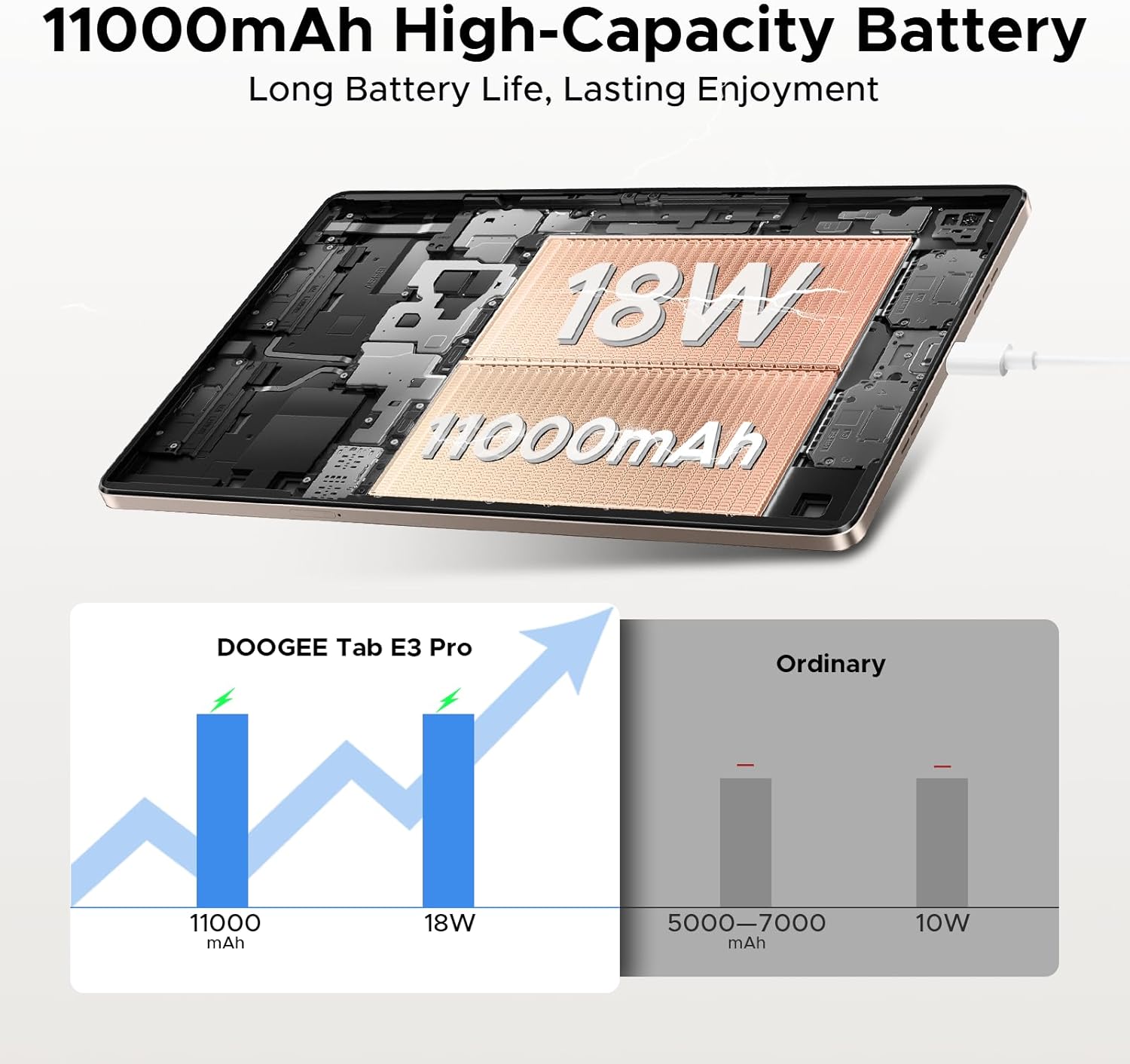
4.1-сүрөт: An illustration demonstrating the 11000mAh high-capacity battery of the DOOGEE Tab E3 Pro, highlighting its long battery life and 18W charging capability compared to ordinary tablets.
4.2. Күйгүзүү / Өчүрүү
- Күйгүзүү үчүн: DOOGEE логотиби пайда болгонго чейин Кубат баскычын басып, кармап туруңуз.
- Өчүрүү үчүн: Кубат баскычын кубат менюсу пайда болгонго чейин басып туруңуз, андан кийин "Өчүрүү" дегенди тандаңыз.
- Кайра баштоо үчүн: Кубат менюсунан "Кайра баштоо" дегенди тандаңыз.
4.3. Баштапкы конфигурация
Планшет биринчи жолу күйгүзүлгөндө, ал сизге баштапкы орнотуу процессин көрсөтөт:
- Каалаган тилиңизди тандаңыз.
- Wi-Fi тармагына туташыңыз.
- Google аккаунтуңуз менен кириңиз же жаңысын түзүңүз.
- Экран кулпусун (PIN код, үлгү, сырсөз же бетти таануу) орнотуңуз.
- Review жана шарттарды кабыл алуу.
5. Планшетиңизди иштетүү
5.1. Android 15 операциялык системасы
Your DOOGEE Tab E3 Pro runs on the latest Android 15 system, offering an intelligent, seamless, and secure user experience with enhanced privacy features and improved performance.
5.2. Дисплей жана визуалдык материалдар
Experience vibrant visuals on the 13-inch FHD+ 90Hz display. With a 1920x1200 resolution, 16:10 aspect ratio, and 84.6% screen-to-body ratio, content comes to life with 16.7 million screen colors.

5.1-сүрөт: A graphic illustrating the 13-inch FHD+ 90Hz display of the DOOGEE Tab E3 Pro, detailing its 1920x1200 resolution, 16:10 aspect ratio, 84.6% screen-to-body ratio, and 16.7 million screen colors.
5.3. Аткаруу жана сактоо
Powered by the Helio G100 Octa-Core Processor, the tablet delivers boosted speed and efficiency with a 2.2GHz ultimate frequency and 6nm advanced process technology.

5.2-сүрөт: А деталдуу view of the MediaTek Helio G100 Octa-Core Processor, emphasizing its 2.2GHz ultimate frequency and 6nm advanced process technology, which powers the DOOGEE Tab E3 Pro.
The tablet comes with 8GB of basic RAM, expandable up to 32GB Max RAM, and 256GB of internal ROM, which can be expanded up to 2TB with a TF card (sold separately).
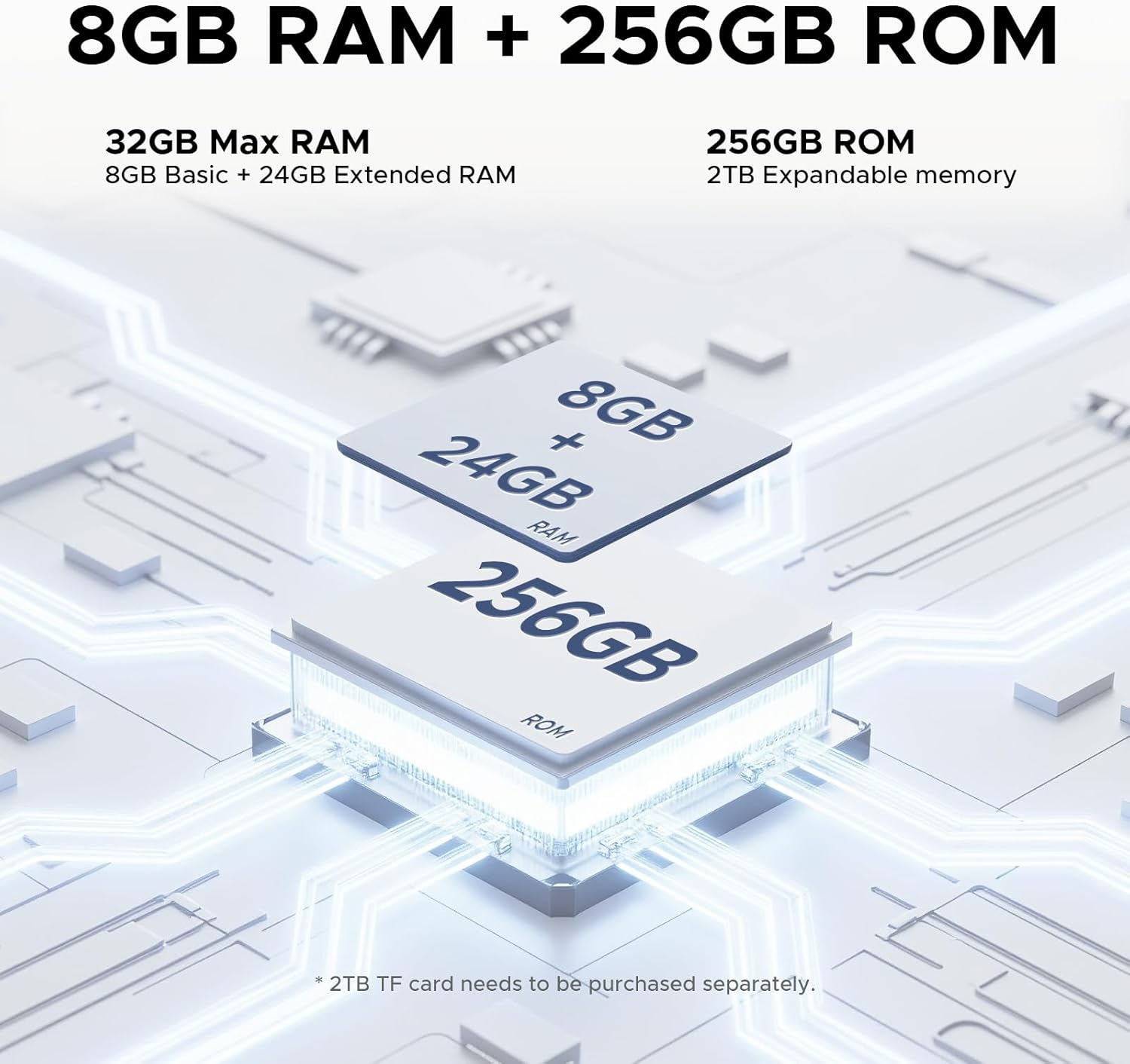
5.3-сүрөт: An illustration detailing the memory configuration of the DOOGEE Tab E3 Pro, showing 8GB Basic RAM + 24GB Extended RAM for a total of 32GB Max RAM, and 256GB ROM with 2TB expandable memory support.
5.4. Built-in Gemini AI
Leverage the built-in Gemini AI for enhanced productivity and convenience. Features include content creation, information retrieval & summarization, image analysis, code development, smart assistant functions, language learning, Gemini Live, and Gemini Deep Research.

5.4-сүрөт: Диаграмма көрсөтүлөтasing the various functionalities of the Built-in Gemini AI on the DOOGEE Tab E3 Pro, including content creation, information retrieval, image analysis, and smart assistant features.
5.5. Аудионун сапаты
Enjoy premium sound quality with the 1217 BOX Quad Speakers, housed within a stylish and sleek metal case, providing an immersive audio experience.

5.5-сүрөт: An image highlighting the sound quality and aesthetics of the DOOGEE Tab E3 Pro, featuring its Premium 1217 BOX Quad Speakers and stylish metal case.
6. Техникалык тейлөө жана кам көрүү
- Тазалоо: Экранды жана корпусту тазалоо үчүн жумшак, мамыксыз чүпүрөктү колдонуңуз. Абразивдүү тазалоочу каражаттарды же эриткичтерди колдонбоңуз.
- Программалык камсыздоо жаңыртуулары: Планшетиңизде эң акыркы функциялар, коопсуздук жаңыртуулары жана иштин жакшыртылышы бар экенине ынануу үчүн система жаңыртууларын үзгүлтүксүз текшерип жана орнотуп туруңуз. Орнотуулар > Система > Системаны жаңыртуу.
- Батареяга кам көрүү: Avoid extreme temperatures. Do not let the battery fully drain frequently. For long-term storage, charge the battery to about 50%.
- Сактагыч: Keep your tablet in a cool, dry place away from direct sunlight and extreme temperatures.
- Коргоо: Consider using a protective case and screen protector to prevent scratches and damage.
7. Кыйынчылыктарды
This section addresses common issues you might encounter with your DOOGEE Tab E3 Pro.
7.1. Планшет күйбөйт
- Батарея заряддалганын текшериңиз. Заряддагычты туташтырыңыз жана күйгүзүүгө аракет кылуудан мурун бир нече мүнөт күтүңүз.
- Өчүрүп күйгүзүүгө мажбурлоо үчүн Кубат баскычын жок дегенде 10-15 секунд басып, кармап туруңуз.
7.2. Wi-Fi туташуу маселелери
- Wi-Fi күйгүзүлгөнүн текшериңиз Орнотуулар > Тармак жана интернет > Wi-Fi.
- Wi-Fi роутериңизди өчүрүп күйгүзүңүз.
- Тармакты унутуп, сырсөздү кайра киргизүү менен кайра туташыңыз.
- Башка түзмөктөр бир эле Wi-Fi тармагына туташа аларын текшериңиз.
7.3. Жай аткаруу
- Фондо иштеп жаткан колдонулбаган колдонмолорду жабуу.
- Clear cache data for apps that are frequently used (Орнотуулар > Колдонмолор > [Колдонмонун аты] > Сактагыч жана кэш > Кэшти тазалоо).
- Сизде жетиштүү бош орун бар экенин текшериңиз.
- Планшетті мезгил-мезгили менен өчүрүп-күйгүзүңүз.
- Эгер көйгөйлөр чечилбесе, баштапкы абалга келтирүүнү карап көрүңүз (Орнотуулар > Система > Параметрлерди баштапкы абалга келтирүү > Бардык дайындарды тазалоо (деск. баштапкы абалга келтирүү)). Warning: This will erase all data on your tablet. Back up important data first.
7.4. Колдонмолор иштебей жатат же жооп бербей жатат
- Колдонмону мажбурлап токтотуу (Орнотуулар > Колдонмолор > [Колдонмонун аталышы] > Мажбурлап токтотуу).
- Колдонмонун кэшин жана дайындарын тазалаңыз.
- Google Play дүкөнүнөн колдонмону жаңыртыңыз.
- Колдонмону алып салуу жана кайра орнотуу.
8. Техникалык шарттар
Detailed technical specifications for the DOOGEE Tab E3 Pro.
| Өзгөчөлүк | Спецификация |
|---|---|
| Модел | DOOGEE Tab E3 Pro |
| Операция системасы | Android 15 |
| Дисплей өлчөмү | 13 дюйм |
| Display Resolution | 1920 x 1200 (FHD+) |
| Жаңыртуу ылдамдыгы | 90Hz |
| Процессор | Helio G100 сегиз ядролуу (2.2 ГГц) |
| RAM | 8GB (expandable up to 32GB Max RAM) |
| Ички сактагыч (ROM) | 256 ГБ |
| Кеңейтүүчү сактагыч | Up to 2TB (TF card, sold separately) |
| Арткы камера | 13 депутат |
| Алдыңкы камера | 8 депутат |
| Батарея сыйымдуулугу | 11000 мАч (литий полимери) |
| Заряддоо | 18W тез заряддоо |
| Өлчөмдөрү (LxWxH) | 11.89 x 7.78 x 0.31 дюйм |
| Элемент Салмагы | 14.7 унция (418 грамм) |
| Байланыш | Wi-Fi, Bluetooth, Cellular (if applicable) |
| Аудио | 1217 BOX Quad Speakers, 3.5mm Headphone Jack |
9. Кепилдик жана колдоо
Your DOOGEE Tab E3 Pro is covered by a limited warranty. Please refer to the warranty card included in your package for specific terms and conditions, including warranty period and coverage details.
For technical support, troubleshooting assistance, or warranty claims, please contact DOOGEE customer service through their official webсайтты же кепилдик документтериңизде көрсөтүлгөн байланыш маалыматын.
You can visit the official DOOGEE store on Amazon for more information and support: DOOGEE Amazon Store


