1. Киришүү
This manual provides detailed instructions for the installation, operation, and maintenance of your KERUI 8-Channel Wireless NVR Surveillance System. This system includes a 10.1-inch NVR monitor and two 6MP PTZ dual-lens Wi-Fi outdoor cameras, designed for comprehensive security monitoring.
Please read this manual thoroughly before operating the system to ensure proper usage and to maximize its functionality and lifespan.
2. Пакеттин мазмуну
Төмөндө саналып өткөн бардык компоненттер пакетиңизге камтылганын текшериңиз:
- 1x 10.1-inch 8-Channel NVR Monitor (with integrated 500GB HDD)
- 2x Wired PTZ Wi-Fi Outdoor Cameras
- 2x 12V/1A Power Adapters for cameras
- NVR үчүн 1x кубат адаптери
- Монтаждоо бурамалар жана анкерлер
- Колдонуучунун Колдонмосу (бул документ)
3. Система бүттүview жана компоненттер
Familiarize yourself with the main components of your surveillance system.
Сүрөт: Detailed diagram of the PTZ camera showing its components: bracket, antenna, waterproof housing, bullet camera, LED light, two-light sensor, wide-angle lens, IR-LEDs, power connection, and speaker. Dimensions are also indicated.
The camera features a robust, waterproof housing suitable for outdoor installation. It includes both a fixed bullet camera and a PTZ (Pan-Tilt-Zoom) camera with dual lenses for comprehensive coverage. Integrated LED lights and IR-LEDs provide various night vision modes. The camera also has a built-in speaker for two-way audio communication.
4. Орнотуу жана орнотуу
4.1 NVR Monitor Setup
- Күйгүзүү: Connect the NVR monitor to a power outlet using its dedicated power adapter. The system will boot up automatically.
- Тармак туташуусу: Connect the NVR to your router via an Ethernet cable for initial setup and remote access. Alternatively, the NVR can connect wirelessly to your network.
- Баштапкы конфигурация: Follow the on-screen prompts to complete the initial setup, including setting a password and configuring network settings.

Сүрөт: The NVR monitor displaying multiple camera feeds, connected to a router via Ethernet for remote viewing and playback. A camera is shown mounted on a wall, connected to power.
4.2 Камераны орнотуу
- Жайгашкан жерди тандоо: Select an outdoor location that provides optimal coverage and has access to a power source. Ensure the camera is within range of the NVR's wireless signal or your Wi-Fi network.
- Монтаждоо: Use the provided screws and anchors to securely mount the camera to a wall or ceiling. The camera's bracket allows for angle adjustment.
- Кубат туташуу: Connect the camera to the 12V/1A power adapter and plug it into a power outlet.
- Жупташтыруу (зарыл болсо): The cameras are typically pre-paired with the NVR. If not, refer to the NVR's on-screen menu for instructions on adding new cameras.

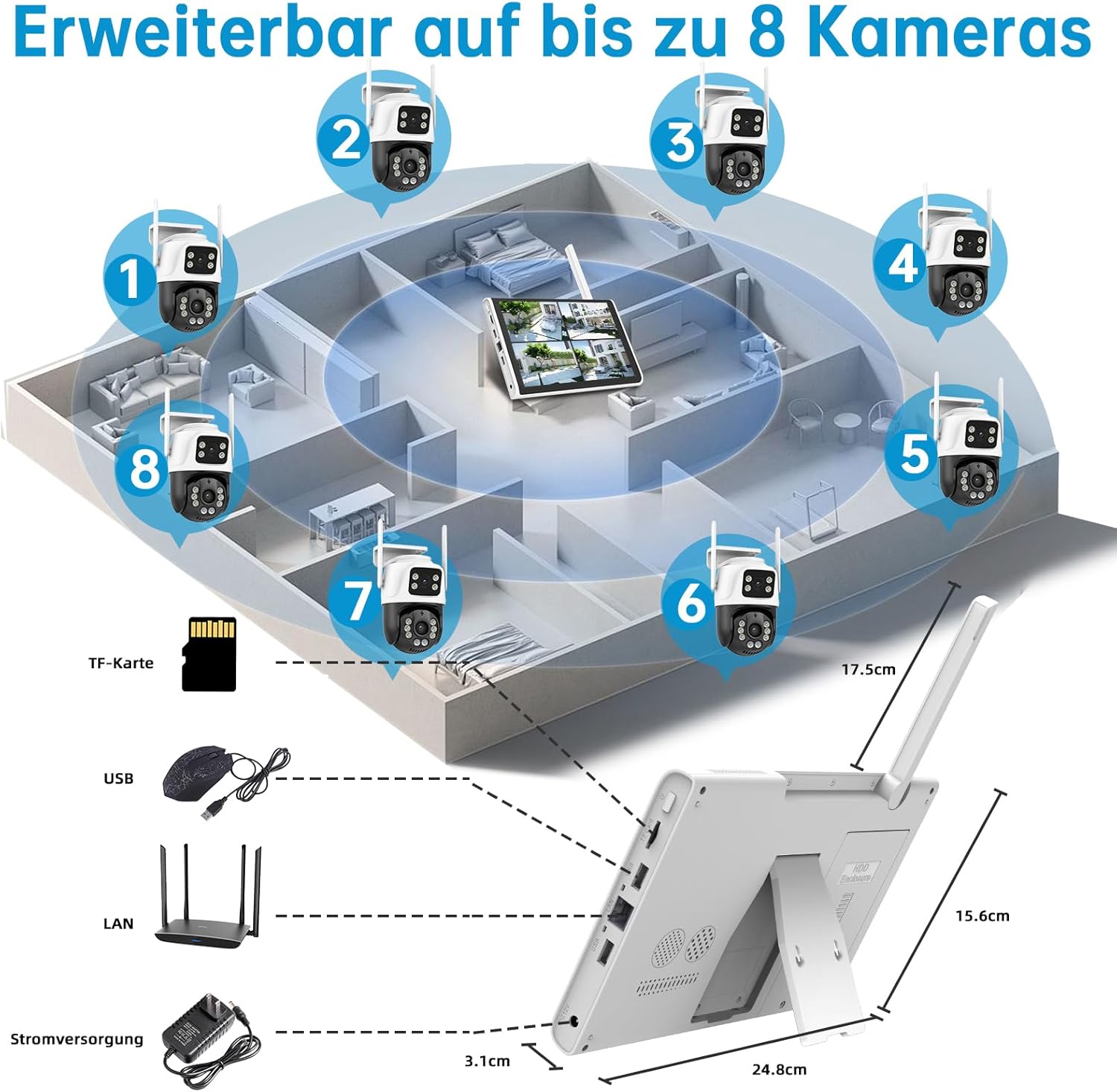
Сүрөт: Үстүбүздөгү чыгым view of a house layout showing the NVR monitor in the center and eight cameras (two included, six expandable) strategically placed around the property. The NVR's ports for TF card, USB, LAN, and power are also depicted.
The system supports up to 8 cameras. You can expand your surveillance by adding up to 6 additional wired or wireless cameras.
5. Операция
5.1 Live View жана Ойнотуу
- NVR мониторунда: The 10.1-inch NVR monitor displays live feeds from all connected cameras. Use the NVR's controls to switch views, access settings, and review foo жазылганtage.
- Remote Access (XMEYE PRO App): Download the free XMEYE PRO app on your smartphone or tablet. Follow the app's instructions to add your NVR system for remote viewing, playback, and system control from anywhere.
5.2 Dual-Lens Camera Features

Сүрөт: A dual-lens PTZ camera illustrating its pan (355°) and tilt (90°) capabilities, providing 360° coverage without blind spots. The image shows the camera's wide field of view over a residential area.
Each camera features two lenses: one fixed and one PTZ. The PTZ lens offers 355° pan and 90° tilt rotation, allowing for comprehensive 360° coverage. This dual-lens design ensures no blind spots in your surveillance area.
5.3 Motion Detection and AI Humanoid Recognition

Сүрөт: An illustration of the AI Humanoid Detection and Auto-Tracking feature. The camera detects a person, activates a spotlight, sends app and email notifications, and tracks the individual. An alarm notification is shown at the bottom.
The system incorporates AI intelligent motion detection to accurately identify human figures, reducing false alarms. When suspicious movement is detected, the camera can activate spotlights, trigger a siren alarm, and send instant push notifications or email alerts to your device. The auto-tracking function allows the PTZ camera to follow detected individuals.
5.4 Эки тараптуу аудио

Сүрөт: A scenario demonstrating two-way audio. A delivery person is at the door, and a user is communicating with them via the camera and NVR monitor from indoors, instructing them to leave the package.
With the built-in microphone and speaker, the cameras support two-way audio communication. This allows you to listen to the environment and speak through the camera, which is useful for interacting with visitors or deterring intruders.
5.5 Түнкү көрүү режимдери
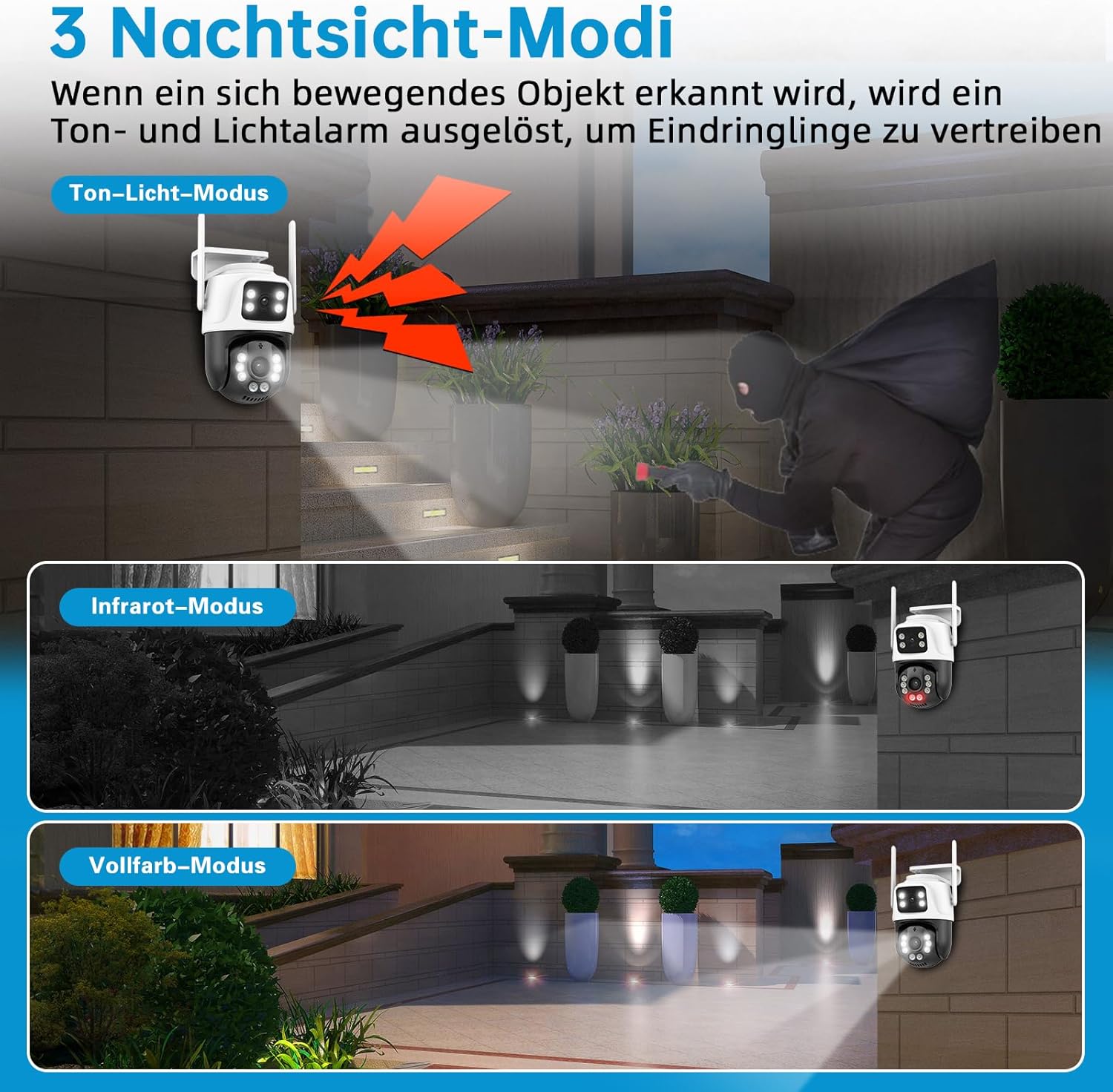
Сүрөт: An illustration showing three night vision modes: Sound-Light Mode (activates light and sound alarm upon detection), Инфракызыл режим (standard black and white night vision), and Full-Color Mode (provides vivid color images at night using integrated lights).
The cameras offer three distinct night vision modes:
- Sound-Light Mode: When motion is detected, the camera activates its integrated lights and an audible alarm to deter intruders.
- Infrared режими: Provides clear black and white video footage in low-light or no-light conditions using infrared LEDs.
- Толук түстүү режим: Utilizes the camera's integrated white lights to capture full-color video even in complete darkness, offering more detailed visual information.
5.6 24/7 жаздыруу жана сактоо

Сүрөт: Depicts continuous 24/7 video and audio recording. The NVR includes a pre-installed 500GB hard drive for local storage, which automatically overwrites older footagд толгондо.
The NVR system supports continuous 24/7 video and audio recording. It comes with a pre-installed 500GB hard drive for local storage. When the storage is full, the system automatically overwrites the oldest footagд тынымсыз жазууну камсыз кылуу.
6. Техникалык тейлөө
- Таза линзалар: Камера линзаларын жумшак, d чүпүрөк менен үзгүлтүксүз тазалаңызamp ачык сүрөт сапатын камсыз кылуу үчүн кездеме. Абразивдүү тазалагычтардан алыс болуңуз.
- Байланыштарды текшерүү: Periodically inspect all power and network connections for security and integrity.
- Программалык камсыздоонун жаңыртуулары: Өндүрүүчүнү текшериңиз website or the XMEYE PRO app for available firmware updates to ensure optimal performance and security.
- Маалыматтын камдык көчүрмөсү: If critical footage needs to be preserved, back it up from the NVR's hard drive to an external storage device or cloud service (if supported).
7. Кыйынчылыктарды
| Көйгөй | Мүмкүн себеп | Чечим |
|---|---|---|
| NVR мониторунда сүрөт жок | Power issue, loose cable, NVR not booted | Check power adapter connection. Ensure NVR is powered on. Restart NVR. |
| Камералар NVRге туташпай жатат | Out of range, power issue, pairing lost | Ensure cameras are powered. Move cameras closer to NVR. Re-pair cameras via NVR settings. |
| Алыстан кирүү иштебей жатат | NVR not connected to internet, incorrect app settings | Verify NVR's internet connection (Ethernet or Wi-Fi). Check app settings and ensure NVR is added correctly. |
| Жалган кыймыл сигналдары | Sensitivity too high, environmental factors (e.g., moving branches) | Adjust motion detection sensitivity in NVR settings. Define specific detection zones to exclude irrelevant areas. |
| Түнкү көрүү сапаты начар | Dirty lens, IR obstruction, insufficient ambient light for color mode | Clean camera lens. Ensure no obstructions block IR LEDs. Switch to Infrared Mode if Full-Color Mode is too dark. |
8. Техникалык шарттар
| Өзгөчөлүк | Деталь |
|---|---|
| Модель номери | CZSNVR050201 |
| NVR мониторунун өлчөмү | 10.1 дюйм |
| NVR каналдары | 8-канал |
| NVR сактагычы | 500GB HDD (integrated) |
| Камеранын чечилиши | 6MP (1296p video capture) |
| Камера түрү | PTZ Dual-Lens Wi-Fi Outdoor Camera |
| Байланыш | Wireless (2.4G & 5G WiFi) |
| PTZ Rotation | Пан 355°, Тилт 90° |
| Аудио | Эки тараптуу аудио |
| Түнкү көрүнүш | Color Night Vision, Infrared Mode, Sound-Light Mode |
| Аба ырайына каршылык | IP66 |
| Өзгөчөлүктөр | AI Humanoid Detection, Auto-Tracking, Siren Alarm, App Control, Recording Audio, Smart Playback |
| Электр камсыздоо | Wired electric (12V/1A adapters) |
| Өлчөмдөрү (NVR) | 25.4 x 7.62 x 17.78 см |
| Weight (NVR) | 2 кг |
9. Кепилдик жана колдоо
For warranty information and technical support, please refer to the official KERUI website or contact their customer service directly. Contact details are typically provided on the product packaging or on the manufacturer's webсайт.
Ensure you have your model number (CZSNVR050201) and purchase details available when contacting support.


