1. Киришүү
The KLIM K7 is a versatile portable cassette player designed for both playback of audio cassettes and conversion of cassette audio to digital MP3 format. It features a built-in microphone for recording, an integrated speaker, and a rechargeable battery for on-the-go use. This manual provides detailed instructions for setting up, operating, and maintaining your KLIM K7 device.

Сүрөт: бүттүview of KLIM K7 features including cassette to MP3 conversion, tape playback, built-in microphone, earphone jack, speaker, and compact size.
2. Пакеттин мазмуну
Төмөндө тизмеленген нерселердин баары пакетиңизге камтылганын текшериңиз:
- KLIM K7 Portable Cassette Player and Converter
- KLIM Fusion наушник
- 32 ГБ микро SD карта
- Micro SD Card Reader (USB adapter)
- Type-C USB заряддоо кабели
- Колдонуучунун Колдонмосу (бул документ)

Image: A visual representation of all items included in the KLIM K7 package: the cassette player, Type-C USB cable, 32GB Micro SD card, SD card reader, and Fusion earphones.
3. Продукт бүтүп калдыview
Familiarize yourself with the various parts and controls of your KLIM K7 device.

Сүрөт: алдыңкы view of the KLIM K7 cassette player, showing the cassette compartment, control buttons, built-in speaker, display, and included earphones, SD card, and USB adapter.
Башкаруу каражаттары жана порттор:
- Кассета бөлүмү: Insert your audio cassettes here.
- Дисплей экраны: Shows track time, SD card status, and recording indicator.
- Ойнотуу/тындыруу баскычы: Starts or pauses cassette playback/MP3 playback.
- Токтотуу баскычы: Ойнотуу же жаздыруу токтотулат.
- Тез алдыга/артка түрдүрүү баскычтары: Navigates through cassette tape or MP3 tracks.
- Жазуу баскычы: Initiates recording from cassette or microphone to SD card.
- Режим баскычы: Switches between cassette playback, MP3 playback, and recording modes.
- Үндү көзөмөлдөө: Аудио чыгаруу деңгээлин тууралайт.
- 3.5 мм наушник уячасы: Connect included earphones or other standard headphones.
- Микрофон: Үн жаздыруу үчүн орнотулган микрофон.
- SD карта уячасы: Insert the provided 32GB Micro SD card for storage.
- Type-C USB порту: Аппаратты заряддоо үчүн.
- Кубат өчүргүч (КҮЙГҮЗҮҮ/ӨЧҮРҮҮ): Аппаратты күйгүзөт же өчүрөт.
4. Орнотуу
4.1 Аппаратты заряддоо
The KLIM K7 is equipped with a 1000mAh rechargeable battery. Before first use, or when the battery is low, charge the device using the provided Type-C USB cable.
- Connect the Type-C end of the USB cable to the charging port on the KLIM K7.
- Connect the standard USB-A end of the cable to a USB power adapter (not included) or a computer's USB port.
- The charging indicator on the device will illuminate. A full charge typically takes approximately 2 hours.
- Толук заряддалгандан кийин, кабелди ажыратыңыз.

Image: The KLIM K7 device shown with its Type-C USB charging cable, illustrating the rechargeable battery feature.
4.2 Micro SD картаны салуу
The included 32GB Micro SD card is essential for converting cassettes to MP3 and for recording audio. Ensure it is properly inserted before use.
- Locate the Micro SD card slot on the side of the KLIM K7.
- Gently insert the 32GB Micro SD card into the slot with the gold contacts facing down, until it clicks into place.
- To remove, gently push the card inward until it clicks, then release, and it will spring out.

Image: The KLIM K7 with its cassette compartment open, illustrating the insertion of the 32GB Micro SD card into its designated slot.
4.3 Inserting an Audio Cassette
- Кассеталык бөлүмдүн эшигин ачыңыз.
- Insert your audio cassette with the open edge facing the playback head.
- Кассета бөлүмүнүн эшигин чыкылдаган үн чыкканча бекем жабыңыз.
5. Иштөө нускамалары
5.1 Күйгүзүү/өчүрүү
Slide the Power Switch (ON/OFF) located on the side of the device to the 'ON' position to power on. Slide it to 'OFF' to power off.
5.2 Кассета тасмасын ойнотуу
- Ensure a cassette tape is inserted and the device is powered on.
- басыңыз Play баскычы (►). The tape will begin to play.
- Үндү башкаруунун жардамы менен үндү тууралаңыз.
- Тыныгуу үчүн басыңыз Ойнотуу/Тыныгуу кайра баскычын.
- Токтотуу үчүн, басыңыз Токто баскычы (■).
- колдонуу Fast Forward (►►) жана Артка түрүү (◄◄) лентаны башкаруу үчүн баскычтар.
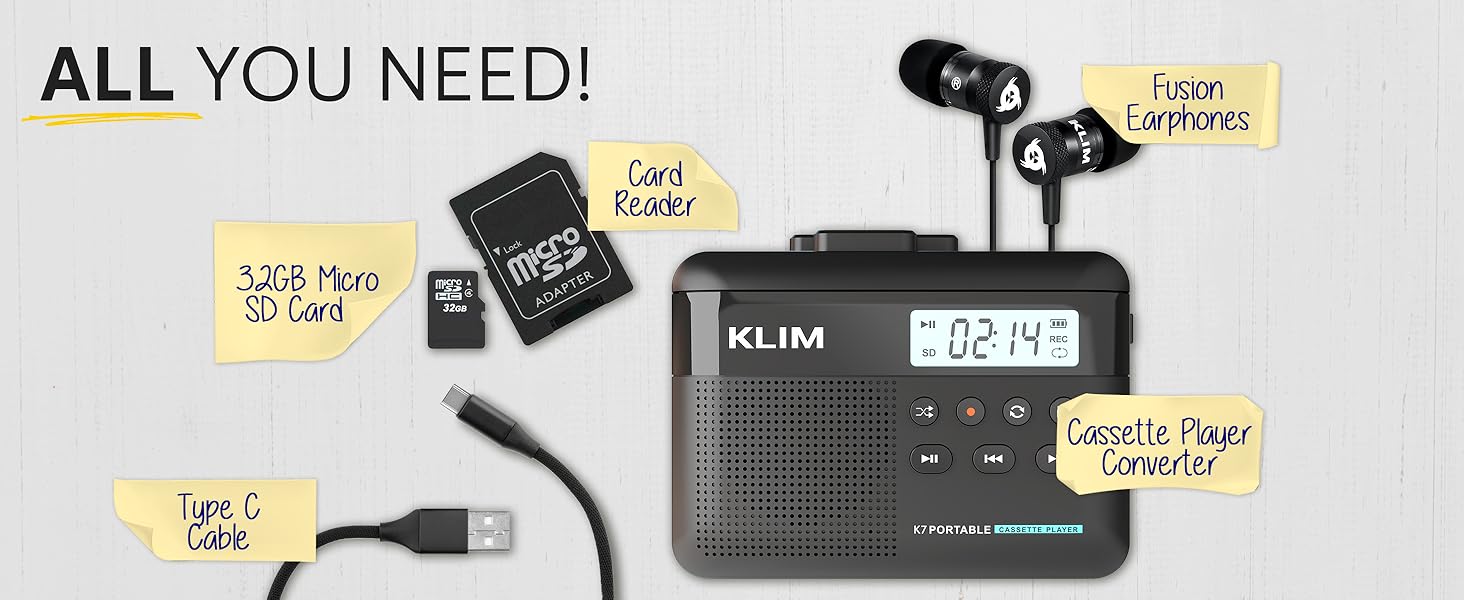
Image: A mother and child sharing earphones connected to the KLIM K7, demonstrating the device's use for listening to cassette tapes.
5.3 Converting Cassette to MP3
The KLIM K7 allows you to convert your cassette tapes directly to MP3 files on the inserted Micro SD card without needing a computer.
- Ensure a cassette tape is inserted and the 32GB Micro SD card is in its slot.
- Түзмөктү күйгүзүңүз.
- басыңыз Play баскычы (►) to start playing the cassette.
- көпкө басыңыз Жаздыруу баскычы (●) to begin recording. The display will show a recording indicator.
- The device will convert the audio from the cassette to an MP3 file on the SD card. Each side of the tape will typically be saved as one MP3 file.
- Жазууну токтотуу үчүн, басыңыз Жаздыруу баскычы (●) кайра.
- After recording, you can remove the SD card and use the provided USB adapter to transfer the MP3 files to a computer or other device.

Image: A five-step visual guide demonstrating how to convert cassette audio to MP3 files on the Micro SD card using the KLIM K7.
5.4 Using the Built-in Microphone for Recording
The KLIM K7 allows you to record external audio using its built-in microphone directly to the Micro SD card.
- Ensure the 32GB Micro SD card is inserted.
- Түзмөктү күйгүзүңүз.
- басыңыз Mode button until the device is in microphone recording mode (indicated on the display).
- басыңыз Жаздыруу баскычы (●) жаздырууну баштоо үчүн басыңыз.
- Speak clearly towards the built-in microphone.
- Жазууну токтотуу үчүн, басыңыз Жаздыруу баскычы (●) кайра.
Note: The KLIM K7 does not support recording onto cassette tapes.

Image: A woman singing into a microphone, with the KLIM K7 and its SD card slot visible, illustrating the high-quality sound recording capability to the SD card.
5.5 MP3 ойнотуу Files from SD Card
The KLIM K7 can also function as an MP3 player, playing files stored on the Micro SD card.
- Ensure the Micro SD card with MP3 files киргизилет.
- Түзмөктү күйгүзүңүз.
- басыңыз Mode button until the device is in MP3 playback mode.
- басыңыз Play баскычы (►) to start playing the first MP3 file.
- колдонуу Fast Forward (►►) жана Артка түрүү (◄◄) тректерди өткөрүп жиберүү үчүн баскычтар.
- Үндү башкаруунун жардамы менен үндү тууралаңыз.
5.6 Using Earphones and Speaker
The KLIM K7 offers flexible listening options:
- тетиги: For private listening, plug the included KLIM Fusion earphones into the 3.5mm earphone jack. The built-in speaker will automatically mute.
- Камтылган динамик: For shared listening, ensure no earphones are plugged in. The audio will play through the integrated speaker.

Image: A man wearing earphones, connected to the KLIM K7, highlighting the universal 3.5mm jack port for personal listening.
6. Техникалык тейлөө
Proper care and maintenance will ensure the longevity and optimal performance of your KLIM K7.
- Тазалоо: Use a soft, dry cloth to clean the exterior of the device. Do not use liquid cleaners or abrasive materials. For the playback head and pinch rollers, use a specialized cassette head cleaner if necessary, following its instructions.
- Сактагыч: Колдонулбаганда, аспапты түз күн нурунан жана өтө температурадан алыс салкын, кургак жерде сактаңыз.
- Батареяга кам көрүү: Батареянын иштөө мөөнөтүн узартуу үчүн, бат-баттан батарейканы толук зарядсыздандырбаңыз. Аппаратты дайыма колдонууда болбосо да, үзгүлтүксүз заряддаңыз.
- Cassette Tapes: Use clean, well-maintained cassette tapes to prevent damage to the playback head and ensure good audio quality.
7. Кыйынчылыктарды
If you encounter issues with your KLIM K7, refer to the following common problems and solutions:
| Көйгөй | Мүмкүн себеп | Чечим |
|---|---|---|
| Түзмөк күйбөйт. | Батарея аз же түгөнүп калган. | Берилген USB-C кабели аркылуу аппаратты заряддаңыз. |
| No sound during cassette playback. | Volume too low; earphones not properly connected; dirty playback head. | Increase volume; ensure earphones are fully plugged in or removed for speaker; clean playback head. |
| Cassette to MP3 conversion not working. | SD card not inserted or full; cassette not playing. | Ensure SD card is correctly inserted and has free space; verify cassette playback is active before recording. |
| Poor audio quality during playback or recording. | Dirty playback head/pinch rollers; damaged cassette tape; low battery. | Clean playback head and pinch rollers; try a different cassette; ensure device is charged. |
| MP3 files not visible on computer after transfer. | SD card not properly read by computer/adapter. | Ensure SD card is fully inserted into the card reader; try a different USB port on your computer. |
8. Техникалык шарттар
| Өзгөчөлүк | Деталь |
|---|---|
| Продукциянын өлчөмдөрү | 4.76 x 3.61 x 1.56 дюйм |
| Элемент Салмагы | 7.7 унция |
| Өндүрүүчү | KLIM |
| Модель номери | K7 |
| Батарея | 1000 мАч литий-ион (кайра заряддоого болот, камтылган) |
| Заряддоо порту | C түрүндөгү USB |
| Сактагыч | 32 ГБ Micro SD карта (кошулган) |
| Аудио чыгаруу | Built-in Speaker, 3.5mm Earphone Jack |
| Жазуу функциясы | Cassette to MP3, Built-in Microphone to MP3 (to SD card) |

Image: The KLIM K7 device with its compact dimensions (4.7" x 3.5" x 1.4") and weight (8 oz), highlighting its portability.
9. Кепилдик жана колдоо
KLIM is committed to producing quality electronics. The KLIM K7 comes with a 5-year assurance against manufacturing defects. If you encounter any problems with your device, please contact KLIM customer support for assistance.
Кошумча колдоо, продукт каттоо, же үчүн view frequently asked questions, please visit the official KLIM webсайт:
10. Коопсуздук маалыматы
- Аппаратты сууга, нымдуулукка же экстремалдык температурага тийгизбеңиз.
- Аппаратты түшүрүүдөн же катуу таасирлерден сактаныңыз.
- Аппаратты өз алдынча бөлүүгө же оңдоого аракет кылбаңыз. Квалификациялуу тейлөө кызматкерлерине кайрылыңыз.
- Балдар жетпеген жерде сактаңыз.
- Аппаратты жана анын батареясын жергиликтүү эрежелерге ылайык таштаңыз.


