1. Киришүү
Welcome to the Hot Pepper K82A Smartphone User Manual. This guide provides essential information on setting up, operating, and maintaining your new device. The Hot Pepper K82A is designed for optimal performance, featuring a vibrant AMOLED display, a powerful octa-core processor, and advanced camera capabilities.
Негизги өзгөчөлүктөр төмөнкүлөрдү камтыйт:
- Curved AMOLED Display: A 6.67-inch screen for vivid colors and immersive visuals.
- Powerful Octa-core Processor: Ensures smooth and fast performance for applications and games.
- AmpСактоо жана эс тутум: 256 GB internal storage and 8 GB RAM for effortless multitasking and data storage.
- Узак мөөнөттүү батарея: A 5000 mAh battery provides extended usage throughout the day.
- Үч камера системасы: A 50 MP main camera and 24 MP front camera for capturing high-quality photos and videos.
2. Кутуда эмне бар
Upon unboxing your Hot Pepper K82A, please verify that all the following items are included:

Image: Contents of the Hot Pepper K82A retail box, showing the smartphone, USB adapter, USB-C charging cable, user manual, and silicone case.
- Hot Pepper K82A Smartphone
- USB адаптер
- USB-C заряддоо кабели
- User Manual
- Силикон корпус
3. Продукт бүтүп калдыview
Familiarize yourself with the physical components and ports of your Hot Pepper K82A smartphone.

Image: Diagram illustrating the various components and ports of the Hot Pepper K82A, including the 3.5mm headphone jack, AI face unlock, side fingerprint unlock, built-in microphone, and USB-C charging port.
- Headphone/AUX: 3.5mm Jack located on the top.
- AI жүзүнөн ачуу: Front-facing camera for facial recognition.
- Манжа ачуу: Side-mounted sensor for quick and secure access.
- Микрофон: Чалуулар жана үн буйруктары үчүн орнотулган.
- Заряддагыч: USB-C port at the bottom for charging and data transfer.
4. Орнотуу
4.1. SIM картаны салуу жана күйгүзүү
- Телефондун капталындагы SIM карта салгычын табыңыз.
- Салгычты ачуу үчүн берилген SIM чыгаруучу куралды колдонуңуз.
- Place your Nano-SIM card(s) and/or microSD card (for expandable storage up to 1TB) into the tray, ensuring correct orientation.
- Gently push the tray back into the phone.
- Press and hold the Power button (usually on the right side) until the Hot Pepper logo appears.
- Тил тандоо, Wi-Fi туташуусу жана Google каттоо эсебин орнотуу сыяктуу баштапкы орнотууну аяктоо үчүн экрандагы нускамаларды аткарыңыз.
4.2. Баштапкы конфигурация
Your Hot Pepper K82A runs on Android 13.0. During the initial setup, you will be guided through:

Image: The Hot Pepper K82A displaying the Android 13 operating system interface.
- Wi-Fi тармагына туташууда.
- Signing in to your Google account or creating a new one.
- Setting up screen lock methods (PIN, pattern, password, fingerprint, face unlock).
- Restoring data from a previous device (optional).
5. Иштөө нускамалары
5.1. Негизги навигация
- Башкы экран: Үй экрандарынын ортосунда чабыттоо үчүн солго же оңго сүрүңүз.
- Колдонмо тартмасы: Бардык орнотулган колдонмолорго жетүү үчүн экранды ылдый жагынан өйдө сүрүңүз.
- Эскертмелер жана Ыкчам жөндөөлөр: Экрандын өйдө жагынан төмөн карай сүрүңүз view эскертмелерди жана тез жөндөөлөргө кирүү которгучтарын күйгүзөт.
- Акыркы колдонмолор: Swipe up and hold from the bottom of the screen (or tap the square navigation button if enabled) to see recently used applications.
5.2. Чалууларды жасоо жана билдирүүлөрдү жөнөтүү
- Чалуулар: Телефон сөлөкөтүн таптап, номерди киргизип, чалуу баскычын таптаңыз.
- Кабарлар: Кабарлар сөлөкөтүн таптап, жаңы сүйлөшүүнү баштаңыз, алуучунун номерин киргизиңиз же байланыштардан тандап, кабарыңызды териңиз.
5.3. Wi-Fi жана Bluetooth туташуу
- Wi-Fi: барыңыз Орнотуулар > Тармак жана интернет > Интернет, select your desired network, and enter the password if prompted.
- Bluetooth: барыңыз Орнотуулар> Туташкан түзмөктөр> Байланыштын каалоолору> Bluetooth. Turn on Bluetooth and pair with available devices. The K82A supports Bluetooth 5.0.
6. Камеранын өзгөчөлүктөрү
The Hot Pepper K82A features an AI Triple Camera system to help you capture every moment with clarity.

Image: Close-up of the Hot Pepper K82A's rear camera module, detailing the 50 Megapixel rear camera, 24 Megapixel front camera, and 2 Megapixel macro camera, along with 1080p auto-focus video capabilities.
- Арткы камера: 50 Megapixel main sensor for high-resolution photos.
- Алдыңкы камера: 24 Megapixel for clear selfies and video calls.
- Макро камера: 2 Megapixel for detailed close-up shots.
- Видео жаздыруу: Supports 1080p video with auto-focus.
To use the camera, tap the Camera app icon. You can switch between photo, video, and other modes by swiping across the screen or selecting from the options.
7. Батарея жана заряддоо
The Hot Pepper K82A is equipped with a 5000 mAh battery designed for long-lasting performance.
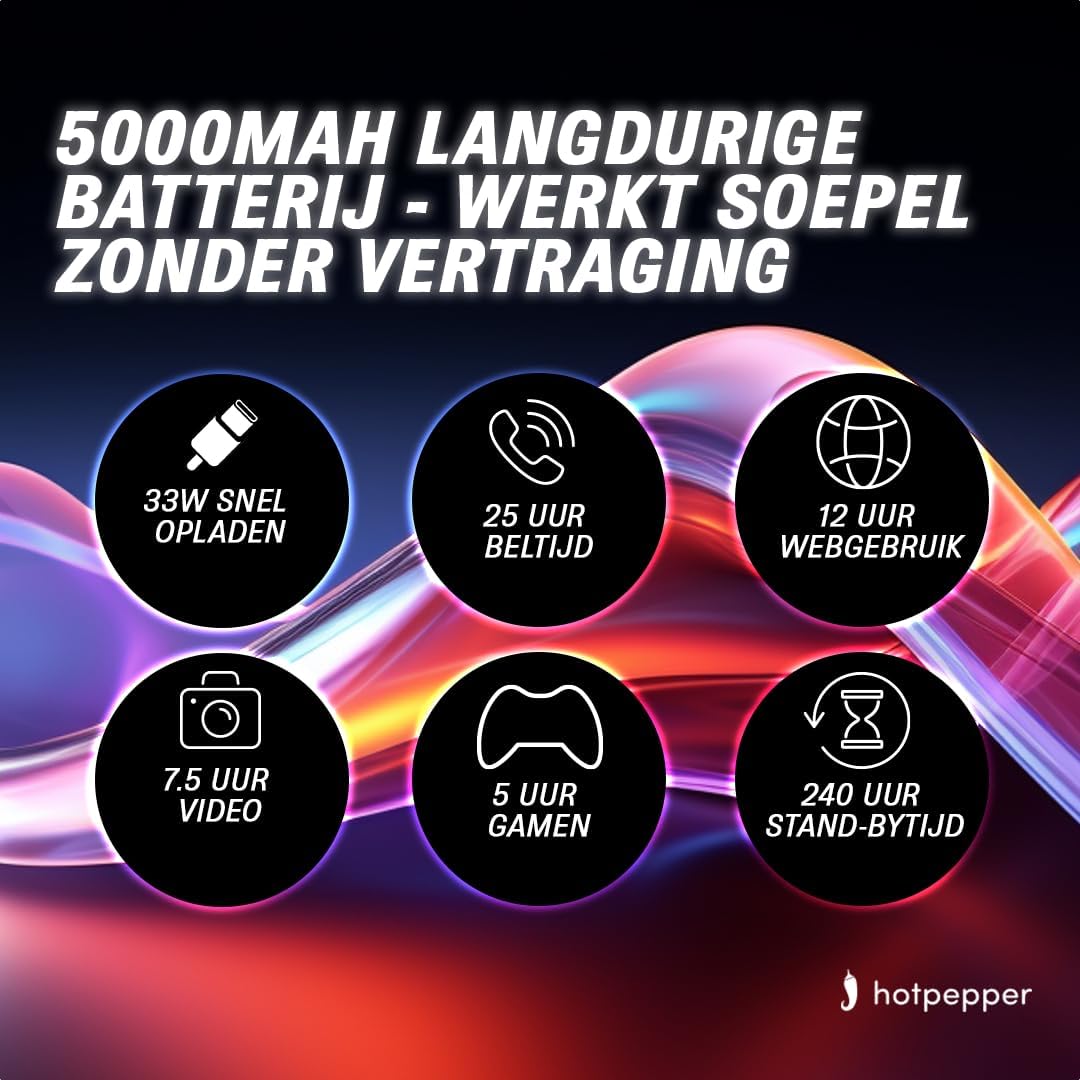
Image: Infographic detailing the 5000mAh long-lasting battery of the Hot Pepper K82A, showing 33W fast charging, 25 hours call time, 12 hours web usage, 7.5 hours video, 5 hours gaming, and 240 hours standby time.
- Батарея сыйымдуулугу: 5000 mAh (Lithium-ion).
- Тез кубаттоо: 33W тез кубаттоону колдойт.
- Estimated Usage Times:
- 25 hours Call Time
- 12 саат Web Колдонуу
- 7.5 hours Video Playback
- 5 hours Gaming
- 240 hours Standby Time
To charge your device, connect the provided USB-C charging cable to the phone's USB-C port and the USB adapter to a power outlet. For optimal charging, use the original charger and cable.
8. Сактоо жана эс тутум
The Hot Pepper K82A offers generous storage and memory for your applications, photos, and files.

Image: Infographic highlighting key features of the Hot Pepper K82A, including 8GB RAM and 256GB ROM, and 1TB TF expansion.
- Ички сактагыч: 256 ГБ.
- RAM: 8 ГБ.
- Кеңейтүүчү сактагыч: Supports up to 1 TB via microSD card (TF expansion).
To manage your storage, go to Орнотуулар > Сактагыч. Сенин колуңдан келет view мейкиндикти колдонуңуз, орун бошотуңуз жана башкарыңыз files.
9. Кыйынчылыктарды
If you encounter issues with your Hot Pepper K82A, try the following basic troubleshooting steps:
- Түзмөк жооп бербейт: Кайра күйгүзүүгө мажбурлоо үчүн кубат баскычын 10-15 секунд басып туруңуз.
- Колдонмонун бузулушу: Close the app from recent apps, clear its cache (Орнотуулар > Колдонмолор > [Колдонмонун аты] > Сактагыч жана кэш > Кэшти тазалоо), or reinstall the app.
- Тармак маселелери: Toggle Airplane Mode on and off, restart the phone, or reset network settings (Орнотуулар > Система > Параметрлерди кайра орнотуу > Wi-Fi, мобилдик жана Bluetooth).
- Батареянын бат түгөнүп калышы: Батареянын колдонулушун текшериңиз Орнотуулар > Батарея to identify power-hungry apps. Reduce screen brightness, disable unnecessary features (GPS, Bluetooth, Wi-Fi when not in use), and close background apps.
- Сактагыч толгон: Керексиз жок кылуу files, uninstall unused apps, or move media to expandable storage.
Татаал маселелер үчүн, баштапкы абалга кайтарууну (адегенде дайындарыңыздын камдык көчүрмөсүн) же кардарларды колдоо кызматына кайрылыңыз.
10. Техникалык шарттар
Detailed technical specifications for the Hot Pepper K82A smartphone:
| Өзгөчөлүк | Спецификация |
|---|---|
| Бренд | Ачуу калемпир |
| Модель аты | Hot Pepper K82A |
| Модель номери | K82A |
| Операция системасы | Android 13.0 |
| Screen Size | 6.67 дюйм |
| Резолюция | 1080 x 2400 |
| CPU модели | MediaTek Helio (Octa-Core) |
| RAM өлчөмү | 8 ГБ |
| Сактоо сыйымдуулугу | 256 ГБ |
| Арткы камеранын чечилиши | 50 мегапиксел |
| Алдыңкы камеранын чечилиши | 24 мегапиксел |
| Батареянын курамы | Литий-ион |
| Батарея сыйымдуулугу | 5000 мАч |
| Байланыш | Bluetooth 5.0, USB-C |
| Түс | Көк |
11. Кепилдик жана колдоо
For information regarding your product's warranty, please refer to the warranty card included in your product packaging or the purchase documentation. Hot Pepper provides customer support for technical assistance and service inquiries.
Please visit the official Hot Pepper website or contact your retailer for specific support channels and contact information.


