Продукт бүттүview
The Haozee WiFi Smart Water Valve is an advanced device designed for intelligent water management and leak protection in your home. It features Wi-Fi connectivity for remote control via a mobile application, ultrasonic flow detection for accurate water usage monitoring, and the ability to integrate with a Wi-Fi water leak detector for automated shutoff in case of leaks. The unit includes a built-in rechargeable battery for continued operation during power outages.

This image shows the main components of the Haozee WiFi Smart Water Valve system, including the smart water valve unit, the circular Wi-Fi water leak detector, and a smartphone screen demonstrating the associated mobile application for control and monitoring.
Эмне камтылган
Your Haozee WiFi Smart Water Valve package should contain the following items:
- Акылдуу суу клапаны
- User Manual
- Кубаттуу адаптер
- Электр кабели
- 3/4-inch head (2 pcs)
- Wi-Fi Water Leak Detector (1 pc)
- Силикон суу өткөрбөйт шакек

This image displays all the items typically found in the Haozee Smart Water Valve product box. It includes the main smart water valve unit, a separate Wi-Fi water sensor, the necessary power adapter and cable, the user manual, and additional plumbing components like 3/4-inch head adapters and silicone waterproof rings.
Жайгашуу
1. Powering On the Smart Water Valve
Connect the provided 5V/2A AC power adapter to the smart water valve's power interface slot. Ensure the connection is firm. The device will power on and the display will activate.
This video demonstrates the initial unboxing and powering on of the Haozee Smart Water Valve, showing how to connect the power adapter and activate the device.
2. Pairing the Smart Water Valve with the App
To pair the valve with your mobile application, push and hold the button on the valve for approximately 10 seconds until the blue light starts flashing. This indicates the device is in pairing mode. Then, follow the instructions in your mobile app to add the device.
This segment of the video illustrates the process of pairing the Haozee Smart Water Valve with the mobile application, including pressing the button for 10 seconds to enter pairing mode and adding the device through the app interface.
3. Pairing the Wi-Fi Water Sensor with the App
The water valve comes with a Wi-Fi water sensor. To pair it, open the sensor casing and push the reset button for 10 seconds until its indicator light flashes, signifying pairing mode. Then, use the mobile app to add the water sensor as a new device.
This part of the video shows how to pair the included Wi-Fi water sensor with the mobile application, detailing the steps to open the sensor, press the reset button, and add it via the app.
Аппаратты иштетүү
1. Remote Control of the Valve
Once paired, you can remotely open or close the water valve using the mobile application. The valve is a ball valve type, which opens and closes based on your commands from the app.
This video clip demonstrates the remote control functionality of the Haozee Smart Water Valve, showing how users can open and close the valve using the mobile application.
2. Ultrasonic Flow Detection and Alarms
The valve utilizes W-type ultrasonic water flow measurement technology for accurate flow detection. You can set water flow rate alarms within the app. The valve can automatically close if the flow rate exceeds or falls below your set values, providing protection against pipe bursts or unusual water consumption.

This diagram visually explains the internal mechanism of the Haozee Smart Water Valve's ultrasonic flow detection, showing how ultrasonic waves are transmitted and received to accurately measure water flow.
This segment of the video shows the mobile app interface for setting flow rate alarms and adjusting flow rate units, highlighting the smart features for water management.
3. Smart Water Meter and Consumption Monitoring
Monitor your water usage with daily, monthly, and last usage statistics available in the app. This feature helps you manage water more efficiently and reduce waste by providing insights into your consumption patterns.
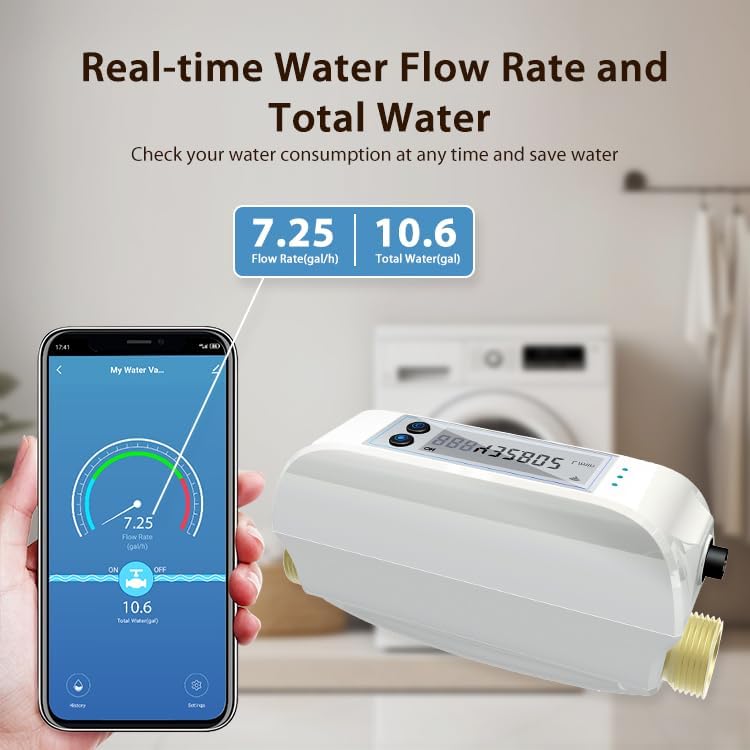
This image illustrates the mobile application's ability to display real-time water flow rate and total water consumption, helping users monitor and manage their water usage effectively.

This image presents various statistical graphs within the mobile app, detailing daily, monthly, and yearly water consumption, providing comprehensive insights into water usage patterns.
4. Automated Scenes with Water Leak Detector
Through the mobile app, you can set up automated scenes. For example, you can configure the system to automatically shut off the water valve when the Wi-Fi water leak detector senses water, providing immediate protection against leaks.
This video demonstrates how to create automated scenes in the app, specifically showing how to configure the system to automatically shut off the water valve when the water leak sensor detects water, followed by a live test of this functionality.
Техникалык тейлөө
The Haozee Smart Water Valve is designed for low maintenance. It features a built-in 2600mAh NiMH rechargeable battery, ensuring operation even during power outages. Ensure the power adapter is connected for continuous charging and optimal performance. Periodically check the device and sensor for any physical damage or debris that might affect their operation. Keep the water sensor clean and free from obstructions to ensure accurate leak detection.
Проблемаларды чечүү
- Түзмөк Wi-Fi'га туташпай жатат: Ensure your Wi-Fi network is 2.4GHz or 5GHz compatible. Check that the device is within range of your Wi-Fi router. Re-enter pairing mode and try connecting again.
- Клапан колдонмонун буйруктарына жооп бербей жатат: Verify the device is online in the app. Check power supply and battery level. Ensure your mobile device has a stable internet connection.
- Inaccurate flow readings: Ensure the valve is installed correctly according to plumbing guidelines. Check for any blockages in the pipe that might interfere with the ultrasonic sensor.
- Water sensor not detecting leaks: Ensure the sensor is placed on a flat surface where water might accumulate. Check the sensor's battery level in the app.
- Automated scene not triggering: Verify that the scene conditions and actions are correctly configured in the app. Ensure both the water sensor and the valve are online and functioning.
Техникалык шарттар
| Өзгөчөлүк | Спецификация |
|---|---|
| Күч | DC 5V/2A |
| Камтылган батарея | 3 pcs (Ni-MH rechargeable battery) |
| Клапан диаметри | DN20 (3/4 дюйм) |
| Суу агымын отчеттуулуктун тактыгы | 0.1 гал |
| Жумушчу суунун басымы | 0 ~ 1.3 МПа |
| Зымсыз жыштык | 2.412 ~ 2.483GHz / 5.18 ~ 5.85GHz |
| Зымсыз стандарт | IEEE 802.11a/b/g/n; IEEE 802.11a/n/11ac |
| Bluetooth | Bluetooth 5.0 |
| Зымсыз аралык | 45M |
| Thread Specification | Available in NPT & BSP |
| Суу өткөрбөйт деңгээл | IP66 |
| Иштөө температурасы | 1 ~ 60°C (34 ~ 140°F) |
| Иштөө нымдуулугу | 1 ~ 95% RH |
| Продукт өлчөмү | 195mm*78mm*102mm (7.87 x 2.76 x 3.94 inches) |
| Элемент Салмагы | 3.96 фунт |

This image provides a comprehensive table of technical specifications for the Haozee Smart Water Valve, outlining details such as power requirements, built-in battery type, valve diameter, water flow reporting accuracy, wireless frequency, and physical dimensions.
Кепилдик жана колдоо
Haozee products typically come with a standard manufacturer's warranty. Please refer to the warranty card included in your product packaging for specific terms and conditions. For technical support, troubleshooting assistance, or warranty claims, please contact Haozee customer service through the contact information provided in your product documentation or on the official Haozee webсайт.


