Introduction
Thank you for choosing the Cherub WST-670 Rechargeable Clip-On Tuner. This compact and versatile tuner is designed for precise tuning of various musical instruments, including chromatic, guitar, ukulele, and violin. Featuring a high-contrast color LCD display and a long-lasting rechargeable battery, it offers convenience and accuracy for musicians of all levels.
Пакеттин мазмуну
Сураныч, пакетте төмөнкү нерселерди текшериңиз:
- 1 x Cherub WST-670 Clip-On Tuner
- 1 x USB заряддоо кабели
- 1 х Колдонуучунун колдонмосу (бул документ)
Продукт бүттүview
The Cherub WST-670 tuner features a robust clip mechanism and a clear display for easy readability. Its intuitive controls allow for quick mode selection and precise tuning.

Сүрөт: алдыңкы view of the Cherub WST-670 Clip-On Tuner, showing the display and clip mechanism.

Image: Close-up of the Cherub WST-670 Tuner's color LCD display, showing tuning indicators and battery level.
Негизги өзгөчөлүктөрү:
- Тунинг режимдери: Chromatic (C), Guitar (G), Ukulele (U), Violin (V).
- Кайра заряддалуучу батарея: Built-in Li-Po battery provides over 10 hours of continuous use per charge.
- Жогорку контрасттуу LCD: Bright and clear color display shows tuning status.
- Жөнгө салынуучу клип: Strong and flexible clip for optimal viewбурч.
- Авто өчүрүү: Automatically turns off to maximize battery life.
Жайгашуу
1. Charging the Tuner
Before first use, fully charge the tuner. The built-in rechargeable battery ensures long operation time.
- Connect the included USB charging cable to the tuner's charging port.
- USB кабелинин экинчи учун стандарттуу USB кубат адаптерине (кошумча эмес) же компьютердин USB портуна туташтырыңыз.
- The battery indicator on the display will show charging status. Once fully charged, the indicator will show a full battery.
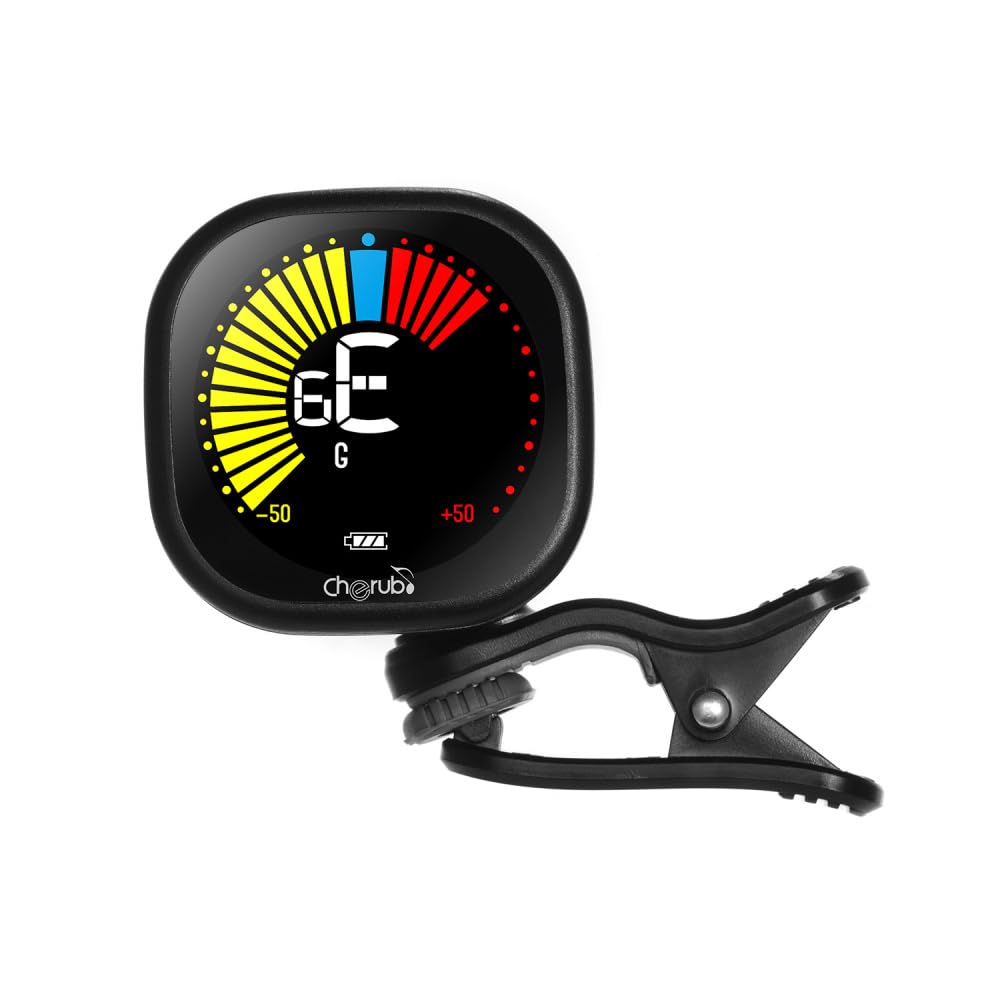
Image: Diagram illustrating how to connect the USB charging cable to the Cherub WST-670 Tuner for recharging.
2. Тюнерди бекитүү
The clip-on design allows for easy attachment to the headstock of your instrument.
- Gently open the clip and attach it securely to the headstock of your guitar, ukulele, or violin.
- Adjust the tuner's display angle for optimal visibility.

Image: The Cherub WST-670 Tuner securely clipped onto the headstock of an acoustic guitar.
Иштөө нускамалары
1. Күйгүзүү/өчүрүү
- To power on, press and hold the power button (usually marked with a power symbol) for a few seconds.
- To power off, press and hold the power button again. The tuner also features an auto power-off function to save battery.
2. Түздөө режимин тандоо
The WST-670 supports multiple tuning modes:
- Chromatic (C): For all instruments, displays the exact note.
- Guitar (G): Optimized for guitar tuning.
- Ukulele (U): Optimized for ukulele tuning.
- Violin (V): Optimized for violin tuning.
To change the tuning mode, press the "MODE" button repeatedly until the desired mode (C, G, U, or V) is displayed on the screen.
3. Аспабыңызды жөндөө
- Ensure the tuner is powered on and the correct tuning mode is selected for your instrument.
- Pluck a single string on your instrument. The tuner will detect the vibration and display the note.
- Дисплейди чечмелөө:
- If the needle points to the left and the display is red/yellow, the note is flat. Tighten the string.
- If the needle points to the right and the display is red/yellow, the note is sharp. Loosen the string.
- When the note is in tune, the needle will be centered, and the display will turn green.
- Аспабыңыз толук каныкканга чейин бардык кылдар үчүн кайталаңыз.
Техникалык тейлөө
Тазалоо
To clean the tuner, use a soft, dry cloth. Do not use liquid cleaners or abrasive materials, as they may damage the display or casing.
Батареяга кам көрүү
- Батареянын иштөө мөөнөтүн узартуу үчүн бат-баттан толук зарядсыздануудан качыңыз.
- If storing the tuner for an extended period, charge it to about 50% capacity and recharge every few months.
- Use only the provided USB cable or a compatible cable for charging.
Проблемаларды чечүү
Tuner not turning on:
- Ensure the battery is charged. Connect the tuner to a USB power source and allow it to charge for at least 30 minutes before attempting to power on again.
- Кубат баскычын катуу басып, бир нече секунд кармап туруңуз.
Туура эмес тюнинг:
- Check that the tuner is securely clipped to the instrument's headstock. Loose attachment can affect vibration detection.
- Ensure the correct tuning mode (C, G, U, or V) is selected for your instrument.
- Тышкы үндөрдүн кийлигишүүсүн болтурбоо үчүн тынч чөйрөдө күүлдөңүз.
- If using Chromatic mode, ensure you are aware of the specific notes for your instrument's standard tuning.
Дисплей күңүрт же бүлбүлдөп жатат:
- The battery might be low. Recharge the tuner using the provided USB cable.
Техникалык шарттар
| Бренд: | керуп |
| Модел: | WST-670 |
| Тунинг режимдери: | Chromatic (C), Guitar (G), Ukulele (U), Violin (V) |
| аныктоо диапазону: | A0 (27.50 Hz) - C8 (4186 Hz) |
| аныктоо ыкмасы: | Пьезо (клип) |
| Маалымдама кадамы: | 440 Гц |
| Тунинг тактыгы: | +/-1 цент |
| Электр камсыздоо: | Built-in Rechargeable Li-Po Battery (3.7V 180mAh) |
| Элемент Салмагы: | 30 г / 1.1 унция |
| Продукциянын өлчөмдөрү: | 10.5 x 9.5 x 5 см (болжол менен 4.1 x 3.7 x 2 дюйм) |
Кепилдик жана колдоо
This product comes with a standard manufacturer's warranty. For specific warranty details, please refer to the documentation provided at the time of purchase or contact your retailer. For technical support or further assistance, please contact the customer service department of your retailer.
Note: The guitar shown in images is for illustration purposes only and is not included with the tuner.


