1. Киришүү
Thank you for choosing the AVMATRIX PKC4000-NDI PTZ Camera Controller. This device is designed for professional live streaming, church, and conference applications, offering intuitive control over PTZ cameras. Featuring a 5-inch touch screen and a 4D joystick, it provides precise control over camera functions such as pan, tilt, zoom, focus, and iris. This manual will guide you through the setup, operation, maintenance, and troubleshooting of your controller.
2. Коопсуздук маалыматы
Түзмөктү иштетүүдөн мурун бардык коопсуздук көрсөтмөлөрүн окуп чыгып, түшүнүп алыңыз. Бул колдонмону келечекте колдонуу үчүн сактап коюңуз.
- Аппаратты жамгырдын, нымдуулуктун же экстремалдык температуранын таасиринде калтырбаңыз.
- Ашыкча ысып кетүүнүн алдын алуу үчүн туура желдетүүнү камсыз кылыңыз.
- Use only the provided power adapter or a compatible PoE source.
- Башкаргычтын үстүнө оор буюмдарды коюудан алыс болуңуз.
- Аппаратты ажыратууга же өзгөртүүгө аракет кылбаңыз. Бардык тейлөөлөрдү квалификациялуу кызматкерлерге тапшырыңыз.
- Clean the device with a soft, dry cloth. Avoid liquid cleaners.
3. Пакеттин мазмуну
Төмөндө тизмеленген нерселердин баары пакетиңизге камтылганын текшериңиз:
- AVMATRIX PKC4000-NDI PTZ Camera Controller x1
- 12V DC кубат адаптери x1
- Tally Connector x1
- Колдонуучунун Колдонмосу (бул документ)
4. Продукт бүтүп калдыview
The PKC4000-NDI controller features a robust design with a clear 5-inch touch screen and a precise 4D joystick for comprehensive camera control.
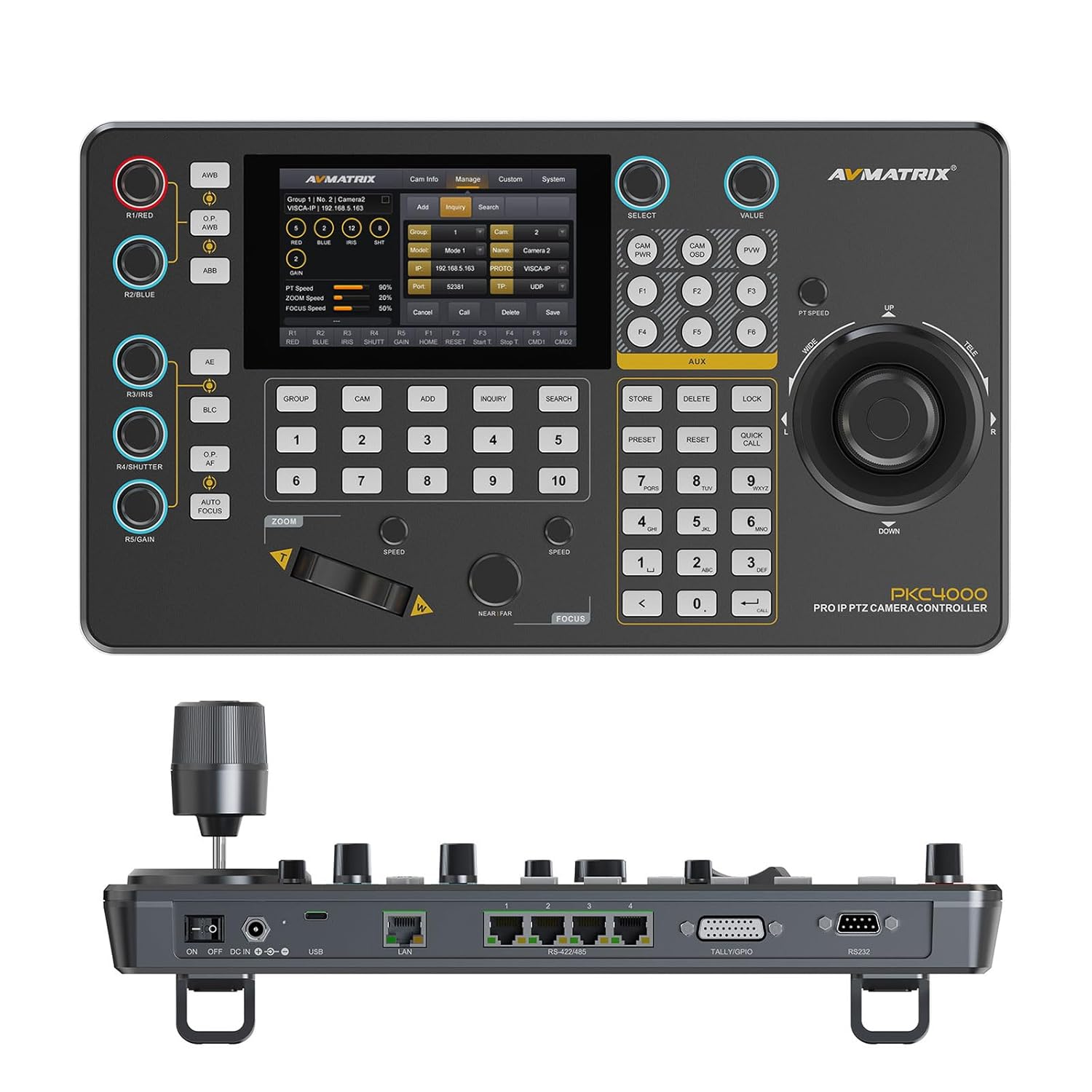
Сүрөт 4.1: Алдыңкы view of the PKC4000-NDI Controller
Негизги өзгөчөлүктөрү:
- Universal Compatibility & Protocol Support: Supports IP and serial control protocols including VISCA, VISCA-IP, ONVIF, PELCO P&D, and NDI (NDI for Optional). Works with AVMATRIX PTZ cameras and most major PTZ brands.
- Fast Setup with Intuitive Touchscreen: Equipped with a 5-inch full-color touchscreen and menu knob for quick setup and operation.
- Smooth, Professional PTZ Control: Precise control over pan, tilt, zoom, focus, iris, shutter, and more. Supports up to 100 camera shortcuts (10 groups x 10 cameras).
- PoE & Flexible Power Options: Supports both Power over Ethernet (PoE) and traditional DC power for simplified cabling.

Figure 4.2: PKC4000-NDI Key Features Overview
5. Орнотуу
5.1 Баштапкы туташуу
Follow these steps to set up your PKC4000-NDI controller:
- Кубат туташуу: Connect the 12V DC power adapter to the 'DC IN' port on the rear of the controller, or connect an Ethernet cable from a PoE-enabled switch to the 'LAN (PoE)' port.
- Тармак туташуусу: For IP control, connect an Ethernet cable from your network switch to the 'LAN (PoE)' port.
- Serial Connection (Optional): For RS-232, RS-422, or RS-485 control, connect the appropriate serial cables from your PTZ cameras to the corresponding ports on the controller.
- Tally/GPIO (Optional): Connect Tally lights or GPIO devices to the Tally/GPIO port as needed.
- Күйгүзүү: Flip the 'ON/OFF' switch to the 'ON' position. The controller will boot up and display the main interface on the 5-inch touch screen.

Figure 5.1: Rear Panel Control Interfaces
5.2 Камеранын конфигурациясы
After initial power-up, you will need to configure your PTZ cameras. The controller supports automatic IP address assignment for quick setup.
- Navigate to the 'CAM' or 'System' menu on the touch screen.
- Select 'Add Camera' and follow the on-screen prompts to discover and add your cameras via IP or serial connection.
- Assign each camera to a group and address for easy recall. The controller can manage up to 100 IP cameras (10 groups x 10 cameras).
6. Иштөө нускамалары
6.1 Негизги операция
The PKC4000-NDI provides intuitive control through its touch screen and physical controls.
- Камераны тандоо: Use the numeric keypad or the 'CAM' menu on the touch screen to select the camera you wish to control.
- Джойстикти башкаруу: The 4D joystick allows for smooth and precise control of Pan, Tilt, and Zoom. Rotate the joystick for zoom control.
- Exposure Controls: Dedicated knobs and buttons allow quick adjustment of Exposure, Iris, Focus, and Gain.
- Алдын ала коюлган кайра чакыруу: Store and recall up to 255 camera presets using the 'PRESET' and numeric buttons.
6.2 Сенсордук экран интерфейси
The 5-inch touch screen provides access to advanced settings and real-time monitoring.
- Меню навигациясы: Tap on menu icons to access camera settings, network configurations, system preferences, and more.
- реалдуу убакыт мониторинг: The NDI version supports video decoding for real-time monitoring of camera feeds directly on the 5-inch screen. This allows for visual confirmation of camera movements and adjustments.

Figure 6.1: Real-time Video Preview on Touch Screen
6.3 Track Recording and Playback
The controller supports track loop function, allowing you to record camera pan, tilt, and zoom movements and replay them whenever needed without manual control.
- Access the 'Track' function from the touch screen menu.
- Initiate recording of your desired camera movements.
- Save the recorded track for future playback.

Figure 6.2: Track Recording and Playback Feature
7. Техникалык тейлөө
7.1 Тазалоо жана кам көрүү
To ensure the longevity and optimal performance of your PKC4000-NDI controller, follow these maintenance guidelines:
- Тазалоо: Use a soft, dry, lint-free cloth to clean the exterior of the controller, including the touch screen. Do not use liquid cleaners, aerosols, or solvents.
- Сактагыч: Эгерде контроллерди көпкө чейин колдонбосоңуз, анда аларды салкын, кургак жерде, күндүн түз нурунан жана өтө жогорку температурадан алыс сактаңыз.
- Колдонуу: Handle the joystick and buttons with care to prevent mechanical damage.
8. Кыйынчылыктарды
8.1 Жалпы маселелер жана чечимдер
If you encounter problems with your controller, refer to the table below for possible solutions.
| Көйгөй | Мүмкүн себеп | Чечим |
|---|---|---|
| Контроллер күйбөйт. | No power supply; Power adapter faulty; PoE not active. | Check power adapter connection; Ensure PoE switch is active; Try a different power outlet. |
| Cannot control camera. | Incorrect camera IP/serial settings; Network issue; Camera not powered on. | Verify camera IP address and protocol settings; Check network cables; Ensure camera is powered on and accessible. |
| Видео алдын ала жокview экранда. | NDI stream not active; Network congestion; Camera not sending video. | Ensure camera is configured for NDI output; Check network bandwidth; Verify camera video output settings. |
| Joystick/buttons unresponsive. | Firmware issue; Hardware malfunction. | Restart the controller; Check for firmware updates; Contact technical support if problem persists. |
9. Техникалык шарттар
9.1 Техникалык мүнөздөмөлөр
Detailed technical specifications for the AVMATRIX PKC4000-NDI PTZ Camera Controller:
| Категория | Параметр | PKC4000-NDI |
|---|---|---|
| Байланыштар | Interfaces | IP(RJ45)x1, RS-232x1, RS-485/RS-422x4, TALLYx1, USB2.0 (For upgrade) |
| IP протоколу | ONVIF, VISCA-IP, NDI | |
| Сериялык протокол | PELCO-D, PELCO-P, VISCA | |
| Сериялык ылдамдык ылдамдыгы | 2400, 4800, 9600, 19200, 38400, 115200 bps | |
| LAN порт | 100M×1 (PoE/PoE+: IEEE802.3 af/at) | |
| Колдонуучу интерфейстери | Дисплей | 5 дюймдук сенсордук экран |
| баскыч | Quickly control iris, shutter speed, gain, auto exposure, white balance, etc. | |
| Джойстик | Pan / Tilt / Zoom | |
| Камера тобу | 10 (Each group connect up to 10 cameras) | |
| Камеранын дареги | 100ге чейин | |
| Камера алдын ала коюлган | 255ге чейин | |
| Күч | Күч | PoE/DC 7~24V |
| Энергияны керектөө | PoE: <8W, DC: <8W | |
| Курчап турган чөйрө | Иштөө температурасы | -20℃~60℃ |
| Сактоо температурасы | -20℃~70℃ | |
| Өлчөм | Өлчөмү (LWD) | 340mm×195mm×49.5mm/ 340mm×195mm×110mm(With joystick) |
| Салмагы | Net:1730g, Gross:2360g | |
| Генерал | Модель номери | NW-PKC4000-NDI |
| Өндүрүүчү | NW-AVMATRIX | |
| Чыгарылган күнү | 1-март, 2025-жыл |

9.1-сүрөт: Толук мүнөздөмөлөрү жана өлчөмдөрү
10. Кепилдик жана колдоо
10.1 Кепилдик маалыматы
The AVMATRIX PKC4000-NDI PTZ Camera Controller is backed by a 1 жылдык чектелген кепилдик сатып алынган күндөн тартып. Бул кепилдик нормалдуу колдонуудагы материалдардагы жана жасалгадагы кемчиликтерди камтыйт. Бул туура эмес колдонуудан, кырсыктан, уруксатсыз өзгөртүүдөн же тышкы себептерден келип чыккан зыянды камтыбайт.
10.2 Техникалык колдоо
For technical assistance, troubleshooting, or warranty claims, please contact AVMATRIX customer support. We offer өмүр бою техникалык колдоо биздин продуктылар үчүн.
Please have your product model number (PKC4000-NDI) and purchase information ready when contacting support.


