Introduction
The Satisure Wireless Doorbell Chime and Extender is designed to upgrade your existing wired doorbell system to a wireless connection, ensuring you never miss a visitor. This system provides an audible alert when someone rings your doorbell, complementing your smart doorbell setup. It is specifically compatible with the Google Nest Doorbell (Wired, 2nd Gen) and Ring Wired Doorbell Plus.

Image: The Satisure Wireless Doorbell Chime, the doorbell extender module with wires, and a Google Nest Doorbell (Wired, 2nd Gen) unit, illustrating the complete system.
Кутуда эмне бар
Сиздин пакетте бардык компоненттер бар экенин текшериңиз:
- 1 x Doorbell Chime (Plug-in Receiver)
- 1 x Doorbell Extender (Radio Converter)
- 1 x User Manual

Image: Visual representation of the included components: the plug-in receiver, the radio converter, and the user manual.
Техникалык шарттар
| Продукциянын өлчөмдөрү | 3.94 x 3.35 x 3.94 дюйм |
| Элемент Салмагы | 4.2 унция |
| Модель номери | B21 |
| Зымсыз диапазон | Ачык талаада 656 футка (200 метрге) чейин |
| Коңгуроо параметрлери | 58 different chimes |
| Үн деңгээли | 5 деңгээл (0-110дБ) |
| Тtage Шайкештик | 3-24V (transformer installation required for out-of-use systems) |

Image: Detailed diagram showing the dimensions and key features of the Satisure doorbell chime and radio converter, including LED indicator, volume buttons, and American power plug.
Шайкештик
This wireless doorbell system is designed to work with specific wired video doorbells and existing wired chimes. Please ensure your current setup is compatible before installation.
- шайкеш келет: Google Nest Doorbell (Wired, 2nd Gen), Ring Wired Doorbell Plus, and existing electronic/electromechanical wired doorbells.
- Төмөнкүлөр менен шайкеш келбейт: Battery-powered doorbells (e.g., Nest Doorbell (battery)).

Image: A visual chart indicating compatibility with Wired Chimes, Nest Doorbell (wired, 2nd gen), and Ring Wired Doorbell Plus, and incompatibility with Nest Doorbell (battery).
Орнотуу жана орнотуу
Follow these steps to install and pair your Satisure Wireless Doorbell Chime and Extender.
1. Extender Installation (Radio Converter)
- Эшиктин коңгуроосунун капкагын ачуу: Open the cover of your existing wired doorbell chime. If you are installing a Ring Wired Doorbell Plus or Nest Doorbell (wired, 2nd gen), ensure you have installed the corresponding accessories as shown in the picture.
- Өткөргүчтү туташтырыңыз: Connect the radio transmitter (extender) to the two wires in your mechanical gong. There is no distinction between positive (+) and negative (-) electrodes.
- Байланышты текшерүү: Turn on the circuit. The LED on the extender should light up, and the receiver should ring, indicating a successful connection.
- Коопсуз өткөргүч: Secure the transmitter to the cover with tape to prevent loosening.
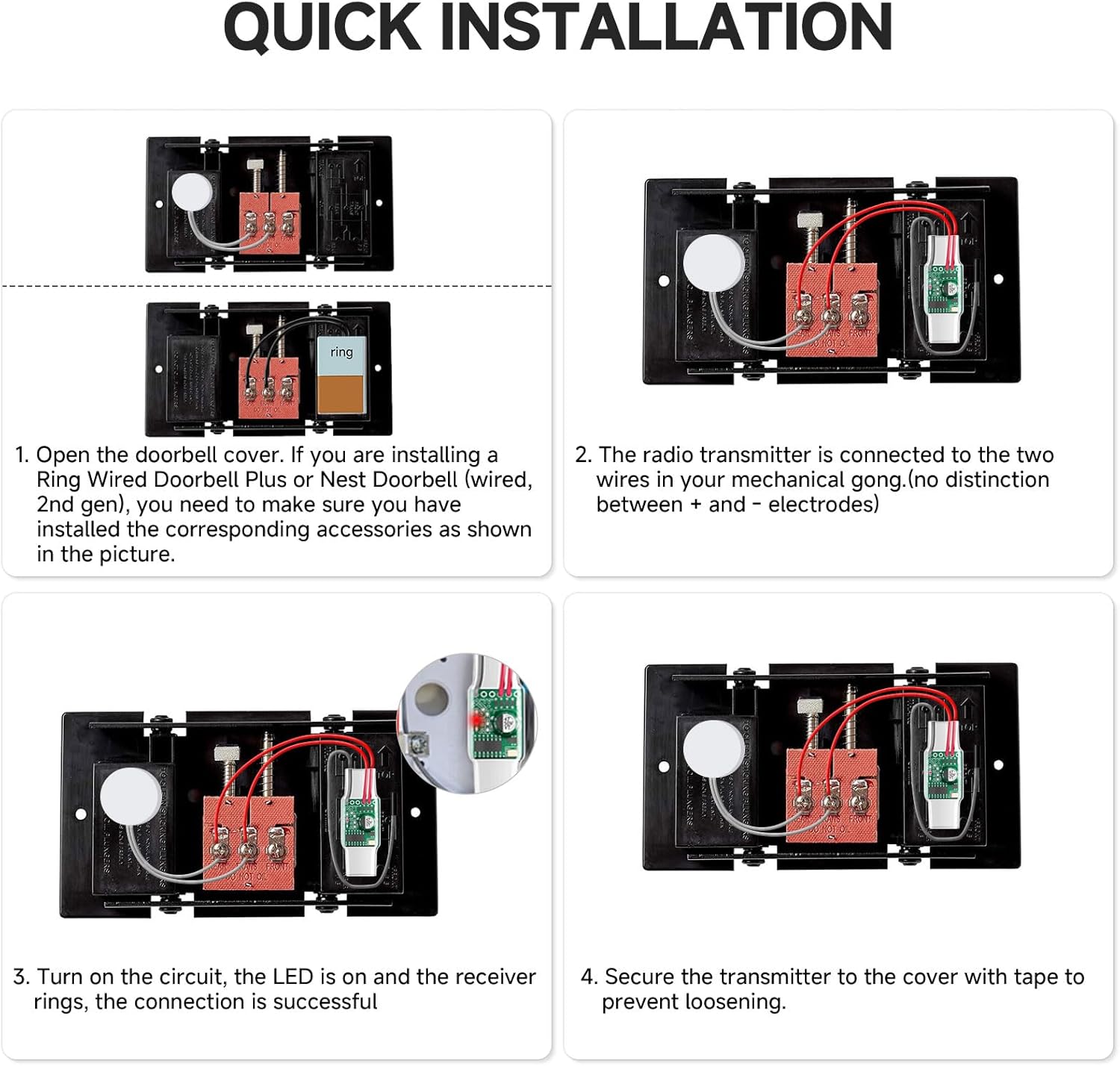
Image: A four-panel diagram illustrating the quick installation process: opening the doorbell cover, connecting the radio transmitter to the mechanical gong wires, verifying the LED and ring, and securing the transmitter.
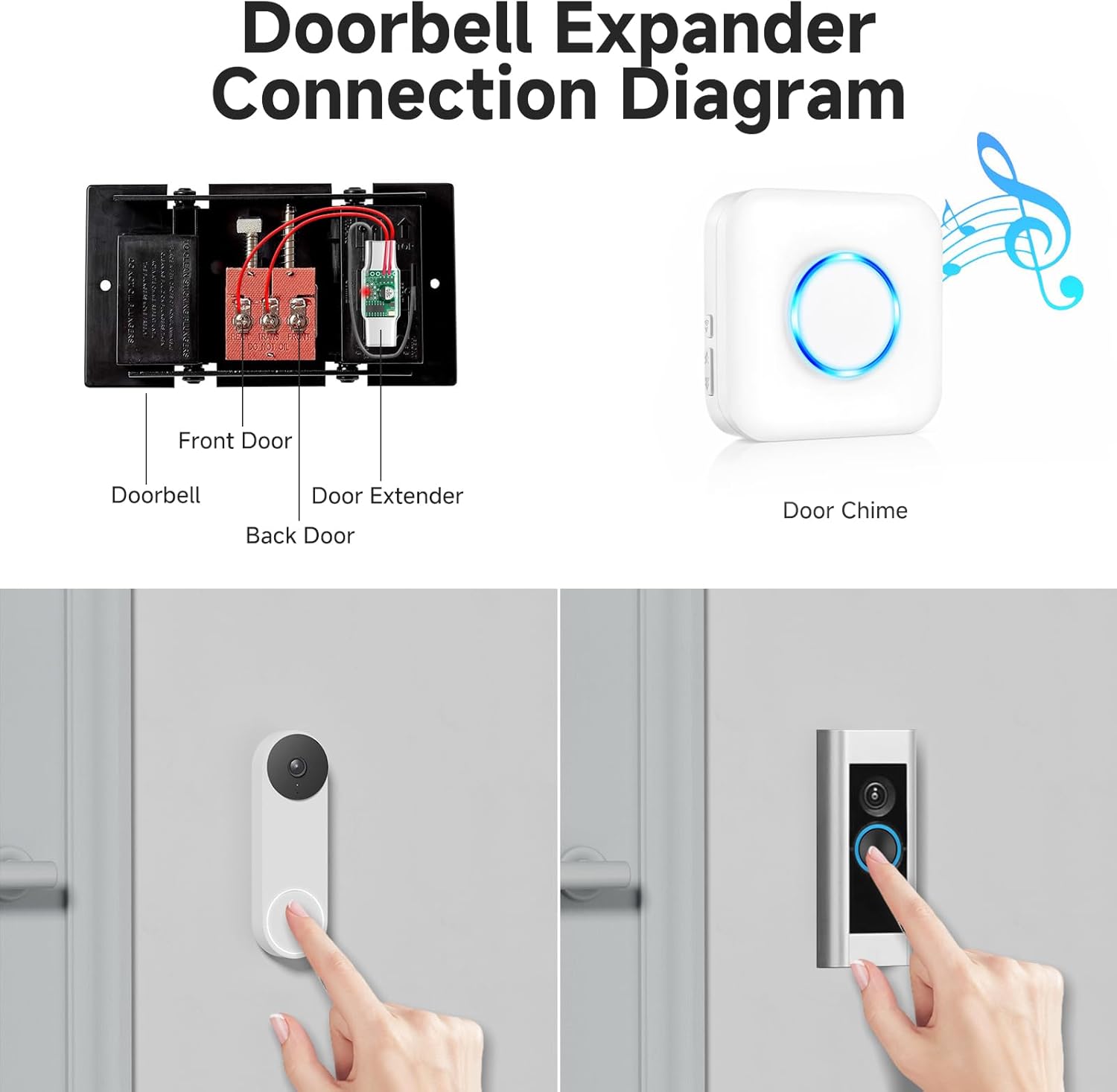
Image: A diagram showing how the doorbell extender connects to an existing wired doorbell system (Front Door, Back Door, Doorbell, Door Extender) and how it communicates wirelessly with the Door Chime.
2. Pairing the Extender with the Doorbell Receiver
- Connect Extender: Ensure the extender is connected to the doorbell battery box. The wired doorbell should be pressed, and its indicator light should be on, confirming it is working normally.
- Ресиверди сайыңыз: Plug the receiver into an electrical outlet. Use the 'Forward' or 'Back' buttons on the receiver to select your desired ringtone.
- Жупташтыруу режимине кирүү: Press and hold the volume button on the receiver for approximately 5-7 seconds until the receiver 'dings' and the indicator light flashes rapidly. This indicates it is in pairing mode.
- Толук жупташтыруу: Press the wired doorbell button. The indicator light of the transmitter extender will send a signal to the receiver. When you hear the ringtone you chose, the pairing operation is successful.

Image: A step-by-step visual guide demonstrating how to pair the doorbell extender with the plug-in receiver, showing button presses and indicator light behavior.
3. App Setup for Smart Doorbells
For optimal performance with your smart doorbell, ensure the in-home chime settings are correctly configured in the respective app.
Video: This video demonstrates how to configure the in-home chime settings within the Ring App to ensure proper functionality with the Satisure doorbell extender.
Video: This video provides instructions on how to set up the Google Home App for your doorbell, including adjusting settings for the indoor chime.
Иштөө нускамалары
Once installed, the Satisure Wireless Doorbell Chime is simple to operate.
Коңгуроо тандоо жана үндү тууралоо
The plug-in receiver offers a variety of chimes and adjustable volume levels to suit your preferences.
- Коңгуроону тандоо: Use the 'Forward' and 'Back' buttons on the side of the receiver to cycle through the 58 available ringtones.
- Үндү тууралоо: Press the volume button on the side of the receiver to adjust between 5 volume levels, ranging from 0dB (mute) to 110dB.

Image: The plug-in receiver highlighting its features, including 5 selectable volume levels from 0-110dB and many optional ringtones like 'Hello Welcome', 'Ding Dong', and 'Merry Christmas'.

Image: A comparison showing the doorbell chime operating in 'Mute Mode' (0dB) for quiet environments and 'Large Decibel Mode' (120dB) for louder environments, ensuring you hear the chime in any situation.
Blue LED Night Light
The plug-in receiver features a blue LED light that can indicate when the doorbell is pressed, even if the chime is in silent mode or at night.

Image: A split image showing the plug-in receiver during the day and at night, demonstrating how the surface LED light can indicate doorbell activity even in silent mode or low light conditions.
Зымсыз камтуу
The Satisure doorbell extender provides a wide wireless coverage area, ensuring you receive alerts throughout your home or business.
- The system covers up to 656 feet (200 meters) in an open field environment.
- This extensive range helps ensure you won't miss any visitors, whether you are in your garage, backyard, or other areas of your property.
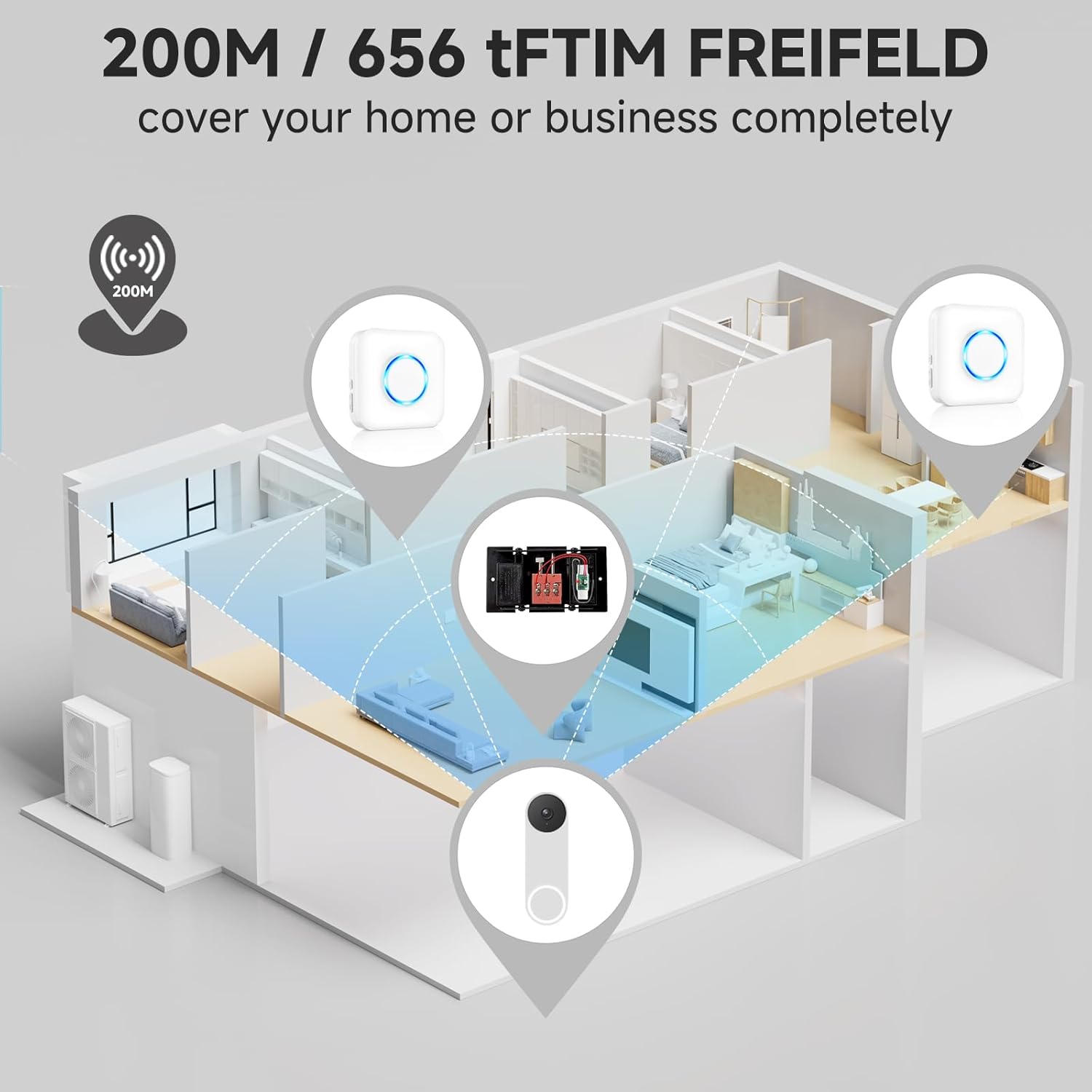
Image: An illustration depicting a house layout with the doorbell, extender, and chime strategically placed, demonstrating the 200-meter (656 feet) wireless range covering the entire home.

Image: A detailed floor plan showing the effective wireless range of 200 meters, illustrating how the system can cover various rooms and areas within a home, ensuring connectivity for multiple matching needs.
Техникалык тейлөө
To ensure the longevity and optimal performance of your Satisure Wireless Doorbell Chime and Extender, follow these simple maintenance guidelines:
- Тазалоо: Use a soft, dry cloth to clean the surfaces of the chime and extender. Avoid using abrasive cleaners or solvents, as these can damage the finish.
- Жайгашкан жери: Ensure the plug-in receiver is in a well-ventilated area and not covered by furniture or curtains, which could impede signal transmission or cause overheating.
- Экологиялык шарттар: While the extender is installed within your existing doorbell, ensure the plug-in chime is kept in a dry indoor environment, away from direct sunlight or extreme temperatures.
Проблемаларды чечүү
If you encounter any issues with your Satisure Wireless Doorbell Chime and Extender, please refer to the following common troubleshooting steps:
- Коңгуроонун үнү жок:
- Check if the plug-in receiver is securely plugged into a working electrical outlet.
- Ensure the volume level on the receiver is not set to 0 (mute).
- Verify that the extender is correctly wired to your existing doorbell and its LED indicator is on when the doorbell is pressed.
- Re-attempt the pairing process as described in the 'Setup and Installation' section.
- Intermittent Chime Sound:
- Check for potential sources of interference (e.g., large metal objects, thick walls) between the extender and the receiver.
- Ensure the distance between the extender and receiver is within the specified wireless range (656 feet/200 meters).
- Confirm that your smart doorbell app settings for the in-home chime are correctly configured (e.g., 'Mechanical' chime type selected for Ring/Google Nest).
- Extender LED Not Lighting Up:
- Ensure the wiring to your existing doorbell is correct and secure.
- Verify that your existing wired doorbell system is receiving power (3-24V). A transformer may be required if your system is out of use or has insufficient voltage.
Эгер бул кадамдар көйгөйдү чечпесе, кошумча жардам алуу үчүн Satisure кардарларды колдоо кызматына кайрылыңыз.
Кепилдик жана колдоо
Satisure жогорку сапаттагы продукцияларды жана эң сонун кардарларды тейлөөнү камсыз кылууга умтулат.
- 30-Day Refund Guarantee: We offer a 30-day refund guarantee from the date of purchase.
- Арналган сатуудан кийинки кызмат: Our dedicated after-sales service team is available to assist you with any questions or concerns you may have regarding your product.
- Биз менен байланышыңыз: Please feel free to reach out to us anytime if you require support or have inquiries about your Satisure Wireless Doorbell Chime and Extender. Refer to the contact information provided on our official webсайт же продуктунун таңгагы.


