1. Киришүү
The ROCAM CR1027 Vibrating Alarm Clock is a portable and rechargeable device designed to provide a customizable wake-up experience. It features dual alarms, adjustable vibration and sound levels, and a long-lasting battery, making it suitable for heavy sleepers, individuals with hearing impairments, or those who prefer a discreet alarm. This manual provides detailed instructions for setup, operation, and maintenance of your alarm clock.

Image 1.1: The ROCAM CR1027 Vibrating Alarm Clock highlighting its cordless, dual alarm, 12/24H, vibrating, volume setting, and rechargeable features.
2. Пакеттин мазмуну
Сураныч, пакетте төмөнкү нерселерди текшериңиз:
- 1 x ROCAM CR1027 Vibrating Alarm Clock
- 1 x USB заряддоо кабели
- 1 x User Manual
- 1 Билек боонун х

Image 2.1: The complete package contents of the ROCAM CR1027 Vibrating Alarm Clock.
3. Продукт бүтүп калдыview
3.1. Алдыңкы Дисплей
The front of the alarm clock features a clear digital display showing the time, AM/PM indicator, day of the week, DST status, alarm icons, and battery level. A speaker grille is located at the bottom of the front face.

Сүрөт 3.1: Алдыңкы view of the ROCAM CR1027 Vibrating Alarm Clock.
3.2. Top Buttons
The top of the device houses the main control buttons:
- (1) Alarm 1 Button: чейин басыңыз view/set Alarm 1.
- (2) Alarm 2 Button: чейин басыңыз view/set Alarm 2.
- TIME/SNOOZE Button: чейин басыңыз view/set current time, or to activate snooze during an alarm.
- (-) Minus Button: Decrease values during setting.
- (+) Plus Button: Increase values during setting.
3.3. Back Switches
The back of the device features several switches for advanced settings:
- ON/OFF которуу: Аппаратты күйгүзүү же өчүрүү үчүн.
- LOCK/UNLOCK Switch: To prevent accidental button presses.
- Alarm 1 Day Setting Switch (MON-SUN, MON-FRI, SAT-SUN): Select the days for Alarm 1 to be active.
- Alarm 2 Day Setting Switch (MON-SUN, MON-FRI, SAT-SUN): Select the days for Alarm 2 to be active.
- Vibration Intensity Switch (H, M, L): Adjust the strength of the vibration (High, Medium, Low).
3.4. Side Port
The side of the device includes the USB-C charging port.
4. Орнотуу
4.1. Аппаратты заряддоо
Before first use, fully charge the alarm clock. Connect the provided USB charging cable to the USB-C port on the side of the device and plug the other end into a compatible USB power adapter (not included). The battery indicator on the display will show charging status. A full charge provides up to 160 days of standby time.

Image 4.1: The alarm clock connected to its USB-C charging cable.
4.2. Күйгүзүү / Өчүрүү
жылдырыңыз КҮЙГҮЗҮҮ/ӨЧҮРҮҮ switch on the back of the device to the 'ON' position to power it on. Slide it to 'OFF' to power down.
5. Иштөө нускамалары
5.1. Учурдагы убакытты орнотуу
- басып, кармап туруңуз УБАКЫТ/ТЫНЧТЫК баскычын сааттын цифралары жарк этмейинче басыңыз.
- колдонуу (+) or (-) саатты тууралоо үчүн баскычтар.
- басыңыз УБАКЫТ/ТЫНЧТЫК саатты ырастоо жана мүнөттүк жөндөөлөргө өтүү үчүн кайра баскычын басыңыз.
- колдонуу (+) or (-) мүнөттөрдү тууралоо үчүн баскычтар.
- басыңыз УБАКЫТ/ТЫНЧТЫК button again to confirm the minutes and move to day adjustment.
- колдонуу (+) or (-) buttons to adjust the day of the week.
- басыңыз УБАКЫТ/ТЫНЧТЫК button one last time to save all settings and exit.
5.2. Setting Alarms (Alarm 1 & Alarm 2)
The device supports two independent alarms.
- басып, кармап туруңуз (1) Alarm 1 баскычы (же (2) Alarm 2 button) until the hour digits flash.
- колдонуу (+) or (-) ойготкуч саатын тууралоо үчүн баскычтар.
- Press the corresponding alarm button again to confirm the hour and move to minute adjustment.
- колдонуу (+) or (-) ойготкуч мүнөттөрдү тууралоо үчүн баскычтар.
- Press the corresponding alarm button again to confirm the minutes and move to alarm mode selection (sound/vibration).
- колдонуу (+) or (-) buttons to select the desired alarm mode: Buzzer + Shaker, Single Buzzer, or Single Shaker.
- Press the corresponding alarm button one last time to save settings and exit.
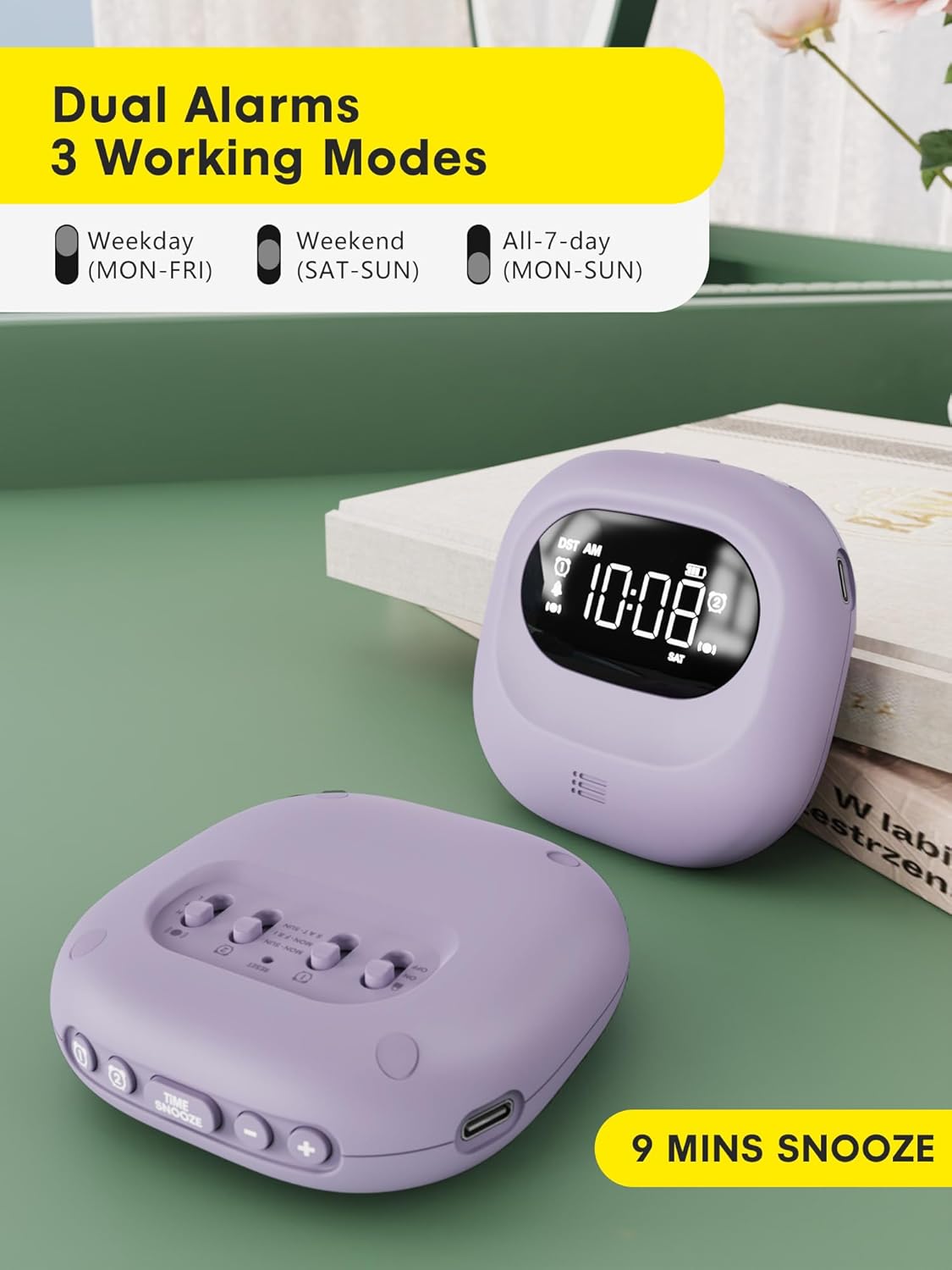
Image 5.1: Dual alarm settings displayed on the ROCAM CR1027.
5.3. Adjusting Alarm Day Settings
On the back of the device, locate the Alarm 1 and Alarm 2 day setting switches. Slide the switch to your preferred setting:
- MON-SUN: Alarm will activate every day.
- ДШ-ЖУМ: Alarm will activate on weekdays only.
- SAT-SUN: Alarm will activate on weekends only.
5.4. Adjusting Vibration Strength
колдонуу Vibration Intensity Switch (H, M, L) on the back of the device to select your desired vibration strength: High, Medium, or Low.

Image 5.2: Illustration of the three wake-up modes available on the alarm clock.
5.5. Үн көлөмүн тууралоо
The device offers 5 volume levels for the audible alarm. Adjust this during the alarm setting process using the (+) or (-) buttons when the volume icon is flashing.
5.6. Тындырма функциясы
Ойготкуч чыкканда, басыңыз УБАКЫТ/ТЫНЧТЫК "Тынчтануу" функциясын иштетүү үчүн баскычын басыңыз. Ойготкуч 9 мүнөткө тыныгуу жасап, андан кийин кайра иштейт. Муну 9 жолуга чейин кайталоого болот.

Image 5.3: The snooze function of the alarm clock.
5.7. Балдардан кулпу функциясы
To prevent accidental changes to settings, slide the БҮЛҮП АЛУУ/АЧУУ switch on the back of the device to the 'LOCK' position. This will disable all buttons until unlocked.

Image 5.4: The child lock feature of the alarm clock.
5.8. Арткы жарык функциясы
The digital screen lights up when in use and automatically turns off after 30 seconds of inactivity to conserve energy. Press any button to reactivate the backlight.
5.9. Time Format (12H/24H/DST)
The time display can be customized. During time setting, you can cycle through 12-hour, 24-hour, and Daylight Saving Time (DST) formats using the appropriate buttons.

Image 5.5: Customizable time formats on the alarm clock display.
6. Техникалык тейлөө
- Аппаратты таза, жумшак, кургак чүпүрөк менен сүртүңүз.
- Абразивдүү тазалагычтарды же эриткичтерди колдонуудан алыс болуңуз.
- Ensure the side sound hole is not covered to maintain normal volume levels.
- Узак мөөнөткө колдонулбаганда салкын, кургак жерде сактаңыз.

Image 6.1: Important note regarding the side sound hole for optimal performance.
7. Кыйынчылыктарды
- Ойготкуч иштебей жатат: Ensure the alarm is set correctly (time, AM/PM, days of the week) and the device is powered on. Check battery level.
- Vibration too weak/strong: Adjust the Vibration Intensity Switch (H, M, L) on the back.
- Дисплей көрүнбөйт: Press any button to activate the backlight. If the display remains off, check the battery level and charge the device.
- Баскычтар жооп бербейт: Check if the Child Lock function is activated. Slide the LOCK/UNLOCK switch to 'UNLOCK'.
8. Техникалык шарттар
| Өзгөчөлүк | Деталь |
|---|---|
| Бренд | ROCAM |
| Модель номери | CR1027 |
| Түс | Кызгылт көк |
| Дисплей түрү | Санарип |
| Power Source | Батарея менен иштейт |
| Батарея сыйымдуулугу | 3000mAh (1 Nonstandard Battery included) |
| Күтүү убактысы | 160 күнгө чейин |
| Продукциянын өлчөмдөрү | 3.34"W x 1.06"H |
| Элемент Салмагы | 6.7 унция |
| Материал | Пластик |
| Өзгөчөлүктөр | 160 Days-Standby, Adjustable Volume, Dual Alarm, Cordless, Rechargeable, Child Lock, Backlight |
9. Кепилдик жана колдоо
This ROCAM product comes with an 18-month free replacement warranty. For any questions, technical assistance, or warranty claims, please refer to the contact information provided in your package or visit the official ROCAM support webсайт.


