Продукт бүттүview
The ATOMSTACK R8 PRO Rotary Chuck is an advanced accessory designed to expand the engraving capabilities of your laser engraver. It enables precise engraving on a wide variety of non-flat objects, including cylindrical, spherical, and irregularly shaped items. This device is engineered for versatility and ease of use, integrating seamlessly with compatible ATOMSTACK laser engravers and popular engraving software.

Image: The ATOMSTACK R8 PRO Rotary Chuck (right) and a compatible rotary roller (left), showcasing the primary components of the system.
Негизги өзгөчөлүктөрү:
- Multi-Scenario Engraving: Capable of engraving on cylinders (tumblers, baseball bats, items up to 1 meter long), spheres, rings, and irregular objects. Supports cylinders from 1-80mm (0.04-3.15in), rings from 10-70mm, and spheres from 25-80mm.
- Dual-Software Smart Control: Features auto-activated roller mode via a recognition chip. Seamlessly integrates with both AtomStack Studio and LightBurn software.
- Extended-Length Capability: Overcomes standard chuck limitations with a 1-meter (3.28ft) capacity. Includes dual-size adjustment and 180° horizontal/30° vertical rotation for precise positioning.
- Industrial-Grade Durability: Constructed from high-quality aluminum alloy and hardened brass core components. Lightweight at 1.4kg, yet capable of withstanding a 1.5 kg (3.3lbs) load.
- Auto-Adjust Plug & Play: Smart diameter adaptation ensures optimal engraving within the 1-80mm range. USB direct-connect system allows full operation within 10 seconds of unboxing.

Image: Visual representation of key features including multi-material adaptation, one-click connection, extended processing, strong support, simple control, and adaptability to various machine models.
Packing List
Before beginning assembly or operation, please ensure all components listed below are present in your package.

Image: A detailed diagram illustrating all items included in the ATOMSTACK R8 PRO package.
| Компонент | Description |
|---|---|
| Чактын денеси | Main unit of the rotary chuck. |
| Rear support 1 | Support component for the rear of the chuck. |
| Rear support 2 | Additional support component for the rear. |
| Threaded cylindrical pins | Pins used for securing objects. |
| L-shaped grippers | Grippers for holding specific object shapes. |
| Trapezoidal grippers | Grippers for holding trapezoidal or irregular object shapes. |
| Жиптүү төөнөгүчтөр | Additional pins for various setups. |
| H2 Аллен ачкычы | Tool for assembly and adjustments. |
| M2.5*6 бурамалар | Fasteners for assembly. |
| Мини деңгээл | For ensuring proper alignment. |
| Рулетка | For measuring objects and setup. |
| Комплект | For precise measurements of objects. |
| 4-Pin Adapter cable | Cable for specific connections. |
| 6-Pin Motor cable | Cable for motor connection. |
| USB кабели | Cable for USB connection. |
| Колдонуучунун колдонмосу | Бул нускама. |
Орнотуу нускамалары
The ATOMSTACK R8 PRO is designed for quick and easy setup. Follow these steps to integrate it with your laser engraver.
1. Алгачкы жайгаштыруу жана байланыш
Place the R8 PRO Rotary Chuck on a stable surface within the working area of your laser engraver. The device supports dual wiring modes for universal compatibility with ATOMSTACK engravers and some other brands.

Image: The R8 PRO Rotary Chuck connected to various ATOMSTACK laser engraver models, demonstrating its dual wiring mode compatibility.
2. Wiring Mode Selection
Choose between USB Cable Connection or Motor Cable Connection based on your engraver model. Refer to the compatibility list below:
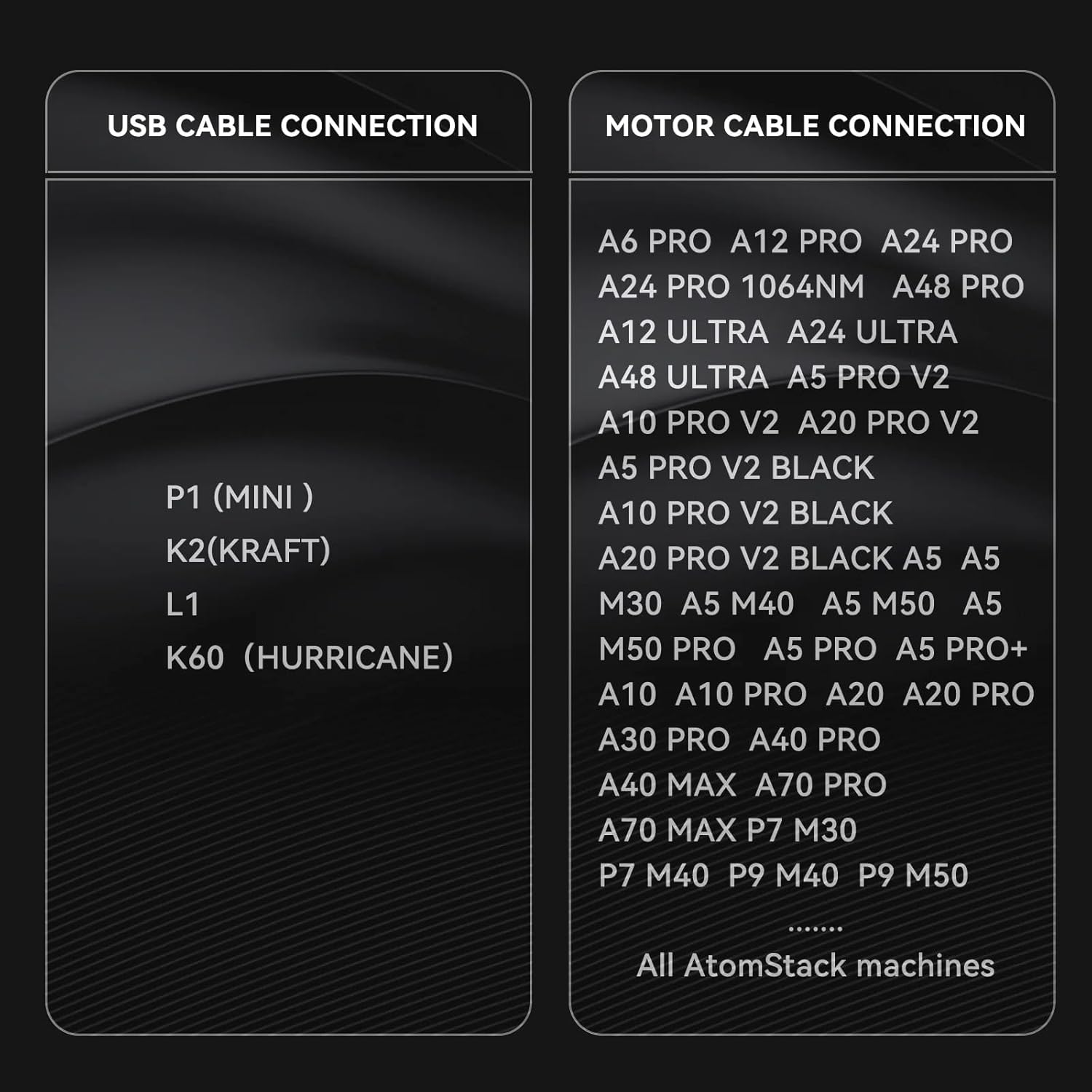
Image: A table detailing which ATOMSTACK engraver models are compatible with USB cable connection versus Motor cable connection.
USB кабелдик туташуу:
- P1 (MINI)
- K2 (KRAFT)
- L1
- K60 (HURRICANE)
Motor Cable Connection:
- A6 PRO, A12 PRO, A24 PRO, A48 PRO
- A24 PRO 1064NM
- A12 ULTRA, A24 ULTRA, A48 ULTRA
- A5 PRO V2, A10 PRO V2, A20 PRO V2
- A5 PRO V2 BLACK, A10 PRO V2 BLACK, A20 PRO V2 BLACK
- A5, A5 M30, A5 M40, A5 M50, A5 M50 PRO, A5 PRO, A5 PRO+
- A10, A10 PRO, A20, A20 PRO, A30 PRO, A40 PRO
- A40 MAX, A70 PRO
- P7 MAX, P7 M30, P7 M40, P9 M40, P9 M50
- ...and all other ATOMSTACK machines.
Connect the appropriate cable from the R8 PRO to your laser engraver. The R8 PRO features an auto-activated roller mode via a recognition chip, ensuring zero manual setup and instant USB connectivity for compatible models.
Иштөө нускамалары
The ATOMSTACK R8 PRO Rotary Chuck simplifies engraving on various shapes. Here's how to operate it effectively.
1. Preparing the Object for Engraving
The R8 PRO is versatile, handling regular cylinders, irregular cylindrical objects, spheres, and rings. Use the provided grippers and pins to securely mount your object.
- For Regular Cylinders: Place the cylindrical object between the chuck and the rear support. The smart diameter adaptation will adjust for optimal engraving within the 1-80mm range.
- For Irregular Cylindrical Objects: Utilize the dual-size adjustment and 180° horizontal/30° vertical rotation features to position the object correctly.
- For Spheres and Rings: Use the specialized L-shaped or trapezoidal grippers and threaded pins to secure these items. The R8 PRO supports spheres from 25-80mm and rings from 10-70mm.

Image: The ATOMSTACK R8 PRO set up to engrave a regular cylindrical object, such as a can or a tumbler.

Image: The ATOMSTACK R8 PRO configured to engrave irregular cylindrical objects like bottles, demonstrating its adaptability.

Сүрөт: Жакын план views of the R8 PRO's fixtures, showing how they adapt to hold special-shaped materials like a handled mug or a spherical ornament.
2. Программалык камсыздоону интеграциялоо
The R8 PRO seamlessly integrates with both AtomStack Studio and LightBurn software. Ensure your software is updated to the latest version for optimal performance and recognition of the rotary chuck.
- AtomStack Studio: This proprietary software offers intuitive controls and is optimized for ATOMSTACK devices.
- LightBurn: A popular third-party laser engraving software known for its advanced features and broad compatibility.
Once connected, the software should automatically detect the R8 PRO. Follow the software's instructions for setting up rotary engraving parameters, including object diameter and rotation speed.
3. Engraving Process
After setting up the object and configuring the software, initiate the engraving process as you would with flat materials. The R8 PRO will precisely rotate the object, allowing the laser to engrave continuously around its surface.

Image: A collage of various items successfully engraved using the ATOMSTACK R8 PRO, including mugs, tumblers, goblets, necklaces, rings, flowerpots, pet bowls, baseballs, canisters, beer mugs, and wine bottles.
Техникалык тейлөө
Regular maintenance ensures the longevity and optimal performance of your ATOMSTACK R8 PRO Rotary Chuck.
- Тазалоо: After each use, especially after engraving materials that produce dust or debris, gently wipe down the chuck body, grippers, and rollers with a soft, dry cloth. Ensure no debris interferes with the moving parts.
- Майлоо: Periodically check the moving parts for smooth operation. If any friction is noted, apply a small amount of light machine oil to the gears and bearings, if accessible and recommended by the manufacturer (refer to specific product diagrams if available).
- Туташуу текшерүү: Regularly inspect all cable connections (USB, Motor) to ensure they are secure and free from damage. Loose connections can lead to inconsistent performance.
- Сактагыч: When not in use, store the R8 PRO in a clean, dry environment, away from direct sunlight and extreme temperatures, to prevent damage to its components.
Проблемаларды чечүү
If you encounter issues with your ATOMSTACK R8 PRO, refer to the following common troubleshooting steps:
- Rotary Chuck Not Detected:
- Ensure the correct cable (USB or Motor) is securely connected to both the R8 PRO and your laser engraver.
- Verify that your laser engraver's firmware and engraving software (AtomStack Studio/LightBurn) are up to date.
- Try connecting the R8 PRO to a different USB port on your computer, if applicable.
- Restart your computer and laser engraver.
- Inaccurate Engraving / Slippage:
- Ensure the object is securely mounted using the appropriate grippers and pins.
- Verify that the object's diameter and other parameters are correctly entered in your engraving software.
- Check for any debris on the rollers or chuck mechanism that might impede smooth rotation.
- Ensure the R8 PRO is placed on a level surface using the mini level provided.
- Motor Not Rotating:
- Confirm that the R8 PRO is receiving power from the engraver.
- Check the motor cable connection for any damage or looseness.
- Ensure the software settings for rotary engraving are enabled and configured correctly.
Эгерде бул кадамдар көйгөйдү чечпесе, кошумча жардам алуу үчүн Колдоо бөлүмүнө кайрылыңыз.
Техникалык шарттар
- Модел: R8 PRO
- Compatible Object Types: Cylindrical, Spherical, Irregular
- Cylinder Diameter Range: 1-80мм (0.04-3.15 дюйм)
- Ring Diameter Range: 10-70мм
- Sphere Diameter Range: 25-80мм
- Maximum Engraving Length: Up to 1 meter (3.28 feet) with extended capacity
- Айланууну тууралоо: 180 ° горизонталдуу, 30 ° тик
- Салмагы: 1.4 кг (3.09 фунт)
- Максималдуу жүктөө жөндөмдүүлүгү: 1.5 кг (3.3 фунт)
- Материал: High-quality aluminum alloy, hardened brass core components
- Байланыш: USB direct-connect, Motor cable connection
- Программалык шайкештик: AtomStack Studio, LightBurn
Кепилдик жана колдоо
ATOMSTACK is committed to providing high-quality products and excellent customer service.
Техникалык колдоо:
Our professional technical and support teams are available 24/7 to answer any questions you may have regarding the ATOMSTACK R8 PRO Rotary Chuck or other ATOMSTACK products. For assistance, please visit the official ATOMSTACK support webсайтка же түздөн-түз кардарларды тейлөөгө кайрылыңыз.
ATOMSTACK also offers Өмүр бою техникалык колдоо for its products, ensuring long-term assistance for your engraving needs.
Кепилдик маалыматы:
For detailed warranty terms and conditions, please refer to the official ATOMSTACK webсайтка же продуктуңузга кошулган кепилдик картасы. Ар кандай кепилдик дооматтары үчүн сатып алганыңыздын далилин сактаңыз.


