1. Introduction and Overview
Thank you for choosing the Hendari Open Ear Bluetooth 5.3 Earbuds. These innovative headphones are designed to provide a comfortable listening experience while maintaining awareness of your surroundings. Featuring advanced Bluetooth 5.3 technology, high-fidelity audio, and a durable, ergonomic design, they are ideal for various activities including sports, travel, and daily use. This manual will guide you through the setup, operation, and maintenance of your new earbuds.

Image: Hendari Open Ear Bluetooth 5.3 Earbuds and their charging case, showcasing the sleek design and digital display.
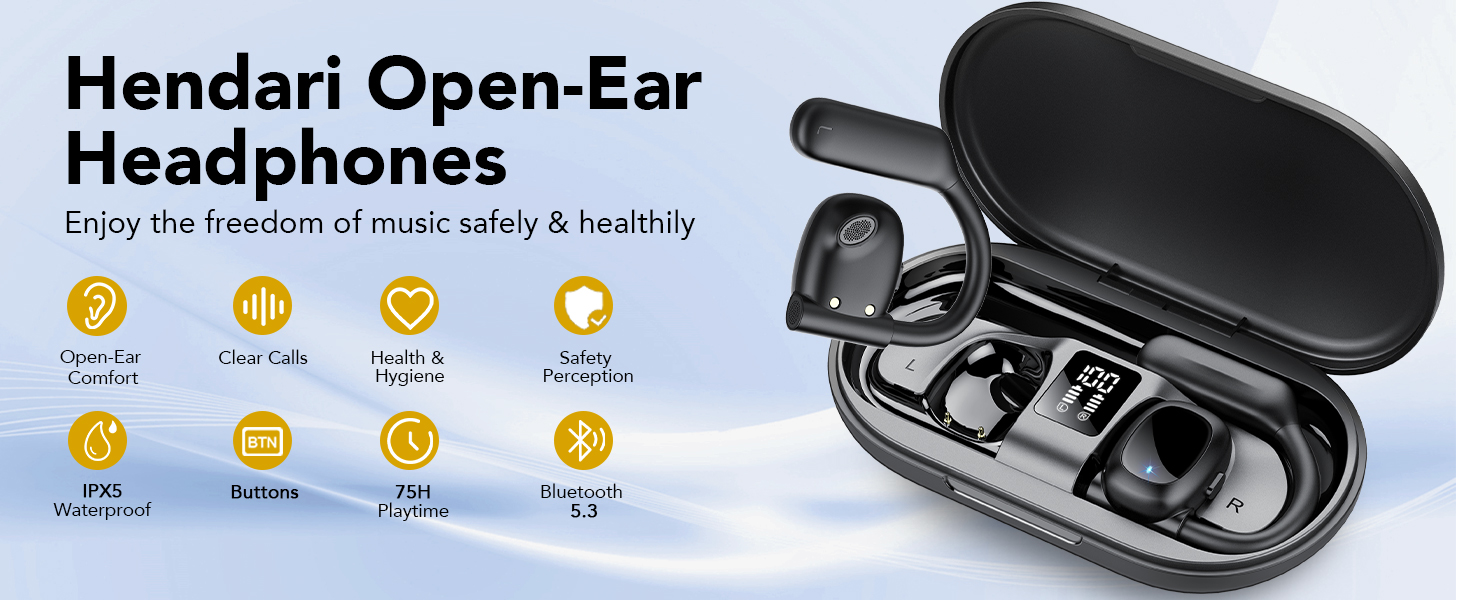
Сүрөт: An overview of the Hendari Open-Ear Headphones highlighting key features such as comfort, clear calls, health & hygiene, safety perception, IPX5 waterproof, button controls, 75H playtime, and Bluetooth 5.3.
2. Кутуда эмне бар
Upon opening your Hendari Open Ear Bluetooth 5.3 Earbuds package, you should find the following items:
- Open Ear Headphones (Left and Right earbuds)
- Зымсыз кубаттоо кутусу
- Заряддоо кабели (USB-C)
- User Manual
Image: The Hendari Open Ear Bluetooth 5.3 Earbuds and their charging case, representing the main components included in the package.
3. Продукциянын өзгөчөлүктөрү
3.1. Open-Ear Design and Comfort
The Hendari earbuds feature a completely open-ear design, allowing you to enjoy audio while remaining aware of your surroundings. This design reduces pressure on the ear canal, prevents sweat accumulation during exercise, and promotes better hygiene compared to in-ear types. The ergonomic ear hooks are designed to fit the natural curve of your ears securely and comfortably for extended periods.

Image: A woman comfortably wearing the open-ear earbuds, illustrating the natural and comfortable fit compared to traditional in-ear or over-ear headphones.

Image: A visual comparison demonstrating the comfort benefits of open-ear headphones over in-ear headphones, which can cause pain, ear infection, hearing loss, or general discomfort.
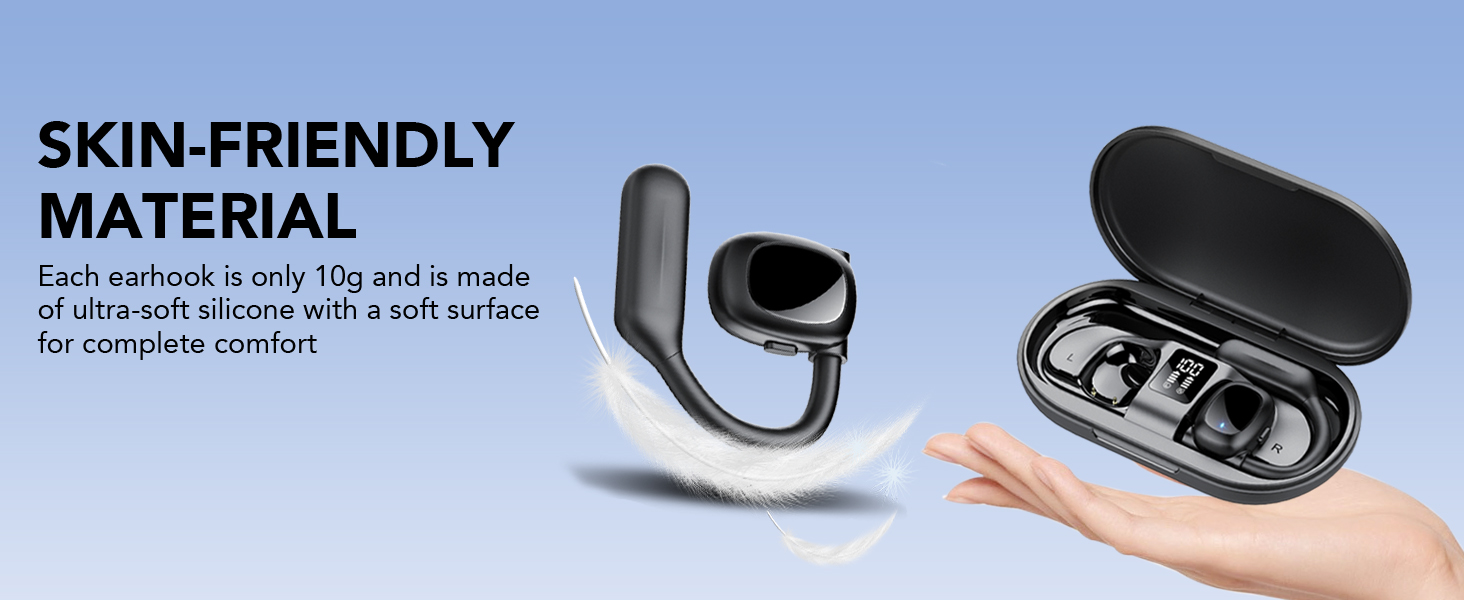
Image: An earhook with a feather, illustrating the ultra-soft, skin-friendly silicone material that makes each earhook weigh only 10g for complete comfort.

Image: A diagram showing the flexibility and ergonomic design of the earhooks, made from high-quality 0.8mm thick titanium memory wire that conforms to the natural shape of any ear.
3.2. Connectivity and Situational Awareness
Equipped with the latest Bluetooth 5.3 technology, these earbuds ensure a fast, stable, and low-latency connection, providing synchronized audio and video. The open design allows for real-time perception of environmental sounds, enhancing safety during outdoor activities or in public spaces.

Image: A cyclist wearing the earbuds on a road, demonstrating the real-time perception of environmental sounds and maintaining a safe posture while exercising.

Image: A cyclist on a road, illustrating how the open-ear design allows users to maintain awareness of their surroundings, crucial for safety during outdoor activities.
3.3. High-Quality Audio and Clear Calls
The earbuds feature dual 16.2mm air-conducted dynamic drivers with bio-diaphragm, delivering crisp, clear highs and powerful bass for a 360° Hi-Fi stereo sound experience. Four high-quality microphones with beamforming technology ensure efficient and clear calls by directionally transmitting sound.

Сүрөт: жарылган view of the earbud's internal components, highlighting the 16.2mm air-guide moving coil drive and bio-diaphragm for superior sound quality.

Image: A diagram illustrating the directed sound propagation technology, showing sound waves entering the ear for crisp highs and powerful lows, along with features like Memory Titanium Wire, Hydrophobic Coating, and Ear-Hanging Design.

Сүрөт: деталдуу диаграмма showcasing the internal structure of the earbud, emphasizing the components that contribute to excellent Hi-Fi 360° stereo sound quality.
3.4. Бышыктыгы жана батареянын иштөө мөөнөтү
The earbuds are IPX5 sweat- and water-resistant, making them suitable for workouts and outdoor activities without worry. With the charging case, the total battery life extends up to 75 hours. The slim charging case features an LED display to show the remaining power in real-time for both the case and the earbuds.

Image: The earbuds in their charging case, displaying the 75H battery life and the LED digital power indicator.

Image: A man drinking water after a workout, demonstrating the sweat-resistant feature of the earbuds, allowing users to enjoy audio during sweaty activities.

Image: The earbuds splashing in water, visually representing their IPX5 waterproof rating.
4. Орнотуу колдонмосу
4.1. Кулакчындарды жана кутуну кубаттоо
Before first use, fully charge the earbuds and the charging case. Place the earbuds into the charging case. Connect the provided USB-C cable to the charging port on the case and plug the other end into a USB power source. The LED digital display on the case will show the charging progress. A full charge is indicated when the display shows 100%.
4.2. Proper Wearing Procedure
For optimal sound and comfort, ensure the earbuds are worn correctly:
- Step 1: Place on the ear. Gently position the earbud over your ear, with the speaker part facing your ear canal.
- Step 2: Rotate the headset back towards the ear until it fits. Adjust the ear hook to securely rest behind your ear.
- Step 3: Adjust the sound source. Ensure the speaker is aligned to direct sound towards your ear for the best audio experience.

Image: A three-step diagram illustrating the correct procedure for placing and adjusting the open-ear earbuds on the ear for a secure and comfortable fit.
4.3. Bluetooth Жупташтыруу
Кулакчындарыңызды түзмөк менен жупташтыруу үчүн:
- Take both earbuds out of the charging case. They will automatically enter pairing mode, indicated by a flashing light on one of the earbuds.
- Түзмөгүңүздө (смартфон, планшет, ноутбук) Bluetooth жөндөөлөрүнө өтүп, Bluetooth'ду күйгүзүңүз.
- Издөө available devices and select "Hendari X8" (or similar name) from the list.
- Once connected, a voice prompt will confirm successful pairing, and the light on the earbud will stop flashing.
Эгер түзмөктө Bluetooth иштетилген болсо, кулакчындар кутудан чыгарылганда акыркы жупташтырылган түзмөккө автоматтык түрдө кайра туташат.

Image: The earbuds placed next to a tablet and smartphone, illustrating their compatibility and ease of connection with various devices.
5. Иштөө нускамалары
The Hendari earbuds feature multi-functional touch buttons for easy control of various functions. The controls are designed to be precise and prevent accidental touches.

Image: A diagram illustrating the push-button controls on the earbud, detailing single, double, triple taps, and various hold durations for different functions.
5.1. Музыка ойнотууну башкаруу
- Ойнотуу/тындыруу: Кулакчындарды бир жолу таптаңыз.
- Кийинки трек: Оң кулакчынды эки жолу таптаңыз.
- Мурунку трек: Сол кулакчынды эки жолу таптаңыз.
- Көлөмү: Hold the Right earbud for 3 seconds.
- Үнүн азайтуу: Hold the Left earbud for 3 seconds.
5.2. Чалууларды башкаруу
- Чалууга жооп берүү/аяктоо: Кирүүчү чалуу же активдүү чалуу учурунда гарнитураны бир жолу таптаңыз.
- Чакырууну четке кагуу: Кирүүчү чалуу учурунда кулакчындардын бирин 2 секунд кармап туруңуз.
5.3. Үн жардамчысы
- Үн жардамчысын иштетүү (Siri/Google Жардамчысы): Кулакчындарды үч жолу таптаңыз.
5.4. Күйгүзүү/өчүрүү
- Күйгүзүү: Earbuds automatically power on when removed from the charging case. Alternatively, hold either earbud for 4 seconds.
- Өчүрүү: Place earbuds back into the charging case. Alternatively, hold either earbud for 4 seconds.
6. Техникалык тейлөө
Proper maintenance ensures the longevity and optimal performance of your Hendari Open Ear Bluetooth Earbuds.
6.1. Тазалоо
- Кулакчындарды жана кубаттоочу кутуну жумшак, кургак, түксүз чүпүрөк менен сүртүңүз.
- өжөр кир үчүн, бир аз гampчүпүрөктү суу менен. Катуу химиялык заттарды же абразивдүү материалдарды колдонбоңуз.
- Заряддоодон мурун кулакчындардагы жана кутучадагы заряддоо контакттары таза жана кургак экенин текшериңиз.
6.2. Сактоо
- Кулакчындарды коргоо жана кубаттоо үчүн колдонулбаган учурда аларды кубаттоо кутучасында сактаңыз.
- Кургак, салкын жерде, өтө жогорку температурадан, нымдуулуктан жана түз күн нурунан алыс сактаңыз.
6.3. Сууга туруктуулук
The earbuds are IPX5 water-resistant, meaning they can withstand sweat and light splashes. They are not designed for submersion in water. Do not use them while swimming or showering. If they get wet, dry them thoroughly before placing them back in the charging case or using them.
7. Кыйынчылыктарды
If you encounter any issues with your Hendari earbuds, please refer to the following common solutions:
| Көйгөй | Мүмкүн себеп | Чечим |
|---|---|---|
| Кулакчындар жупташтырылбай жатат/туташтырылбай жатат | Bluetooth off on device, earbuds not in pairing mode, interference, previously paired device nearby. | Ensure Bluetooth is on. Place earbuds in case, then remove to re-enter pairing mode. Turn off Bluetooth on other devices. Try pairing again. |
| Үн жок же үнү төмөн | Volume too low, earbuds not properly seated, connection issue, dirty speaker mesh. | Increase volume on both earbuds and device. Adjust earbuds for proper fit. Reconnect Bluetooth. Clean speaker mesh gently. |
| Чалуу учурунда микрофон иштебейт | Microphone muted on device, connection issue, earbud not properly positioned. | Check device microphone settings. Reconnect Bluetooth. Ensure earbuds are worn correctly and microphones are not obstructed. |
| Заряддоо маселелери | Dirty charging contacts, faulty cable/adapter, case battery empty. | Clean charging contacts. Try a different USB-C cable and power adapter. Ensure charging case is charged. |
| Үзгүлтүктүү байланыш/үн төмөндөшү | Түзмөктөн өтө алыс, тоскоолдук, батареянын заряды аз. | Stay within 25 meters of your device. Avoid areas with strong Wi-Fi or other Bluetooth signals. Charge earbuds and case. |
Бул чечимдерди колдонуп көргөндөн кийин көйгөй чечилбесе, кардарларды колдоо менен байланышыңыз.
8. Техникалык шарттар
| Өзгөчөлүк | Спецификация |
|---|---|
| Модель аты | X8 |
| Бренд | Hendari |
| Байланыш технологиясы | Зымсыз (Bluetooth 5.3) |
| Bluetooth диапазону | 25 метр |
| Кулак жайгаштыруу | Ачык кулак |
| Форма фактору | Over Ear (Ear Hook) |
| Аудио драйвер түрү | Динамикалык драйвер (16.2 мм) |
| Микрофондор | 4 (with beamforming technology) |
| Noise Control | None (Open-ear design for situational awareness) |
| Сезимталдуулук | 118 дБ |
| Жыштык диапазону | 20 Гцден 20,000 Гцге чейин |
| Башкаруу түрү | Touch Control |
| Батареянын иштөө мөөнөтү | 75 саатка чейин (заряддоо кутусу менен) |
| Сууга туруктуулук деңгээли | IPX5 суу өткөрбөйт |
| Материал | Silicone (earhooks) |
| Элемент Салмагы | 20.4 грамм (0.72 унция) |
| Түс | Midnight Black |
9. Кепилдик жана колдоо
9.1. Продукцияга кепилдик
Hendari offers a 2-year warranty for this product upon registration within 14 days of receipt. This warranty covers free replacement of damaged products without the need for return. Please refer to the warranty card included in your package for registration details or contact customer service.
9.2. Кардарларды колдоо кызматы
For any questions, concerns, or assistance with your Hendari Open Ear Bluetooth Earbuds, please do not hesitate to contact our customer service team. We are available 24/7 to help with product inquiries, issues during use, or any other feedback.
How to Contact Us Quickly:
- Go to your Amazon order page.
- Find your product's order number.
- Contact the seller directly through the listing or order details.

Image: An icon representing 24H Online Customer Service, indicating support availability for product issues or suggestions.

Image: A visual guide on how to quickly find and contact customer service via Amazon's order page.


