Introduction
The Motorola DLR1060 is a 6-channel digital business radio designed for reliable and private communication in various professional environments. Operating in the digital 900 MHz ISM license-free band, this radio offers enhanced clarity and security compared to analog systems. Its compact and lightweight design, combined with robust features, makes it an essential tool for efficient team coordination.
Эмне камтылган
The Motorola DLR1060 package typically includes the following items:
- Motorola DLR1060 2-Way Digital Business Radio (quantity as per pack size)
- Кайра заряддалуучу литий-иондук батарейка
- Charging Tray with Power Adapter
- Swivel Belt Holster
- User Guide and Safety Leaflet

Image: A typical 6-pack of Motorola DLR1060 digital business radios, showcasing the compact design of each unit.
Негизги өзгөчөлүктөрү
- Digital 900 MHz ISM License-Free Band: Ensures private and reliable communication.
- Кеңейтилген диапазон: Covers up to 300,000 square feet or 20 floors.
- 6 канал: Provides multiple communication lines for different teams or purposes.
- Үн кеңештери: User-friendly voice prompts for channel navigation, battery status, and feature customization.
- Radio Profile ID: Unique 4-digit ID for enhanced privacy and direct communication.
- Computer Programming Software (CPS): Allows for personalized setups, including Private Groups, custom channel names, and radio settings.
- Туруктуу курулуш: Complies with Military Standards 810 C, D, E, F, and G for resistance against shock, vibration, extreme temperatures, and dust.
- Батареянын узак иштөө мөөнөтү: Internal rechargeable battery provides up to 14 hours of continuous operation.
- Instant Mute: Quickly silence the radio when needed.
- Customizable Top Button: Assign frequently used functions for quick access.
Жайгашуу
1. Батареяны заряддоо
- Insert the rechargeable Lithium-Ion battery into the radio, ensuring it clicks securely into place.
- Place the radio into the charging tray.
- Connect the power adapter to the charging tray and plug it into a standard electrical outlet.
- The charging indicator light on the tray will illuminate to show charging status. A full charge typically takes several hours.

Image: The Motorola DLR1060 radio securely seated in its charging cradle, ready for power connection.
2. Attaching the Belt Holster
- Align the radio with the swivel belt holster.
- Slide the radio into the holster until it locks into position.
- Attach the holster to your belt or clothing for convenient carrying.
Иштөө нускамалары
1. Күйгүзүү/өчүрүү
- Күйгүзүү үчүн, басып, кармап туруңуз Күч/Меню button (usually located on the top or side) until you hear a tone or voice prompt.
- Өчүрүү үчүн, басып туруңуз Күч/Меню button again until the radio shuts down.

Сүрөт: каптал view of the DLR1060 radio, highlighting the power button and volume controls for easy access.
2. Үндү тууралоо
- колдонуу Үнүн жогорулатуу (+) жана Үнүн азайтуу (-) buttons on the side of the radio to adjust the listening volume.
3. Каналды тандоо
- айлантыңыз Канал тандоо баскычы (typically on the top) to choose one of the 6 available channels.
- The radio will provide a voice prompt announcing the selected channel number.
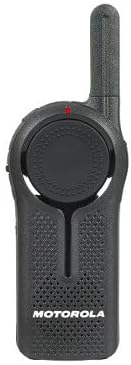
Сүрөт: алдыңкы view of the DLR1060 radio, featuring the prominent channel selector knob and integrated speaker.
4. Берүү жана кабыл алуу
- Өткөрүш үчүн басып, кармап туруңуз Push-To-Talk (PTT) радионун капталындагы баскыч. Микрофонго так сүйлө.
- Жоопту угуу үчүн PTT баскычын коё бериңиз.
- Ensure you are on the same channel as the person you wish to communicate with.
5. Private Communication (Radio Profile ID)
- The DLR1060 uses a unique 4-digit Radio Profile ID for private communication. This ID must be programmed into all radios intended for a private group.
- Refer to the Computer Programming Software (CPS) manual for detailed instructions on setting up and managing Radio Profile IDs and Private Groups.
Техникалык тейлөө
Радиону тазалоо
- Радионун сыртын жумшак, гamp кездеме.
- Катуу химиялык заттарды, тазалоочу эриткичтерди же күчтүү жуучу каражаттарды колдонбоңуз, анткени алар радионунasing жана ички компоненттер.
- Ensure the radio is powered off and disconnected from any charging accessories before cleaning.
Батареяга кам көрүү
- Always use genuine Motorola batteries and charging accessories.
- Батареяны экстремалдуу температурага тийгизүүдөн сактаңыз.
- If the radio will not be used for an extended period, store the battery separately in a cool, dry place.
Проблемаларды чечүү
| Көйгөй | Мүмкүн чечим |
|---|---|
| Радио күйбөйт. | Батарея толук заряддалганын жана туура салынганын текшериңиз. |
| Өткөрүп же кабыл албайт. | Verify that all radios are on the same channel and have the correct Radio Profile ID. Check if the battery is low. |
| Аудио сапаты начар же статикалык. | Move closer to the other radio or to an open area. Check for obstructions. Ensure the antenna is clear. |
| Батареянын иштөө мөөнөтү күтүлгөндөн кыска. | Ensure the battery is fully charged before use. Battery performance can degrade over time; consider replacing older batteries. |
Техникалык шарттар
| Өзгөчөлүк | Деталь |
|---|---|
| Frequency Band | 900 MHz ISM (License-Free) |
| Каналдар | 6 |
| Диапазон | Up to 300,000 sq ft / 20 Floors |
| Батареянын иштөө мөөнөтү | 14 саатка чейин (адатта колдонуу) |
| Бышыктык стандарттары | Military Standards 810 C, D, E, F, G |
| Турак жай материалы | Поликарбонат |
| FCC ID | AZ489FT5870 |
| Шайкеш түзмөктөр | Speaker, Headphone, Laptop (for CPS) |
| Түс | Кара |
Кепилдик жана колдоо
For detailed warranty information and technical support, please refer to the documentation provided with your product or visit the official Motorola Solutions webсайт. Сатып алуу квитанциясын кепилдик дооматтары үчүн сатып алуунун далили катары сактаңыз.


