Introduction
Welcome to the user manual for your new AOLON Mars R3 Smartwatch. This guide provides detailed instructions on how to set up, operate, maintain, and troubleshoot your device. The Mars R3 Smartwatch features a 3D flexible surface design, high-definition Bluetooth calling capabilities, and comprehensive notification display. It is designed to keep you connected and track your daily activities with ease.
Негизги өзгөчөлүктөр төмөнкүлөрдү камтыйт:
- True IP68 waterproof rating for enhanced durability.
- 3D flexible surface design for a sleek aesthetic.
- HD Bluetooth calls, allowing you to answer calls directly from your wrist.
- Large screen display for clear viewing of messages and notifications.
- Support for custom photo wallpapers and a variety of default clock displays.
- Integrated activity tracking features.
Продукт бүттүview
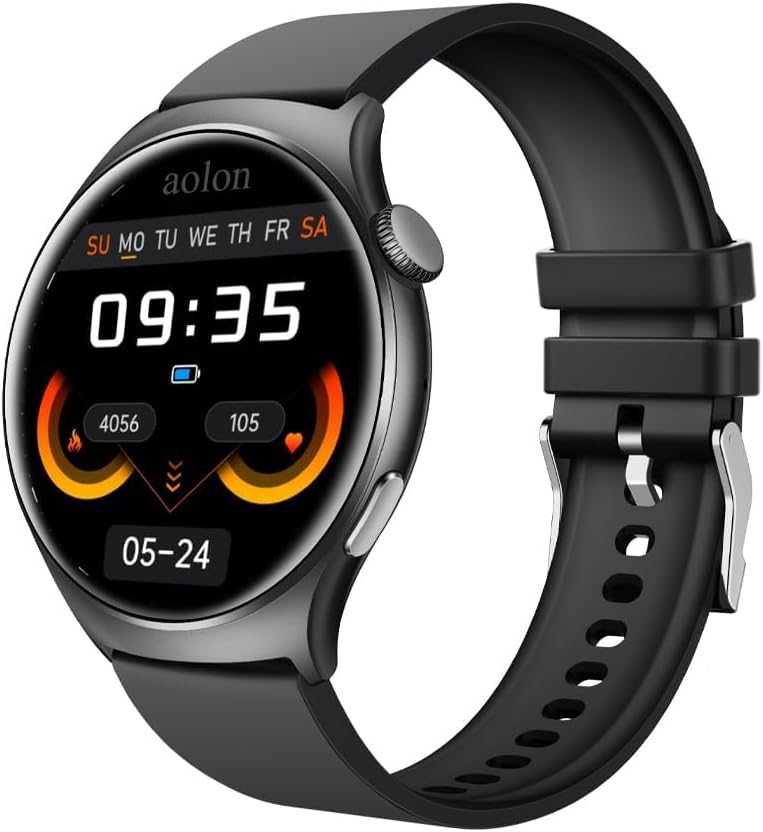
Figure 1: The AOLON Mars R3 Smartwatch, showcasing its round display and black silicone strap. The screen displays the current time, date, and various health metrics.
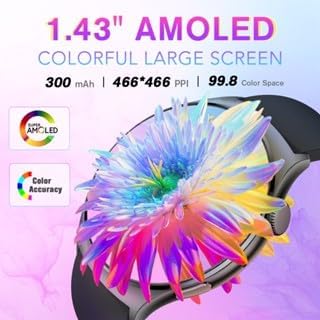
Figure 2: The 1.83-inch AMOLED colorful large screen of the Mars R3 Smartwatch, highlighting its vibrant display capabilities and high resolution.

Figure 3: The Bluetooth call feature of the Mars R3 Smartwatch, demonstrating how users can answer or hang up calls directly from their wrist, seamlessly switching between the watch and mobile phone.
Жайгашуу
1. Баштапкы заряддоо
Before first use, fully charge your Mars R3 Smartwatch. Connect the magnetic charging cable to the charging contacts on the back of the watch and plug the USB end into a standard USB power adapter (not included) or a computer USB port. The watch display will indicate charging status.
2. Күйгүзүү / Өчүрүү
- Күйгүзүү үчүн: Press and hold the side button until the AOLON logo appears.
- Өчүрүү үчүн: Капталдагы баскычты басып, кармап туруңуз, андан кийин экрандагы "Өчүрүү" опциясын тандаңыз.
3. Колдонмону орнотуу жана жупташтыруу
To unlock the full functionality of your smartwatch, you need to install the companion application on your smartphone. The watch operates with an Android 7.0 based system, ensuring broad compatibility.
- Scan the QR code provided in the watch's quick start guide or search for the official AOLON smartwatch app in your smartphone's app store (Google Play Store for Android, Apple App Store for iOS).
- Колдонмону жүктөп алып, орнотуңуз.
- Смартфонуңузда Bluetooth'ду иштетиңиз.
- Open the AOLON app and follow the on-screen instructions to pair your Mars R3 Smartwatch. Ensure the watch is powered on and within Bluetooth range of your phone.
- Телефонуңузда жана акылдуу саатыңызда жупташтыруу өтүнүчүн ырастаңыз.
Иштөө нускамалары
1. Негизги навигация
- Сенсордук экран: Swipe left, right, up, or down to navigate through menus and screens. Tap to select an item.
- Каптал баскычы: Башкы экранга кайтуу же дисплейди ойготуу үчүн басыңыз. Кубат параметрлери үчүн көпкө басыңыз.
2. Чалууларды кабыл алуу жана кабыл алуу
The Mars R3 Smartwatch supports HD Bluetooth calls, allowing you to manage calls directly from your wrist.
- Чалууга жооп берүү үчүн: Чалуу келгенде, саат экранындагы жашыл жооп берүү сүрөтчөсүн басыңыз.
- To Decline a Call: Tap the red decline icon on the watch screen.
- Чалуу үчүн: Access the dialer or contacts list through the watch's menu. Tap to dial a number or select a contact. Ensure your watch is connected to your phone via Bluetooth.
3. Эскертмелер
Кабыл алуу жана view notifications from your smartphone directly on your smartwatch screen.
- Ensure notification permissions are enabled in the AOLON app on your smartphone.
- Сааттын бетинин үстүнөн ылдый сүрүңүз view акыркы эскертмелер.
- Messages from social media applications will display their content on the large screen.
4. Иш-аракеттерди көзөмөлдөө
The smartwatch automatically tracks various activities and health metrics.
- View daily steps, distance, and calories burned directly on the watch face or in the activity tracking menu.
- Detailed historical data and additional health insights are available in the companion app.
5. Сааттын жүзүн ыңгайлаштыруу
Акылдуу саатыңызды ар кандай саат беттери менен жекелештириңиз.
- Саат боюнча: Long press the current watch face to enter the watch face selection menu. Swipe left or right to browse available faces and tap to select.
- Колдонмо аркылуу: Use the 'App Jam Display Market' within the AOLON app to explore a wider range of watch faces. You can also set your own photos as wallpaper through the app.
Техникалык тейлөө
1. Акылдуу саатыңызды тазалоо
Үзгүлтүксүз тазалоо аппаратыңыздын сырткы көрүнүшүн жана иштөөсүн сактоого жардам берет.
- Экранды жана корпусту жумшак, мамыксыз чүпүрөк менен сүртүңүз. Зарыл болсо,ampкездемени бир аз суу менен чайкаңыз.
- Катуу химиялык заттарды, абразивдүү тазалоочу каражаттарды же эриткичтерди колдонбоңуз, анткени алар сааттын капталына жана пломбаларына зыян келтириши мүмкүн.
- Жакшы туташууну камсыз кылуу үчүн заряддоочу контакттарды мезгил-мезгили менен кургак чүпүрөк менен тазалап туруңуз.
2. Сууга туруктуулук (IP68)
The Mars R3 Smartwatch has a True IP68 waterproof rating, meaning it is protected against dust ingress and can withstand immersion in water up to 1.5 meters for up to 30 minutes.
- It is suitable for everyday use, including hand washing, rain, and brief immersion.
- Avoid using the watch in hot water, saunas, or steam rooms, as steam can penetrate seals.
- Суу астында баскычтарды баспаңыз.
- After exposure to water, especially saltwater, rinse the watch with fresh water and dry it thoroughly before charging.
3. Батареяга кам көрүү
- Батареяны бат-баттан толук кубаттап калуудан алыс болуңуз.
- Charge the watch regularly, ideally before the battery level drops too low.
- Store the watch in a cool, dry place if not used for extended periods, with the battery charged to about 50%.
Проблемаларды чечүү
1. Саат күйбөйт
- Саат толук заряддалганын текшериңиз. Аны заряддагычка кеминде 30 мүнөт туташтырыңыз.
- Заряддоо кабелин жана адаптердин бузулганын текшериңиз.
- Башка USB портун же кубат адаптерин колдонуп көрүңүз.
2. Телефон менен жупташтыруу мүмкүн эмес
- Телефонуңузда жана саатыңызда Bluetooth иштетилгенин текшериңиз.
- Make sure the watch is within close proximity to your phone.
- Телефонуңузду да, акылдуу саатыңызды да өчүрүп күйгүзүңүз.
- Forget the device in your phone's Bluetooth settings and try pairing again through the AOLON app.
- Ensure the AOLON app has necessary permissions enabled (e.g., location, Bluetooth).
3. Эскертмелер көрүнбөй жатат
- Verify that notification permissions are granted to the AOLON app in your phone's settings.
- Check if the app's notification settings are configured correctly for the desired applications.
- Ensure the watch is connected to the phone via Bluetooth.
- Disable and re-enable notifications in the app.
4. Иш-аракеттерди так эмес көзөмөлдөө
- Сааттын билегиңизге бекем тагылганын, өтө бош же өтө катуу эмес экенин текшериңиз.
- Update the AOLON app to the latest version.
- Calibrate the watch if an option is available in the app.
Техникалык шарттар
| Өзгөчөлүк | Спецификация |
|---|---|
| Модель номери | aolon |
| Screen Size | 1.83 дюйм |
| Туруктуу экран дисплей өлчөмү | 1.83 дюйм |
| Форма | Төрт бурчтуу |
| Операция системасы | Android7.0 |
| Эстутум сактоо сыйымдуулугу | 128 MB |
| RAM эстутум орнотулган өлчөмү | 128 MB |
| Байланыш технологиясы | Bluetooth |
| Зымсыз байланыш стандарты | Bluetooth |
| Батарея сыйымдуулугу | 244.98 миллионamp Саат |
| Батарея клеткасынын курамы | Литий ион |
| Өзгөчө өзгөчөлүк | Activity Tracker |
| GPS | GPS жок |
| Элемент Салмагы | 1.96 унция (55.5 грамм) |
| Пакеттин өлчөмдөрү | 1.1 x 0.28 x 0.26 дюйм |
| Кутуда эмне бар | Акылдуу саат |
Кепилдик жана колдоо
Кепилдик маалымат
Specific warranty details for your AOLON Mars R3 Smartwatch are typically provided with your purchase documentation or can be found on the official AOLON webсайт. Кепилдик дооматтары үчүн сатып алганыңыздын далилин сактап коюңуз.
Кардарларды колдоо
For further assistance, technical support, or inquiries regarding your AOLON Mars R3 Smartwatch, please visit the official AOLON website or contact their customer service department. You can often find FAQs, troubleshooting guides, and contact information on the manufacturer's support pages.
Visit the AOLON Store: AOLON Official Store


