1. Киришүү
Welcome to the user manual for your new Taiahiro BK820 Typewriter Mechanical Gaming Keyboard and Mouse Combo. This guide provides essential information for setting up, operating, and maintaining your new peripheral set. Please read this manual thoroughly to ensure optimal performance and longevity of your product.

Figure 1: Taiahiro BK820 Typewriter Mechanical Gaming Keyboard and Mouse Combo
2. Пакеттин мазмуну
Upon opening your Taiahiro BK820 package, you should find the following items:
- 1 x Taiahiro BK820 Typewriter Mechanical Gaming Keyboard
- 1 x Taiahiro RGB Backlit Gaming Mouse
- 1 x Чычкан аянты
- 1 х Колдонуучунун колдонмосу (бул документ)
Please inspect all items for any signs of damage. If any components are missing or damaged, please contact customer support.
Video 1: Unboxing the BK820 Typewriter Mechanical Keyboard and Mouse Combo. This video demonstrates the contents of the product packaging.
3. Орнотуу
The Taiahiro BK820 Keyboard and Mouse Combo is designed for simple plug-and-play functionality. No additional drivers are typically required for basic operation.
3.1 Баскычтопту туташтыруу
- Баскычтопка тиркелген USB кабелин табыңыз.
- Plug the USB connector into an available USB port on your PC, Laptop, or Mac.
- The keyboard's RGB backlighting will illuminate, indicating a successful connection.
3.2 Чычканды туташтыруу
- Locate the USB cable attached to the mouse.
- Plug the USB connector into an available USB port on your PC, Laptop, or Mac.
- The mouse's RGB backlighting will illuminate, indicating a successful connection.
Сиздин клавиатураңыз жана чычканыңыз азыр колдонууга даяр.
4. Иштөө нускамалары
4.1 Keyboard Features & Backlight Control
The BK820 keyboard features a 104-key full-size layout with retro typewriter-style punk round keycaps and clicky blue mechanical switches, providing tactile feedback. It also includes N-Keys rollover for precise input during gaming.

Figure 2: ашыкview of BK820 Keyboard and Mouse features.
Adjusting Backlight Modes:
- Басыңыз Fn + INS to cycle through 11 different backlight modes.
Арткы жарыктын жарыктыгын жөндөө:
- Басыңыз Fn + ↑ жарыктыкты жогорулатуу үчүн (4 деңгээл).
- Басыңыз Fn + ↓ to decrease brightness (4 levels).
Adjusting Backlight Speed:
- Басыңыз Fn + ← to decrease animation speed (4 levels).
- Басыңыз Fn + → to increase animation speed (4 levels).
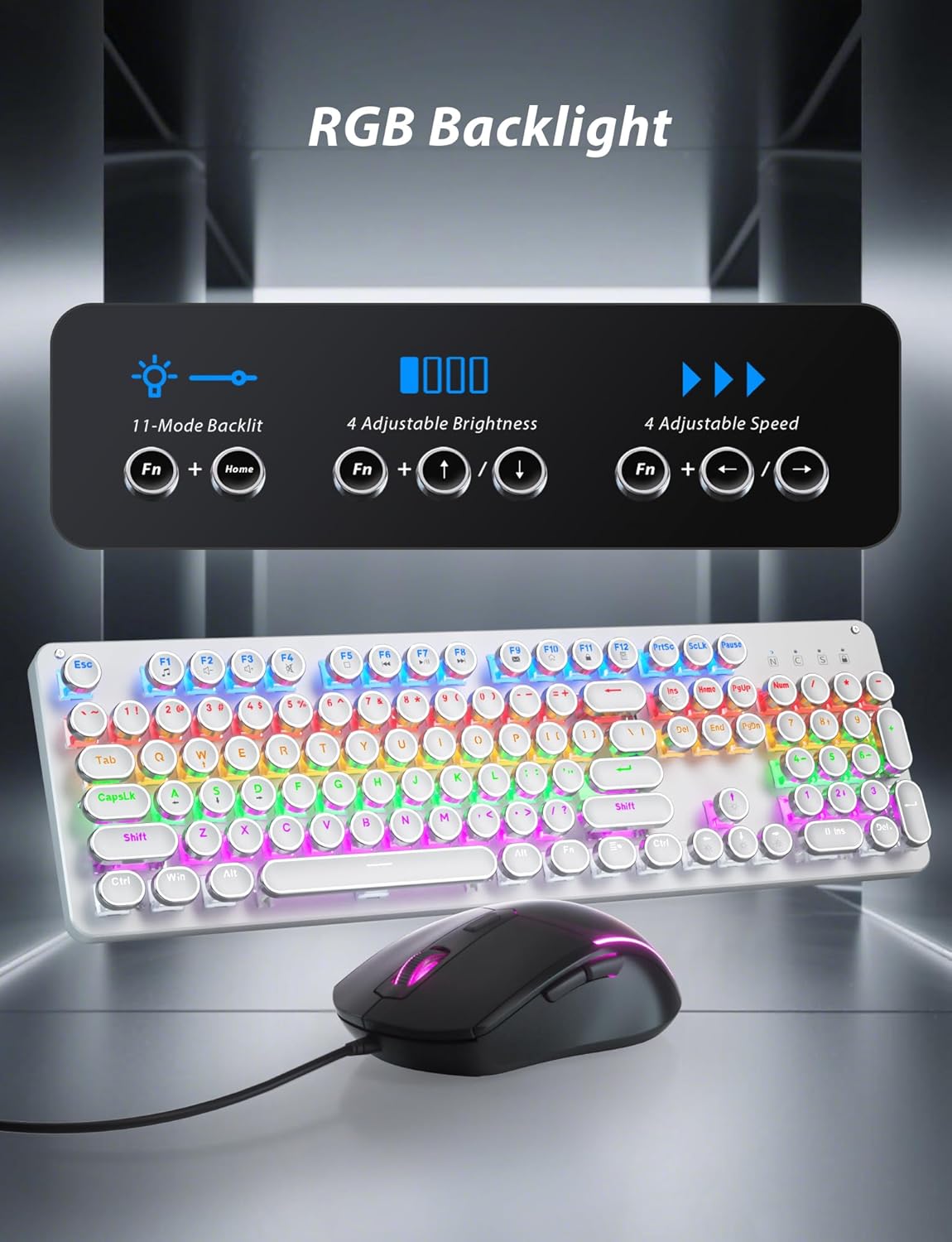
Figure 3: Keyboard RGB Backlight control functions.
Жөнгө салынуучу клавиатура стенди:
The keyboard features an adjustable stand on the underside, allowing you to set the typing angle for improved ergonomics and comfort.

4-сүрөт: Эргономикалык ыңгайлуулук үчүн жөнгө салынуучу клавиатура стенди.
4.2 Mouse Features & DPI Adjustment
The included gaming mouse features RGB backlighting with 7-color breathing effects and an ergonomic design for comfortable use. It also has dedicated forward and back buttons for convenience.

Figure 5: Gaming Mouse features including DPI levels and backlighting.
DPI жөндөөлөрүн тууралоо:
The mouse offers 4 adjustable DPI levels (800/1600/2400/3200) to suit your preference for precision and speed. The DPI button is typically located near the scroll wheel. Press the DPI button to cycle through the available settings.
5. Техникалык тейлөө жана тазалоо
To ensure the longevity and optimal performance of your Taiahiro BK820 keyboard and mouse, regular cleaning is recommended.
5.1 Баскычтопту тазалоо
The keyboard's floated keycap design makes it easier to clean. Use a can of compressed air to remove dust and debris from between the keycaps. For deeper cleaning, the keycaps can be carefully removed using a keycap puller (not included) and wiped with a damp cloth. Ensure the keyboard is unplugged before cleaning.
5.2 Mouse Cleaning
Wipe the surface of the mouse with a soft, damp cloth. Avoid using harsh chemicals or abrasive materials that could damage the finish. Ensure the mouse is unplugged before cleaning.
Video 2: This video demonstrates the ease of removing keycaps for cleaning or customization.
6. Кыйынчылыктарды
If you encounter any issues with your Taiahiro BK820 Keyboard and Mouse Combo, please refer to the following common troubleshooting steps:
6.1 Түзмөк жооп бербей жатат
- Клавиатуранын жана чычкандын USB кабелдеринин экөө тең компьютериңиздин USB портторуна бекем сайылганын текшериңиз.
- Түзмөктөрдү компьютериңиздин башка USB портторуна сайып көрүңүз.
- Компьютериңизди өчүрүп күйгүзүңүз.
- Test the devices on another computer to determine if the issue is with the peripherals or your system.
6.2 Backlighting Not Working/Incorrect
- For the keyboard, ensure you are using the correct key combinations (Fn + INS, Fn + ↑/↓, Fn + ←/→) to adjust modes, brightness, and speed.
- For the mouse, the 7-color breathing backlight is automatic and cycles through colors. Ensure the mouse is properly connected.
- Unplug and replug the device to reset its lighting.
6.3 Mouse DPI Not Changing
- Ensure you are pressing the dedicated DPI button on the mouse to cycle through the 4 available DPI settings.
- Try unplugging and replugging the mouse.
7. Техникалык шарттар
| Өзгөчөлүк | Description |
|---|---|
| Бренд | Taiahiro |
| Модель номери | BK820 |
| Баскычтоптун түрү | Typewriter Mechanical Gaming Keyboard |
| Негизги которгучтар | Clicky Blue Switch |
| Key Life | 50 миллион чыкылдатуу |
| Баскыч капкактары | Punk Round Keycaps |
| Арткы жарыктандыруу | RGB Backlit (11 modes, 4 brightness, 4 speed) |
| Чычкан DPI | 800/1600/2400/3200 (4 levels) |
| Mouse Backlighting | 7-Color Breathing Backlighting |
| Байланыш | Зымдуу USB |
| Шайкеш түзмөктөр | ЖК, ноутбук, Mac |
| Элемент Салмагы | 2.83 фунт |
| Пакеттин өлчөмдөрү | 17.56 x 6.14 x 3.11 дюйм |
8. Кепилдик жана колдоо
For warranty information and customer support, please refer to the contact details provided on the product packaging or the official Taiahiro webсайт. Сатып алуу квитанциясын кепилдик дооматтары үчүн сатып алуунун далили катары сактаңыз.


