1. Киришүү
This manual provides comprehensive instructions for the safe and effective use of your Insta360 Flow 2 PRO Gimbal Stabilizer. Please read this manual thoroughly before operating the device to ensure optimal performance and to prevent damage.
The Insta360 Flow 2 Pro is a cutting-edge smartphone gimbal stabilizer designed to enhance your mobile videography and photography. Featuring advanced AI tracking, 3-axis stabilization, and an integrated tripod, it offers a professional-grade experience for content creators.
2. Кутуда эмне бар
Пакетиңизде бардык буюмдар бар экенин текшериңиз:

Сүрөт 2.1: Contents of the Insta360 Flow 2 PRO package. This image displays the main gimbal unit, a spotlight accessory, a carrying pouch, and charging cables, along with a smartphone mounted on the gimbal.
- Insta360 Flow 2 PRO Gimbal Stabilizer
- Spot Light
- Ташуу баштыгы
- Заряддоо кабели (USB-C)
- Магниттик телефон Clamp
3. Продукт бүтүп калдыview & Өзгөчөлүктөрү
The Insta360 Flow 2 PRO is engineered with several key features to enhance your mobile content creation:
- 3-октуу турукташтыруу: Provides smooth, cinematic footage by compensating for shakes and vibrations.
- Deep Track 4.0 AI Tracking: Advanced subject tracking, including multi-person tracking, Active Zoom Tracking, and Pro Framing grid.
- Apple DockKit Compatibility: Enables AI tracking directly within the iPhone native camera and third-party apps.
- Built-in Tripod & Selfie Stick: Integrated design for versatile shooting options.
- 1 кадамдуу тез жайылтуу: Quick setup for immediate use.
- 10 сааттык батареянын иштөө мөөнөтү: Extended operation for all-day shooting.
- Selfie күзгүсү: For high-quality self-portraits and vlogging.
- 360° чексиз панорамалык көзөмөлдөө: Allows tracking subjects from any angle.
- Free Tilt Mode: Maintains angle while phone moves up and down.
- AI Editing Suite: In-app tools for post-production.
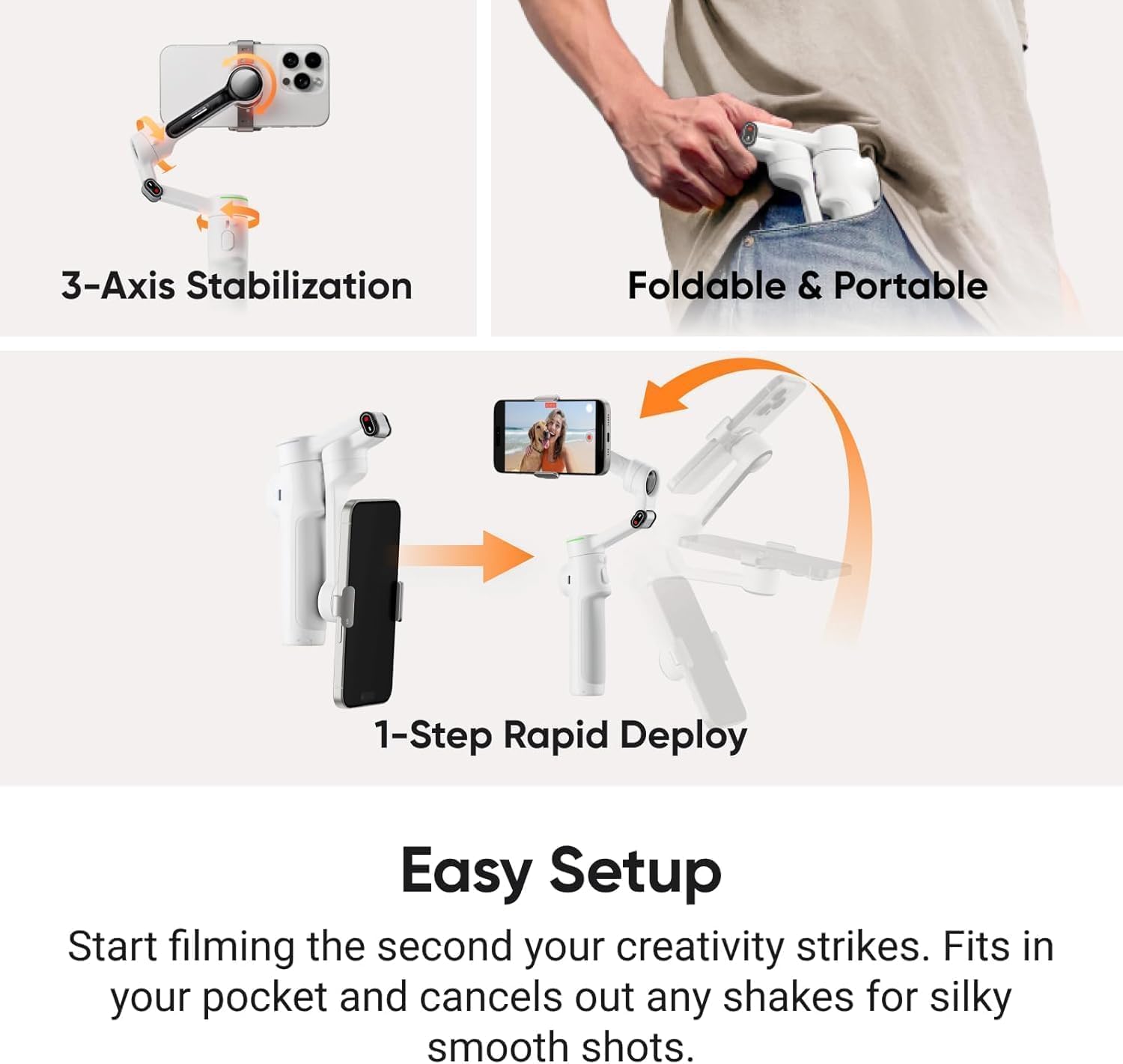
Сүрөт 3.1: Visual representation of the gimbal's 3-axis stabilization, its compact foldable design, and the quick 1-step rapid deploy mechanism for easy setup.

Сүрөт 3.2: Highlights of the all-in-one design, including a 10-hour battery life, the integrated selfie stick and tripod, and a convenient selfie mirror for high-quality self-portraits.
4. Орнотуу колдонмосу
4.1 Гимбалды кубаттоо
- Connect the provided USB-C cable to the charging port on the gimbal.
- Кабелдин экинчи учун USB кубат адаптерине туташтырыңыз (кошулмада жок).
- The indicator light will show charging status and turn solid when fully charged.
4.2 Смартфонуңузду орнотуу
- Unfold the gimbal to its operating position.
- Магниттик телефон клamp to your smartphone, ensuring it is centered.
- Align the phone clamp with the magnetic mount on the gimbal and securely attach it.
- Ensure your phone is balanced. If necessary, slightly adjust the phone's position within the clamp.
4.3 Колдонмону орнотуу жана туташуу
- Download the official Insta360 app from your smartphone's app store (iOS App Store or Google Play Store).
- Смартфонуңузда Bluetooth'ду иштетиңиз.
- Open the Insta360 app and follow the on-screen prompts to connect to your Flow 2 PRO gimbal.
- Perform any firmware updates prompted by the app for optimal performance.
5. Иштөө нускамалары
5.1 Күйгүзүү/өчүрүү
- Күйгүзүү: Кубат баскычын 2 секунд басып туруңуз.
- Өчүрүү: Кубат баскычын 3 секунд басып туруңуз.
5.2 Using Deep Track 4.0 AI Tracking
Deep Track 4.0 allows the gimbal to automatically follow a selected subject.
- In the Insta360 app, select the tracking mode.
- Draw a box around the subject on your phone screen, or use hand gestures if enabled.
- The gimbal will automatically adjust to keep the subject in frame.

Сүрөт 5.1: Demonstrates the capabilities of Deep Track 4.0, including tracking subjects from a distance, achieving perfect framing for natural aesthetics, and tracking an entire group of people simultaneously.

Сүрөт 5.2: Illustrates the "Track with Apple DockKit" feature, showing the gimbal's ability to track subjects within the iPhone's native camera and other third-party applications for video calls, live streams, and meetings.
5.3 Gimbal Modes and Controls
The gimbal offers various modes for different shooting scenarios:
- Көзөмөл режими: The gimbal follows your pan and tilt movements.
- Пан ээрчүү режими: The gimbal only follows your pan movements, keeping the tilt axis locked.
- FPV режими: All three axes follow your movements, providing a first-person view.
- Free Tilt Mode: Allows the gimbal to maintain a specific tilt angle while panning, useful for creative shots.

Сүрөт 5.3: Depicts the 360° Infinite Pan Tracking feature, illustrating how the gimbal can track a subject continuously around its axis, providing complete freedom of movement.

Сүрөт 5.4: Shows the Free Tilt Mode in action, where the gimbal maintains a consistent angle as the phone moves up and down, enabling unique and creative shot compositions.
5.4 Using the AI Editing Suite
The Insta360 app includes an AI-powered editing suite to refine your footage.
- After recording, open your footage in the Insta360 app.
- Navigate to the editing section.
- Utilize AI-powered features for automatic edits, color correction, and effects.

Сүрөт 5.5: Features the AI Editing Suite, highlighting its ability to master shots with AI-powered tools available within the Insta360 application, shown with various video thumbnails.
6. Техникалык тейлөө жана кам көрүү
- Тазалоо: Гимбалды тазалоо үчүн жумшак, кургак чүпүрөктү колдонуңуз. Суюк тазалоочу каражаттарды же эриткичтерди колдонбоңуз.
- Сактагыч: Store the gimbal in a cool, dry place, away from direct sunlight and extreme temperatures. Use the provided carrying pouch for protection.
- Батареяга кам көрүү: Узак мөөнөткө сактоо үчүн, батареянын иштөө мөөнөтүн сактоо үчүн аны үч ай сайын болжол менен 50-60% га чейин кубаттап туруңуз.
- Таасирден качуу: Protect the gimbal from drops and impacts, which can damage the motors and internal components.
7. Кыйынчылыктарды
| Көйгөй | Мүмкүн себеп | Чечим |
|---|---|---|
| Gimbal not powering on | Батарея аз; Кубат баскычы жетиштүү убакытка чейин басылган жок | Charge the gimbal; Press and hold the power button for 2 seconds |
| Туруксуз тамак-ашtage / Gimbal shaking | Phone not balanced; Gimbal not calibrated; Obstruction | Re-balance phone; Calibrate gimbal via app; Check for obstructions around motors |
| Колдонмого туташуу мүмкүн эмес | Bluetooth off; App not updated; Gimbal not in pairing mode | Ensure Bluetooth is on; Update app; Restart gimbal and app |
| AI tracking not working | Poor lighting; Subject too far/small; App permissions | Ensure adequate lighting; Keep subject within optimal range; Check app permissions for camera/microphone |
8. Техникалык шарттар
| Өзгөчөлүк | Деталь |
|---|---|
| Модель номери | CINSABQB-AI |
| Бренд | Insta360 |
| Турукташтыруу | 3-огу |
| AI Tracking | Deep Track 4.0 |
| Батареянын иштөө мөөнөтү | 10 саатка чейин |
| Элемент Салмагы | 1.82 фунт |
| Түс | Ак |
| Шайкеш түзмөктөр | Smartphones (refer to compatibility list for specifics) |
8.1 Смартфондун шайкештиги
For optimal performance, ensure your smartphone is compatible with the Insta360 Flow 2 PRO. Refer to the table below for common models:

Сүрөт 8.1: Detailed compatibility list for various smartphone models, including iPhone, Samsung Galaxy, and Google Pixel, showing supported video resolutions, timelapse resolutions, 360° panorama, and Active Zoom Tracking capabilities.
9. Кепилдик жана колдоо
Insta360 products come with a standard manufacturer's warranty. For detailed warranty information, please refer to the official Insta360 webсайтка же кардарларды тейлөөгө кайрылыңыз.
- Официалдуу Webсайт: www.insta360.com
- Кардарларды колдоо: расмий колдоо бөлүмүн карагыла website for contact methods (email, live chat, phone).
- Программалык камсыздоонун жаңыртуулары: Regularly check the Insta360 app for the latest firmware updates to ensure optimal performance and access to new features.


