1. Киришүү
This manual provides detailed instructions for the safe and efficient operation of the TOA Electronics BG-2060 5-Input Mixer Amplifier. The BG-2060 is designed for background music and general announcement applications, suitable for various commercial environments such as bars, retail stores, and banquet rooms. It features multiple inputs, flexible output options, and robust controls for optimal audio management.
2. Коопсуздук маалыматы
Түзмөктү иштетүүдөн мурун ушул коопсуздук көрсөтмөлөрүн кунт коюп окуп чыгыңыз. Бул колдонмону келечекте колдонуу үчүн сактап коюңуз.
- Кубат булагы: Connect the unit only to the specified power supply (120 V AC, 60 Hz).
- Вентиляция: Адекваттуу вентиляцияны камсыз кылыңыз. Вентиляция тешиктерин жаап албаңыз.
- Нымдуулук: Өрт же электр тогуна урунуп калбаш үчүн аппаратты жамгырга же нымга тийгизбеңиз.
- Тейлөө: Бардык тейлөөлөрдү квалификациялуу тейлөө кызматкерлерине тапшырыңыз. Бул продуктуну өзүңүз тейлөөгө аракет кылбаңыз.
- Жайгашкан жери: Түзмөктү туруктуу, тегиз жерге коюңуз. Аны жылуулук булактарынын жанына же күн нуру түз тийген жерге койбоңуз.
- Негиздөө: Электр шоктун алдын алуу үчүн туура жерге туташтырууну камсыз кылыңыз.
3. Пакеттин мазмуну
Төмөндө саналган нерселердин бардыгы пакетте камтылганын текшериңиз:
- TOA Electronics BG-2060 Mixer Ampөмүрлүү
- 5x Volume control cover YA-920
- 4x Removable terminal plug (2 pins)
- 2x Removable terminal plug (3 pins)
- 1x Removable terminal plug (4 pins)
- 1x Removable terminal plug (5 pins)
- Колдонуучунун Колдонмосу (бул документ)
4. Продукт бүтүп калдыview
4.1 алдыңкы панели

Сүрөт 4.1: Алдыңкы панелдин башкаруу элементтери
This image displays the front panel of the TOA BG-2060 Mixer Amplifier. Key features visible include five input volume knobs (Mic, Line 1/Tel, Line 2, Line 3, Module), Bass and Treble tone controls, Signal, Peak, and Power LED indicators, and the main power switch. The overall design is a sleek black chassis.
- Input Volume Controls (MIC, LINE 1/TEL, LINE 2, LINE 3, MODULE): Adjust the volume level for each corresponding input channel.
- BASS башкаруу: Adjusts the low-frequency response of the audio output.
- TREBLE Control: Adjusts the high-frequency response of the audio output.
- СИГНАЛ LED: Аудио сигнал болгондо күйөт.
- PEAK LED: Illuminates when the output signal is clipping or nearing distortion.
- POWER LED: Indicates the power status of the unit (blue when ON).
- POWER которуштуруу: Агрегатты КҮЙГҮЗӨТ же ӨЧҮРөт.
4.2 Арткы панель
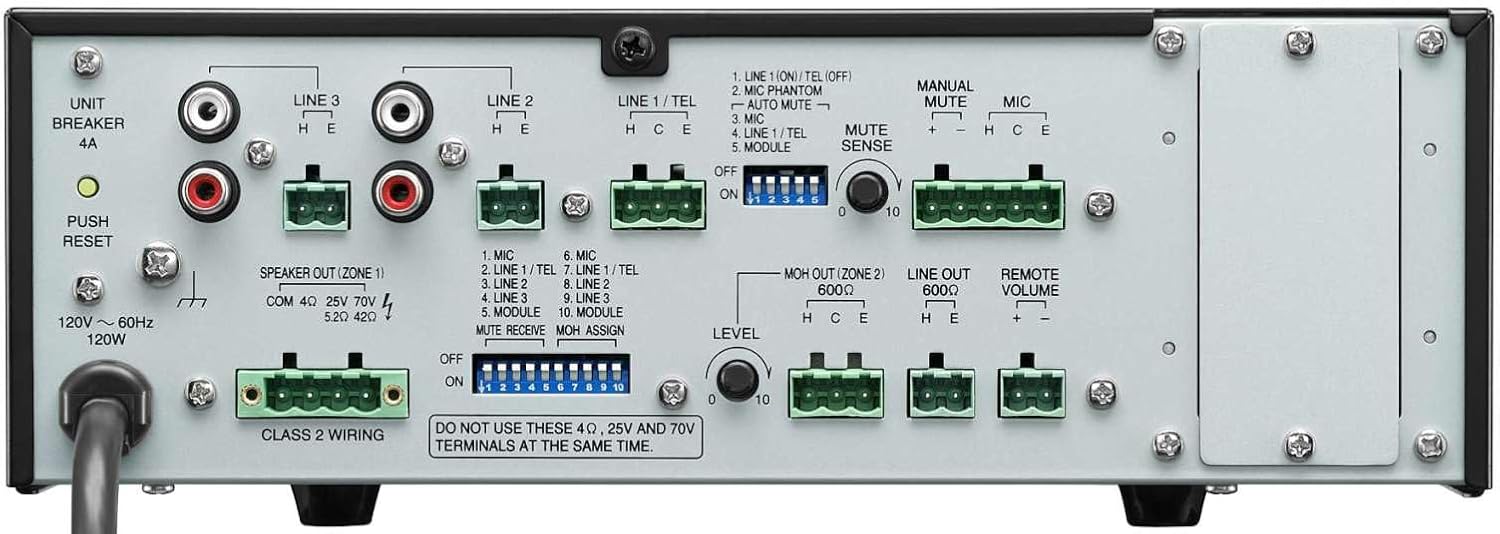
Сүрөт 4.2: Арткы панелдик байланыштар
This image shows the rear panel of the TOA BG-2060 Mixer Amplifier, detailing its connectivity options. Visible are the power input, speaker outputs (4 Ohms, 25V, 70V), various input terminals (Mic, Line 1/Tel, Line 2, Line 3, Module), MOH output, Line output, Remote Volume control, and DIP switches for configuration.
- Кубат киргизүү: AC кубат шнурунун туташуусу.
- UNIT BREAKER: Resettable circuit breaker.
- Speaker Output (ZONE 1): Terminals for connecting speakers (4 Ohms, 25V, or 70V). Note: Do not use 4 Ohms, 25V, and 70V terminals at the same time.
- Киргизүү терминалдары:
- MIC: Balanced input for microphones, with +24V DC phantom power option.
- LINE 1/TEL: Selectable input for line-level devices or telephone paging.
- LINE 2, LINE 3: Unbalanced inputs for line-level devices (e.g., CD players, media players).
- МОДУЛЬ: Input for optional modules.
- MOH OUT (ZONE 2): Music On Hold output, also assignable as a second zone output.
- LINE OUT: Unbalanced line-level output for connecting to external ampкөтөргүчтөр же жаздыруучу түзүлүштөр.
- АЛЫСКЫ ҮНДҮМ: Terminals for connecting an optional remote volume control.
- DIP өчүргүчтөр: Configure various settings such as phantom power, input sensitivity, muting functions, and MOH assignment.
5. Орнотуу
Follow these steps for initial setup of your BG-2060 Mixer Ampөмүрлүү.
- Өчүрүү: Ensure the unit's power switch is in the OFF position and the power cord is disconnected.
- Динамик туташуу: Connect your speakers to the appropriate speaker output terminals (4 Ohms, 25V, or 70V) on the rear panel. Ensure correct polarity. Do not connect speakers to multiple output types simultaneously.
- Киргизүү түзмөгүнүн туташуусу: Connect your audio sources (microphones, music players, etc.) to the desired input terminals (MIC, LINE 1/TEL, LINE 2, LINE 3, MODULE) using appropriate cables and terminal plugs.
- DIP которуштуруу конфигурациясы: Refer to the rear panel diagram and the detailed instructions in the full manual for setting the DIP switches according to your specific needs (e.g., phantom power for microphones, mute settings).
- Кошумча туташуулар: If using, connect to the MOH OUT, LINE OUT, or REMOTE VOLUME terminals.
- Кубат туташуу: Once all connections are secure, plug the power cord into a suitable AC outlet.
6. Операция
Operating the BG-2060 is straightforward.
- Күйгүзүү: Turn the POWER switch on the front panel to the ON position. The POWER LED will illuminate blue.
- Input Volume Adjustment: Slowly turn up the volume knob for the input channel you wish to use (MIC, LINE 1/TEL, etc.).
- Башкы үндү тууралоо: Adjust the master volume control (if applicable, or use individual input volumes) to achieve the desired overall output level.
- Тон көзөмөлү: Use the BASS and TREBLE controls to fine-tune the audio's low and high frequencies to your preference.
- Мониторинг: Observe the SIGNAL and PEAK LEDs. The SIGNAL LED indicates audio presence. If the PEAK LED illuminates frequently or stays lit, reduce the input volume to prevent distortion.
- Үн чыгаруу функциясы: If configured via DIP switches, utilize the manual or automatic mute functions as needed for paging or announcements.
7. Техникалык тейлөө
Proper maintenance ensures the longevity and optimal performance of your mixer ampөмүрлүү.
- Тазалоо: Агрегатты жумшак, кургак чүпүрөк менен сүртүңүз. Абразивдүү тазалагычтарды, момдорду же эриткичтерди колдонбоңуз.
- Вентиляция: Periodically check that ventilation openings are clear of dust and debris.
- Байланыштары: Бардык кабелдик туташуулардын бекем жана дат баспагандыгын текшериңиз.
- Сактагыч: Эгерде түзмөктү узак убакытка сактап койсоңуз, аны электр тармагынан сууруп, салкын, кургак жерде сактаңыз.
8. Кыйынчылыктарды
Жалпы маселелер жана аларды чечүү үчүн төмөнкү таблицага кайрылыңыз.
| Көйгөй | Мүмкүн себеп | Чечим |
|---|---|---|
| Күч жок | Power cord disconnected; Unit breaker tripped; Power outlet issue. | Check power cord connection; Press UNIT BREAKER button on rear panel; Test power outlet with another device. |
| Үн чыгышы жок | Input volume too low; Speaker connections incorrect; Mute function active; Incorrect input selected. | Increase input and master volumes; Verify speaker wiring and impedance; Check DIP switch settings for mute; Ensure correct input source is active. |
| Бурмаланган үн | Input signal too high (PEAK LED on); Incorrect impedance matching; Faulty cable. | Reduce input volume; Ensure speaker impedance matches amplifier output; Replace cables. |
| Ызы-чуу же ызы-чуу | Жерге туташтыруу цикли; Бош туташуулар; Башка электроникадан келген тоскоолдуктар. | Ensure proper grounding; Check all cable connections; Move unit away from other electronic devices. |
9. Техникалык шарттар
| Өзгөчөлүк | Деталь |
|---|---|
| Power Source | 120 В өзгөрмө, 60 Гц |
| Rated Output | 60 Вт |
| Киргизүүлөр | Mic: -60 dB, 600 Ohms, balanced; Line 1/TEL: -10 dB/-20 dB, 10 kOhms, balanced; Line 2, 3: -10 dB, 10 kOhms, unbalanced; Modules |
| Чыгуулар | Speaker: 4 Ohms, 25 V (10 Ohms), 70 V (83 Ohms), balanced; MOH: 0 dB, 600 Ohms, balanced; Line: 0 dB, 600 Ohms, unbalanced |
| Чыгарууну жөнгө салуу | 2 dB or less, no load to full load (1 kHz) |
| фантомдук күч | On/Off switch for Mic, +24 V DC |
| Тон башкаруу | Bass: +/- 10 dB at 100 Hz; Treble: +/- 10 dB at 10 kHz |
| Үнсүз | Manual mute/Automatic mute |
| Көрсөткүчтөр | Power LED, Сигнал деңгээл LED, Peak LED |
| Өлчөмдөрү (WxHxD) | 10.39 x 3.71 x 10.52 дюйм |
| Салмагы | 11.68 фунт |
10. Кепилдик жана колдоо
For warranty information and technical support, please refer to the documentation provided with your purchase or visit the official TOA Electronics webсайт.


