1. Киришүү
This manual provides detailed instructions for the installation, operation, and maintenance of your KERUI G64 GSM/WiFi Home Alarm System. Please read this manual thoroughly before using the system to ensure proper functionality and safety. The KERUI G64 system offers advanced security features, including dual network connectivity (WiFi and 4G GSM), a 4.3-inch LCD touchscreen, and smart home integration.
2. Продукт бүтүп калдыview
The KERUI G64 is a comprehensive home security solution designed to protect your property. It features a central control panel with a touchscreen display and supports various wireless sensors and accessories.
2.1 Негизги өзгөчөлүктөрү
- WiFi + 4G GSM Dual Network: Operates on 2.4 GHz WiFi and 2G/3G/4G SIM cards for reliable connectivity.
- 4.3-inch TFT Full-Touch Screen: Intuitive interface for local and remote control via Tuya APP/Smart Life APP.
- Timed Arming and Disarming: Schedule activation and deactivation to suit your routine.
- Манжа изин таануу: Supports up to 30 fingerprints for convenient arming/disarming.
- Кеңейтүүчү система: Supports up to 99 wireless sensors (door/window, motion, smoke, water leakage) and 10 remote controls.
- Үн менен башкаруу: Amazon Alexa жана Google Assistant менен шайкеш келет.
- реалдуу убакыт мониторинг: Synchronizes information and provides instant alerts.
- Уурулукка каршы коргоо: Triggers a loud alarm and sends notifications to your smartphone upon detection.
- Температура жана нымдуулук дисплей: Shows current environmental conditions.
- Көп тилдүү колдоо: 12 тилди колдойт.
2.2 Системанын компоненттери

2.1-сүрөт: Main components of the KERUI G64 alarm system, including the control panel, siren, remote controls, door/window sensors, and motion detectors.
- Alarm Host (Control Panel): The central unit with a 4.3-inch touchscreen.
- Эшик/терезе сенсорлору: Detect opening and closing of doors and windows.
- PIR кыймыл детекторлору: Detect movement within their coverage area.
- Алыстан башкаруу каражаттары: Куралдандыруу, куралсыздандыруу жана SOS функциялары үчүн.
- Зымдуу сирена: Сигнализация иштетилгенде катуу үн чыгарат.
- Кубаттуу адаптер: For powering the alarm host.
- Колдонуучунун колдонмосу: Бул документ.

2.2-сүрөт: Diagram illustrating the KERUI G64 alarm system with various compatible accessories such as IP cameras, smoke detectors, and water leakage detectors.
3. Орнотуу
3.1 Баштапкы кубаттуулук
- Connect the power adapter to the alarm host and plug it into a power outlet.
- The system will power on, and the 4.3-inch TFT display will activate.
- Follow the on-screen prompts for initial language selection and time/date settings.

3.1-сүрөт: The 4.3-inch TFT color touchscreen display of the KERUI G64 alarm host, showing the main interface with status, date, and time.
3.2 Network Configuration (WiFi & GSM)
- WiFi туташуусу:
- On the alarm host, navigate to "Settings" > "Network Settings" > "WiFi".
- Select your 2.4 GHz WiFi network (5G WiFi is not supported) and enter the password.
- Ensure the host is connected to the internet.
- GSM SIM Card Installation:
- Insert a 2G/3G/4G SIM card into the designated slot on the alarm host.
- The system will automatically detect the SIM card. Ensure it has sufficient credit for calls and SMS.
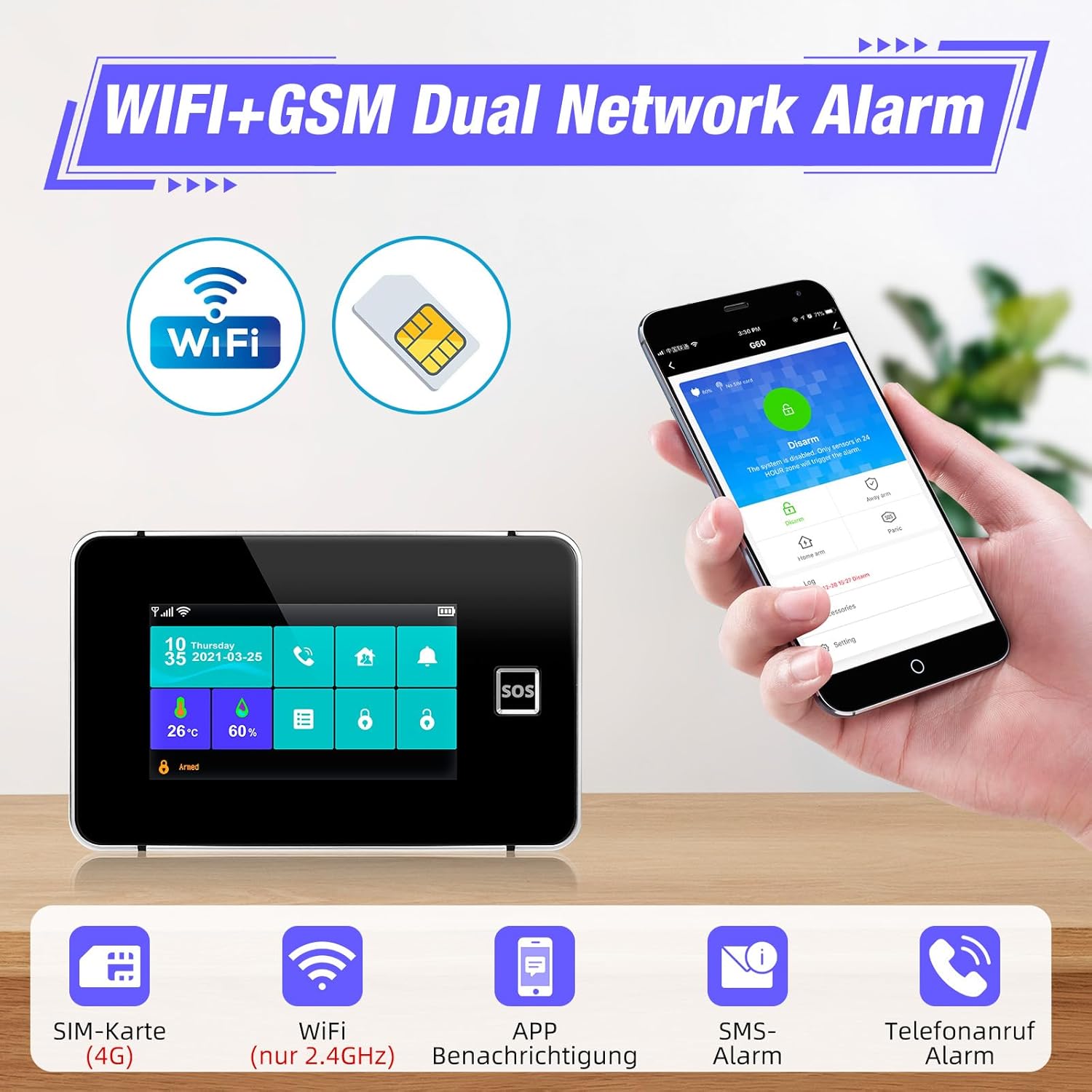
3.2-сүрөт: The KERUI G64 alarm host demonstrating its WiFi and GSM dual network capabilities, allowing remote control via a smartphone app.
3.3 Колдонмону орнотуу жана жупташтыруу
- Смартфонуңуздун колдонмолор дүкөнүнөн (iOS же Android) "Tuya Smart" же "Smart Life" тиркемесин жүктөп алыңыз.
- Каттоо эсебин жана кирүү.
- In the app, select "Add Device" and follow the instructions to pair your KERUI G64 alarm host. This typically involves scanning a QR code on the host or selecting it from a list of nearby devices.

3.3-сүрөт: The Tuya Smart app interface showing integration with various smart home devices, including the alarm host, enabling remote control and monitoring.
3.4 Adding Sensors and Remote Controls
- On the alarm host, navigate to "Settings" > "Accessories" > "Add Sensor" or "Add Remote".
- Follow the on-screen instructions to trigger the sensor (e.g., open a door for a door sensor, press a button on the remote) or activate the pairing mode for motion detectors.
- The host will detect and add the accessory. You can then name the sensor for easier identification (e.g., "Front Door," "Living Room Motion").
- Repeat for all desired sensors and remote controls. The system supports up to 99 wireless sensors and 10 remote controls.
3.5 Манжа изин орнотуу
- On the alarm host, go to "Settings" > "Fingerprint Management".
- Follow the prompts to register your fingerprints. You can register up to 30 fingerprints for arming, disarming, and unlocking the system.
3.6 Убакыт менен куралдандыруу жана куралсыздандыруу
- Access the "Timed Arm/Disarm" settings via the alarm host or the Tuya/Smart Life app.
- Set desired times for the system to automatically arm (e.g., when leaving for work) and disarm (e.g., upon returning home).
- You can also configure a delay time for arming to prevent false alarms when exiting the premises.

3.4-сүрөт: Мурункуample schedule for timed arming and disarming, illustrating how the system can be automated for daily routines.
4. Иштөө нускамалары
4.1 Системаны куралдандыруу жана куралсыздандыруу
- Via Touchscreen: Tap the "Arm" or "Disarm" icon on the main screen.
- Алыстан башкаруу аркылуу: Press the "Arm" or "Disarm" button on your remote.
- Via Fingerprint: Катталган манжаңызды манжа изинин сенсоруна коюңуз.
- Колдонмо аркылуу: Use the "Arm" or "Disarm" function in the Tuya/Smart Life app.
- Үн менен башкаруу: Use commands like "Alexa, arm my security system" or "Hey Google, disarm the alarm" (after linking accounts).
4.2 SOS функциясы
In an emergency, press the "SOS" button on the alarm host or remote control. The system will immediately trigger a loud siren and send emergency notifications to pre-configured contacts via call and SMS.
4.3 Receiving Alerts and Notifications
When a sensor is triggered (e.g., door opened, motion detected), the system will:
- Сиренаны иштетиңиз.
- Send push notifications to your smartphone via the Tuya/Smart Life app.
- Send SMS messages to designated phone numbers.
- Make phone calls to designated phone numbers.

4.1-сүрөт: Illustration of an alarm event, showing a triggered sensor, the alarm host, and a smartphone receiving an immediate notification and call.
4.4 Температураны жана нымдуулукту көзөмөлдөө
The alarm host displays real-time temperature and humidity readings on its main screen, providing additional environmental information.

4.2-сүрөт: The alarm host display showing current temperature (26°C) and humidity (60%) readings.
5. Техникалык тейлөө
5.1 Батареяны башкаруу
The KERUI G64 alarm host includes a backup battery to ensure continuous operation during power outages. Wireless sensors are battery-powered. The system will notify you of low battery levels for both the host and connected sensors.

5.1-сүрөт: Notifications for anti-tamper, low main unit battery, power outage, and low sensor battery, all sent to the user's smartphone.
- Alarm Host Battery: The internal alkaline battery provides backup power. If a "Low Battery" alert appears, contact support for replacement or follow specific instructions if user-replaceable.
- Сенсордук батареялар: When a sensor's battery is low, replace it promptly with the recommended battery type (refer to individual sensor manuals or product specifications).
5.2 Тазалоо
Wipe the alarm host and sensors with a soft, dry cloth. Do not use liquid cleaners or abrasive materials, as these can damage the devices.
5.3 Системаны жаңыртуу
Periodically check the Tuya/Smart Life app for firmware updates for your alarm host. Keeping the system updated ensures optimal performance and security.
6. Кыйынчылыктарды
| Көйгөй | Мүмкүн себеп | Чечим |
|---|---|---|
| System not connecting to WiFi. | Incorrect WiFi password; 5GHz network selected; host too far from router. | Verify password; ensure 2.4GHz network is selected; move host closer to router. |
| No GSM signal or calls/SMS not working. | SIM card not inserted correctly; no credit on SIM; poor network coverage. | Reinsert SIM card; check SIM card balance; move host to an area with better signal. |
| Сенсор ойготкучту иштетпей жатат. | Sensor battery low; sensor not paired; sensor out of range; incorrect zone setting. | Replace sensor battery; re-pair sensor; move sensor closer to host; check zone settings. |
| Колдонмо эскертмелерди албай жатат. | App permissions not granted; host not connected to internet; app not running in background. | Check app notification permissions; ensure host has stable WiFi/GSM connection; keep app running. |
| Манжа изи таанылган жок. | Finger wet or dirty; fingerprint not registered correctly. | Ensure finger is clean and dry; re-register fingerprint if issues persist. |
7. Техникалык шарттар
- Модель номери: G64
- Өндүрүүчү: KERUI
- Продукциянын өлчөмдөрү: 14 x 10 x 22 см
- Элемент Салмагы: 600 грамм
- Кубат булагы: Battery powered (with AC adapter)
- Орнотуу ыкмасы: Self-adhesive (for sensors)
- Үн деңгээли: 115 Decibels (siren)
- Байланыш технологиясы: Wireless (WiFi 2.4GHz, GSM 2G/3G/4G)
- Дисплей: 4.3-inch TFT Full-Touch Screen
- Шайкеш түзмөктөр: Smartphones (via Tuya/Smart Life App)
- Батарея түрү: Alkaline (for backup and sensors)
- Камтылган компоненттер: Alarm Host, Door/Window Sensors, Motion Detector, Siren, Remote Controls, Power Adapter.
8. Кепилдик жана колдоо
KERUI products are designed for reliability and performance. For warranty information, technical support, or service inquiries, please refer to the warranty card included with your product or visit the official KERUI webсайт. Сатып алганыңыздын далили катары сатып алуу дүмүрчөгүңүздү сактаңыз.
Кошумча булактарды жана көп берилүүчү суроолорду алуу үчүн, сиз баш багсаңыз болот KERUI Brand Store on Amazon.


