1. Продукт бүтүп калдыview
The CHOETECH B695 is a versatile 10000mAh magnetic power bank designed for convenient charging of multiple devices. It features both wireless charging capabilities and multiple wired output options, including built-in USB-C and Lightning cables. Its compact design and integrated safety features make it an ideal portable power solution.

Сүрөт: алдыңкы жана арткы view of the CHOETECH B695 Magnetic Power Bank, showcasing анын компакттуу конструкциясы жана ар турдуу порттору.
Негизги өзгөчөлүктөрү:
- 10000mAh кубаттуулугу: камсыз кылат ampбир нече заряд үчүн күч.
- 2-бирде заряддоо: Supports both magnetic wireless charging and wired charging.
- Камтылган кабелдер: Integrated USB-C and Lightning cables for direct device connection.
- Бир нече чыгуулар: Includes USB-A, Type-C (input/output), and dedicated wireless charging for phones and watches.
- Магниттик тегиздөө: Ensures secure and efficient wireless charging for compatible devices.
- LED санарип дисплей: Clearly indicates remaining battery percentage.
- Комплекстүү коопсуздук коргоосу: Built-in safeguards against overcharge, overdischarge, overcurrent, overvoltage, temperature, short circuit, overpower, recovery, and electromagnetic field issues.
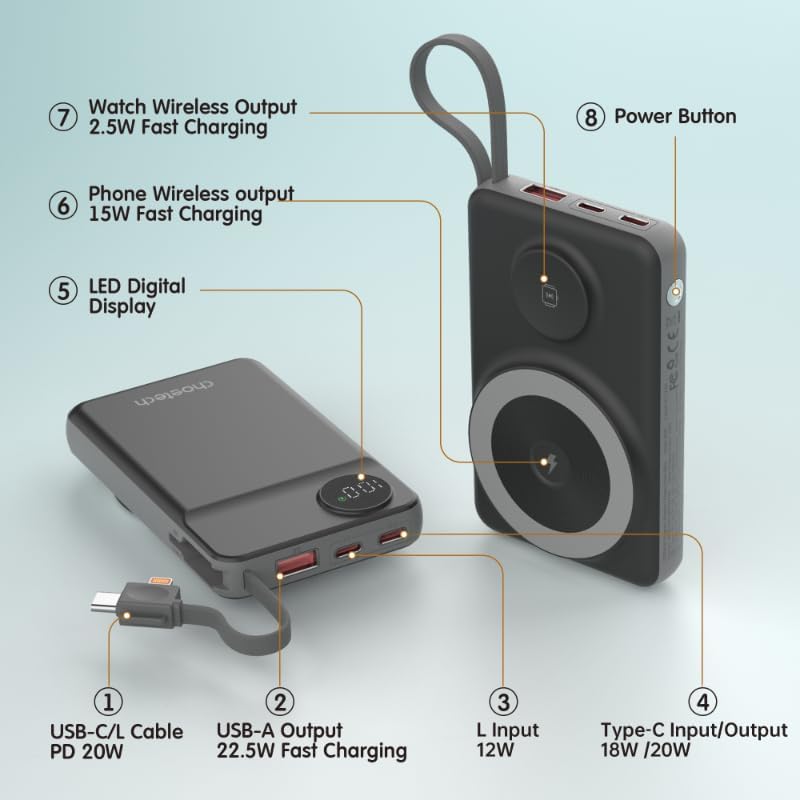
Image: Detailed diagram labeling the ports and features of the CHOETECH B695, including USB-C/L cable, USB-A output, L input, Type-C input/output, LED display, phone wireless output, watch wireless output, and power button.
2. Баштоо: Орнотуу
2.1 Power банкты заряддоо
Before initial use, fully charge your CHOETECH B695 power bank. This ensures optimal performance and battery longevity.
- Connect a compatible USB-C charging cable (not included) to the Type-C Input/Output port (4) on the power bank.
- Connect the other end of the cable to a USB wall adapter (not included).
- The LED Digital Display (5) will show the charging progress. It will display "100" when fully charged.
- Alternatively, you can use the built-in Lightning input (3) to charge the power bank with a Lightning cable and adapter.
Эскертүү: For fastest charging of the power bank, use a PD (Power Delivery) compatible wall adapter with the Type-C port.
3. Иштөө нускамалары
3.1 Батареянын деңгээлин текшерүү
Press the Power Button (8) once to activate the LED Digital Display (5), which will show the current battery percentage.
3.2 Зымдуу заряддоо
The CHOETECH B695 offers multiple wired charging options:
- Using Built-in USB-C/L Cable (1):
- Pull out the integrated USB-C or Lightning cable from its storage slot.
- Connect the appropriate cable end to your device's charging port.
- Заряддоо автоматтык түрдө башталат.
- Using USB-A Output (2):
- Connect your device's USB charging cable to the USB-A Output port (2).
- Кабелиңиздин экинчи учун аппаратыңызга туташтырыңыз.
- Заряддоо башталат.
- Using Type-C Input/Output (4):
- Connect your device's USB-C charging cable to the Type-C Input/Output port (4).
- Кабелиңиздин экинчи учун аппаратыңызга туташтырыңыз.
- Заряддоо башталат.

Image: The CHOETECH B695 power bank connected to a smartphone via its built-in USB-C cable, demonstrating wired charging.
3.3 Wireless Charging (Phone)
The power bank supports magnetic wireless charging for compatible smartphones (e.g., iPhone 12 series and newer, or Android phones with magnetic cases).
- Кубат банкынын жетиштүү кубатталганын текшериңиз.
- Align your compatible smartphone with the larger magnetic charging pad (6) on the power bank.
- The phone should snap into place magnetically, and wireless charging will begin.

Image: A smartphone magnetically attached to the larger wireless charging pad and a smartwatch on the smaller pad of the CHOETECH B695, illustrating simultaneous wireless charging.
3.4 Wireless Charging (Watch)
The power bank includes a dedicated smaller magnetic charging pad for smartwatches.
- Кубат банкынын жетиштүү кубатталганын текшериңиз.
- Place your compatible smartwatch onto the smaller magnetic charging pad (7).
- The watch should align magnetically, and wireless charging will begin.
3.5 Бир убакта заряддоо
The CHOETECH B695 can charge multiple devices simultaneously using a combination of its wired and wireless outputs.

Image: The CHOETECH B695 power bank connected to and wirelessly charging multiple devices, including smartphones and a smartwatch, demonstrating its multi-output capability.
4. Коопсуздук жөнүндө маалымат жана коргоо функциялары
The CHOETECH B695 is equipped with multiple safety mechanisms to protect your devices and the power bank itself.
- Ашыкча кубаттан коргоо: Prevents the battery from being charged beyond its capacity.
- Ашыкча разряддан коргоо: Protects the battery from being fully depleted, extending its lifespan.
- Ашыкча ток коргоо: Ашыкча ток агымынан коргойт.
- Overvoltage Коргоо: т. каршы коргойтtagд толкундары.
- Температураны коргоо: Monitors and regulates the internal temperature to prevent overheating.
- Кыска туташуулардан коргоо: Кыска туташуу болгон учурда автоматтык түрдө өчөт.
- Ашыкча күчтөн коргоо: Prevents power output beyond safe limits.
- Калыбына келтирүүдөн коргоо: Allows the device to recover from protection states.
- Электромагниттик талааны коргоо: Shields against harmful electromagnetic interference.

Image: An infographic detailing the nine safety protection features integrated into the CHOETECH B695 power bank, including overcharge, overdischarge, overcurrent, overvoltage, temperature, short circuit, overpower, recovery, and electromagnetic field protection.
Маанилүү: Do not expose the power bank to extreme temperatures, direct sunlight, or water. Do not disassemble or attempt to repair the device. Keep out of reach of children.
5. Техникалык тейлөө
- Тазалоо: Use a soft, dry cloth to clean the power bank. Avoid liquid cleaners.
- Сактагыч: Power банкты күн тийбеген жана экстремалдык температурадан алыс, салкын, кургак жерде сактаңыз.
- Батареянын ден соолугу: To maintain battery health, fully charge and discharge the power bank at least once every three months if not in regular use.
- Кабельге кам көрүү: Handle the built-in cables gently. Avoid excessive bending or pulling to prevent damage.
6. Кыйынчылыктарды
6.1 Power Bank заряддалбай жатат
- Ensure the charging cable is securely connected to both the power bank's input port and the wall adapter.
- Дубал адаптеринин туура иштеп жатканын жана иштеп жаткан розеткага сайылып турганын текшериңиз.
- Try a different USB-C or Lightning charging cable and wall adapter.
6.2 Түзмөк Power Bankтан кубатталбай жатат
- Зымдуу кубаттоо:
- Powerbankтын заряды жетиштүү экенин текшериңиз (LED дисплейди караңыз).
- Кубаттоочу кабелдин кубаттоочу банктын чыгаруу портуна жана түзмөгүңүзгө бекем туташтырылганын текшериңиз.
- Power bank'теги башка кубаттоочу кабелди же башка чыгаруу портун колдонуп көрүңүз.
- Press the power button once to activate output if necessary.
- Зымсыз кубаттоо:
- Ensure your device is compatible with magnetic wireless charging.
- Remove any thick cases or metallic objects from your device that might interfere with wireless charging.
- Ensure your device is correctly aligned with the magnetic charging pad on the power bank.
- Power банктын заряды жетиштүү экендигин текшериңиз.
6.3 Жай заряддоо
- Power bankты жана түзмөктөрүңүздү кубаттоо үчүн тез кубатталуучу шайкеш келген кабель жана адаптер колдонуп жатканыңызды текшериңиз.
- Some devices may limit charging speed when multiple devices are connected simultaneously.
- Environmental factors (e.g., high temperature) can affect charging efficiency.
6.4 LED Display Not Working
- Кубат баскычын бекем басыңыз.
- Эгерде кубат банкы толугу менен түгөнгөн болсо, дисплей бир аз заряддалганга чейин күйбөй калышы мүмкүн.
7. Техникалык шарттар
| Модел | B695 |
| Батарея сыйымдуулугу | 10000mAh |
| Камтылган кабелдик чыгаруу | USB-C/L Cable PD 20W |
| USB-A чыгаруу | 22.5W тез заряддоо |
| Type-C Киргизүү/Чыгуу | 18W / 20W |
| Lightning Input | 12 Вт |
| Phone Wireless Output | 15W тез заряддоо |
| Wireless Output | 2.5W тез заряддоо |
| Өлчөмдөрү (У x Туурасы x Калыңдыгы) | 7.7L x 9.7W x 16.2Th centimeters |
| Элемент Салмагы | 0.05 килограмм (50г) |
| Түс | Кара |
8. Кепилдик жана колдоо
CHOETECH products are designed and manufactured to the highest quality standards. For warranty information and customer support, please refer to the warranty card included with your purchase or visit the official CHOETECH webсайт.
If you encounter any issues or have questions regarding your CHOETECH B695 power bank, please contact CHOETECH customer service for assistance.