1. Киришүү
This manual provides essential information for the safe and effective operation of your ION Audio Retro Glow Boombox. This device combines classic audio playback with modern connectivity, featuring an AM/FM radio, cassette player/recorder, Bluetooth 5.3, USB, and SD card playback capabilities. Please read this manual thoroughly before use and retain it for future reference.
2. Коопсуздук маалыматы
- Агрегатты сууга же нымга тийгизбеңиз.
- Аппаратты жылуулук булактарынын жанына же тике күн нуруна коюудан алыс болуңуз.
- туура желдетүүнү камсыз кылуу; вентиляция тешиктерин жаап салбаңыз.
- Өндүрүүчү белгилеген тиркемелерди/аксессуарларды гана колдонуңуз.
- Чагылган бороондо же узак убакыт бою колдонбогондо, розеткадан ажыратыңыз.
- Бардык тейлөөлөрдү квалификациялуу тейлөө кызматкерлерине тапшырыңыз.
3. Эмнелер камтылган
Таңгактан чыгаргандан кийин, төмөндө көрсөтүлгөн нерселердин бардыгы бар экенин жана жакшы абалда экендигин текшериңиз:
- ION Audio Retro Glow Boombox
- Электр кабели
- Ыкчам Старт Жетекчиси
4. Продукт бүтүп калдыview
The Retro Glow Boombox features a translucent housing with multi-colored LED lights that synchronize with music. It includes dual full-range speakers for robust audio output.
Front Panel

Сүрөт 1: Алдыңкы view of the Retro Glow Boombox, showcasing the cassette deck, radio tuner, and illuminated dual speakers.
Жогорку башкаруу элементтери

2-сүрөт: Детальдуу view of the top panel, including volume, bass, treble controls, cassette function buttons (Pause, Stop/Eject, F.FWD, REW, Play, REC), and mode selectors (Tape, Aux, Radio, Bluetooth/USB/SD).
Side Panel and Rear
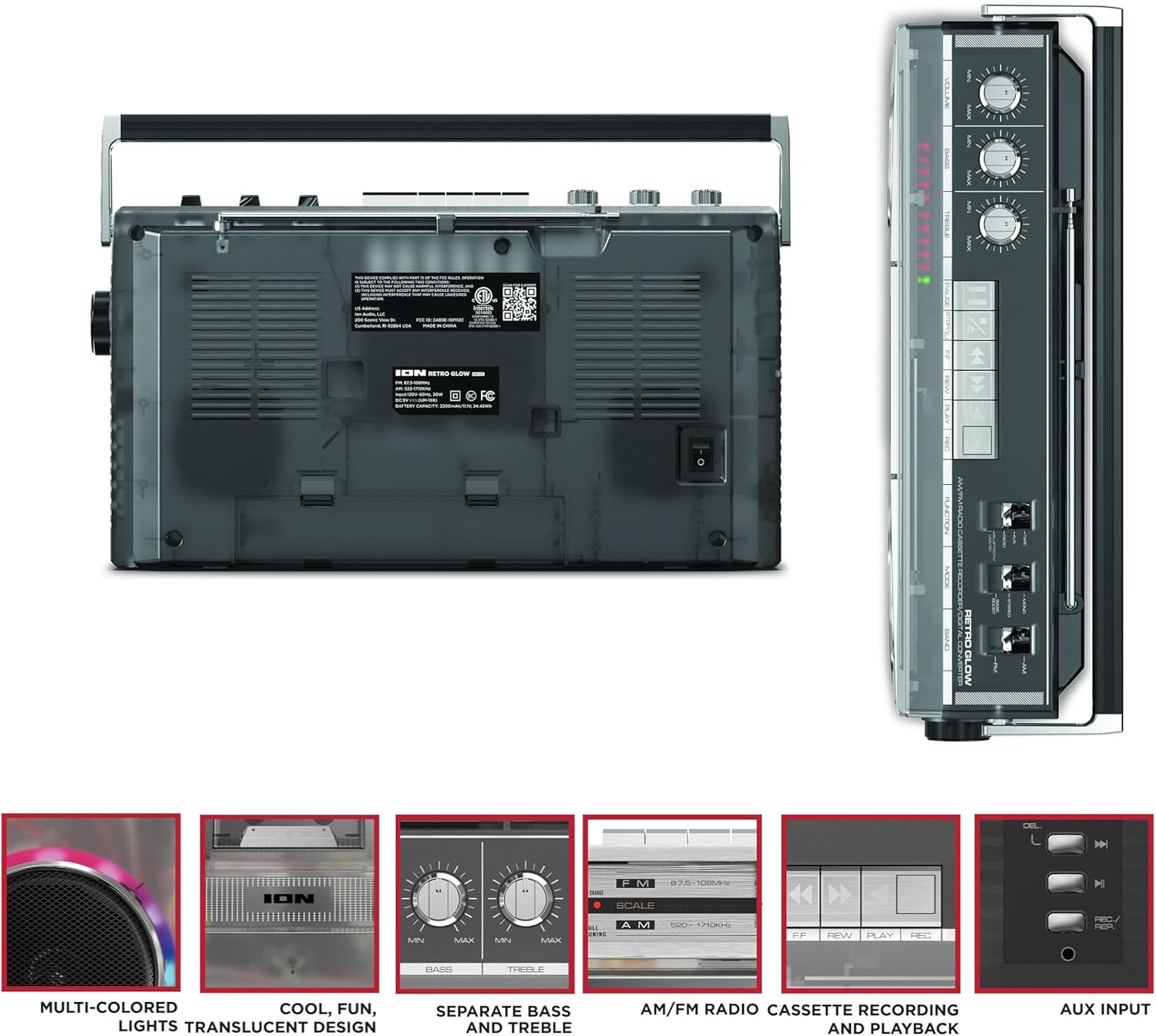
Figure 3: Side panel illustrating the USB port, SD card slot, and playback control buttons. The rear panel includes the power input and battery compartment.
5. Орнотуу
Бумбоксту кубаттоо
The Retro Glow Boombox can be powered via the included AC power cable or by batteries for portable use.
- AC кубаттуулугу: Connect the power cable to the AC input on the rear of the unit and then to a wall outlet.
- Батарея кубаттуулугу: Open the battery compartment on the rear and insert the required batteries (type and quantity specified in specifications).

4-сүрөт: Арткы view of the boombox, highlighting the power input and the battery compartment for portable operation.
6. Иштөө нускамалары
Жалпы операция
- Күйгүзүү/өчүрүү: Use the power switch to turn the unit on or off.
- Үндү көзөмөлдөө: Adjust the 'VOLUME' knob on the top panel to increase or decrease the sound level.
- Тон көзөмөлү: Use the 'BASS' and 'TREBLE' knobs to customize the audio output to your preference.
- LED жарыктары: The multi-colored LED lights around the speakers dance in sync with the music. Refer to the Quickstart Guide for specific controls to change light modes or turn them off.
Радио функциясы
- Switch the 'FUNCTION' selector to 'RADIO'.
- Select 'AM' or 'FM' using the 'BAND' switch.
- Extend the telescopic antenna for optimal FM reception. For AM, rotate the unit for best reception.
- Use the 'TUNING' knob to scan for stations.
Кассета ойноткуч/Диктофон
- Ойнотуу: Press the 'STOP/EJ' button to open the cassette door. Insert a cassette tape and close the door. Press 'PLAY' to begin playback.
- Жаздыруу: To record from the radio, built-in microphone, or an external source (via Aux input), ensure a blank cassette is inserted. Select the desired source using the 'FUNCTION' switch. Press the 'REC' button (often simultaneously with 'PLAY') to start recording.
- Тез алдыга/артка түрдүрүү: Use the 'F.FWD' and 'REW' buttons for tape navigation.
Bluetooth байланышы
- Switch the 'FUNCTION' selector to 'BLUETOOTH/USB/SD'. The unit will enter pairing mode.
- On your Bluetooth-enabled device, search for 'Retro Glow Boombox' and select it to pair.
- Once paired, you can stream audio wirelessly to the boombox.
USB жана SD картаны ойнотуу
- Insert a USB drive or SD card into the respective slot on the side panel.
- Switch the 'FUNCTION' selector to 'BLUETOOTH/USB/SD'. The unit should automatically detect and begin playing audio fileс киргизилген медиадан.
- Use the playback control buttons (play/pause, skip forward/backward) on the side panel to manage your audio.
Көмөкчү киргизүү
- Connect an external audio device (e.g., smartphone, MP3 player) to the 'AUX' input using a 3.5mm audio cable (not included).
- Switch the 'FUNCTION' selector to 'AUX'. Audio from your external device will play through the boombox speakers.
7. Техникалык тейлөө
- Тазалоо: Түзмөктүн сыртын тазалоо үчүн жумшак, кургак чүпүрөктү колдонуңуз. Абразивдүү тазалоочу каражаттарды же эриткичтерди колдонбоңуз.
- Кассеталык палубага кам көрүү: Тасма баштарын үзгүлтүксүз тазалап, роликтерди кебез таякча менен бир аз кысып туруңузampОптималдуу үн сапатын камсыз кылуу жана тасманын бузулушун алдын алуу үчүн изопропил спирти менен эритилсин.
- Сактагыч: When not in use, store the boombox in a cool, dry place away from direct sunlight and extreme temperatures.
8. Кыйынчылыктарды
Күч жок
- Кубат кабели бирдикке да, иштеп жаткан электр розеткасына да бекем туташтырылганын текшериңиз.
- Батареяларды колдонсоңуз, алардын туура салынганын жана түгөнүп калбагандыгын текшериңиз.
Үн жок
- Check the volume level on the boombox and the connected audio source (if applicable).
- Ensure the correct function mode (Radio, Tape, Bluetooth, USB/SD, Aux) is selected.
- For cassette playback, verify the tape is inserted correctly and the heads are clean.
Bluetooth жупташуу маселелери
- Make sure the boombox is in Bluetooth pairing mode.
- Ensure your Bluetooth device is within range (typically 30 feet or 10 meters).
- Түзмөктү жупташып, кайра жупташып көрүңүз.
9. Техникалык шарттар
| Продукциянын өлчөмдөрү | 9.25 x 16.25 x 5.25 дюйм |
| Элемент Салмагы | 8.93 фунт |
| Байланыш технологиясы | Bluetooth 5.3, USB, SD Card, Aux Input |
| Динамик түрү | Stereo, Full-Range |
| Power Source | AC Power Cable, Rechargeable Battery (approx. 10-hour life) |
| Өзгөчөлүктөр | AM/FM Radio, Cassette Player/Recorder, Multi-colored LED Lights, Retro VU Meters, Separate Bass and Treble Controls |
10. Кепилдик жана колдоо
For warranty information or technical support, please refer to the Quickstart Guide included with your product or visit the official ION Audio webсайт. Кепилдик талаптары үчүн сатып алуунун далили талап кылынышы мүмкүн болгондуктан, сатып алуу дүмүрчөгүңүздү сактап коюңуз.


