1. Продукт бүтүп калдыview
The NEWFAST WiFi Booster Range Extender is designed to expand your existing Wi-Fi network coverage, eliminate dead zones, and provide a strong, stable internet connection throughout your home or office. This dual-band device supports speeds up to 1200Mbps (867Mbps on 5GHz and 300Mbps on 2.4GHz), making it suitable for various online activities including 4K HD video streaming, online gaming, and general browsing.

Image: The NEWFAST WiFi Booster Range Extender, showcasinанын компакттуу дизайны жана төрт жөнгө салынуучу антеннасы.
2. Негизги өзгөчөлүктөрү
- High-Speed Dual-Band Connectivity: Offers combined speeds of up to 1200Mbps (867Mbps on 5GHz and 300Mbps on 2.4GHz) for seamless internet usage across multiple devices.
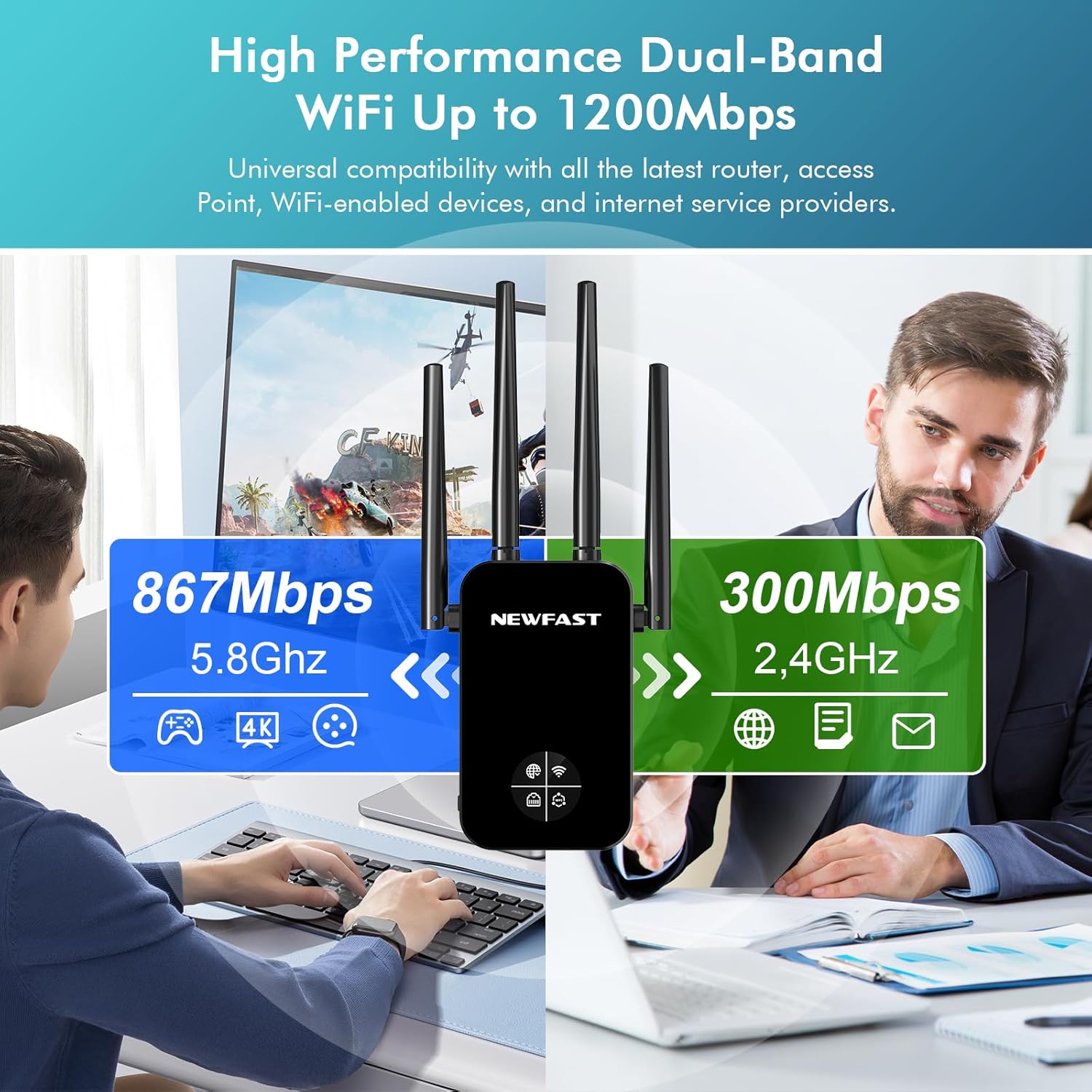
Image: Visual representation of the dual-band capabilities, highlighting 5.8GHz (867Mbps) and 2.4GHz (300Mbps) speeds.
- Кеңири сигналдык камтуу: Equipped with four external antennas and advanced signal enhancement technology to bypass obstacles and provide 360° coverage, eliminating Wi-Fi dead zones.
- Smart LCD дисплей: Features a display for simplified setup and easy monitoring of network, Wi-Fi, and WPS indications. Note: This is not a touchscreen.
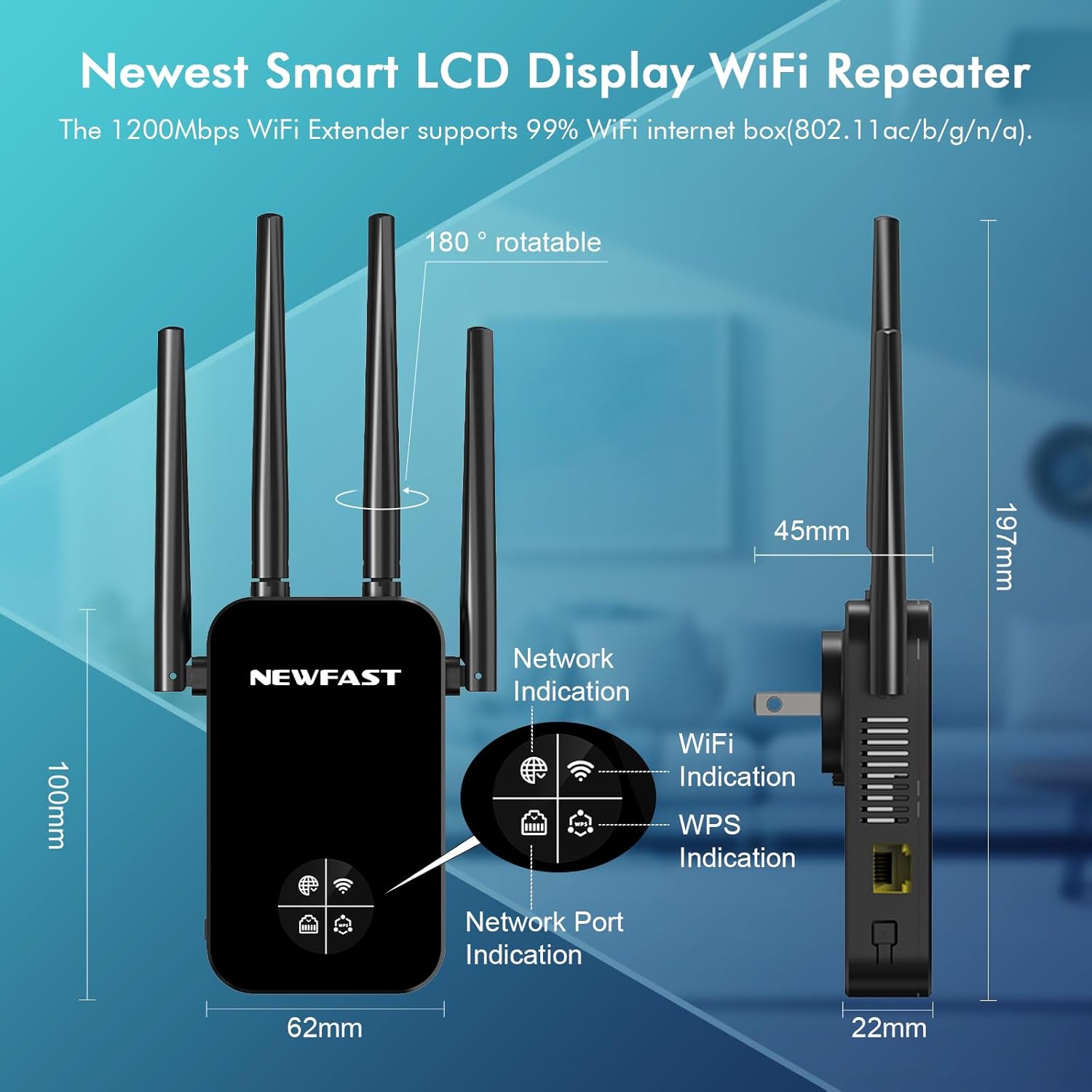
Сүрөт: деталдуу view of the WiFi repeater's smart LCD display and physical dimensions, showing network, WiFi, and WPS indicators.
- Enhanced Wi-Fi Security: Supports WPA/WPA2 and WPA-PSK/WPA2-PSK encryption protocols to protect your network from unauthorized access and ensure data privacy.
- Бир нече иштөө режимдери: Supports Repeater, Router, AP (Access Point), Bridge, and Client modes to suit various network requirements.

Image: Illustration of the five operating modes: Repeater/Bridge for Home, AP for Hotel, and Router/Client for Office/Cafe scenarios.
- Кеңири шайкештик: Works seamlessly with all wireless network devices, routers, modems, and Wi-Fi-enabled gadgets that follow 802.11AC/N/B/G standards, including smartphones, tablets, laptops, smart TVs, and game consoles.
- Ethernet порту: Includes an Ethernet port for connecting wired devices, providing a stable connection for devices like gaming consoles or desktop computers.
3. Пакеттин мазмуну
Пакетти ачкандан кийин, бардык буюмдардын бар экенине жана жакшы абалда экенине ынаныңыз:
- 1 x NEWFAST WiFi Extender
- 1 x User Manual
4. Орнотуу колдонмосу
4.1 Алгачкы жайгаштыруу
For optimal performance, plug the NEWFAST WiFi Booster into an electrical outlet located approximately halfway between your main router and the area where you experience weak Wi-Fi signal. Avoid placing it near large metal objects, microwave ovens, or other devices that may cause interference.
4.2 One-Tap Connection (WPS Method)
The simplest way to set up your NEWFAST WiFi Booster is using the WPS (Wi-Fi Protected Setup) button:
- Plug the NEWFAST WiFi Booster into a power outlet. Wait for the power indicator light to stabilize.
- Негизги зымсыз роутериңиздеги WPS баскычын басыңыз.
- Within 2 minutes, press and hold the WPS/Reset button on the NEWFAST WiFi Booster for 2-3 seconds.
- The WPS indicator on the booster will flash and then turn solid, indicating a successful connection. The booster will automatically extend your router's Wi-Fi network.

Image: Step-by-step guide for setting up the WiFi extender using the WPS button on both the router and the extender.
4.3 Кол менен орнотуу (Web Browser Method)
If your router does not support WPS, or if you prefer manual configuration, follow these steps:
- Plug the NEWFAST WiFi Booster into a power outlet near your computer or mobile device.
- Connect your computer or mobile device to the booster's default Wi-Fi network (e.g., "NEWFAST_EXT"). This network will not have internet access initially.
- ачуу а web browser (e.g., Chrome, Firefox) and enter the default IP address or domain name provided in the booster's quick start guide (commonly 192.168.1.1 or extender.net).
- Демейки колдонуучу аты жана сырсөз менен кириңиз (адатта экөө тең "admin").
- Follow the on-screen wizard to select your desired operating mode (Repeater, AP, Router, etc.) and connect to your existing Wi-Fi network by selecting its name (SSID) and entering its password.
- Once configured, the booster will restart. You can then connect your devices to the extended network.
5. Иштөө режимдери
The NEWFAST WiFi Booster supports multiple operating modes to cater to different networking needs:
- Кайталоочу режим (Диапазонду кеңейтүүчү): Бар болгон зымсыз тармактын камтуу аймагын кеңейтет. Бул Wi-Fi өлүк зоналарын жок кылуунун эң кеңири таралган режими.
- AP режими (кирүү чекити): Transforms a wired network connection into a wireless one. Ideal for creating a new Wi-Fi hotspot in a hotel room or office where only an Ethernet port is available.
- Багыттоочу режим: Functions as a primary wireless router, creating a new private network. This mode is typically used when you have a modem but no router.
- Көпүрө режими: Connects two separate network segments, often used to connect wired devices to a wireless network.
- Кардар режими: Allows wired devices (like smart TVs, gaming consoles, or desktop PCs) to connect to a wireless network. The booster acts as a wireless adapter for these devices.
6. Техникалык шарттар

Сүрөт: жарылган view of the NEWFAST WiFi Booster, highlighting its high-performance chip, external antennas, heat dissipation, and WPS/Reset button.
| Өзгөчөлүк | Деталь |
|---|---|
| Бренд | NEWFAST |
| Модел | 1200 Mbps WiFi Booster Range Extender |
| Зымсыз байланыш стандарты | 802.11a/b/g/n/ac |
| Маалыматтарды өткөрүү ылдамдыгы | 1200 Мегабит/секунда (Мбит/сек) |
| Жыштык тилкесинин классы | Кош тилкелүү (5 ГГц жана 2.4 ГГц) |
| Антенналар | 4 External Antennas (180° Rotatable) |
| Өзгөчө өзгөчөлүк | Access Point Mode, Smart LCD Display |
| Коопсуздук протоколдору | WPA / WPA2, WPA-PSK / WPA2-PSK |
| Порттар | 1 x Ethernet порту |
| Өлчөмдөрү (болжол менен) | 197мм (H) x 62mm (W) x 22mm (D) |
| Салмагы (болжол менен) | 230 г |
| Келип чыккан өлкө | Кытай |
7. Кыйынчылыктарды
If you encounter issues with your NEWFAST WiFi Booster, please refer to the following common solutions:
- Кубат/индикатордун жарыгы өчпөгөн:
- Ensure the booster is securely plugged into a working electrical outlet.
- Башка электр розеткасын колдонуп көрүңүз.
- Cannot Connect to the Booster's Wi-Fi:
- Make sure the booster is powered on and within range of your device.
- Verify you are selecting the correct Wi-Fi network name (SSID) for the booster.
- If you changed the booster's Wi-Fi name, ensure you are connecting to the new name.
- No Internet Access After Connecting to Booster:
- Ensure the booster is successfully connected to your main router (check the indicator lights, usually a solid Wi-Fi or network light).
- Re-run the setup process (WPS or manual) to ensure the booster is correctly configured to extend your main router's network.
- Негизги роутериңиздин интернетке кирүү мүмкүнчүлүгү бар-жогун текшериңиз.
- Try repositioning the booster closer to your main router.
- Жай ылдамдык же туруксуз байланыш:
- Relocate the booster to an optimal position, ideally halfway between your router and the weak signal area. Avoid placing it in corners or near obstructions.
- Ensure there are no major sources of interference (e.g., microwaves, cordless phones) nearby.
- Check for firmware updates for your booster (refer to the manufacturer's website if available).
- If many devices are connected, consider the total bandwidth available from your main router.
- WPS орнотуудагы каталар:
- Ensure your main router supports WPS and that its WPS function is enabled.
- Press the WPS buttons on both devices within the specified time frame (usually 2 minutes).
- Try the manual setup method via a web браузер.
- Resetting the Booster:
- If issues persist, you can perform a factory reset. With the booster powered on, use a pin or paperclip to press and hold the WPS/Reset button for approximately 5-10 seconds until the lights flash. This will restore the booster to its factory default settings, and you will need to set it up again.
8. Техникалык тейлөө
To ensure the longevity and optimal performance of your NEWFAST WiFi Booster:
- Түзмөктү салкын, кургак жерде, түз күн нурунан жана ашыкча ысыктан же нымдуулуктан алыс кармаңыз.
- Сыртын жумшак, кургак чүпүрөк менен тазалаңыз. Суюк тазалоочу каражаттарды же аэрозольдорду колдонбоңуз.
- Ensure proper ventilation around the device; do not block the ventilation holes.
- Periodically check for firmware updates on the NEWFAST official website to ensure you have the latest features and security enhancements.
9. Кепилдик жана колдоо
The NEWFAST WiFi Booster Range Extender comes with a standard manufacturer's warranty. For specific warranty terms and conditions, please refer to the warranty card included in your package or visit the official NEWFAST webсайт.
For technical support, troubleshooting assistance, or any product-related inquiries, please contact NEWFAST customer service through their official support channels. Details can typically be found on the product packaging or the brand's webсайт.
Өндүрүүчү: NEWFAST


