1. Киришүү
This manual provides essential information for the safe and efficient operation of your Machenike Machcreator N17A laptop. Please read this manual thoroughly before using the device and retain it for future reference.
2. Пакеттин мазмуну
Пакетте бардык буюмдар бар экенин текшериңиз:
- Machenike Machcreator N17A Laptop
- Кубаттуу адаптер
- Колдонуучунун Колдонмосу (бул документ)
3. Продукт бүтүп калдыview
The Machenike Machcreator N17A is a 17.3-inch laptop designed for daily computing tasks. It features an Intel N100 Processor, 8GB DDR5 RAM, and a 256GB PCIe SSD for responsive performance. The 17.3" Full HD 120Hz display provides clear visuals, and the laptop runs on Windows 11 Home.
3.1. Ноутбук компоненттери

Сүрөт 3.1: Алдыңкы view of the Machenike Machcreator N17A laptop.
This image shows the overall design of the Machenike Machcreator N17A laptop, highlighting its large 17.3-inch display and sleek chassis.

Figure 3.2: The 17.3-inch Full HD 120Hz display.
А деталдуу view of the laptop's 17.3-inch Full HD display, emphasizing its narrow bezels and 120Hz refresh rate for smooth visuals.

Figure 3.3: Backlit keyboard and touchpad.
This image highlights the backlit keyboard and the spacious touchpad, designed for comfortable typing and navigation.
3.2. Порттор жана туташтыргычтар
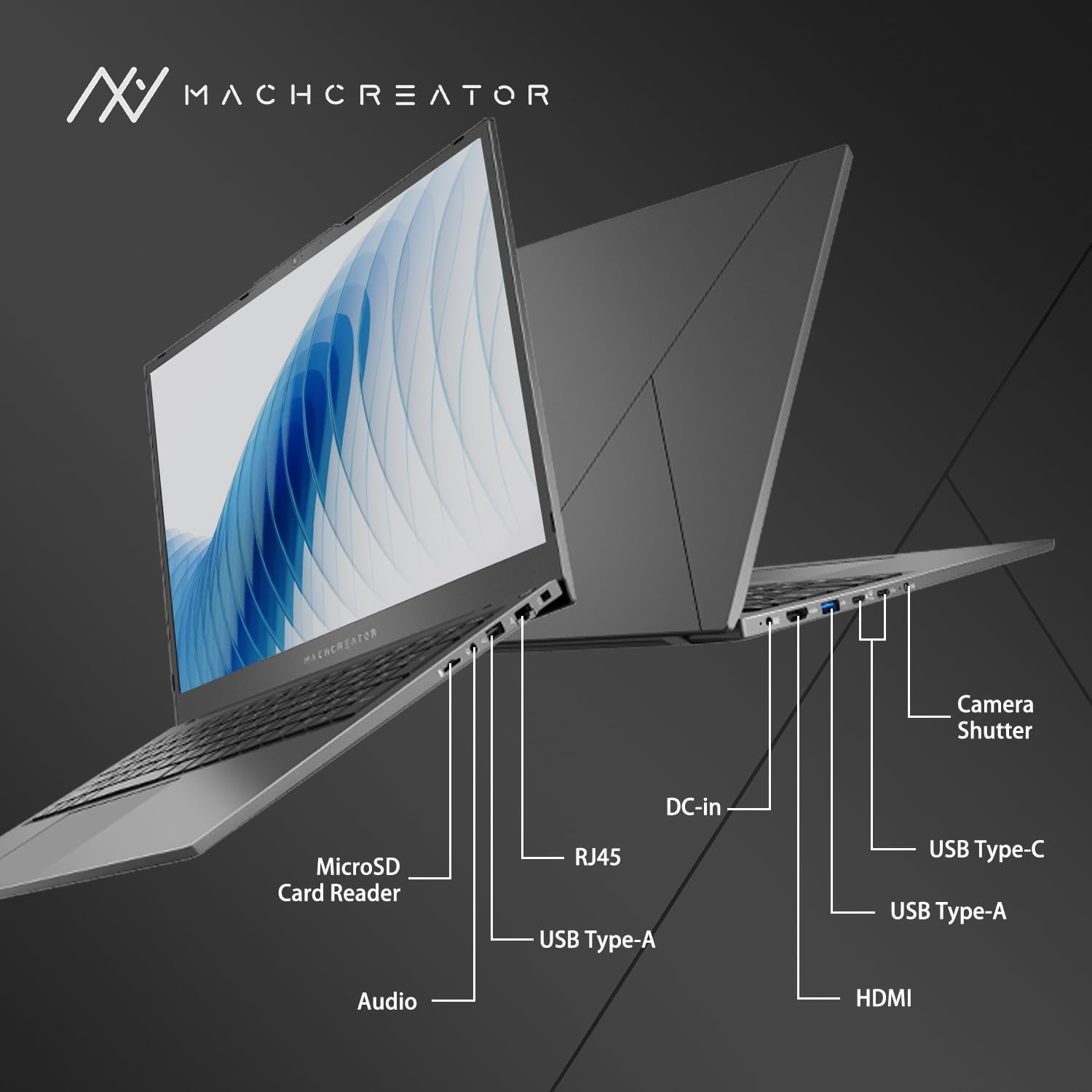
3.4-сүрөт: Каптал view порт белгилери менен.
An illustration detailing the various input/output ports available on the laptop, including USB, HDMI, and the SD card reader.
- MicroSD картаны окугуч: For reading and writing data to MicroSD cards.
- DC кирүүсү: Connect the power adapter for charging and power supply.
- Thunderbolt 4 (x2): Жогорку ылдамдыктагы маалыматтарды берүү, видео чыгаруу жана кубаттуулукту жеткирүү.
- USB 2.0 Type-A (x2): USB түзмөктөрүн туташтырыңыз.
- HDMI: Тышкы дисплейлерге же проекторлорго туташуу.
- RJ45: Зымдуу тармакка туташуу үчүн Ethernet порту.
- Аудио Jack: Наушниктерди же тышкы динамиктерди туташтырыңыз.
4. Орнотуу
4.1. Баштапкы күйгүзүү
- Ноутбукту жана бардык аксессуарларды кутудан чыгарыңыз.
- Connect the power adapter to the DC-in port on the laptop and then to a power outlet.
- Ноутбуктун капкагын ачыңыз.
- Ноутбукту күйгүзүү үчүн клавиатурада жайгашкан кубат баскычын басыңыз.
- Windows 11 Home орнотуу процессин аяктоо үчүн экрандагы көрсөтмөлөрдү аткарыңыз. Буга аймакты, тилди тандоо жана колдонуучу аккаунтуңузду орнотуу кирет.
4.2. Wi-Fiга туташуу
- During the Windows setup, you will be prompted to connect to a Wi-Fi network. Select your desired network from the list.
- Enter the Wi-Fi password if prompted and click "Connect".
- If you skip this step, you can connect later via Windows Settings: Go to Баштоо > Орнотуулар > Тармак жана интернет > Wi-Fi.
5. Иштөө нускамалары
5.1. Баскычтопту жана сенсордук тактаны колдонуу
The laptop features a full-size keyboard with a numeric keypad and a large touchpad. The keyboard is backlit, which can be activated or adjusted using the function keys (e.g., Fn + F5).
5.1-сүрөт: Баскычтоптун жана сенсордук панелдин жайгашуусу.
This image illustrates the keyboard and touchpad, showing the key layout and the size of the touchpad for user interaction.
5.2. Тышкы түзмөктөрдү туташтыруу
Тышкы түзмөктөрдү туташтыруу үчүн жеткиликтүү портторду колдонуңуз:
- USB түзмөктөрү: Plug USB drives, mice, or keyboards into the USB Type-A or Thunderbolt 4 (USB-C) ports.
- Тышкы дисплей: Connect an external monitor or TV using the HDMI port or one of the Thunderbolt 4 ports (with an appropriate adapter, if needed).
- SD карталары: Insert a MicroSD card into the MicroSD Card Reader slot to access its contents.
- Зымдуу тармак: Connect an Ethernet cable to the RJ45 port for a stable wired internet connection.
5.3. Adjusting the Display Angle
The laptop screen can be adjusted up to a 170-degree angle, providing flexibility for various viewing positions, presentations, or collaborative work.
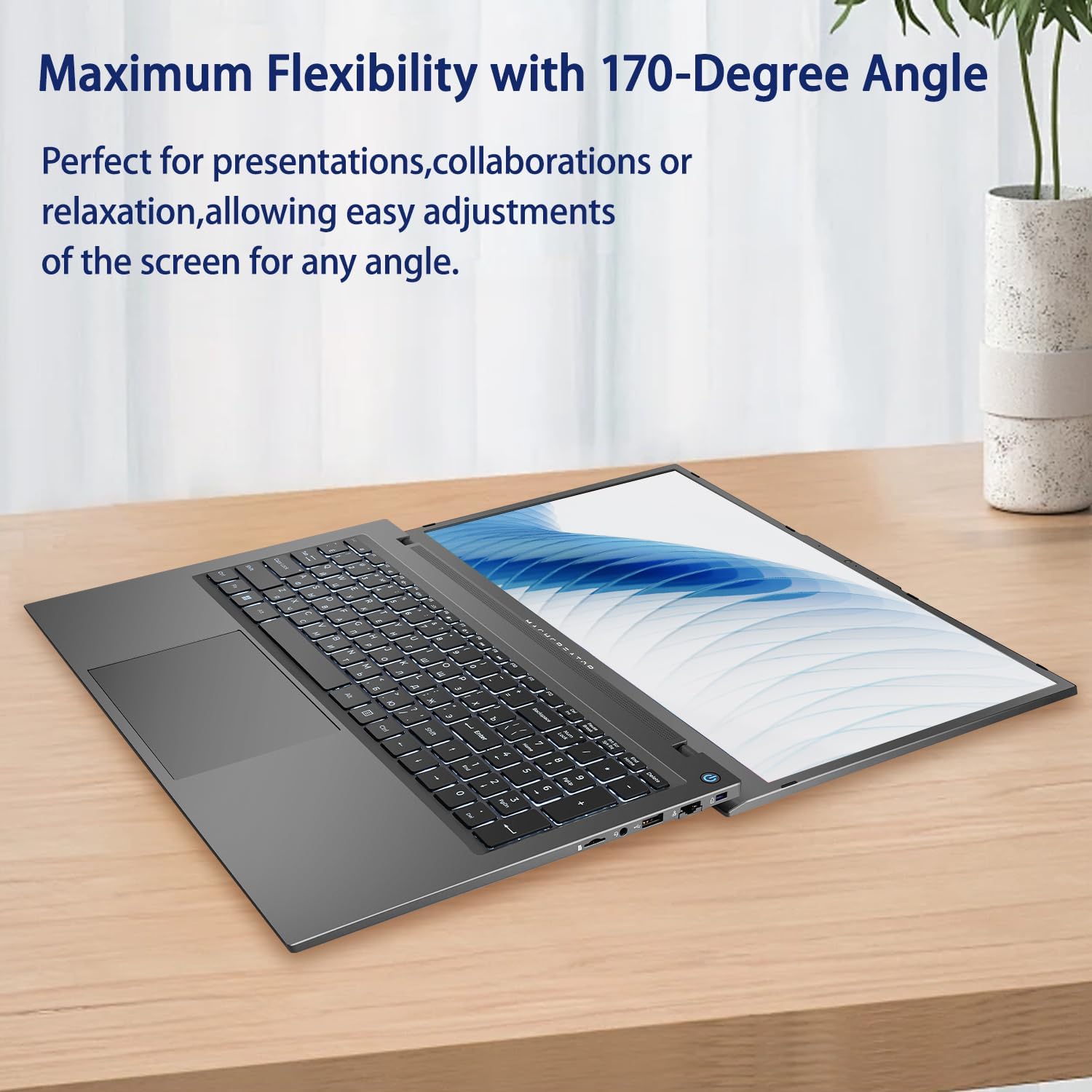
Figure 5.2: Laptop display at 170-degree angle.
This image demonstrates the laptop's ability to open its screen to a wide 170-degree angle, useful for various viewсценарийлер.
5.4. Charging the Laptop
Connect the provided power adapter to the DC-in port. The laptop also supports fast charging via its USB-C (Thunderbolt 4) ports with a compatible USB-C Power Delivery charger.
6. Техникалык тейлөө
6.1. Тазалоо
- Экранды тазалоо үчүн жумшак, мамыксыз чүпүрөктү колдонуңуз. Өжөр тактар үчүн, бир аз сүртүңүзampчүпүрөккө суу же экранды тазалоо эритмеси.
- Баскычтопту жана шассиди жумшак, кургак чүпүрөк менен сүртүңүз. Катуу химиялык заттарды же абразивдүү материалдарды колдонуудан алыс болуңуз.
- Тазалоодон мурун ноутбуктун өчүрүлгөнүн жана розеткадан ажыратылганын текшериңиз.
6.2. Батареяга кам көрүү
- Батареяны бат-баттан толук кубаттап калуудан алыс болуңуз.
- Ноутбукту өтө жогорку температурага дуушар кылбаңыз.
- If storing the laptop for an extended period, charge the battery to approximately 50-70% before turning it off.
6.3. Программалык камсыздоону жаңыртуу
Оптималдуу иштөөнү жана коопсуздукту камсыз кылуу үчүн Windows операциялык тутумуңузду жана драйверлериңизди үзгүлтүксүз жаңыртып туруңуз. Баштоо > Орнотуулар > Windows жаңыртуу жаңыртууларды текшерүү үчүн.
7. Кыйынчылыктарды
| Көйгөй | Мүмкүн чечим |
|---|---|
| Ноутбук күйбөйт. |
|
| Wi-Fi байланышы жок. |
|
| Экран бош же бүлбүлдөп турат. |
|
| Баскычтоптун жарыгы иштебейт. |
|
8. Техникалык шарттар
| Өзгөчөлүк | Деталь |
|---|---|
| Модель аты | Machenike Machcreator N17A |
| Процессор | Intel N100 (4 Cores, up to 3.4 GHz) |
| RAM | 8 ГБ DDR5 (4800 МГц) |
| Сактагыч | 256 ГБ PCIe SSD |
| Графика | Intel UHD графикасы (интегралдык) |
| Дисплей | 17.3" FHD (1920x1080) IPS, 120Hz |
| Операция системасы | Windows 11 Home |
| Порттар | 2x Thunderbolt 4, 2x USB 2.0 Type-A, 1x HDMI, 1x RJ45, 1x MicroSD Card Reader, 1x Audio Jack, 1x DC-in |
| Зымсыз байланыш | Wi-Fi (802.11n) |
| Өзгөчөлүктөр | Арткы жарык клавиатура, Сандык баскычтоп |
| Өлчөмдөрү (LxWxH) | 15.6 x 10.32 x 1.02 дюйм |
| Салмагы | 5.78 фунт |
| Түс | Боз |
9. Кепилдик жана колдоо
For warranty information and technical support, please refer to the documentation provided with your purchase or visit the official Machenike webсайт. Кепилдик дооматтар үчүн сатып алганыңыздын далилин сактаңыз.
Онлайн ресурстар:
- Machenike Official Webсайт: www.machenike.com (Эскертүү: Бул толтургуч URL, please refer to your product's specific warranty card for the correct support contact.)
10. Продукцияны көрсөтүүчү видео
Video 10.1: Machcreator N17A Laptop Overview.
Бул видео визуалдык көрүнүштү камсыз кылатview of the Machenike Machcreator N17A laptop, showcasing its design, key features, and various ports. It demonstrates the unboxing experience, the backlit keyboard, and the available connectivity options.


