1. Киришүү
This manual provides detailed instructions for the operation and maintenance of your FOXWELL NT716 OBD2 Bidirectional Scan Tool and FOXWELL BT60 6V/12V Wireless Car Battery Tester. Please read this manual thoroughly before using the devices to ensure proper function and to prevent damage. Keep this manual for future reference.
2. Продукт бүтүп калдыview
2.1 FOXWELL NT716 OBD2 Bidirectional Scan Tool
The FOXWELL NT716 is a professional diagnostic scan tool designed for comprehensive vehicle system analysis. It offers advanced features including bidirectional control, 9 reset functions, and diagnostics for 4 main systems (Engine, Transmission, ABS, SRS).

Image 2.1: The FOXWELL NT716 OBD2 Scanner (left) and BT60 Battery Tester (right). The NT716 features a large display and robust casing, while the BT60 is a compact, handheld device with battery clamps.
- Эки тараптуу башкаруу: Perform active tests to control various vehicle components.
- 9 баштапкы абалга келтирүү функциялары: Includes Oil Light Reset, ABS Bleeding, BMS Reset, SAS Reset, DPF Reset, Injector Coding, TPMS Reset, EPB Reset, and Throttle Reset.
- 4 Системалык диагностика: Comprehensive scanning for Engine, Transmission, Anti-lock Braking System (ABS), and Supplemental Restraint System (SRS).
- Толук OBDII функциялары: Read/Erase Codes, Live Data, Freeze Frame Data, I/M Readiness, O2 Sensor Test, On-Board Monitor Test, Component Test, Vehicle Information.
- Free Updates: Ensures access to the latest vehicle data and software enhancements.
2.2 FOXWELL BT60 6V/12V Wireless Car Battery Tester
The FOXWELL BT60 is an innovative, app-supported battery tester designed for 6V and 12V automotive batteries. It connects wirelessly via Bluetooth to your smartphone, providing detailed battery health analysis and report sharing capabilities.

Image 2.2: The FOXWELL BT60 Wireless Battery Tester highlighting its versatile features including State of Health (SOH), State of Charge (SOC), Load Test, Battery Voltage, Resistance Test, Cranking Test, Ripple Test, Data Storage, and Data Share.
- Зымсыз туташуу: Bluetooth 5.3 for seamless connection to the BT60 App on your smartphone.
- Батареяны комплекстүү талдоо: Measures State of Health (SOH), State of Charge (SOC), Battery Voltage, Internal Resistance, Cranking Test, and Charging System Ripple Test.
- App-Supported: Manage multiple battery records, share diagnostic reports, and access quick start guides directly from the app.
- Кеңири шайкештик: 6V жана 12V батарейкаларды колдойт.
3. Орнотуу
3.1 FOXWELL NT716 Setup
- Күйгүзүү: Connect the NT716 to the vehicle's OBD-II port. The device will power on automatically.
- Баштапкы конфигурация: Follow the on-screen prompts to select language, time zone, and other initial settings.
- Программалык камсыздоону жаңыртуу: Connect the NT716 to a computer with internet access and use the FOXWELL update tool to ensure the latest software is installed. This provides access to the most current vehicle data and functions.
3.2 FOXWELL BT60 Setup
- Колдонмону жүктөп алуу: Download and install the "FOXWELL BT60" application from your smartphone's app store (iOS or Android).
- Charge BT60: Ensure the BT60 device is adequately charged before first use.
- Батареяга туташуу: кызыл clamp оң (+) терминалга жана кара clamp унаанын аккумуляторунун терс (-) терминалына.
- Bluetooth жупташууда:
- Open the BT60 App on your smartphone.
- Телефонуңузда Bluetooth иштетилгенин текшериңиз.
- The app will automatically search for and connect to the BT60 device. Confirm the pairing if prompted.

Image 3.2: The FOXWELL BT60 connected to a car battery, demonstrating its wireless Bluetooth 5.3 connection to a smartphone app for remote testing and monitoring.
4. Иштөө нускамалары
4.1 Using the FOXWELL NT716 OBD2 Scanner
- Унаага туташуу: Plug the NT716 into the vehicle's OBD-II port (usually located under the dashboard).
- Унаа тандоо: From the main menu, select the vehicle manufacturer and model.
- Функцияны тандоо: Navigate through the menu to select the desired diagnostic function.
4.1.1 4 System Diagnostic
This function allows you to read and clear diagnostic trouble codes (DTCs), view live data, and retrieve freeze frame data for the Engine, Transmission, ABS, and SRS systems.

Image 4.1.1: The FOXWELL NT716 displaying its 4-system diagnostic capabilities, including Engine, Transmission, ABS, and SRS, along with full OBDII functions, live data, and code reading/erasing.
- Окуу коддору: Displays current, pending, and permanent DTCs.
- Коддорду тазалоо: Clears DTCs from the vehicle's computer. Ensure the underlying issue is resolved before clearing codes.
- Жандуу маалыматтар: Shows real-time data streams from various sensors and components.
4.1.2 Эки багыттуу башкаруу (активдүү тест)
Bidirectional control allows the scan tool to send commands to the vehicle's ECUs to perform specific tests and functions, such as activating components to verify their operation.
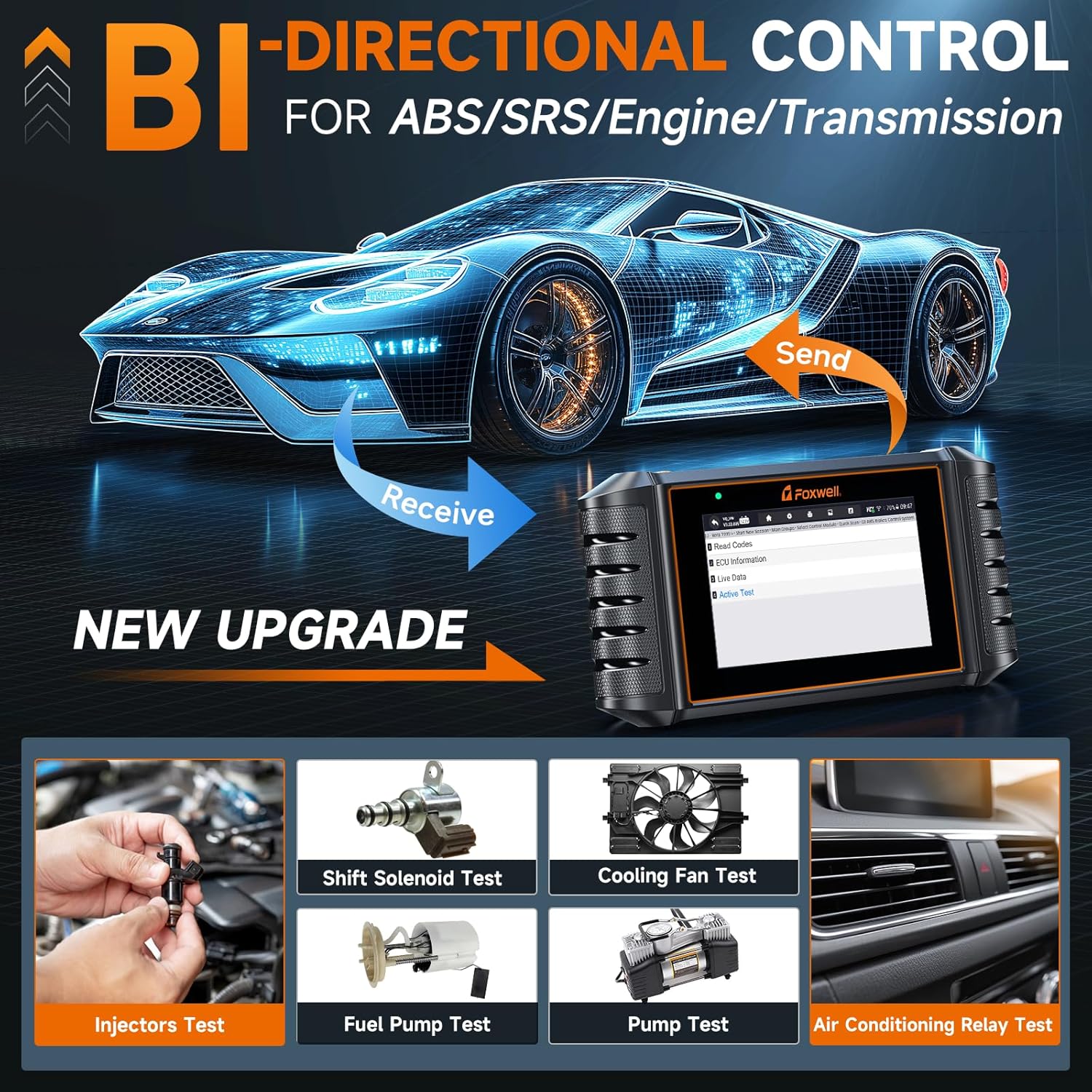
Image 4.1.2: The FOXWELL NT716 demonstrating bidirectional control, allowing the user to send commands to vehicle components like injectors, fuel pump, cooling fan, and A/C relay for active testing.
- Injector Test: Activates individual injectors to check their functionality.
- Fuel Pump Test: Commands the fuel pump to turn on/off.
- Cooling Fan Test: Activates the engine cooling fan.
- A/C Relay Test: Tests the air conditioning compressor relay.
4.1.3 Special Functions (Resets)
The NT716 supports 9 commonly used special reset functions for various vehicle systems.
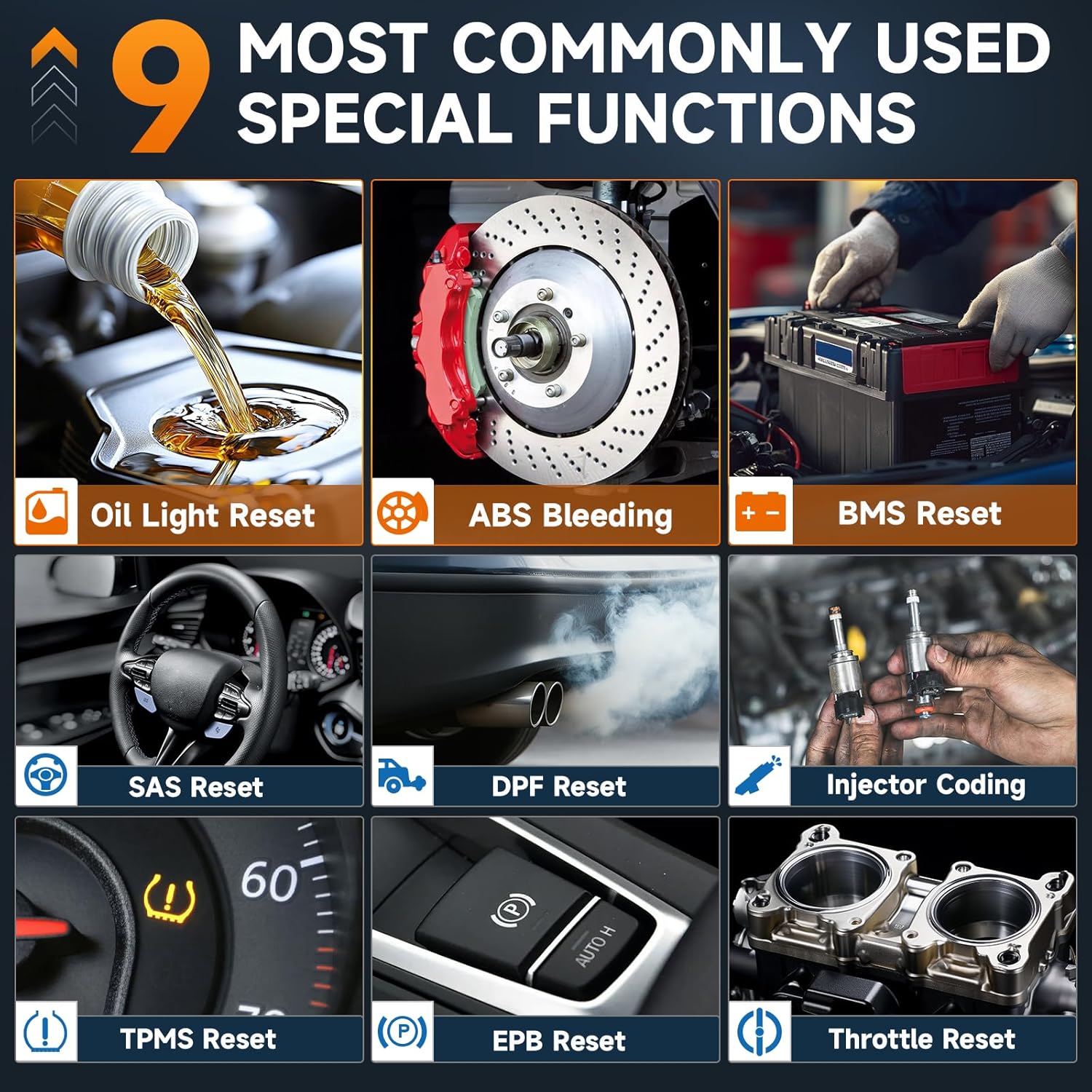
Image 4.1.3: The FOXWELL NT716 displaying its 9 special functions, including Oil Light Reset, ABS Bleeding, BMS Reset, SAS Reset, DPF Reset, Injector Coding, TPMS Reset, EPB Reset, and Throttle Reset.
- Май чырагын баштапкы абалга келтирүү: Май алмаштырылгандан кийин майдын тейлөө жарыгын баштапкы абалга келтирет.
- ABS кан агуу: Performs bleeding procedures for the Anti-lock Braking System.
- BMS баштапкы абалга келтирүү: Батареяны алмаштыргандан кийин Батареяны башкаруу системасын баштапкы абалга келтирет.
- SAS баштапкы абалга келтирүү: Руль бурчу сенсорун калибрлейт.
- DPF баштапкы абалга келтирүү: Дизель бөлүкчөлөрүнүн чыпкалоо системасын баштапкы абалга келтирет.
- Инжектор коддоо: Инжектордун жаңы баалуулуктарын ECUга коддойт.
- TPMS баштапкы абалга келтирүү: Дөңгөлөк басымын көзөмөлдөө системасын баштапкы абалга келтирет.
- EPB баштапкы абалга келтирүү: Resets the Electronic Parking Brake after brake pad replacement.
- дроссель кайра коюу: Relearns throttle body position.
4.2 Using the FOXWELL BT60 Battery Tester
Once the BT60 is connected to the battery and paired with the app, you can perform various tests.

Image 4.2: The FOXWELL BT60 app interface showing battery status at a glance, including tested capacitance, voltage, battery health, state of charge, and resistance. It also displays results for cranking and charging tests.
4.2.1 Батарея сыноо
- Open the BT60 App and select "Battery Test".
- Input battery information (type, standard, CCA) if prompted, or select from saved profiles.
- The app will display the battery's State of Health (SOH), State of Charge (SOC), Voltage, жана Ички каршылык.
4.2.2 Кранкинг сыноо
This test measures the battery's ability to provide current during engine cranking.
- Select "Cranking Test" in the app.
- Кыймылдаткычты иштетүү үчүн экрандагы көрсөтмөлөрдү аткарыңыз.
- The app will display the cranking voltage and time, indicating the battery's performance during startup.
4.2.3 Заряддоо сыноосу
Evaluates the vehicle's charging system (alternator, regulator) performance.
- Select "Charging Test" in the app.
- Follow the on-screen instructions to rev the engine to specified RPMs.
- The app will display charging voltage and ripple, indicating the health of the charging system.
4.2.4 Маалыматтарды башкаруу жана бөлүшүү

Image 4.2.4a: The FOXWELL BT60 app interface showing options for managing multiple batteries, accessing data records, and utilizing online quick guides and diagnosis result definitions.

Image 4.2.4b: The FOXWELL BT60 app demonstrating the ability to share diagnostic reports via images or text, allowing for easy communication of battery health information.
- Manage Multiple Batteries: The app allows you to save and manage test records for various batteries.
- Маалыматтардын жазуулары: Access historical test data for comparison and trend analysis.
- Отчетторду бөлүшүү: Generate and share diagnostic reports via email, messaging apps, or other platforms directly from the app.
5. Техникалык тейлөө
- Тазалоо: жумшак колдонуу, damp аппаратты тазалоо үчүн чүпүрөк сasings. Do not use abrasive cleaners or solvents.
- Сактагыч: Store the devices in a dry, cool environment away from direct sunlight and extreme temperatures.
- Кабельге кам көрүү: Inspect cables and connectors regularly for damage. Replace if necessary.
- Программалык камсыздоо жаңыртуулары: Regularly update the NT716 software via the FOXWELL update tool and ensure the BT60 app is updated to the latest version for optimal performance and compatibility.
6. Кыйынчылыктарды
- Device Not Powering On (NT716):
- Ensure the OBD-II cable is securely connected to both the vehicle and the scanner.
- Унаанын от алдыруу системасы "ON" абалында экенин текшериңиз.
- Check the vehicle's fuse for the OBD-II port.
- BT60 Not Connecting to App:
- Смартфонуңузда Bluetooth иштетилгенин текшериңиз.
- Verify the BT60 device is powered on and connected to the battery.
- Restart the BT60 app and try pairing again.
- Check if the BT60 device has sufficient charge.
- Туура эмес окуулар:
- Батарея clamps are clean and securely attached to the battery terminals.
- Verify the battery type and CCA values entered in the BT60 app are correct.
- For NT716, ensure the correct vehicle information is selected.
- Программалык камсыздоону жаңыртуудагы көйгөйлөр:
- Ensure a stable internet connection during updates.
- Temporarily disable antivirus software if it interferes with the update process.
7. Техникалык шарттар
7.1 FOXWELL NT716 OBD2 Scanner
| Өзгөчөлүк | Description |
|---|---|
| Дисплей | Түстүү LCD |
| Байланыш | OBD-II cable, USB for updates |
| Operating Voltage | 9-18V туруктуу ток (OBD-II аркылуу) |
| Колдоого алынган протоколдор | All OBD-II protocols (ISO9141-2, ISO14230-2, ISO15765-4, KWP2000, J1850 VPW, J1850 PWM) |
| Функциялар | 4 System Diagnostics, Bidirectional Control, 9 Reset Functions, Full OBDII |
7.2 FOXWELL BT60 батареясын текшергич
| Өзгөчөлүк | Description |
|---|---|
| Батарея түрлөрү | 6V, 12V Lead-Acid Batteries (Flooded, AGM, GEL, EFB) |
| Сыноо стандарттары | CCA, BCI, CA, MCA, JIS, DIN, IEC, EN, SAE, GB |
| Байланыш | Bluetooth 5.3 (App-controlled) |
| Иштөө температурасы | 0°Cден 50°Cге чейин (32°F—122°F) |
| Сактоо температурасы | -20°Cден 70°Cге чейин (-4°Fтен 158°Fге чейин) |
8. Кепилдик жана колдоо
FOXWELL products typically come with a limited warranty. Please refer to the warranty card included with your product or visit the official FOXWELL webдеталдуу кепилдик шарттары жана шарттары үчүн сайт.
For technical support, product inquiries, or service, please contact FOXWELL customer support through their official website or the contact information provided in your product packaging. Regular software updates are available to enhance functionality and compatibility.
- Официалдуу Webсайт: www.foxwelltech.com (Чыгampшилтеме, чындыгын текшериңиз URL)
- Кардарларды тейлөө: Продукциянын таңгагын караңыз же webбайланыш маалыматы үчүн сайт.


