Introduction
This manual provides essential information for setting up, operating, and maintaining your Dell 15 Laptop DC15250. Please read this guide thoroughly to ensure optimal performance and longevity of your device.
Кутуда эмне бар
Your Dell 15 Laptop DC15250 package includes the following items:
- Dell 15 Laptop DC15250
- 65 Watt AC Adapter
- Электр кабели
- Документация
Жайгашуу
1. Баштапкы күйгүзүү жана заряддоо
Before first use, connect the laptop to a power outlet using the provided 65 Watt AC Adapter and Power Cord. Allow the battery to charge sufficiently before proceeding with setup.

Image: Dell 15 Laptop DC15250 in Platinum Silver. The laptop is shown open, displaying the screen and keyboard.
2. Operating System Setup (Windows 11 Home)
Follow the on-screen instructions to complete the Windows 11 Home setup. This typically involves selecting your region, connecting to a Wi-Fi network, and creating a user account.

Image: Windows 11 logo, indicating the operating system.
3. Port Overview
Перифериялык түзүлүштөрдү туташтыруу үчүн жеткиликтүү порттор менен таанышып алыңыз:
- Сол жагы: USB 3.2 Gen 1 Type-C, USB 3.2 Gen 1 Type-A, HDMI 1.4, Power Jack.
- Оң жагы: Universal Audio Jack, USB 2.0, SD Card Reader.
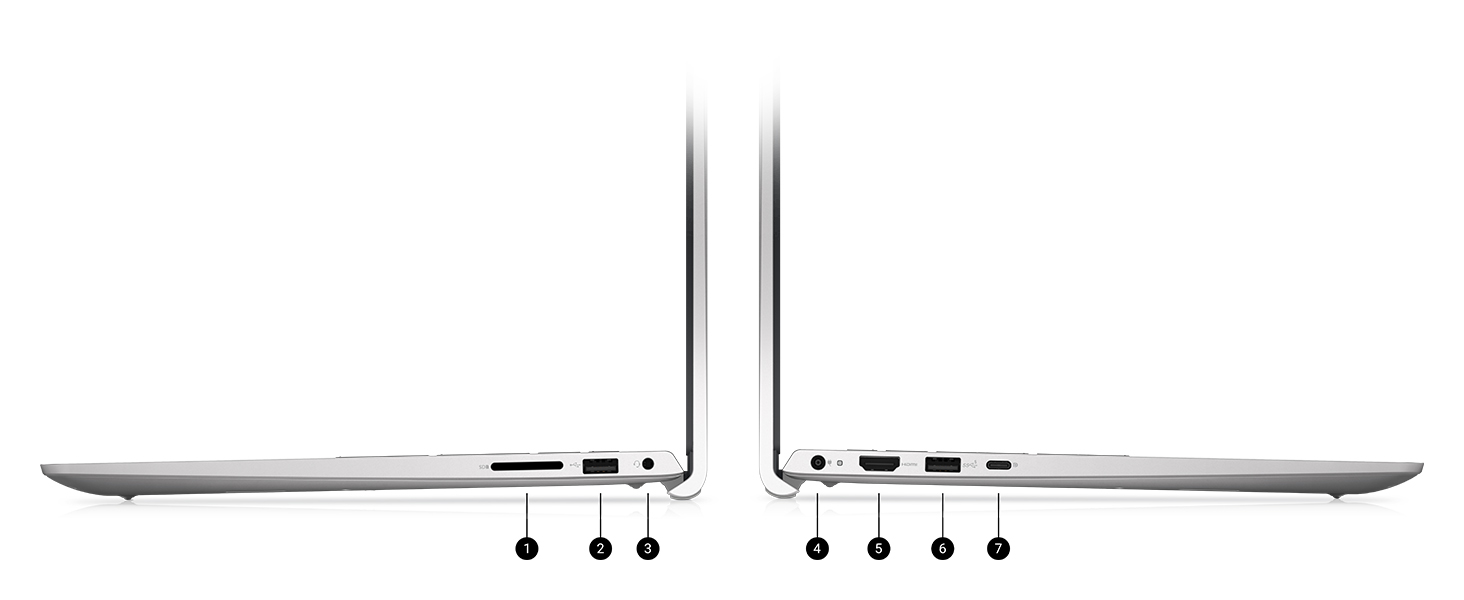
Image: Diagram illustrating the various ports and slots on the Dell 15 Laptop, including USB, HDMI, power, audio, and SD card reader.
Operating Your Dell 15 Laptop
Баскычтоп жана сенсордук такта
The laptop features an enlarged ergonomic keyboard with a separate numeric keypad for efficient data entry. The touchpad supports multi-touch gestures for navigation.

Сүрөт: жогорудан төмөнгө view of the Dell 15 Laptop's keyboard and touchpad, highlighting the full-size layout and numeric keypad.
Дисплей өзгөчөлүктөрү
The 15.6-inch Full HD (1920x1080) 120Hz display provides clear visuals. Dell ComfortView software helps reduce blue light emissions for extended viewсооронуч.

Image: The Dell 15 Laptop display showing a video call, demonstrating the clarity of the screen.
Adaptive Thermals
The laptop incorporates adaptive thermal technology to maintain efficient operation whether used on a desk or on your lap.

Сүрөт: жогорудан ылдыйга view of the Dell 15 Laptop, open with a digital background on the screen, illustrating its design.
Windows 11 өзгөчөлүктөрү
Leverage Windows 11 Home for a modern interface and multitasking tools designed to enhance productivity.
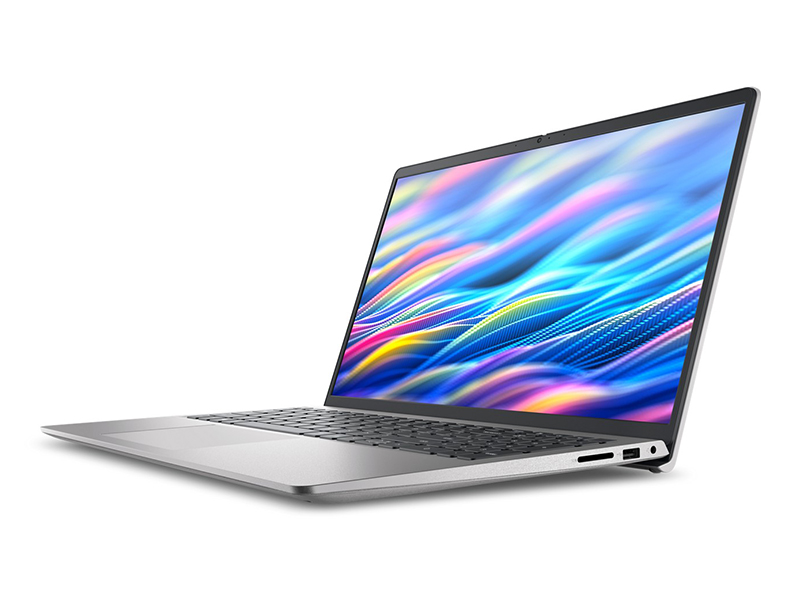
Image: The Dell 15 Laptop screen displaying the Windows 11 interface, including the Copilot feature.
Техникалык тейлөө
Ноутбугуңузду тазалоо
Бир аз жумшак, түксүз кездемени колдонуңуз dampened with water or a screen cleaner to clean the display. For the keyboard and chassis, use a soft cloth. Avoid harsh chemicals.
Батареяга кам көрүү
To prolong battery life, avoid extreme temperatures and fully discharging the battery frequently. Express Charge support allows for quick recharging.
Программалык камсыздоо жаңыртуулары
Regularly check for and install Windows updates and Dell driver updates to ensure optimal performance and security.
Проблемаларды чечүү
Жалпы маселелер жана чечимдер
- Ноутбук күйбөй жатат: AC адаптери бекем туташып турганын жана розетка иштеп турганын текшериңиз. Батарея зарядынын деңгээлин текшериңиз.
- Жай аткаруу: Керексиз тиркемелерди жаап, фондук процесстерди текшерип, жетиштүү бош орунду камсыз кылыңыз.
- Дисплей көйгөйлөрү: Adjust brightness settings. If external monitor is connected, check cable connections.
- Keyboard/Touchpad unresponsive: Restart the laptop. Ensure no foreign objects are obstructing the keys or touchpad.
For more detailed troubleshooting, refer to the Dell support webсайтына кириңиз же Dell кардарларды тейлөө кызматына кайрылыңыз.
Техникалык шарттар
| Өзгөчөлүк | Деталь |
|---|---|
| Модель аты | Dell 15 DC15250 Laptop (LDC15250-5353SLV-PUS) |
| Процессор | Intel Core i5-1334U процессору |
| RAM | 16 ГБ DDR4 (3200 МГц) |
| Сактагыч | 512 ГБ SSD (катуу абалдагы диск) |
| Дисплей | 15.6-inch FHD (1920x1080) 120Hz, Anti-Glare |
| Графика | Intel UHD графикасы (интегралдык) |
| Операция системасы | Windows 11 Home |
| Түс | Platinum Silver |
| Салмагы | 3.64 фунт |
| Өлчөмдөрү (LxWxH) | 9.25 x 14.11 x 0.75 дюйм |
| Зымсыз байланыш | 802.11ax, Bluetooth |
| Порттар | 1x USB 2.0, 2x USB 3.0, 1x USB 3.2 Gen 1 Type-C, 1x HDMI 1.4, 1x Universal Audio Jack, 1x SD Card Reader, 1x Power Jack |
Кепилдик жана колдоо
Your Dell 15 Laptop DC15250 comes with a 1 Year Onsite Service. This service provides support when and where you need it. Dell will dispatch a technician to your home, office, or location of choice if an issue covered by the Limited Hardware Warranty cannot be resolved remotely. This typically occurs within 1 or 2 business days following remote diagnosis completion. The customer must return the original hardware according to Dell's terms. Onsite service is provided by Dell Marketing L.P. Availability varies. For complete details, refer to Dell's service contracts.
For further assistance, visit the official Dell support webсайтка же кардарларды тейлөөгө кайрылыңыз.
Image: Dell Technologies graphic highlighting onsite support benefits: access to hardware support, easy PC repairs, and SupportAssist.
Продукт видеолору
Dell 15 Laptop Overview
Видео: Аткаминерview of the Dell 15 Laptop, showcasing its design and features. This video is provided by Dell Marketing USA, LP.


