1. Продукт бүтүп калдыview
The TABWEE T20 is a versatile 10-inch Android tablet designed for both productivity and entertainment. It features a high-resolution Incell display, a powerful Octa-Core processor, and ample memory and storage, making it suitable for a wide range of applications from content creation to multimedia consumption.
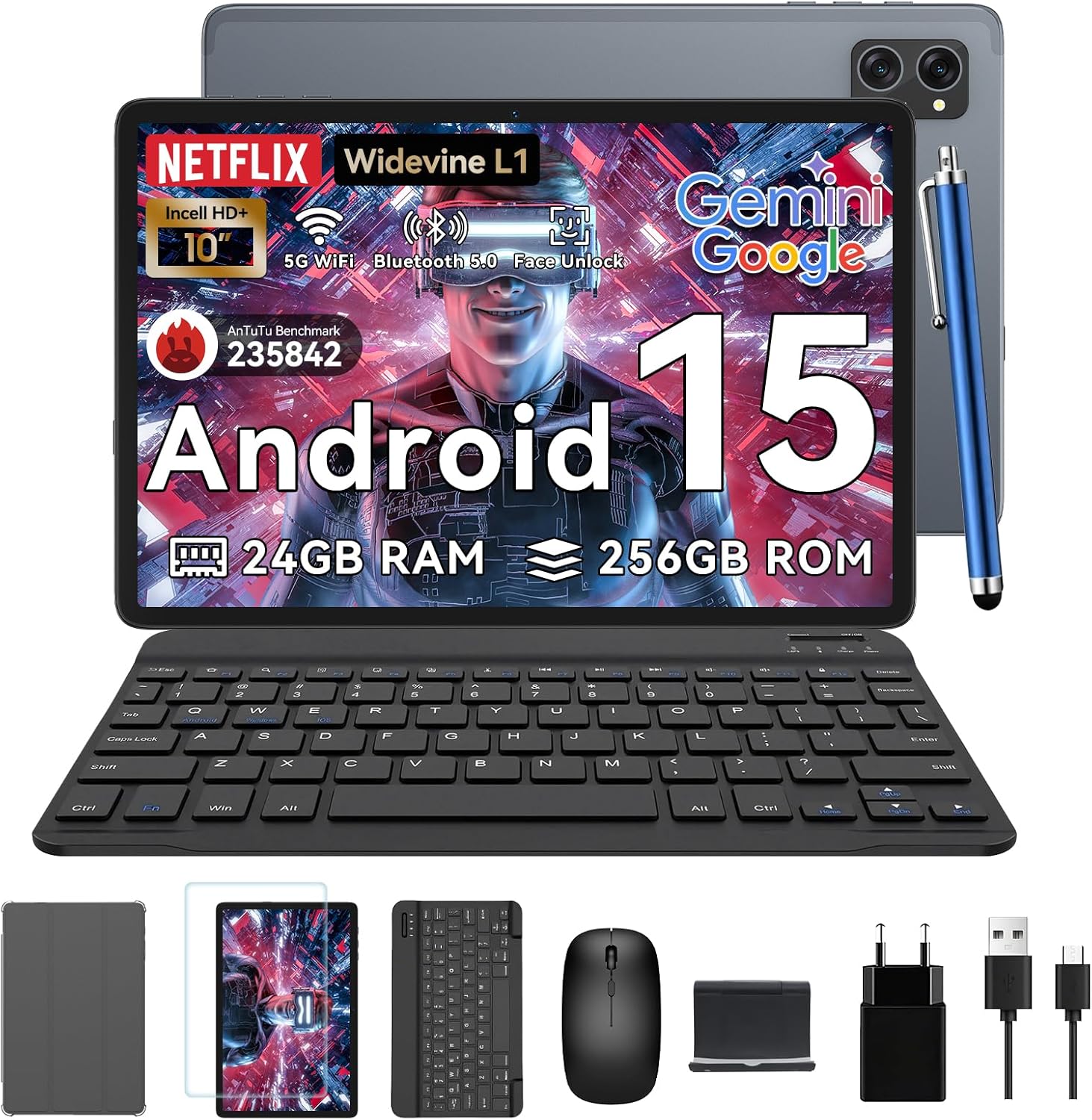
Figure 1.1: TABWEE T20 Tablet and its complete accessory package, including a Bluetooth keyboard, mouse, stylus, protective case, screen protector, charger, and USB cable.
Кутуда эмне бар
Upon unboxing your TABWEE T20 Tablet, verify that all components are present:

Figure 1.2: Contents of the TABWEE T20 Tablet retail package.
- 1x TABWEE T20 Tablet
- 1x Bluetooth баскычтоп
- 1x чычкан
- 1x Stylus
- 1x коргоочу кап
- 1x Экран коргоочусу
- 1x Tablet Stand
- 1x заряддагыч
- 1x USB кабели
2. Орнотуу жана алгачкы колдонуу
Планшетти заряддоо
Before first use, fully charge the tablet using the provided charger and USB cable. Connect the charger to a power outlet and the USB cable to the tablet's charging port. The charging indicator will illuminate.
Күйгүзүү/өчүрүү
- Күйгүзүү үчүн: Экранда TABWEE логотиби пайда болгонго чейин Кубат баскычын басып, кармап туруңуз.
- Өчүрүү үчүн: Кубат параметрлеринин менюсу пайда болгонго чейин Кубат баскычын басып, кармап туруңуз. "Өчүрүү" дегенди тандап, ырастаңыз.
- Кайра баштоо үчүн: Кубат параметрлеринин менюсунан "Кайра баштоо" тандап, ырастаңыз.
Баштапкы орнотуу устасы
Биринчи күйгүзүлгөндө, планшет сизди баштапкы орнотуу устасы аркылуу жетектейт. Экрандагы көрсөтмөлөрдү аткарыңыз:
- Тилиңизди тандаңыз.
- Wi-Fi тармагына туташыңыз.
- Google аккаунтуңуз менен кириңиз же жаңысын түзүңүз.
- Экран кулпусун (PIN код, графикалык ачкыч, сырсөз же Жүздөн таануу) орнотуңуз.
- Review жана шарттарды кабыл алуу.
Кошумча шаймандар
The TABWEE T20 comes with a Bluetooth keyboard and mouse for enhanced productivity.
- Bluetooth баскычтобу:
- Баскычтоп кубатталып, күйгүзүлгөнүн текшериңиз.
- Планшетке өтүңүз Орнотуулар > Туташкан түзмөктөр > Bluetooth.
- Turn on Bluetooth and tap "Pair new device".
- Select the keyboard from the list of available devices and follow pairing instructions.
- Bluetooth чычканы:
- Чычкан күйгүзүлгөнүн жана жупташтыруу режиминде экенин текшериңиз.
- Планшетке өтүңүз Орнотуулар > Туташкан түзмөктөр > Bluetooth.
- Tap "Pair new device" and select the mouse from the list.
- Калем: The included stylus can be used directly on the screen for navigation, drawing, and note-taking. It features palm-rejection precision.
3. Планшетти иштетүү
Android 15 операциялык системасы
The TABWEE T20 runs on Android 15, offering enhanced privacy controls, seamless cross-device collaboration, and improved multitasking capabilities.

3.1-сүрөт: Android 15 операциялык системасынын негизги өзгөчөлүктөрү.
Gemini AI интеграциясы
The tablet integrates Google Gemini AI, which intelligently optimizes tasks, from photo editing to document formatting, while prioritizing security with a dedicated encrypted privacy space.

Figure 3.2: ашыкview of Gemini AI capabilities on the tablet.
Display and Multimedia
The 10.1-inch Incell HD+ display (1280x800 resolution) provides vivid colors and crisp details. With Widevine L1 certification, you can enjoy 1080P streaming on platforms like Netflix, Disney+, and Hulu.

Figure 3.3: Display features and eye-friendly modes.
The tablet also features Dual Smart-K Box Speakers for an immersive audio experience.

Figure 3.4: Dual Smart-K Box Speakers for enhanced audio.
Камеранын өзгөчөлүктөрү
Equipped with an 8MP rear camera and a 5MP front camera, the tablet supports Google Lens integration for smart scanning and object recognition. Face Unlock is also supported for convenient security.

Figure 3.5: Camera specifications and features.

Figure 3.6: Smart Google Lens functionalities.
Байланыш
The TABWEE T20 supports dual-band 5G WiFi and Bluetooth 5.0 for fast and stable connections.
- Wi-Fi: Connect to 2.4GHz or 5GHz networks for seamless streaming and quick downloads.
- Bluetooth 5.0: Pair with wireless earbuds, speakers, or other Bluetooth-enabled devices with 20% faster data transfer speed.
- OTG колдоо: Allows for easy transfer of files to and from external storage devices.

Figure 3.7: Advanced Bluetooth 5.0 connectivity.

Figure 3.8: Lightning Fast WiFi 5 Technology.
4. Техникалык тейлөө жана кам көрүү
Proper maintenance ensures the longevity and optimal performance of your TABWEE T20 Tablet.
Батарея башкаруу
The 5000mAh battery provides extended usage times. To maximize battery life:
- Ашыкча температурадан сактаныңыз.
- Берилген заряддагычты колдонуңуз.
- Enable smart power-saving modes in settings.
- Фондо иштеп жаткан колдонулбаган колдонмолорду жабуу.

Figure 4.1: 5000mAh Mega Battery performance metrics.
Планшетти тазалоо
- Экранды жана денени тазалоо үчүн жумшак, түксүз чүпүрөктү колдонуңуз.
- өжөр тактар үчүн, бир аз гampчүпүрөккө суу же экран тазалоочу каражат.
- Катуу химиялык заттарды же абразивдүү материалдарды колдонуудан алыс болуңуз.
Сактоо жана эстутум башкаруу
The tablet comes with 256GB of internal storage and supports up to 2TB TF card expansion. It also features 24GB RAM (8GB physical + 16GB virtual) for smooth multitasking.

Figure 4.2: Storage and RAM expansion capabilities.
To optimize performance and storage:
- Кэшти жана убактылуу кэшти үзгүлтүксүз тазалап туруу files.
- Колдонулбаган колдонмолорду чыгарып салыңыз.
- Utilize the 2TB TF card slot for large files like 4K videos and design documents.
5. Кыйынчылыктарды
This section addresses common issues you might encounter with your TABWEE T20 Tablet.
| Көйгөй | Мүмкүн себеп | Чечим |
|---|
| Планшет күйбөйт. | Аз батарея; системанын бузулушу. | Планшетті кеминде 30 мүнөт кубаттаңыз. Эгер дагы эле жооп бербесе, өчүрүп-күйгүзүү үчүн Күйгүзүү баскычын 10-15 секунд басып туруңуз. |
| Wi-Fi туташуу маселелери. | Туура эмес сырсөз; роутер көйгөйлөр; диапазондон тышкары. | Verify Wi-Fi password. Restart your router. Ensure tablet is within Wi-Fi range. Forget the network and reconnect. |
| Bluetooth accessories not pairing. | Accessory not in pairing mode; Bluetooth off on tablet. | Ensure accessory is in pairing mode. Turn Bluetooth off and on again on the tablet. Restart both devices. |
| Жай иштеши же колдонмо иштебей калышы. | Өтө көп колдонмолор иштеп жатат; аз сактоо; эскирген программалык камсыздоо. | Close background apps. Clear app caches. Free up storage space. Check for system updates in Орнотуулар > Система > Системаны жаңыртуу. |
| Экран жооп бербейт. | Убактылуу программалык ката. | Force restart the tablet by holding the Power button for 10-15 seconds. |
Эгер бул чечимдерге аракет кылгандан кийин маселе чечилбесе, кардарларды колдоо кызматына кайрылыңыз.
7. Кепилдик жана колдоо
TABWEE is committed to providing excellent customer service and support for your T20 Tablet.
Кепилдик маалымат
Your TABWEE T20 Tablet is covered by a 2 жылдык кепилдик from the date of purchase. This warranty covers manufacturing defects and ensures risk-free ownership.
Кардарларды колдоо
For any technical assistance, troubleshooting, or warranty claims, please contact our support team:
- Электрондук почта колдоо: serviceplus.linda@gmail.com
- Online Call Support: Available 24/7 for US/CA customers.
- Repair Support: 2-Year Repair Support is provided.

Figure 7.1: TABWEE Customer Support Services.
Please have your purchase details and tablet model number ready when contacting support to expedite the process.


