Introduction
The INPHIC IN10P is an ultra-lightweight wireless gaming mouse designed for precision and versatility. Featuring tri-mode connectivity (Bluetooth 5.0, 2.4G Wireless, and Type-C Wired), a high-performance PAW3395 sensor with up to 26,000 DPI, and an 8K polling rate, it offers a responsive and customizable experience for various gaming and work scenarios. Its solid shell design ensures durability while maintaining a mere 60g weight.
Кутуда эмне бар
- INPHIC IN10P Gaming Mouse (x1)
- 8K Nano USB Receiver (x1)
- Receiver Extension Adapter (x1)
- 1.8m Type-C Braided Paracord Cable (x1)
- Колдонуучунун колдонмосу (x1)
- Anti-slip Mouse Grip Tape Set (x1)
Продукт бүттүview

Figure 1: INPHIC IN10P Mouse Components
The IN10P mouse features a sleek, ergonomic design with a solid shell, preventing dust buildup while maintaining an ultra-lightweight profile of approximately 60g. Key components include:
- Lightforce Hybrid Switches: Designed for durability with a lifespan of 100 million clicks.
- Жылдыруу дөңгөлөгү: For navigation and input.
- Ыңгайлаштырылуучу каптал баскычтар: Two buttons on the left side for user-defined functions.
- DPI Switching and Bluetooth Pairing Button: Located on the underside for quick adjustments and pairing.
- Байланыш которгучу: A three-position switch (OFF, 2.4G, BT) on the underside to select the connection mode.
- USB кабылдагычтын сактагычы: A dedicated compartment on the underside for the 2.4G USB receiver.
- Zero-Additive PTFE Feet: For smooth gliding across surfaces.
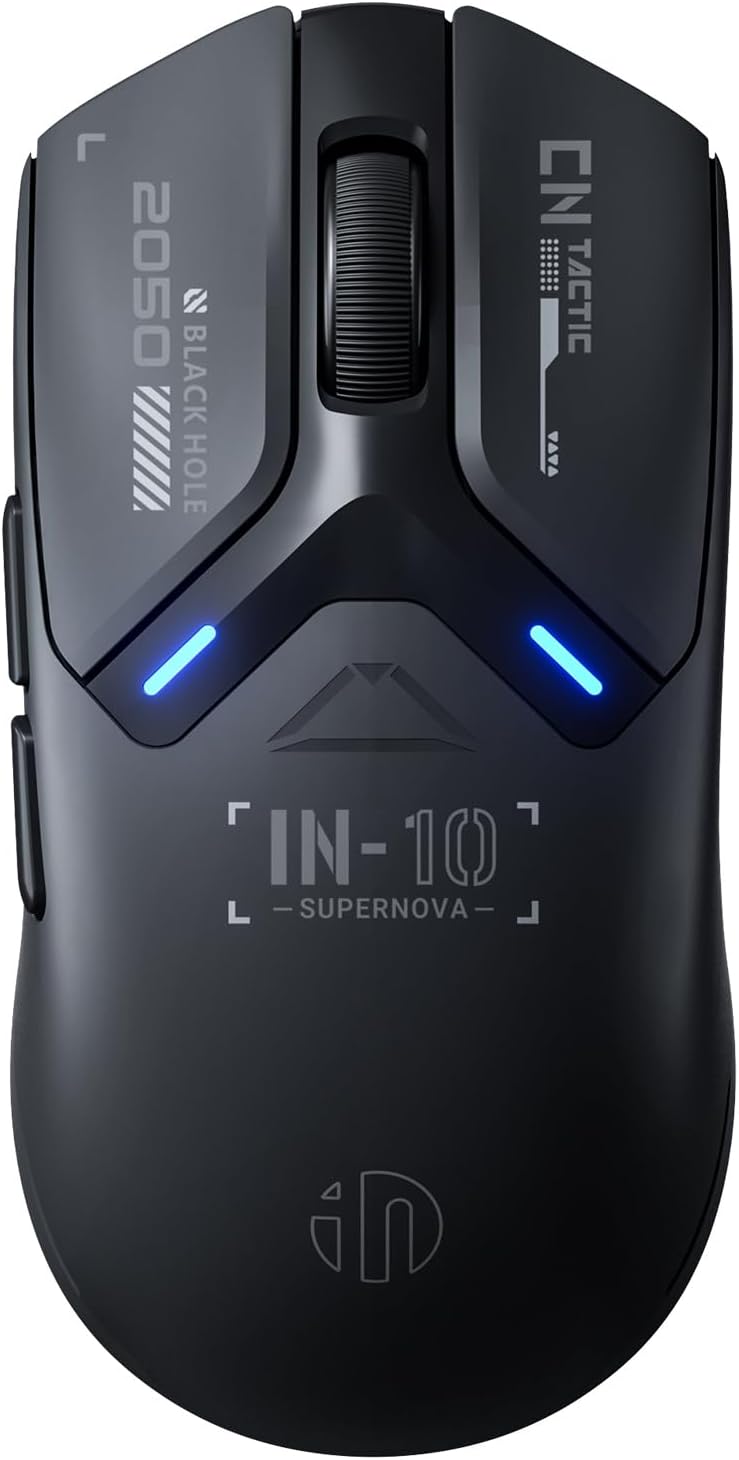
2-сүрөт: Жогорку View of INPHIC IN10P Mouse

Figure 3: Ultra-Lightweight Design (60g)
Жайгашуу
1. 2.4G зымсыз байланыш аркылуу туташуу
- Locate the 8K Nano USB receiver in the storage compartment on the underside of the mouse.
- Plug the USB receiver directly into an available USB-A port on your computer. For extended range or convenience, use the provided receiver extension adapter by connecting the USB-C cable to the adapter and then plugging the receiver into the adapter.
- Slide the connectivity switch on the mouse's underside to the "2.4G" position. The mouse should automatically connect to your device.
2. Bluetooth 5.0 аркылуу туташуу
- Slide the connectivity switch on the mouse's underside to the "BT" position.
- Press and hold the DPI/PAIR button on the underside of the mouse for 3-5 seconds until the RGB indicator light starts blinking, indicating pairing mode.
- On your computer or device, navigate to Bluetooth settings and search for new devices. Select "INPHIC IN10P" from the list to complete the pairing process.
3. Connecting via Type-C Wired Mode
- Connect one end of the provided 1.8m Type-C braided paracord cable to the USB-C port on the front of the mouse.
- Connect the other end of the cable to an available USB-A port on your computer.
- Чычкан автоматтык түрдө зымдуу режимге өтүп, заряддоону баштайт.

Figure 4: Tri-Mode Connectivity Options
4. Applying Anti-slip Mouse Grip Tape
For enhanced grip and comfort, you can apply the included anti-slip mouse grip tape. Carefully peel the adhesive backing from the tape pieces and apply them to the designated areas on the mouse, typically the sides and main click buttons, as desired.
Video 1: Unboxing and Initial Setup of INPHIC IN10P Mouse. This video demonstrates the unboxing process, showing the mouse and its accessories, and how to connect the USB receiver.
Иштөө нускамалары
1. Которуу режимдери
Use the physical switch on the underside of the mouse to toggle between OFF, 2.4G wireless, and Bluetooth (BT) modes. This allows seamless transition between different devices or connection types.
2. Adjusting DPI Settings
The IN10P mouse features 6 adjustable DPI levels ranging from 800 to 26,000. Press the DPI/PAIR button on the underside of the mouse to cycle through the preset DPI levels. The built-in RGB indicator system will change color to reflect the current DPI setting.

Figure 5: PAW3395 Sensor and Performance Metrics
3. Using Programmable Buttons and Software Customization
The mouse is equipped with 5 programmable buttons. To fully customize these buttons, adjust DPI levels, remap functions, set macros, and configure RGB lighting, download and install the official INPHIC driver software. The software allows for extensive personalization to suit your gaming and productivity needs. Note that some advanced features may only be available in wired or 2.4G wireless modes.

Figure 6: INPHIC InCloud MACRO Software Interface
Техникалык тейлөө
1. Чычканды заряддоо
The IN10P mouse is powered by a 400mAh high-efficiency rechargeable battery. When the battery is low, the RGB indicator will provide a low-power warning. Connect the mouse using the provided Type-C braided paracord cable to a USB power source to charge. The mouse can be used in wired mode while charging.
2. Батареяга кам көрүү
To maintain optimal battery health and prevent damage from prolonged periods without power, it is recommended to charge the product at least once every three months.
3. Тазалоо
Due to its solid shell design, the IN10P is resistant to dust buildup. For general cleaning, use a soft, dry cloth to wipe the surface of the mouse. Avoid using harsh chemicals or abrasive materials.

Figure 7: 400mAh Battery for Extended Use
Проблемаларды чечүү
1. Polling Rate Discrepancy
The IN10P mouse is advertised with an 8000Hz polling rate. While this rate is achievable in 2.4G wireless mode using the 8K receiver, the wired mode typically supports a 1000Hz polling rate. Ensure you are using the 2.4G wireless connection with the provided 8K receiver for the highest polling rate performance.
2. Software Limitations in Bluetooth Mode
Some advanced customization features within the INPHIC driver software may have limited functionality or not be available when the mouse is connected via Bluetooth mode. For full customization options, use the wired or 2.4G wireless connection.
3. Байланыш маселелери
- 2.4G зымсыз: Ensure the USB receiver is securely plugged into a working USB port and the mouse switch is set to "2.4G". Try using the receiver extension adapter to improve signal strength if experiencing interruptions.
- Bluetooth: Verify Bluetooth is enabled on your device and the mouse is in pairing mode (blinking RGB indicator). Re-pair the device if connection is lost.
- текст: Check that the Type-C cable is firmly connected to both the mouse and the computer.
Техникалык шарттар
| Өзгөчөлүк | Спецификация |
|---|---|
| Модель номери | IN10P |
| Байланыш | 2.4G зымсыз, Bluetooth 5.0, USB-C зымдуу |
| Сенсор | PixArt PAW3395 оптикалык сенсор |
| DPI диапазону | 800 - 26,000 DPI (6 деңгээл) |
| Добуш берүү көрсөткүчү | Up to 8000Hz (2.4G Wireless) |
| Көз салуу ылдамдыгы | 650IPS |
| Ылдамдатуу | 50G |
| Салмагы | Болжол менен 60г (2.05 унция) |
| Өлчөмдөр | 4.8 x 2.44 x 0.04 дюйм |
| Батарея | 400mAh Rechargeable (Up to 120 hours continuous use) |
| Жашоо мөөнөтүн которуу | 100 миллион чыкылдатуу |
| Шайкештик | Windows, macOS, Linux |
Коопсуздук нускамалары
Please read and follow these safety instructions carefully to ensure proper use and longevity of your INPHIC IN10P mouse:
- Normal operating environment: 0°C-40°C, 40%-85%RH.
- Продукцияны кандайдыр бир суюктукка батырбаңыз же ысык/нымдуу чөйрөгө чыгарбаңыз.
- Эгерде продукт белгиленген диапазондон тышкаркы температураларга дуушар болсо, температура белгиленген иштөө диапазонунда турукташканга чейин дароо кубат которгучун өчүрүңүз (зымдуу чычкандын USB кабелин сууруп алыңыз).
- Кайра заряддалуучу өнүмдөрдү ысык/нымдуу чөйрөдө заряддабаңыз. Заряддоо кабели, клавиатура, чычкан жана USB порттору кубаттоо учурунда кургап, калдыктары жок экенин текшериңиз.
- Эгерде өнүмдүн туташтыруу кабели же кубаттоо кабели кандайдыр бир жол менен бузулган болсо, аны колдонууну дароо токтотуңуз.
- Бул продукт колдонуучу тейлей турган бөлүктөрүн камтыбайт. Эгерде продукт туура иштебесе, кардарларды тейлөөгө кайрылыңыз.
- Буюмду өзүңүз өзгөртүүгө же оңдоого аракет кылбаңыз, анткени бул кепилдикти жокко чыгарат.
- Эгерде кайра заряддоого болгон өнүмдөр узак убакыт бою колдонулбаса, адегенде аларды толугу менен заряддап, өчүргүчтү өчүрүп, салкын, кургак жерде сактаңыз. Батареяны кубатсыз узак убакытка зыян келтирбөө үчүн ар бир үч ай сайын кубаттап туруңуз.

Figure 8: Excerpt from Safety Instructions
Кепилдик жана колдоо
For product support, warranty information, or if your product does not function properly, please contact INPHIC customer service. Do not attempt to modify or repair the product yourself, as this will void the warranty.
You can find more information and contact details on the official INPHIC webсайт: www.inphic.com
For direct support, you may also email: support@inphic.cn


