1. Киришүү
The Donner STARRYPAD MINI is a compact and portable MIDI controller designed for music production, beat making, and live performance. Featuring 16 velocity-sensitive RGB pads with polyphonic aftertouch and a Note Repeat function, it offers versatile control for various digital audio workstations (DAWs) and music software. This manual provides essential information for setting up, operating, and maintaining your STARRYPAD MINI.
2. Пакеттин мазмуну
Пакетиңизде бардык буюмдар бар экенин текшериңиз:
- Donner STARRYPAD MINI MIDI Controller
- USB-C - USB-A кабели
- Колдонуучунун Колдонмосу (бул документ)

Image: The Donner STARRYPAD MINI MIDI Controller shown with its included USB-C to USB-A cable.
3. Продукт бүтүп калдыview
The STARRYPAD MINI features a grid of 16 illuminated pads and a USB-C port for connectivity and charging. Its compact design allows for easy portability.
3.1 Негизги өзгөчөлүктөрү
- 16 RGB Velocity-Sensitive Pads: Responsive pads with customizable RGB lighting and velocity curves.
- Polyphonic Aftertouch: Adds expressive control to your performances.
- Note Repeat Function: For creating rhythmic effects.
- Бир нече туташуу параметрлери: Supports both USB-C and wireless (Bluetooth) MIDI connections.
- Камтылган кайра заряддалуучу батарея: Provides up to 10 hours of operation.
- Кеңири шайкештик: Works with Android, iOS, Mac, and Windows devices.
- Ыңгайлаштыруу программасы: Allows for detailed configuration of pad behavior, colors, and MIDI messages.

Image: A hand interacting with the illuminated pads of the STARRYPAD MINI, illustrating its expressive capabilities.
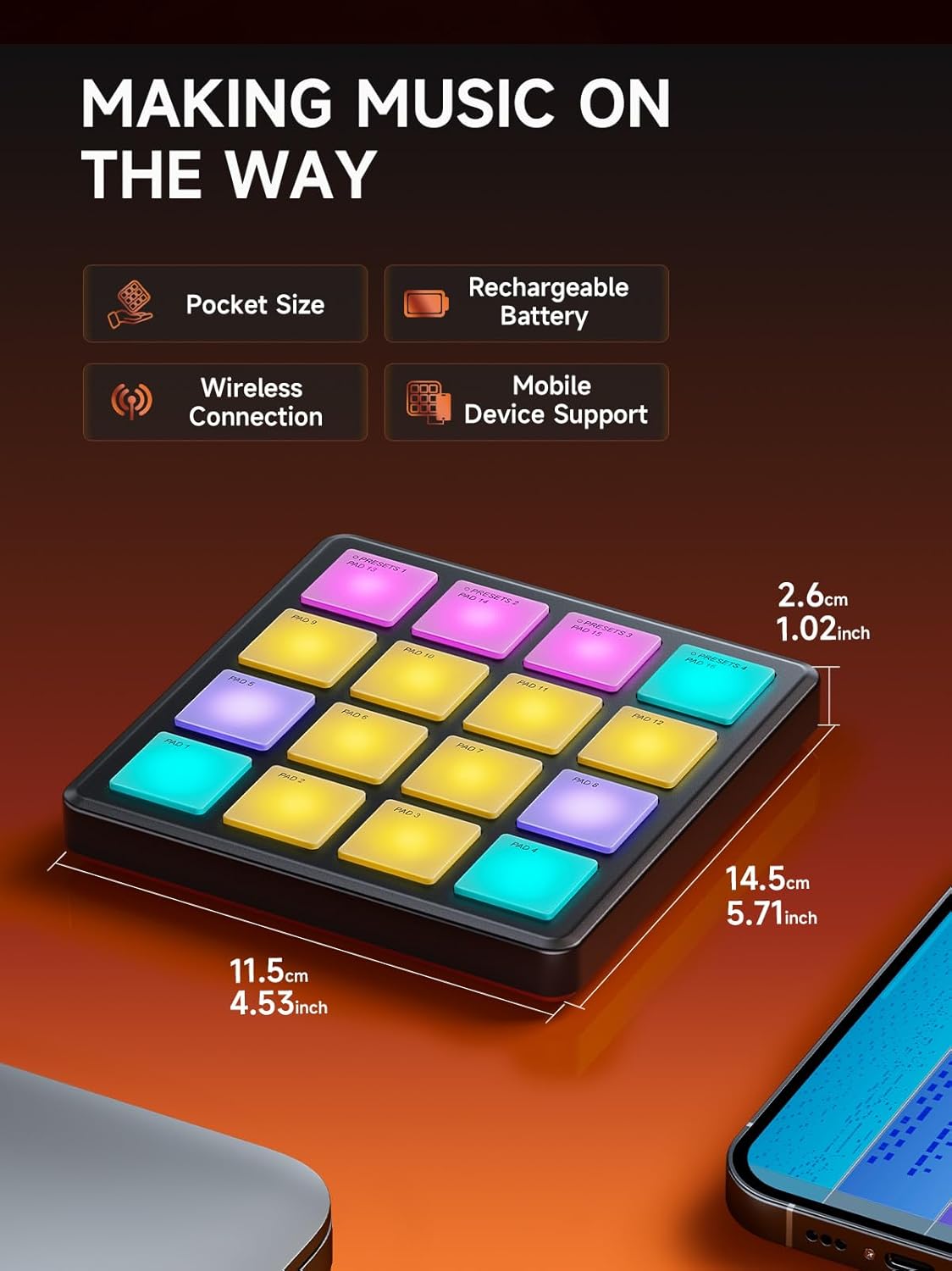
Image: The compact dimensions of the STARRYPAD MINI, highlighting its portability and built-in features.
4. Орнотуу
4.1 Аппаратты заряддоо
Before initial use, fully charge your STARRYPAD MINI. Connect the included USB-C cable to the device's USB-C port and the other end to a standard USB power adapter (not included) or a computer's USB port. The device's indicator light will show charging status.

Image: The STARRYPAD MINI offers up to 10 hours of battery life on a full charge.
4.2 Connecting to a Computer (USB-C)
- Connect the STARRYPAD MINI to your computer using the provided USB-C cable.
- The device is USB Class Compliant, meaning no special drivers are typically required for Windows, macOS, or Linux.
- Your computer should automatically recognize the STARRYPAD MINI as a MIDI input device.
4.3 Connecting Wirelessly (Bluetooth MIDI)
- Power on the STARRYPAD MINI.
- On your computer (Mac/Windows with Bluetooth MIDI support) or mobile device (iOS/Android), open your device's Bluetooth settings.
- Издөө available Bluetooth MIDI devices and select "STARRYPAD MINI" to pair.
- Once paired, the device can transmit MIDI data wirelessly to your music software.

Image: The STARRYPAD MINI supports both USB-C and wireless MIDI connections for flexible setup.

Image: The STARRYPAD MINI is compatible with a wide range of devices, including PC, Mac, Android, and iOS.
4.4 Программалык камсыздоону интеграциялоо
The STARRYPAD MINI requires Digital Audio Workstation (DAW) software or other music production applications to produce sound. It acts as a controller, sending MIDI messages to your software.
- DAW Software: Configure your DAW (e.g., Ableton Live, GarageBand, Cubase) to recognize the STARRYPAD MINI as a MIDI input device. Refer to your DAW's manual for specific instructions.
- Included Software Bundle: The STARRYPAD MINI comes with a music software bundle, which may include applications like Melodics, Cubasis LE3, Cubase LE, and WaveLab LE. Install these as per their respective instructions to enhance your music production capabilities.

Image: The STARRYPAD MINI includes a software bundle to get you started with music production.
5. Иштөө нускамалары
5.1 Basic Pad Operation
The 16 pads are velocity-sensitive, meaning the sound's intensity (velocity) will vary based on how hard you strike the pad. They also support polyphonic aftertouch, allowing for additional expressive control by pressing down on a pad after the initial strike.
5.2 Note Repeat Function
The Note Repeat function allows you to automatically trigger a note repeatedly at a set tempo and division while holding down a pad. This is useful for creating rolls, arpeggios, and other rhythmic patterns.

Image: The STARRYPAD MINI features built-in MIDI effects such as Note Repeat for dynamic performance.

Сүрөт: деталдуу view of the Note Repeat function's adjustable parameters.
5.3 Customization with MIDI Suite Software
The STARRYPAD MINI can be extensively customized using the dedicated MIDI Suite software (available for Windows, macOS, iOS, and Android). This software allows you to:
- Adjust velocity curves for each pad.
- Change pad colors.
- Configure MIDI messages sent by each pad.
- Save and recall up to 4 presets.

Image: The MIDI Suite software provides comprehensive customization options for the STARRYPAD MINI.

Image: The STARRYPAD MINI offers extensive customization through its software, including pad behavior and color settings.

Image: The controller supports various MIDI message types for broad compatibility.

Image: The STARRYPAD MINI allows users to save and recall up to 4 custom presets.
6. Техникалык тейлөө
6.1 Тазалоо
To clean the STARRYPAD MINI, use a soft, dry, lint-free cloth. Do not use abrasive cleaners, solvents, or sprays directly on the device. Avoid moisture near ports and pads.
6.2 Батареяга кам көрүү
To prolong battery life, avoid fully discharging the device frequently. If storing for an extended period, charge the battery to approximately 50% and store in a cool, dry place. Recharge every few months to prevent deep discharge.
7. Кыйынчылыктарды
- Үн чыгышы жок: The STARRYPAD MINI is a MIDI controller and does not produce sound on its own. Ensure it is connected to a computer or mobile device running a DAW or music software, and that the software is configured to receive MIDI input from the STARRYPAD MINI and has an instrument loaded.
- Connectivity Issues (USB): Ensure the USB-C cable is securely connected to both the controller and your computer. Try a different USB port or cable. Restart your computer and the STARRYPAD MINI.
- Connectivity Issues (Wireless/Bluetooth): Ensure Bluetooth is enabled on your host device and the STARRYPAD MINI is powered on. Unpair and re-pair the device if connection is unstable. Ensure your host device supports Bluetooth MIDI.
- Pads Not Responding/Inconsistent Velocity: Check the pad sensitivity settings in the MIDI Suite software. Ensure the pads are clean and free from debris. A firmware update might resolve some performance issues; check the Donner webакыркы микропрограмма жана жаңыртуу нускамалары үчүн сайт.
- Программа түзмөктү тааныбай жатат: Verify that your DAW or music software's MIDI settings are correctly configured to detect and use the STARRYPAD MINI as an input device.
- Pad Colors Not Changing: Ensure you are using the MIDI Suite software to customize pad colors and that the changes are saved and applied to the device.
8. Техникалык шарттар
| Өзгөчөлүк | Деталь |
|---|---|
| Модель номери | EC7176 |
| Төшөктөр | 16 RGB Velocity-Sensitive Pads with Polyphonic Aftertouch |
| Байланыш | USB Type-C, Wireless (Bluetooth MIDI) |
| Шайкеш түзмөктөр | Laptop, PC, Tablet, Smartphone |
| Аппараттык платформа | PC/Mac, Mobile (Android/iOS) |
| Колдоого алынган программалык камсыздоо | Ableton Live, Melodics, Cubasis LE3, Cubase LE, WaveLab LE (and other DAWs) |
| Батареянын иштөө мөөнөтү | 10 саатка чейин |
| Элемент Салмагы | 6.7 унция (0.19 килограмм) |
| Өлчөмдөрү (L x W x Y) | 5.71 x 4.53 x 1.02 дюйм (14.5 x 11.5 x 2.6 см) |
9. Кепилдик жана колдоо
For warranty information, please refer to the documentation included with your purchase or visit the official Donner website. For technical support, product registration, or to download the latest drivers and software, please visit the Donner support page on their official webсайт.
Donner Official Webсайт: www.donnerdeal.com


