1. Киришүү
Thank you for choosing the KZ Sora True Wireless Earbuds. These earbuds are designed to provide a superior audio experience with HiFi deep bass stereo sound, advanced Bluetooth 5.4 connectivity, and a comfortable, sweat-resistant design. This manual will guide you through the setup, operation, and maintenance of your new earbuds to ensure optimal performance and longevity.

Image: KZ Sora True Wireless Earbuds resting in their open charging case, showcasing алардын жарашыктуу дизайны.
2. Кутуда эмне бар
Сураныч, пакеттин мазмунун текшерип, бардык буюмдар бар экенин текшериңиз:
- KZ Sora True Wireless Earbuds (Left and Right)
- Кубаттоочу станция
- Ear Cushions (S/M/L sizes)
- Колдонуучунун Колдонмосу (бул документ)
- USB-A to USB-C Charging Cable (not explicitly listed in 'whats_in_the_box' but implied by 'fast-charging USB A to USB C cable' in feature bullets)
3. Продукт бүтүп калдыview
The KZ Sora earbuds feature a compact and ergonomic design for comfortable wear. The charging case not only protects your earbuds but also provides extended battery life.

Image: The KZ Sora earbuds displayed within their charging case, highlighting their HiFi audio capabilities and professional design.
3.1 Негизги компоненттер
- Кулакчындар: Left and Right earbuds with touch control surfaces.
- Заряддоо кутусу: Houses and charges the earbuds, with a USB-C charging port and LED indicator.
- Кулак кеңештери: Silicone ear tips in various sizes (S, M, L) for a secure and comfortable fit.
3.2 Super Linear Internal Magnetic Driver
The KZ Sora incorporates a super-linear wide-band internal magnetic dynamic driver. This advanced technology ensures exceptional depth, accuracy, and resolution across low, mid, and high frequencies, delivering a truly immersive audio experience.

Сүрөт: жарылган view diagram illustrating the components of the Super Linear Wideband Internal Magnetic Driver within the KZ Sora earbuds.
4. Орнотуу
4.1 Кулакчындарды жана кутучаны заряддоо
Биринчи колдонуудан мурун, кулакчындарды жана заряддоо кутучасын толук заряддаңыз.
- Кулакчындарды заряддоо кутусуна салыңыз, алар туура орнотулганын текшериңиз.
- Connect the USB-C charging cable to the charging port on the case and the other end to a USB power source.
- The LED indicator on the case will show charging status. A full charge for the case takes approximately 1.5 hours.
The earbuds offer over 5 hours of playtime on a single charge, with a total of 25 hours using the charging case.

Image: The KZ Sora earbuds in their charging case, illustrating the fast charging capability and extended battery life of 25 hours total playtime.
4.2 Сиздин аппаратыңыз менен жупташуу
The KZ Sora earbuds feature one-step pairing for convenience.
- Open the charging case and take out both earbuds. They will automatically power on and connect to each other.
- Enable Bluetooth on your mobile phone or audio device.
- Издөө "KZ Sora" in the list of available Bluetooth devices and select it to pair.
- Once paired, the earbuds are ready for use.
5. Иштөө
5.1 Сенсордук башкаруу
The KZ Sora earbuds utilize intuitive touch controls for various functions:
| Акция | Функция |
|---|---|
| Бир жолу басыңыз (кулакчындын бирине) | Play/Pause music, Answer/Hang up call |
| Оң кулакчынды 2 секунд басып туруңуз | Siri / Үн жардамчысын жандырыңыз |
| Сол гарнитураны эки жолу таптаңыз | Мурунку ыр |
| Оң кулакчынды эки жолу таптаңыз | Кийинки ыр |
| Long press either earbud for 2 seconds during incoming call | Кирүүчү чалууну четке кагуу |
| Touch either earphone for three seconds | Switch between High-Performance Mode and Standard Mode |
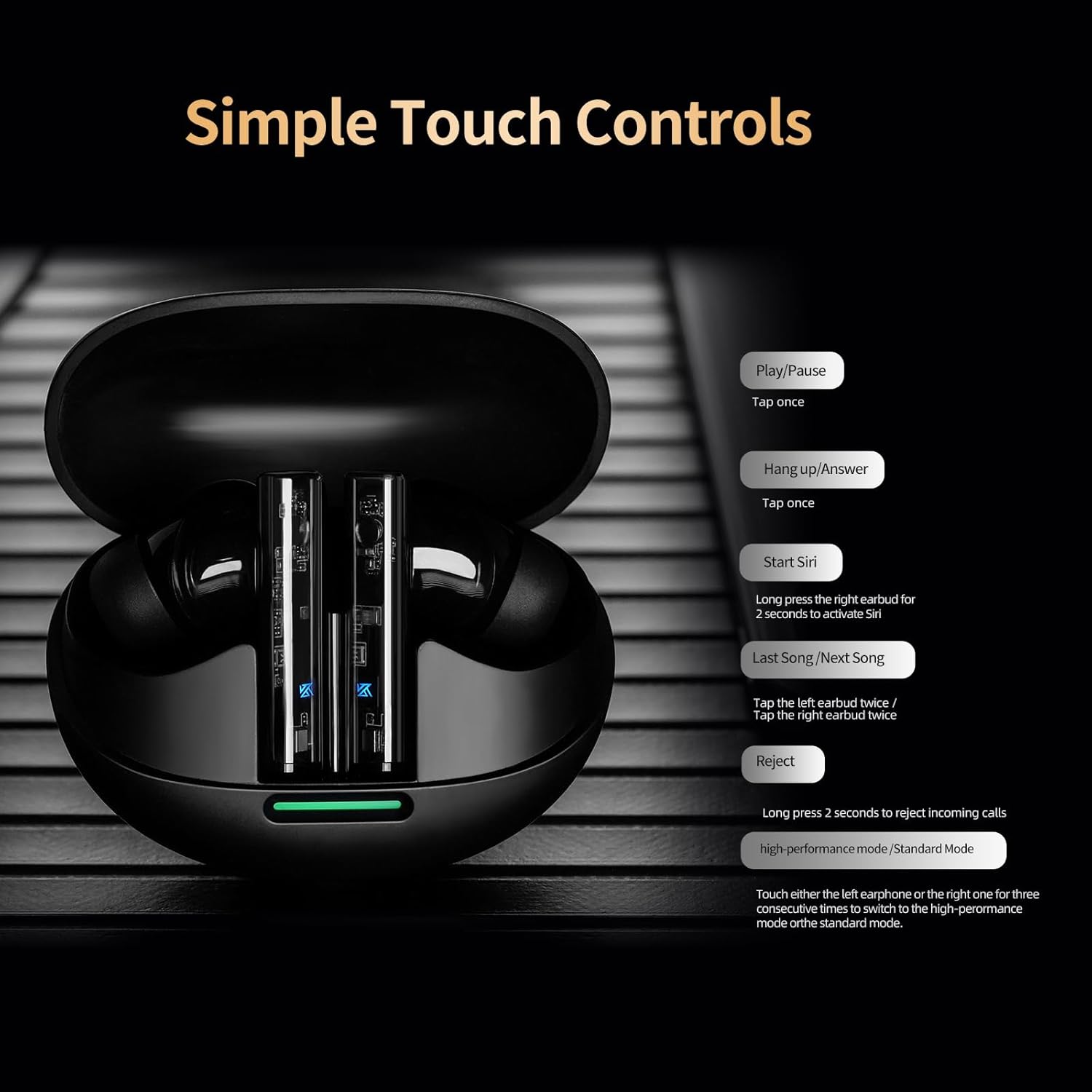
Image: A visual guide to the simple touch controls on the KZ Sora earbuds, detailing actions for music playback, calls, and voice assistant activation.
5.2 Standard and High-Performance Modes
The KZ Sora supports both SBC and AAC transmission protocols, allowing you to switch between standard and high-performance modes.
- Стандарттык режим: Музыка угуу үчүн идеалдуу, күчтүү чечилиш жана сонун үндөрдү беретtage, жана тең салмактуу жыштыктар.
- Жогорку өндүрүмдүүлүк режими: Reduces latency to as low as 55ms, perfect for gaming to pinpoint sounds and enhance the experience.

Image: Comparison illustrating the KZ Sora's Standard Mode for music listening and High-Performance Mode for gaming, highlighting the low latency.
5.3 Кулакчындарды тагынуу
Choose the ear tips that provide the most comfortable and secure fit. A proper seal is crucial for optimal sound quality and bass response. Insert the earbuds gently into your ear canal and twist slightly to secure them.
6. Техникалык тейлөө
Proper maintenance ensures the longevity and performance of your KZ Sora earbuds.
- Тазалоо: Кулакчындарды, айрыкча кулактын учтарын жана кубаттоочу контакттарды жумшак, кургак, түксүз чүпүрөк менен дайыма тазалап туруңуз. Катуу химиялык заттарды же абразивдүү материалдарды колдонбоңуз.
- Сактагыч: Колдонулбай турган учурда, кулакчындарды чаңдан, кирден жана физикалык зыяндан коргоо үчүн ар дайым кубаттоочу кутучасында сактаңыз.
- Суу каршылык: The earbuds are sweat-resistant and water-resistant. However, they are not waterproof. Avoid submerging them in water or exposing them to heavy rain. Dry them thoroughly if they get wet.
- Батареяга кам көрүү: Батареянын кубатын сактоо үчүн, кулакчындарды жана кутучаны тез-тез толук зарядсыздандырбаңыз. Аларды үзгүлтүксүз колдонбосоңуз да, үзгүлтүксүз кубаттап туруңуз.
7. Кыйынчылыктарды
If you encounter any issues with your KZ Sora earbuds, refer to the following common solutions:
- Кулакчындар бири-бири менен жупташпайт: Place both earbuds back into the charging case, close the lid, wait a few seconds, then open the lid and take them out again. They should automatically connect.
- Кулакчындар түзмөккө туташпай жатат: Ensure Bluetooth is enabled on your device and the earbuds are in pairing mode. Forget "KZ Sora" from your device's Bluetooth list and try pairing again.
- Бир кулакчындан үн чыкпайт: Check if both earbuds are charged. Try resetting them by placing them in the case and then taking them out.
- Заряддоо маселелери: Ensure the charging cable is securely connected and the charging contacts on both the earbuds and case are clean and free of debris. Try a different USB power source or cable.
- Көлөмү төмөн же үн сапаты начар: Ensure ear tips are properly sealed in your ear canal. Clean any earwax or debris from the earbud nozzles.
If the issue persists, please contact KZ customer support for further assistance.
8. Техникалык шарттар
Detailed technical specifications for the KZ Sora True Wireless Earbuds:
| Өзгөчөлүк | Спецификация |
|---|---|
| Модель аты | KZ Сора |
| Байланыш технологиясы | Зымсыз (Bluetooth 5.4) |
| Bluetooth диапазону | 50 Фут |
| Аудио драйвер түрү | Динамикалык драйвер |
| Аудио драйверинин өлчөмү | 10 миллиметр |
| Frequency Response | 20 Гц - 20 КГц |
| Сезимталдуулук | 105 дБ |
| Импеданс | 22 Ом |
| Noise Control | Үн изоляциясы |
| Башкаруу ыкмасы | тийүү |
| Батареянын кубаттуулугу | 300 миллионamp Саат |
| Батареянын орточо иштөө мөөнөтү | 25 Hours (with case) |
| Батареяны заряддоо убактысы | 1.5 саат |
| Аудио кечигүү | 55 Milliseconds (High-Performance Mode) |
| Сууга туруктуулук деңгээли | Water Resistant (Sweat Resistant) |
| Материал | Акрилонитрил бутадиен стирол (ABS) |
| Элемент Салмагы | 3.52 унция |

Image: A graph illustrating the excellent acoustic curve of the KZ Sora earbuds, demonstrating their sound performance across frequencies.
9. Кепилдик жана колдоо
KZ products are manufactured to high-quality standards. For warranty information and customer support, please refer to the warranty card included in your product packaging or visit the official KZ webсайт. Ар кандай кепилдик дооматтары үчүн сатып алганыңыздын далилин сактаңыз.
For technical assistance or inquiries, please contact KZ customer service through their official channels.