1. Киришүү
Сатып алганыңыз үчүн рахматasing the Karlsson Vogue Alarm Clock. This versatile device combines a digital alarm clock, a wireless induction charger, and a Bluetooth speaker, designed to enhance your daily routine. Please read this manual carefully before using the product to ensure proper operation and to maximize its lifespan. Keep this manual for future reference.
Коопсуздук чаралары
- Аппаратты сууга же ашыкча нымдуулукка дуушар кылбаңыз.
- Ашыкча температурадан сактаныңыз.
- Аппаратты өзүңүз ажыратпаңыз же оңдоого аракет кылбаңыз.
- Use only the provided or recommended USB adapter for power.
- Иштеп жаткан учурда аппараттын айланасында туура желдетүүнү камсыз кылыңыз.
2. Продукт бүтүп калдыview
The Karlsson Vogue Alarm Clock features a sleek design with a fabric-covered front and intuitive controls. Below is an overview of its main components and controls.
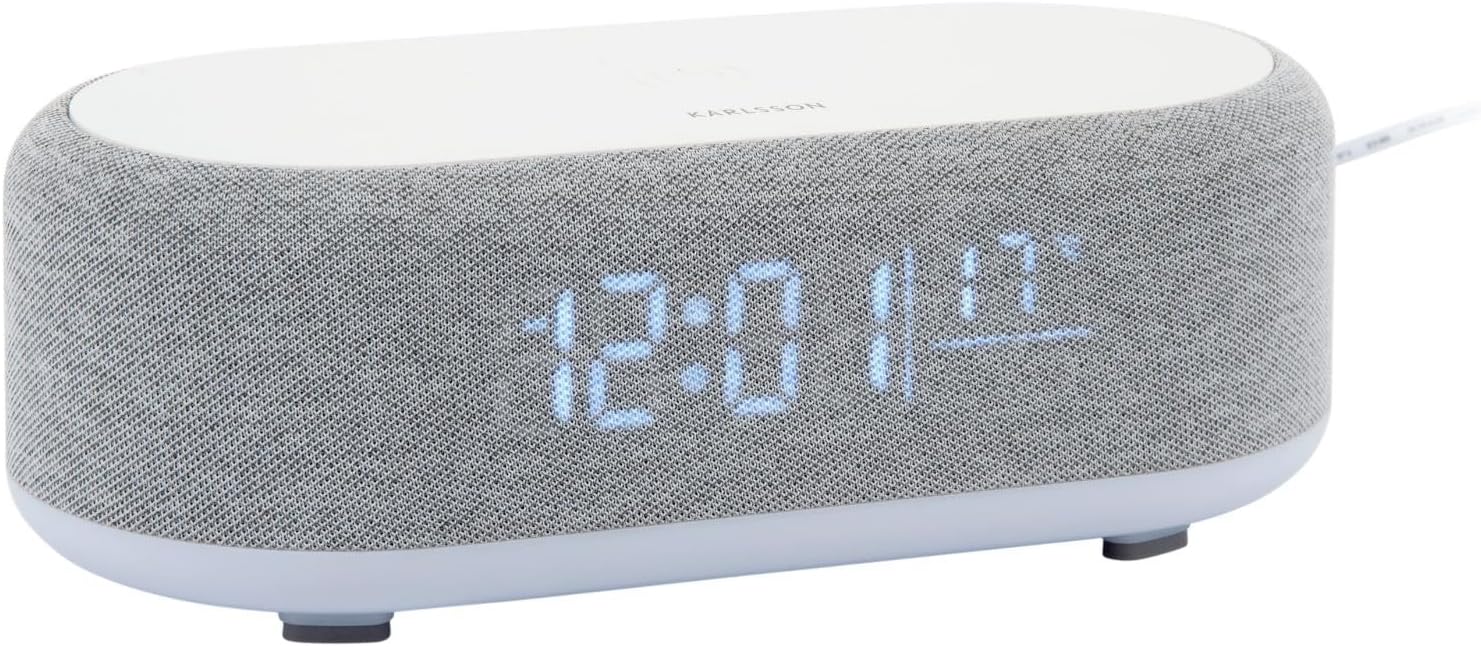
Сүрөт 2.1: Алдыңкы view of the Karlsson Vogue Alarm Clock, displaying the digital time and temperature.
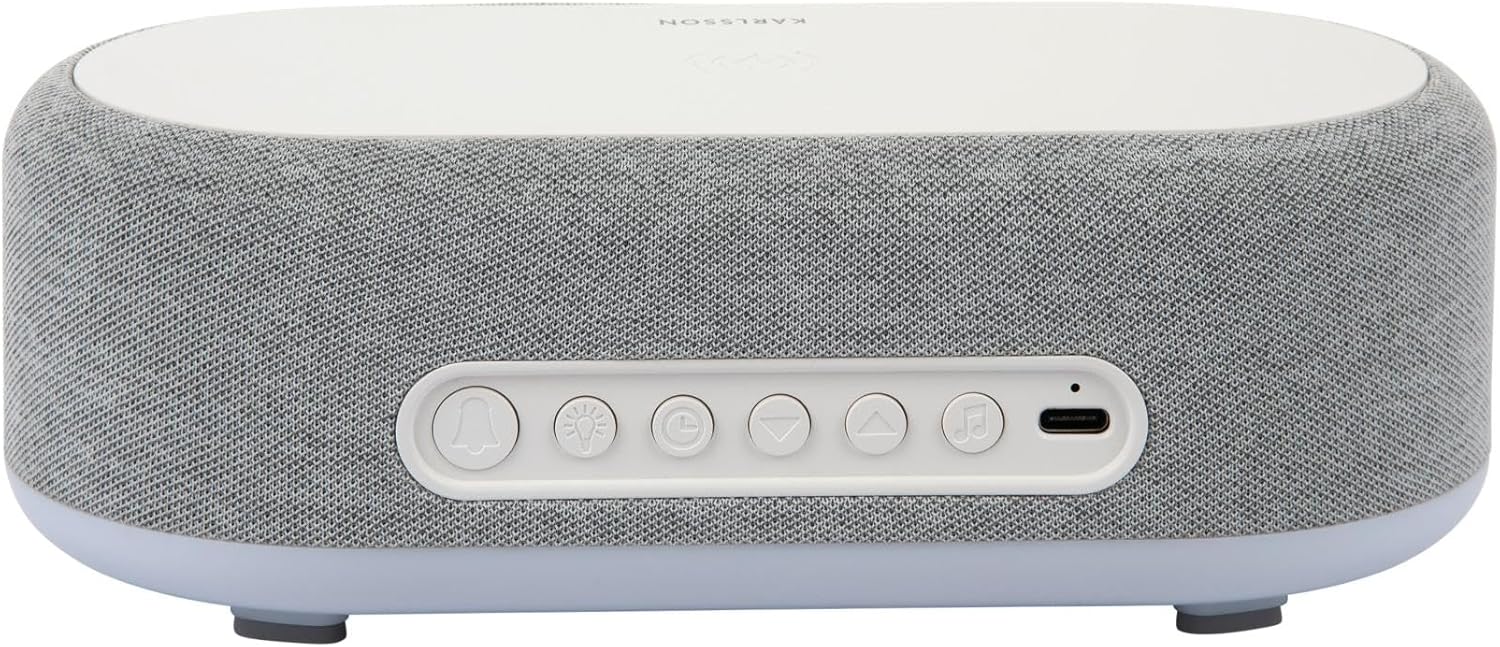
2.2-сүрөт: Арткы view of the alarm clock, highlighting the control buttons and USB-C power input.
Control Buttons (from left to right on rear panel):
- Ойготкуч 1 баскычы: Press to activate/deactivate Alarm 1. Long press to set Alarm 1 time.
- Ойготкуч 2 баскычы: Press to activate/deactivate Alarm 2. Long press to set Alarm 2 time.
- Brightness/Snooze Button: Press to adjust display brightness. When alarm sounds, press to snooze.
- Убакытты орнотуу баскычы: Убакытты орнотуу режимине өтүү үчүн көпкө басыңыз.
- Төмөн баскычы: Decrease values during setting, navigate menus.
- Өйдө баскычы: Increase values during setting, navigate menus.
- Bluetooth/Play/Pause Button: Long press to enter Bluetooth pairing mode. Press to play/pause music.
- USB-C кубат киргизүү: Кубат адаптерин бул жерге туташтырыңыз.
Жогорку панель:
- Зымсыз заряддоо аянтчасы: Зымсыз кубаттоо үчүн шайкеш келген түзмөктөрдү бул жерге жайгаштырыңыз.
3. Орнотуу
3.1 Кубат туташтыруу
- Connect the provided USB adapter to the USB-C Power Input port on the rear of the alarm clock.
- Plug the USB adapter into a standard wall outlet.
- The display will light up, indicating the device is powered on.
3.2 Баштапкы убакытты орнотуу
- көпкө басыңыз Убакытты орнотуу баскычы (clock icon) on the rear panel. The hour digits will start flashing.
- колдонуу Up жана Төмөн баскычтары саатты тууралоо үчүн.
- басыңыз Убакытты орнотуу баскычы Саатты ырастоо жана мүнөт коюуга өтүү үчүн кайрадан басыңыз. Мүнөт сандары күйүп-өчүп турат.
- колдонуу Up жана Төмөн баскычтары мүнөттү тууралоо үчүн.
- басыңыз Убакытты орнотуу баскычы one more time to confirm the minute and exit time setting mode.
4. Иштөө нускамалары
4.1 Ойготкучтарды орнотуу
Аппарат эки көз карандысыз ойготкучту колдойт (Ойготкуч 1 жана Ойготкуч 2).
- To set Alarm 1: көпкө басыңыз Ойготкуч 1 баскычы (bell icon with '1'). The hour digits for Alarm 1 will flash.
- колдонуу Up жана Төмөн баскычтары ойготкуч саатын тууралоо үчүн.
- басыңыз Ойготкуч 1 баскычы Саатты ырастоо жана мүнөт жөндөөсүнө өтүү үчүн кайрадан басыңыз.
- колдонуу Up жана Төмөн баскычтары ойготкучтун мүнөтүн тууралоо үчүн.
- басыңыз Ойготкуч 1 баскычы one more time to confirm and exit alarm setting. The alarm icon will appear on the display.
- To set Alarm 2: Follow the same steps using the Ойготкуч 2 баскычы (bell icon with '2').
4.2 Activating/Deactivating Alarms
- Тиешелүү баскычты басыңыз Ойготкуч 1 баскычы or Ойготкуч 2 баскычы briefly to toggle the alarm on or off. The alarm icon on the display will indicate its status.
4.3 Тындыруу функциясы
- Ойготкуч чыкканда, басыңыз Brightness/Snooze Button (light bulb icon) to activate snooze. The alarm will temporarily stop and sound again after approximately 9 minutes.
- To turn off the alarm completely, press any other button on the rear panel.
4.4 Bluetooth колонкасынын иштеши
- Жупташтыруу: көпкө басыңыз Bluetooth/Play/Pause Button (music note icon) until the display shows "BT" and starts flashing, indicating pairing mode.
- On your mobile device, enable Bluetooth and search for "Karlsson Vogue". Select it to connect.
- Once connected, the "BT" indicator will stop flashing. You can now play audio through the alarm clock's speaker.
- Ойнотуу: басыңыз Bluetooth/Play/Pause Button briefly to play or pause music.
- Volume control is managed via your connected mobile device.
4.5 Wireless Induction Charging
The top surface of the alarm clock features a wireless charging pad compatible with Qi-enabled devices.
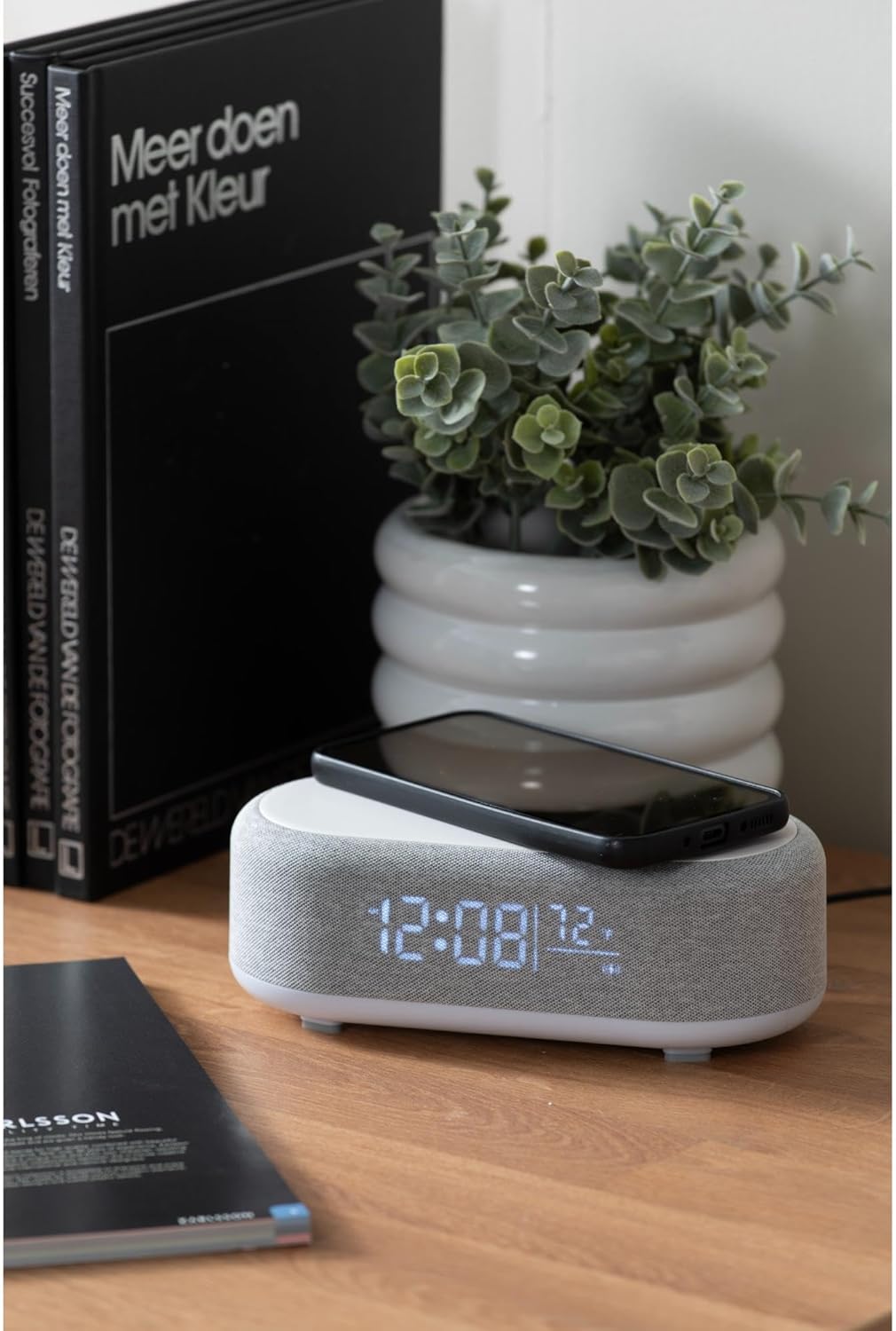
Figure 4.1: A smartphone placed on the wireless charging pad of the alarm clock.
- Place your Qi-compatible smartphone or other device directly onto the center of the top charging pad.
- Ensure the device is properly aligned. A charging indicator (usually on your phone screen) will confirm charging has begun.
- Толук заряддалгандан кийин түзмөгүңүздү алып салыңыз.
4.6 Дисплейдин жарыктыгын жөндөө
- басыңыз Brightness/Snooze Button (light bulb icon) repeatedly to cycle through different brightness levels for the display.
5. Техникалык тейлөө
5.1 Тазалоо
- Before cleaning, disconnect the power adapter.
- Ойготкуч сааттын бетин жумшак, кургак же бир аз кургак аарчы менен сүртүңүзamp кездеме.
- Абразивдүү тазалагычтарды, эриткичтерди же күчтүү химиялык заттарды колдонбоңуз, анткени алар бетке зыян келтириши мүмкүн.
5.2 Сактоо
- If storing the device for an extended period, disconnect it from power.
- Күн нурунан жана экстремалдык температурадан алыс салкын, кургак жерде сактаңыз.
6. Кыйынчылыктарды
| Көйгөй | Мүмкүн себеп | Чечим |
|---|---|---|
| Түзмөк күйбөй жатат. | Эч кандай кубат туташуу же туура эмес адаптер. | Ensure the USB-C cable is securely connected and the adapter is plugged into a working outlet. Try a different outlet. |
| Bluetooth туташпай жатат. | Device not in pairing mode; already connected to another device; mobile device Bluetooth off. | Long press the Bluetooth button to enter pairing mode. Ensure no other device is connected. Turn off and on Bluetooth on your mobile device. |
| Зымсыз кубаттоо иштебейт. | Phone not Qi-compatible; phone not aligned; phone case too thick. | Ensure your device supports Qi wireless charging. Re-position the device on the center of the pad. Remove thick phone cases. |
| Сигнал угулбай жатат. | Alarm deactivated; volume too low (for Bluetooth alarm). | Check if the alarm icon is displayed. Ensure the alarm time is set correctly. If using Bluetooth audio for alarm, ensure phone volume is adequate. |
7. Техникалык шарттар
| Өзгөчөлүк | Деталь |
|---|---|
| Бренд | Карлссон |
| Модель номери | KA6033GY |
| Түс | Боз |
| Материал | Пластик (ABS) |
| Өлчөмдөрү (L x W x Y) | 19.8 x 9.8 x 7 см (7.8 x 3.86 x 2.76 дюйм) |
| Салмагы | 0.46 кг (1.01 фунт) |
| Power Input | USB (Adapter included) |
| Зымсыз заряддоо | Induction (Qi-compatible) |
| Байланыш | Bluetooth |
8. Кепилдик жана колдоо
For warranty information and customer support, please refer to the documentation provided with your purchase or contact your retailer. You may also visit the official Karlsson webкошумча жардам үчүн сайт.
Webсайт: Karlsson Official Store


