Introduction
This manual provides detailed instructions for the proper use and maintenance of your VILTROX AF 35mm F1.2 LAB FE lens. Please read this manual thoroughly before using the lens to ensure optimal performance and longevity.
Кутуда эмне бар
- Объектив
- Линза капкактары (алдыңкы жана арткы)
- Линзалык баштык
- Линза капкагы
1. Орнотуу
1.1 Линзаны камераңызга бекитүү
- Камераңыз өчүк экенин текшериңиз.
- Линзанын арткы капкагын линзадан, ал эми корпус капкагын камерадан чыгарыңыз.
- Align the mounting index (red dot) on the lens with the corresponding index on your camera body.
- Объективди камера орноткучуна кыстарыңыз жана аны чыкылдатканча саат жебеси боюнча айлантыңыз.

Image: The VILTROX AF 35mm F1.2 LAB FE lens securely attached to a Sony E-mount camera body.
1.2 Линза капкагын бекитүү
The lens hood helps to prevent stray light from entering the lens, reducing flare and ghosting. It also provides some physical protection for the front element.
- Линза капкагындагы белгини линзанын алдыңкы бетиндеги белги менен тегиздеңиз.
- Rotate the lens hood clockwise until it locks into place.

Image: The VILTROX AF 35mm F1.2 LAB FE lens with its included lens hood properly installed.
2. Объективди иштетүү
2.1 Диафрагманы башкаруу
The lens features an ultra-large f/1.2 aperture, allowing for excellent low-light performance and shallow depth of field. The aperture can be controlled via the camera body or using the dedicated aperture ring on the lens. The aperture ring includes click stops for tactile feedback.

Image: Detail of the lens barrel, highlighting the aperture ring and the integrated LCD screen.
2.2 Автофокус (AF) жана кол менен фокустоо (MF)
The lens is equipped with a HyperVCM motor for rapid and smooth autofocus. You can switch between autofocus and manual focus using the AF/MF switch located on the lens barrel.
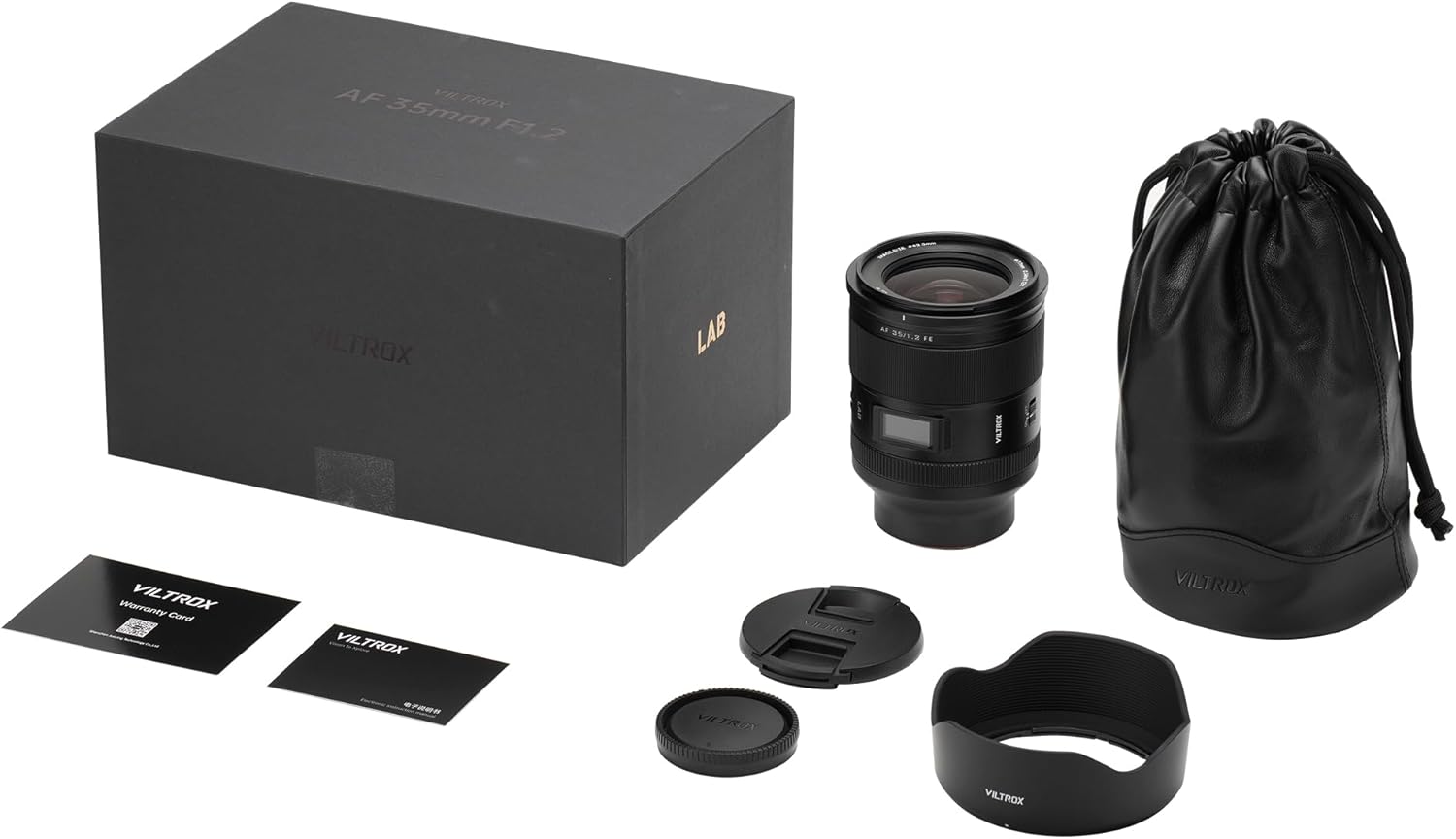
Image: The AF/MF switch and two customizable function buttons on the lens body.
2.3 Customizable Fn Buttons
Two customizable Fn (Function) buttons are provided on the lens barrel. These buttons can be assigned various functions through your camera's menu, such as focus hold, depth-of-field preview, or other camera settings.
2.4 Focus Range Limiter
A focus range limiter switch is integrated into the lens. This feature allows you to restrict the autofocus range, which can improve focusing speed and accuracy when shooting subjects within a specific distance range.
2.5 ЖК экран
The integrated LCD screen displays key information such as focus distance and aperture settings, providing quick visual confirmation of your current lens parameters.

Image: The LCD screen on the lens showing focus distance and aperture information.
2.6 Оптикалык иштөө
The lens features an advanced optical design with 15 elements in 10 groups, including 5 ultra-low dispersion elements, 3 high-refractive index elements, and 2 large-diameter aspherical elements. This construction ensures high image quality, sharpness, and reduced aberrations.

Сүрөт: жарылды view diagram illustrating the complex optical elements within the lens.
2.7 Close-Up Photography
With a minimum focusing distance of 0.34m and a magnification ratio of 0.17x, this lens is capable of delivering excellent image quality for close-up subjects.
3. Техникалык тейлөө
3.1 Линзаны тазалоо
To clean the lens, use a soft, lint-free cloth. For stubborn smudges, use a lens cleaning solution specifically designed for optical surfaces. Avoid touching the lens elements directly with your fingers.
3.2 Сактоо
When not in use, store the lens with both front and rear caps attached in a dry, cool place, away from direct sunlight and extreme temperatures. Using the provided lens pouch offers additional protection.
3.3 Узактыгы
The lens body is constructed from a magnesium-aluminum alloy, providing a lightweight yet robust design with high impact resistance. It also features advanced dust and splash protection, ensuring reliable performance in various environmental conditions.
4. Кыйынчылыктарды
4.1 Lens Elements Clunking Sound
It is normal for the lens elements to make some clunking sounds when the lens is not powered up. This is due to the linear motors with magnetic fields, which allow the lenses to move freely in the absence of current. This does not indicate a malfunction.
4.2 Focus and Sharpness Issues
If you experience issues with focus accuracy or image sharpness, ensure the lens is securely mounted to the camera body. Verify that the AF/MF switch is set correctly for your intended use. For optimal performance, ensure your camera's firmware and the lens firmware are up to date. If problems persist, consult VILTROX customer support.
4.3 Aperture Ring Operation
The aperture ring provides direct control over the aperture. If you prefer to control the aperture solely through the camera body, ensure the aperture ring is set to its 'A' (Auto) position, if available, or the widest aperture setting, and then adjust via the camera's command dial. Be aware of the tactile feedback of the click stops to prevent accidental changes.
5. Техникалык шарттар
| Өзгөчөлүк | Description |
|---|---|
| Бренд | VILTROX |
| Модель номери | AF 35/1.2 LAB FE |
| Фокустун узундугу | 35 мм (бекитилген) |
| Максималдуу диафрагма | f/1.2 |
| Минималдуу диафрагма | (Not specified, typical for f/1.2 lenses is f/16 or f/22) |
| Линза орнотуу | Sony E-Mount (Full Frame) |
| Оптикалык курулуш | 15 elements in 10 groups (5 ULD, 3 HRI, 2 Aspherical) |
| Автофокус мотору | HyperVCM |
| Минималдуу Фокустоо Дистанциясы | 0.34m (1.12 и) |
| Максималдуу чоңойтуу | 0.17x |
| Чыпка өлчөмү | 77мм |
| Өлчөмдөрү (L x D) | Болжол менен 4.8 x 3.5 дюйм (12.2 x 8.9 см) |
| Салмагы | Болжол менен 4 фунт (1.8 кг) |
| Курулуш материалы | Магний-алюминий эритмеси |
| Аба ырайы | Чаңдан жана чачырандылардан коргоо |
6. Кепилдик жана колдоо
VILTROX products are covered by a manufacturer's warranty. Please refer to the warranty card included in your product packaging for specific terms and conditions. For technical support, service, or inquiries, please visit the official VILTROX webсайтка же кардарларды тейлөө бөлүмүнө кайрылыңыз.
Онлайн ресурстар: VILTROX расмий дүкөнү
7. Продукт видеолору
7.1 Кутудан чыгаруу жана баштапкы орнотуу
Video: A detailed unboxing of the VILTROX AF 35mm F1.2 LAB FE lens, showing all included accessories and initial handling.
7.2 Function Button Overview
Video: A demonstration of the customizable function buttons and switches on the VILTROX AF 35mm F1.2 LAB FE lens.
7.3 Night Bokeh Performance
Видео: Кыска клип шоуcasing the night bokeh capabilities of the VILTROX AF 35mm F1.2 LAB FE lens.


