1. Киришүү
This manual provides detailed instructions for the safe and effective use of your Oraimo SpaceBox Pro Portable Bluetooth Speaker. Please read this manual thoroughly before operating the device and retain it for future reference.

Image 1: Oraimo SpaceBox Pro Portable Bluetooth Speaker. This image shows the speaker's front grille with an illuminated infinity symbol light effect.
2. Пакеттин мазмуну
Төмөндө тизмеленген нерселердин баары пакетиңизде бар экенин текшериңиз:
- Зымсыз динамик x 1
- Саламдашуу Guide x 1
- Погон x 1
- Type-C заряддоо кабели x 1

Image 2: Package contents including the speaker, welcome guide, shoulder strap, and Type-C charging cable.
3. Продукт бүтүп калдыview
Динамиктин ар кандай бөлүктөрүн жана башкаруу элементтерин билип алыңыз.
3.1. Башкаруу каражаттары жана көрсөткүчтөр

Image 3: Top panel of the speaker showing power, Bluetooth, volume down, play/pause, volume up, light effect, and bass buttons, along with battery indicator lights.
- Кубат баскычы: Күйгүзүү/өчүрүү үчүн басып туруңуз.
- Bluetooth баскычы: Жупташтыруу режимине кирүү үчүн басыңыз.
- Үнүн төмөндөтүү (-): Үнүн азайтуу.
- Ойнотуу/тындыруу баскычы: Аудиону ойнотуу же тындыруу.
- Үнүн жогорулатуу (+): Үнүн жогорулатуу.
- Жарык эффектисинин баскычы: Cycle through light modes.
- Басс баскычы: Activate/deactivate Bass Boost.
- Батарея индикатор жарыктары: Батареянын учурдагы деңгээлин көрсөтүү.
3.2. Порттар жана байланыштар

Image 4: Rear panel of the speaker showing the microphone input, AUX-in port, TF card slot, USB-A port, and USB-C charging port.
- Микрофон киргизүү (6.35 мм): For connecting a wired microphone or wireless microphone dongle.
- AUX-ин порту (3.5 мм): For connecting external audio devices via an auxiliary cable.
- TF карта уячасы: For playing audio directly from a TF (microSD) card (up to 128GB).
- USB-A порту: For playing audio from a USB drive or charging other devices.
- USB-C заряддоо порту: Динамикти заряддоо үчүн.
4. Орнотуу
4.1. Динамикти кубаттоо
Before first use, fully charge your speaker. Connect the provided Type-C charging cable to the speaker's USB-C port and a compatible power adapter (not included). A full charge takes approximately 2 hours with a 35W charger.

Image 5: The speaker connected to a power source via its USB-C charging port.
4.2. Күйгүзүү/өчүрүү
- Күйгүзүү үчүн: Индикатор жарыктары күйгөнгө чейин Кубат баскычын басып, кармап туруңуз.
- Өчүрүү үчүн: Индикатор жарыктары өчкөнгө чейин Кубат баскычын басып, кармап туруңуз.
4.3. Bluetooth Жупташтыруу
- Динамикти күйгүзүңүз. Bluetooth индикатору күйүп-өчөт, бул анын жупташтыруу режиминде экенин билдирет.
- Түзмөгүңүздө (смартфон, планшет ж.б.) Bluetooth иштетиңиз жана жеткиликтүү түзмөктөрдү издеңиз.
- Select "Oraimo SpaceBox Pro" from the list. Once connected, the Bluetooth indicator will stop flashing and remain solid.
- For Android devices, a Google Pop-Up Notification may appear for quick pairing.

Image 6: A smartphone showing a Google Pop-Up Notification for quick pairing with the speaker.
4.4. Oraimo Sound App
Download the Oraimo Sound app for enhanced control and customization options. The app allows you to:
- Customize Equalizer (EQ) settings.
- Change light effects and patterns.
- Enable Karaoke effects.
- Динамиктин микропрограммасын жаңыртыңыз.

Image 7: The Oraimo Sound app displaying various customization options for the speaker.
5. Иштөө нускамалары
5.1. Аудио ойнотуу
- Bluetooth: Connect your device via Bluetooth as described in Section 4.3.
- AUX кирүүсү: Connect an audio device to the 3.5mm AUX-in port using an auxiliary cable. The speaker will automatically switch to AUX mode.
- TF картасы: Аудио менен TF (microSD) картасын салыңыз files into the TF card slot. The speaker will automatically play music from the card.
- USB Drive: Аудио менен USB дискти салыңыз files into the USB-A port. The speaker will automatically play music from the drive.

Image 8: The speaker supports various playback options including Bluetooth, TF Card, AUX-in, and USB Drive.
5.2. Жарык эффекттери
Press the Light Effect Button on the top panel to cycle through different beat-adaptive light modes. Further customization of light patterns and colors is available via the Oraimo Sound app.

Сүрөт 9: Мисamples of different beat-adaptive light patterns available on the speaker, including Grooving, Flowing, Breathing, and Crossing.
5.3. Караоке функциясы
Connect a 6.35mm wired microphone or a wireless microphone with a 6.35mm dongle to the dedicated microphone input port. Use the Oraimo Sound app to adjust voice enhancement, echo effects, and other settings for an optimized karaoke experience.
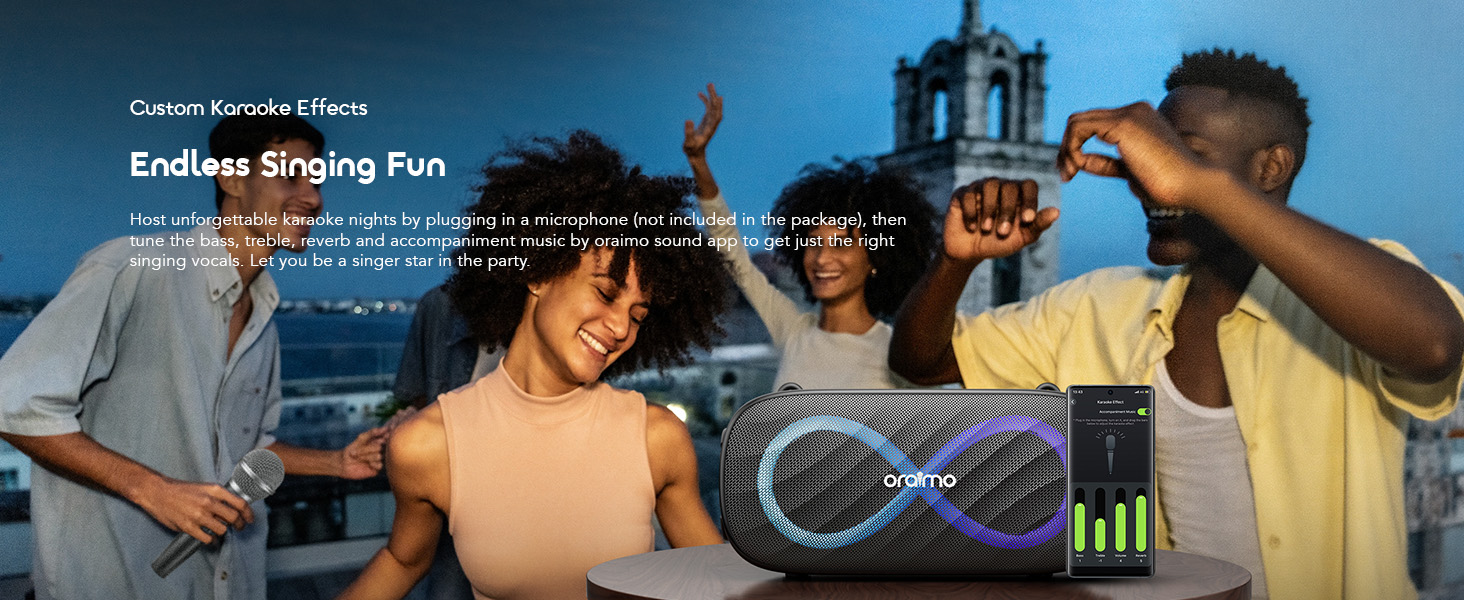
Image 10: The speaker being used for karaoke, with a smartphone app showing microphone and effect controls.
5.4. Чыныгы зымсыз стерео (TWS) жупташтыруу
To achieve 160W surround sound, you can pair two Oraimo SpaceBox Pro speakers together:
- Эки динамик тең күйгүзүлгөнүн жана эч кандай Bluetooth түзмөгүнө туташкан эмес экенин текшериңиз.
- On one speaker (this will be the primary speaker), press and hold the Bluetooth button until you hear a prompt indicating TWS pairing mode.
- The primary speaker will automatically search for the secondary speaker. Once connected, you will hear a confirmation sound, and the Bluetooth indicators on both speakers will synchronize.
- Түзмөгүңүздү негизги динамикке Bluetooth аркылуу туташтырыңыз. Эми аудио эки динамиктен тең ойнотулат.

Image 11: Two Oraimo SpaceBox Pro speakers shown together, illustrating the True Wireless Stereo (TWS) feature.
5.5. Playtime Boost Mode
Activate Playtime Boost Mode via the Oraimo Sound app to extend battery life. In this mode, the speaker can provide 24-27 hours of playtime, compared to 13-20 hours in normal mode. Note that equalizer and light settings may be disabled in Playtime Boost Mode to conserve battery.

Image 12: The speaker shown in two scenarios (day and night camping) to highlight the extended battery life with Playtime Boost Mode.
6. Техникалык тейлөө
- Тазалоо: Динамиктин бетин тазалоо үчүн жумшак, кургак чүпүрөктү колдонуңуз. Абразивдүү тазалагычтарды же эриткичтерди колдонбоңуз.
- Суу каршылык: The speaker is IPX4 splash-proof. Avoid submerging it in water or exposing it to heavy rain for extended periods. Ensure the port cover is securely closed to maintain water resistance.
- Сактагыч: Динамикти түз күн нурунан жана өтө температурадан алыс салкын, кургак жерде сактаңыз.
- Батареяга кам көрүү: Батареянын иштөө мөөнөтүн узартуу үчүн динамикти тез-тез колдонбосо дагы, дайыма заряддаңыз. Батареяны узак убакытка толук зарядсыздандырбаңыз.
7. Кыйынчылыктарды
Динамикиңизде көйгөйлөргө туш болсоңуз, төмөнкү жалпы көйгөйлөрдү жана чечимдерди караңыз:
- Динамик күйгүзбөйт: Батарея заряддалганын текшериңиз. Динамикти кубат булагына туташтырыңыз жана кайра аракет кылыңыз.
- Bluetooth түзмөгү менен жупташтыруу мүмкүн эмес:
- Ensure the speaker is in Bluetooth pairing mode (flashing indicator).
- Түзмөгүңүздүн Bluetooth функциясы күйгүзүлгөнүн жана анын диапазонунда (10 метрге чейин) экенин текшериңиз.
- Forget "Oraimo SpaceBox Pro" from your device's Bluetooth list and try pairing again.
- Динамикти да, түзмөгүңүздү да өчүрүп күйгүзүңүз.
- Үн жок:
- Динамиктин жана туташкан түзмөгүңүздүн үнүнүн деңгээлин текшериңиз.
- Ensure the correct input source (Bluetooth, AUX, TF Card, USB) is selected or automatically detected.
- If using AUX, TF card, or USB, ensure the media files are not corrupted and the cable/card/drive is properly inserted.
- Үн сапаты начар:
- Тоскоолдукту азайтуу үчүн динамикти Bluetooth түзмөгүңүзгө жакындатыңыз.
- Динамик менен түзмөгүңүздүн ортосундагы тоскоолдуктардан качыңыз.
- Try adjusting the EQ settings via the Oraimo Sound app.
- TWS жупташтыруу ишке ашпай калды:
- Ensure both speakers are the same model (Oraimo SpaceBox Pro).
- TWS жупташтырууну баштоодон мурун, эки динамик тең башка Bluetooth түзмөгүнө туташып турбаганын текшериңиз.
- TWS жупташуу кадамдарын кылдаттык менен кайталаңыз.
8. Техникалык шарттар
| Өзгөчөлүк | Спецификация |
|---|---|
| Модель аты | OBS-682 |
| Бренд | Oraimo |
| Материал | Пластик |
| Динамик түрү | Сыртта |
| Өзгөчөлүктөр | Bass Boost, Display, Hi Res Audio, LED Light |
| Байланыш технологиясы | Bluetooth |
| Зымсыз байланыш технологиясы | Bluetooth |
| Динамиктин максималдуу чыгаруу күчү | 80 Ватт (макс) |
| Аудио чыгаруу режими | Стерео, көлөмдүү (TWS менен) |
| Сууга туруктуулук деңгээли | IPX4 (Сууга туруктуу) |
| Заряддоо убактысы | 2 саат (35W заряддагыч менен) |
| Оюн убактысы | 13-20 Hours (Normal), 24-27 Hours (Playtime Boost Mode) |
| Продукциянын өлчөмдөрү | 5"D x 10"W x 5"H |
| Элемент Салмагы | 6.3 фунт |
Эскертүү: Техникалык мүнөздөмөлөр алдын ала эскертүүсүз өзгөртүлүшү мүмкүн.
9. Кепилдик жана колдоо
9.1. Кепилдик маалыматы
The Oraimo SpaceBox Pro Portable Bluetooth Speaker comes with a Limited Warranty. For detailed information regarding warranty terms, conditions, and duration, please refer to the official Oraimo webсайтында же топтомуңузга кирген кепилдик картасында көрсөтүлгөн.
9.2. Кардарларды колдоо кызматы
For further assistance, technical support, or inquiries, please visit the official Oraimo store or contact their customer service through the channels provided on their webсайт.
Official Oraimo Store: OraimoHome on Amazon


