1. Киришүү
This manual provides comprehensive instructions for the setup, operation, and maintenance of your SOULION R100 Plus Wireless Bluetooth Computer Speaker. Please read this manual thoroughly before using the product to ensure proper function and longevity.
2. Пакеттин мазмуну
Төмөндө көрсөтүлгөн бардык буюмдар продуктуңуздун таңгагында бар экенин текшериңиз:
- SOULION R100 Plus Computer Speaker
- USB-C кубат кабели
- 3.5mm AUX кабели
- Quick Start Guide
3. Продукт бүтүп калдыview
The SOULION R100 Plus is a versatile computer speaker designed to enhance your audio experience with clear stereo sound, dynamic RGB lighting, and multiple connectivity options.
3.1 Негизги өзгөчөлүктөрү
- Кайра заряддалуучу батарея: Provides 4-6 hours of playtime on a 4-hour charge.
- Таза стерео үн: Equipped with upgraded 2x5W technology for balanced audio.
- Динамикалык RGB жарыктандыруу: Features 4 colorful light shows with adjustable modes.
- Көп функциялуу баскычтар: Intuitive controls for power, volume, track selection, and light effects.
- Кеңири шайкештик: Connects via Bluetooth or 3.5mm AUX to PCs, laptops, tablets, and smartphones.
3.2 Динамиктин компоненттери жана башкаруу элементтери

The top panel of the speaker features four independent buttons for easy operation:
- "M" Button: Short press for Play/Pause. Long press to Power On/Off.
- "Gear" Button (Sun icon): Short press to change RGB light modes. Long press for 3 seconds to clear Bluetooth memory.
- "+" баскычы: Short press for Volume Up. Long press to switch to the Next Song.
- "-" баскычы: Short press for Volume Down. Long press to switch to the Previous Song.

The rear of the speaker includes the 3.5mm AUX input and the USB-C charging port.
4. Орнотуу нускамалары
4.1 Алгачкы заряддоо
Before first use, fully charge the speaker using the provided USB-C cable. Connect the USB-C end to the speaker's charging port and the USB-A end to a compatible power source (e.g., computer USB port, USB wall adapter). A full charge takes approximately 4 hours and provides 4-6 hours of playtime.

4.2 Bluetooth аркылуу туташуу
- Long press the "M" button on the speaker to power it on.
- Динамик Bluetooth жупташтыруу режимине кирет, жаркыраган жарык менен көрсөтүлгөн.
- On your smartphone, tablet, or computer, navigate to Bluetooth settings.
- Издөө "R100 Plus" in the list of available devices and select it to connect.
- Once connected, the light indicator will become solid, and you can begin audio playback.
4.3 Connecting via 3.5mm AUX Cable
- Берилген 3.5 мм AUX кабелинин бир учун динамиктеги AUX портуна туташтырыңыз.
- Connect the other end of the 3.5mm AUX cable to the audio output port of your device (PC, laptop, tablet, etc.).
- Long press the "M" button on the speaker to power it on. The speaker will automatically switch to AUX mode.
- Adjust the volume on both your device and the speaker.

4.4 Windows Setup
- Plug the 3.5mm AUX connector into your computer's audio port.
- Long press the "M" button to power on the speaker.
- Fix the setting:
- Click the Speaker icon in the taskbar and choose "R100 Plus" as the audio output.
- Alternatively, go to Control Panel/System Preferences > Sound Settings > choose "R100 Plus" as audio output > save changes.

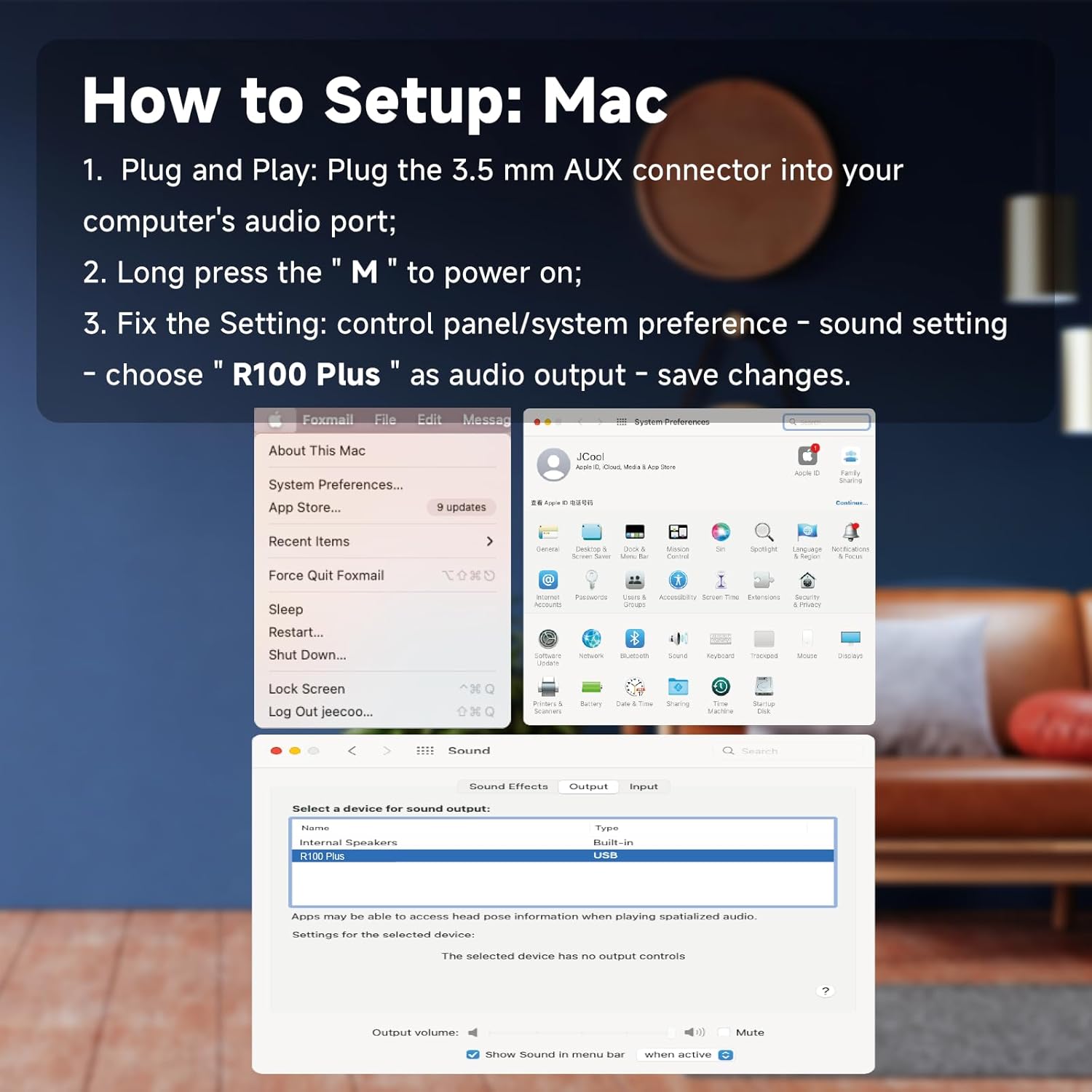
4.5 Mac Setup
- Plug the 3.5mm AUX connector into your computer's audio port.
- Long press the "M" button to power on the speaker.
- Fix the setting: Go to Control Panel/System Preferences > Sound Settings > choose "R100 Plus" as audio output > save changes.
5. Иштөө нускамалары
5.1 Күйгүзүү/өчүрүү
Long press the "M" button on the top of the speaker to power it on or off.
5.2 Үндү башкаруу
Short press the "+" button to increase volume. Short press the "-" button to decrease volume.
5.3 Track Selection
Long press the "+" button to skip to the next song. Long press the "-" button to go to the previous song.
5.4 RGB жарыкты башкаруу
Short press the "Gear" (Sun icon) button to cycle through the 4 available RGB light modes. The lights can be turned on or off by clicking this button.

5.5 Clearing Bluetooth Memory
Long press the "Gear" (Sun icon) button for 3 seconds to clear the speaker's Bluetooth pairing memory.
6. Техникалык тейлөө
- Динамикти суудан жана ашыкча нымдуулуктан алыс кармаңыз.
- Динамикти жумшак, кургак чүпүрөк менен тазалаңыз. Абразивдүү тазалагычтарды же эриткичтерди колдонбоңуз.
- Динамикти экстремалдуу температурага дуушар кылуудан алыс болуңуз.
- Динамикти узак убакытка колдонбогондо салкын, кургак жерде сактаңыз.
7. Кыйынчылыктарды
If you encounter issues with your SOULION R100 Plus speaker, refer to the following common solutions:
- No Sound/Speaker Not Working:
- Check if the speaker has power. Ensure it is charged or connected to a power source. A 5V/1A adapter is recommended for charging (not included).
- Ensure both your computer/device and the R100 Plus speaker's volume are turned up, preferably to maximum for testing.
- Avoid plugging two audio devices into your computer simultaneously.
- Confirm "R100 Plus" is selected as the audio output on your device.
- If using AUX, try plugging the 3.5mm AUX jack into a different computer host port.
- Test the speaker with other devices to determine if the issue is device-specific.
- If using Bluetooth, try changing to AUX mode or re-pairing the Bluetooth connection.
- Bluetooth туташуу маселелери:
- Ensure the speaker is in pairing mode (flashing light).
- Clear the Bluetooth memory on the speaker (long press "Gear" button for 3 seconds) and on your device, then attempt to re-pair.
- Динамик Bluetooth түзмөгүңүздүн натыйжалуу диапазонунда экенин текшериңиз.
8. Техникалык шарттар
| Өзгөчөлүк | Деталь |
|---|---|
| Модель аты | R100 Plus |
| Бренд | СУЛЬОН |
| Байланыш технологиясы | Bluetooth, 3.5 мм AUX |
| Динамик түрү | Саундбар |
| Аудио чыгаруу режими | Стерео |
| Динамиктин максималдуу чыгаруу күчү | 5 Watts (2x5W technology) |
| Frequency Response | 150 Гц |
| Ызы-чуунун катышы | 80 дБ |
| Power Source | Батарея менен иштейт (кайра заряддалуучу) |
| Батарея сыйымдуулугу | 2600 мАч |
| Заряддоо убактысы | 4 саат |
| Ойнотуу убактысы | 4-6 саат |
| Продукциянын өлчөмдөрү (D x W x Y) | 16" x 2.5" x 2.5" (40.6см x 6.4см x 6.4см) |
| Элемент Салмагы | 1.54 фунт (0.83 кг) |
| Материал | Plastic (with fabric cover) |
| Өзгөчө өзгөчөлүк | Rechargeable, Bluetooth, 3.5mm Plug-N-Play, Lightweight, Dynamic RGB Light |
9. Кепилдик жана колдоо
The SOULION R100 Plus speaker comes with a Limited Warranty. For detailed warranty information, product support, or technical assistance, please refer to the contact information provided in the Quick Start Guide included in your package or visit the official SOULION webсайт.


