1. Киришүү
Сатып алганыңыз үчүн рахматasing the GLOBE Electric 65000134 1-Light Plug-in or Hardwire Wall Sconce. This versatile lighting fixture features a minimalist design with an oval backplate and a matte white finish, suitable for various interior decors. It offers flexible installation options, allowing it to be used as a plug-in unit for easy placement or hardwired for a clean, cordless appearance. This manual provides essential information for safe installation, operation, and maintenance of your new wall sconce.
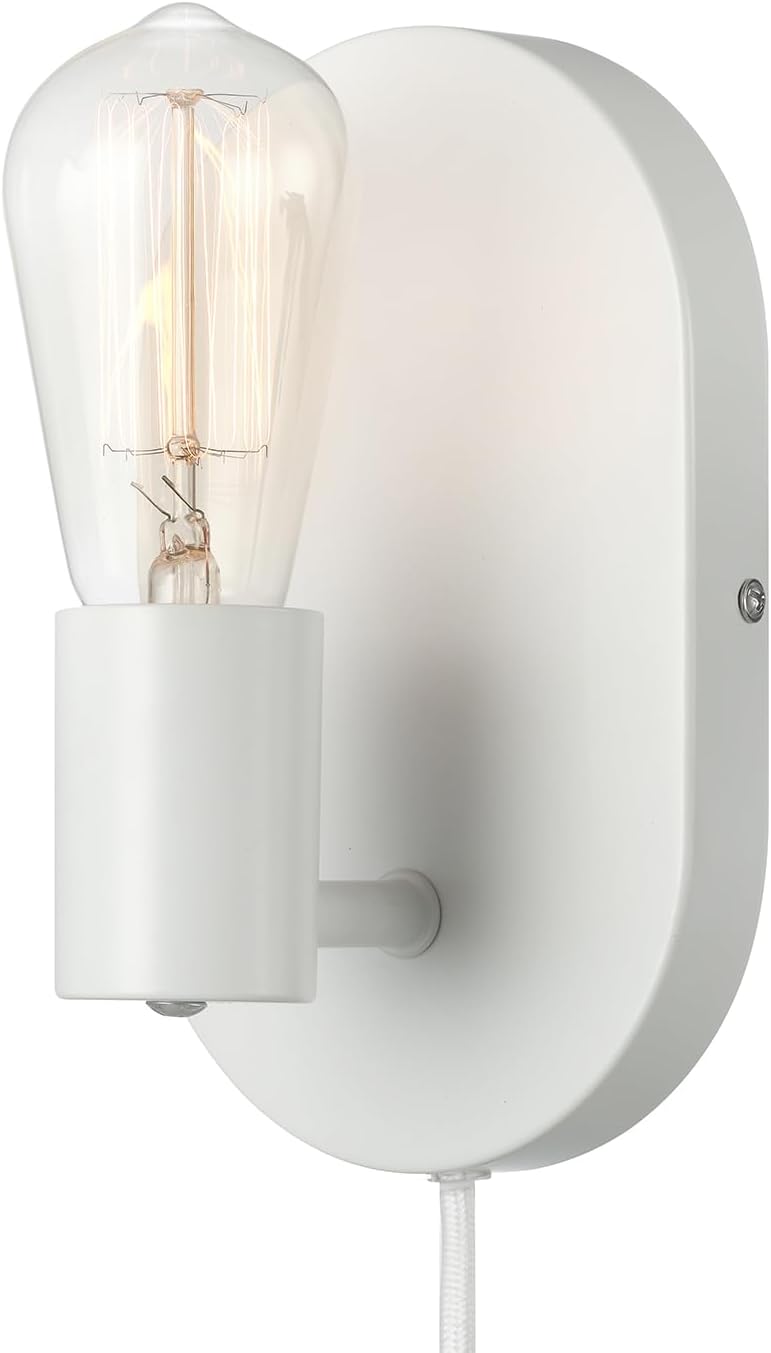
Figure 1: GLOBE Electric 1-Light Wall Sconce (Matte White, Linus model).
2. Орнотуу жана орнотуу
Before beginning installation, ensure the power is turned off at the circuit breaker. All necessary mounting hardware is included for quick and easy setup.
2.1 Bulb Requirements
This sconce requires 1x E26/Medium Base 60W Bulb (sold separately). It is compatible with both LED and Incandescent bulbs. Choose a bulb wattage that suits your desired brightness.
2.2 Орнотуу параметрлери
The wall sconce offers two installation methods: plug-in or hardwire.
2.2.1 Плагинди орнотуу
- Identify a suitable wall location near an electrical outlet.
- Secure the mounting plate to the wall using the provided hardware. Ensure it is level and firmly attached.
- Attach the sconce fixture to the mounting plate.
- Insert the E26/Medium Base bulb into the socket.
- Plug the 6ft white fabric covered cord into a standard electrical outlet.

2-сүрөт: Мисample of plug-in installation in a bedroom setting.
2.2.2 Hardwire Installation
For a sleek, cordless look, the sconce can be hardwired. This option requires the removal of the plug-in cord.
- Turn off power at the circuit breaker before starting.
- Carefully remove the plug-in cord from the sconce fixture.
- Connect the sconce's wiring to your home's electrical wiring according to local electrical codes. If you are unsure, consult a qualified electrician.
- Secure the mounting plate to the wall over the junction box.
- Attach the sconce fixture to the mounting plate.
- Insert the E26/Medium Base bulb into the socket.
- Автоматтык өчүргүчтөгү кубаттуулукту калыбына келтириңиз.

Figure 3: Product dimensions and illustration of the hardwired option with removable cord.
3. Иштөө нускамалары
The GLOBE Electric 65000134 Wall Sconce is designed for simple operation.
3.1 Күйгүзүү/өчүрүү
Locate the inline on/off rocker switch on the cord (for plug-in models) or the integrated switch on the fixture (for hardwired models, if applicable). Press the switch to turn the light on or off.
3.2 Adjusting Brightness (Dimmable)
If you have installed a dimmable bulb and your hardwired setup includes a compatible dimmer switch, you can adjust the light intensity. For plug-in models, the inline rocker switch typically provides on/off functionality only. To achieve dimming with a plug-in setup, you would need to use a smart bulb with app control or a compatible plug-in dimmer (sold separately).

Figure 4: The wall sconce illuminated, demonstrating its lighting effect.
4. Техникалык тейлөө
Regular maintenance will help preserve the appearance and functionality of your wall sconce.
- Тазалоо: Тазалоодон мурун электр кубатынан ажыратыңыз. Жабдууну жумшак, кургак чүпүрөк менен сүртүңүз. Абразивдүү тазалоочу каражаттарды, эриткичтерди же жылтыраткычтарды колдонбоңуз, анткени алар каптамага зыян келтириши мүмкүн.
- Лампаны алмаштыруу: Ensure the fixture is cool and power is off before replacing the bulb. Unscrew the old bulb and screw in a new E26/Medium Base 60W (max) bulb.
- Текшерүү: Мезгил-мезгили менен бардык туташууларды жана монтаждоо жабдыктарын текшерип туруңуз.
5. Кыйынчылыктарды
If you encounter issues with your wall sconce, refer to the following common problems and solutions:
| Көйгөй | Мүмкүн себеп | Чечим |
|---|---|---|
| Жарык күйбөйт. | No power to the fixture; loose bulb; faulty bulb; switch off. | Check circuit breaker. Ensure cord is fully plugged in (if plug-in). Tighten bulb. Replace bulb. Ensure switch is in 'on' position. |
| Жарык жылтылдайт. | Loose bulb; incompatible dimmer (if applicable); unstable power supply. | Tighten bulb. Ensure dimmer is compatible with bulb type. Consult an electrician if power supply is suspected. |
| Fixture is loose on the wall. | Mounting hardware not secure. | Tighten mounting screws. Ensure proper anchors were used during installation. |
6. Техникалык шарттар
| Өзгөчөлүк | Деталь |
|---|---|
| Бренд | ГЛОБ |
| Модель аты | Linus |
| Бөлүмдүн номери | 65000134 |
| Түс | Matte White |
| Материал | Металл |
| Стиль | Минималист |
| Продукциянын өлчөмдөрү | 4.21"L x 4.72"W x 7.87"H |
| Power Source | Hardwired/Plug-in |
| Жарык булактарынын саны | 1 |
| Тtage | 120 вольт |
| Ватtage | 60 ватт (максимум) |
| Лампанын базасы | E26 (Орто база) |
| Которуу түрү | Rocker (inline) |
| Кордун узундугу | 6 фут (1.82 м) |
| Элемент Салмагы | 1.28 фунт |
| Ички/тышкы колдонуу | Indoor |
7. Кепилдик маалыматы
According to the product specifications, this item comes with Кепилдик жок. Please refer to your retailer's return policy for any issues with the product upon receipt.
8. Кардарларды колдоо кызматы
For further assistance or inquiries regarding your GLOBE Electric 65000134 Wall Sconce, please contact GLOBE Electric customer service through their official website or the retailer from whom you purchased the product. Always provide your model number (65000134) when seeking support.


