1. Киришүү
This manual provides comprehensive instructions for the installation, operation, and maintenance of your Techage CG6E Solar Security Camera. Designed for outdoor use, this wireless camera system offers 2K high-definition video, AI motion detection, color night vision, two-way audio communication, and is built with an IP66 waterproof rating for reliable performance in various weather conditions. The integrated solar panel ensures continuous power, reducing the need for frequent battery recharges.
2. Пакеттин мазмуну
Пакетиңизде бардык буюмдар бар экенин текшериңиз:
- Techage Solar Security Camera (2 units)
- Solar Panel (2 units)
- Монтаждоо кронштейндери жана буроолор
- USB заряддоо кабели
- Колдонуучунун Колдонмосу (бул документ)

Image: Two Techage CG6E solar security cameras and two solar panels, illustrating the complete product package.
3. Продукт бүтүп калдыview
The Techage CG6E camera system is engineered for robust outdoor surveillance. Key features include:
- 2K Ultra HD токтому: Таза видеолорду тартатtage with 1.5 times the clarity of standard 1080P cameras.
- Күн энергиясы менен иштөөнүн натыйжалуулугу: Equipped with an external solar panel for continuous battery charging, ensuring uninterrupted operation.
- Кыймылды аныктоо: Жасалма интеллект Advanced algorithms identify human movement, reducing false alerts and sending instant notifications.
- Түнкү көрүнүш: Dual LED spotlights enable full-color video recording even in low-light conditions.
- Эки тараптуу аудио: Built-in microphone and speaker allow for real-time communication through the camera.
- IP66 аба ырайы: Designed to withstand rain, snow, and extreme temperatures for year-round outdoor use.
- Ийкемдүү сактагыч: Supports local storage via a Micro SD card (up to 128GB, not included) and cloud storage options.

Сүрөт: An overview of the Techage CG6E camera highlighting its main features: long-lasting battery, free 3-day cloud storage, AI motion detection, and full-color night vision.
4. Орнотуу
4.1 Колдонмону орнотуу
The Techage CG6E camera operates with the Vicohome app. Download the app from your device's app store:
- For iOS devices, search for "Vicohome" in the Apple App Store.
- For Android devices, search for "Vicohome" in the Google Play Store.
Follow the on-screen instructions to create an account and log in.

Image: A smartphone displaying the Vicohome app interface, indicating where to download the application.
4.2 Камераны жупташтыруу
- Смартфонуңуз 2.4 ГГц Wi-Fi тармагына туташкандыгын текшериңиз. Камера 5 ГГц Wi-Fi колдобойт.
- Open the Vicohome app and tap the "Add Device" or "+" icon.
- Power on the camera. The camera will enter pairing mode, indicated by a specific LED light pattern or voice prompt.
- Follow the app's instructions to scan the QR code on the camera or manually select the device.
- Суралганда, Wi-Fi тармагыңыздын сырсөзүн киргизиңиз.
- Once connected, the camera will confirm successful pairing, and you can name your device within the app.
4.3 Физикалык орнотуу
The camera and solar panel are designed for wall mounting.
- Жайгашкан жерди тандаңыз: Каалаган нерсени камсыз кылган ачык жерди тандаңыз viewing angle and receives ample direct sunlight for the solar panel. Ensure the camera is within range of your 2.4GHz Wi-Fi network.
- Камераны орнотуу: Use the provided mounting bracket and screws to securely attach the camera to a wall or other stable surface. Adjust the camera angle for optimal coverage.
- Күн панелин орнотуу: Position the solar panel in a location that maximizes sun exposure throughout the day. Connect the solar panel cable to the camera's charging port.
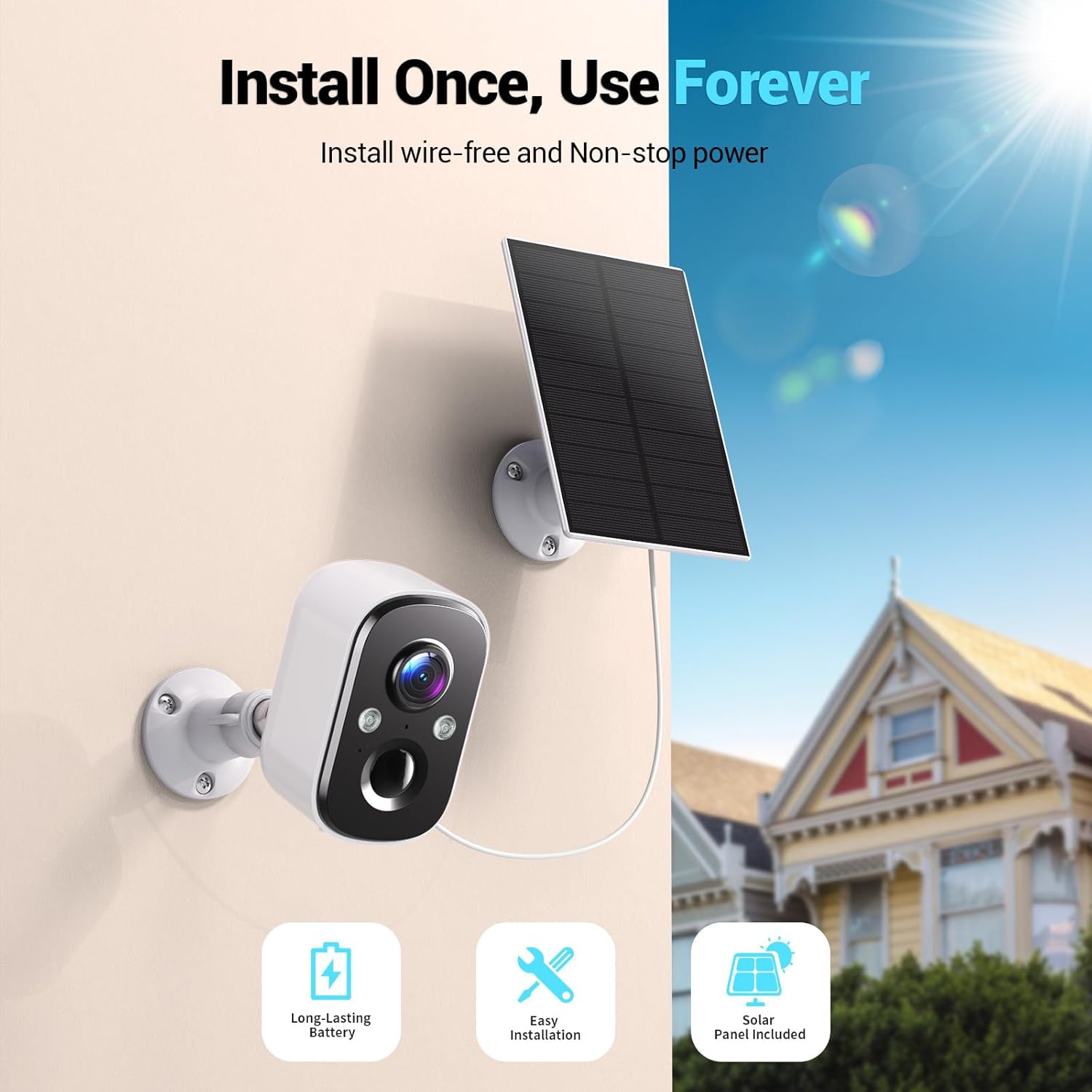
Image: A Techage CG6E camera and its solar panel are shown mounted on an outdoor wall, illustrating a typical installation scenario.
5. Иштөө нускамалары
5.1 Live View
Access real-time video feed from your camera through the Vicohome app. Simply select the desired camera from your device list to view its live stream.
5.2 Кыймылды аныктоо орнотуулары
The camera features advanced AI motion detection. You can customize settings within the Vicohome app:
- Сезимталдуулук: Adjust the detection sensitivity to minimize false alerts.
- Иш зоналары: Камеранын ичинде белгилүү бир аймактарды аныктаңыз view where motion detection should be active, ignoring other areas.
- AI таануу: The camera can differentiate between people, vehicles, packages, and pets, providing more relevant alerts.
- Эскертүүлөр: Configure push notifications to your smartphone when motion is detected.

Image: A visual representation of the camera detecting motion near a doorway, triggering a spotlight, siren, and sending a notification to the Vicohome app.
5.3 Эки тараптуу аудио
Utilize the two-way audio feature to communicate with individuals near the camera. Tap the microphone icon in the live view interface of the Vicohome app to speak, and the camera's speaker will broadcast your voice. You can also hear audio from the camera's location.

Image: A person inside a house communicating via the camera with another person outside, demonstrating the two-way audio function.
5.4 Түнкү көрүү режимдери
Камера эки түнкү көрүү режимин сунуштайт:
- Түнкү көрүнүш: When the built-in spotlights are activated (either manually or by motion detection), the camera captures full-color video in dark environments.
- Инфракызыл түнкү көрүнүш: With spotlights off, the camera uses infrared LEDs to provide clear black-and-white video in darkness.

Image: A comparison showing the difference between color night vision (spotlight on) and infrared night vision (spotlight off) in a dark setting.
5.5 Сактоо параметрлери
Your camera supports two storage methods:
- Micro SD картасы: Жергиликтүү жаздыруу үчүн камерадагы атайын уячага Micro SD картаны (128 ГБ чейин, комплектке кирбейт) салыңыз.
- Булуттагы сактагыч: The Vicohome app offers a free 3-day rolling event recording cloud storage. Optional premium cloud plans are available for extended storage and advanced features.
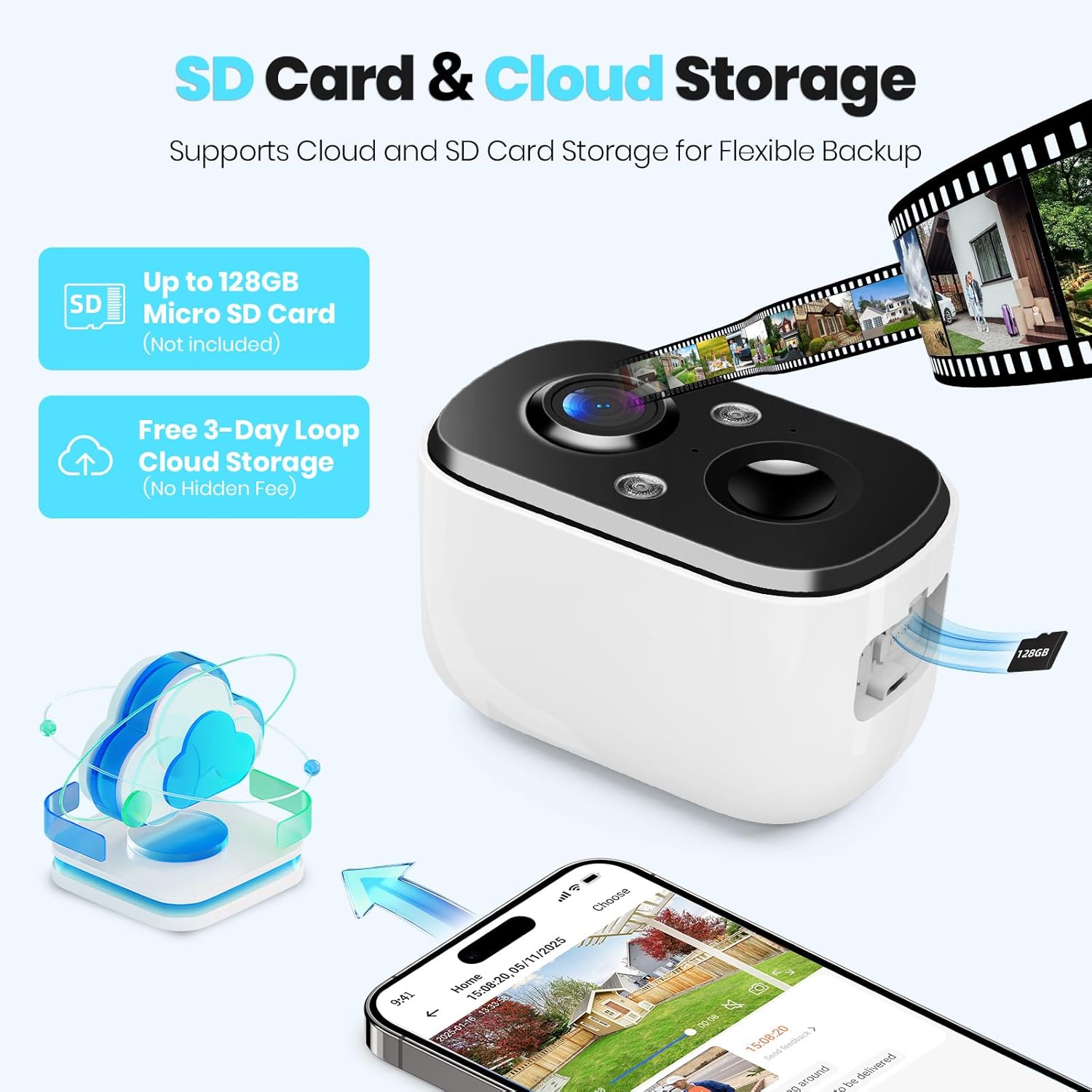
Image: A close-up of the camera highlighting the Micro SD card slot and illustrating cloud storage functionality.
5.6 Бөлүшүү мүмкүнчүлүгү
You can share camera access with family members or trusted individuals through the Vicohome app. This allows multiple users to view жандуу каналдар жана эскертүүлөрдү алуу.
6. Техникалык тейлөө
6.1 Battery Charging and Solar Panel Placement
The solar panel is designed to keep the camera battery charged. Ensure the solar panel is positioned to receive maximum direct sunlight daily. If the camera's battery level drops significantly due to prolonged cloudy weather or insufficient sunlight, you may need to temporarily charge the camera using the provided USB cable.
6.2 Тазалоо
Камеранын линзасын жана күн панелинин бетин мезгил-мезгили менен жумшак, d менен тазалап туруңуз.amp cloth to ensure optimal performance. Avoid using harsh chemicals or abrasive materials.
6.3 Микропрограмма жаңыртуулары
The Vicohome app will notify you of available firmware updates. It is recommended to keep your camera's firmware updated to ensure the latest features, security enhancements, and bug fixes.
7. Кыйынчылыктарды
- Камера Wi-Fi'га туташпай жатат: Ensure your Wi-Fi network is 2.4GHz. Check Wi-Fi signal strength at the camera's location. Restart your router and the camera.
- Frequent false alerts: Adjust motion detection sensitivity and configure activity zones within the Vicohome app to focus on relevant areas.
- Түнкү көрүүнүн начардыгы: Ensure the camera lens is clean. Check if the spotlights are enabled for color night vision.
- Батарея кубатталбай жатат: Verify the solar panel is connected correctly and receives sufficient direct sunlight. Clean the solar panel surface.
- No cloud recording: Confirm your cloud storage subscription status. The free plan offers 3-day rolling event recording.
For further assistance, refer to the in-app help section or contact customer support.
8. Техникалык шарттар
| Өзгөчөлүк | Спецификация |
|---|---|
| Модель аты | CG6E |
| Ички/тышкы колдонуу | Сыртта |
| Power Source | Күн энергиясы |
| Байланыш технологиясы | Зымсыз (Wi-Fi 2.4 ГГц гана) |
| Видео тартуунун резолюциясы | 2K (1440p) |
| Түнкү көрүү диапазону | 33 Фут |
| Сууга туруктуулук деңгээли | IP66 суу өткөрбөйт |
| Эки тараптуу аудио | Ооба |
| Сактагыч параметрлери | Микро SD карта (128 ГБ чейин), Cloud Storage |
| Шайкеш түзмөктөр | Smartphone (via Vicohome app) |
| Продукциянын өлчөмдөрү | 6 x 3.49 x 7.5 дюйм |
| Элемент Салмагы | 2.09 фунт |
9. Кепилдик жана колдоо
Techage provides free technical support for its products. For warranty information or to contact support, please refer to the contact details provided within the Vicohome app or visit the official Techage webсайт.

Image: A customer support representative, symbolizing the availability of technical assistance.


