Introduction
The amaran Desk Stand is a height-adjustable aluminum desktop stand designed for desk-based setups and tabletop lighting. It provides a stable and versatile mounting solution for amaran lights and other gear equipped with a universal 1/4-20 inch screw mount.
Негизги өзгөчөлүктөр төмөнкүлөрдү камтыйт:
- 87cm (2.83ft) height-adjustable design for flexible positioning.
- Universal 1/4-20in screw mount with locating pins for broad compatibility.
- Smooth telescoping column for easy height adjustments from 55cm (1.79ft) to 87cm (2.83ft).
- Adjustable tilt angle with a locking knob for precise gear positioning.
- Weighted steel base with soft padding for enhanced stability and surface protection.
- Integrated locking wheel for secure attachment of content creation gear.
- Included cable management clip for a tidy workspace.
Кутуда эмне бар
Сураныч, кутудан чыгарууда бардык компоненттер бар экенин текшериңиз:
- 1 x Telescopic Adjustable Column
- 1 x Weighted Steel Base Plate
- 1 x Cable Management Clip

This image displays the main components of the Amaran Desk Stand: the telescopic adjustable column and the separate weighted steel base plate, ready for assembly.
Орнотуу нускамалары
- Стендди чогултуу: Carefully insert the bottom end of the telescopic adjustable column into the central opening of the weighted steel base plate. Ensure it is seated firmly.
- Secure the Column: Twist the locking mechanism at the base of the column (if present) or on the base plate to secure the column in place.
- Attach Your Gear: Locate the 1/4-20 inch screw mount at the top of the telescopic column. Align your amaran light or other compatible gear with the screw and twist clockwise until securely fastened. Use the integrated locking wheel to tighten the connection.
- Эңкейүү бурчун тууралоо: Use the locking knob near the 1/4-20 inch mount to adjust the tilt angle of your attached device. Loosen to adjust, then tighten to secure.
- Кабелдик башкаруу: Attach the provided cable management clip to the column as needed to organize any power or data cables from your attached device.
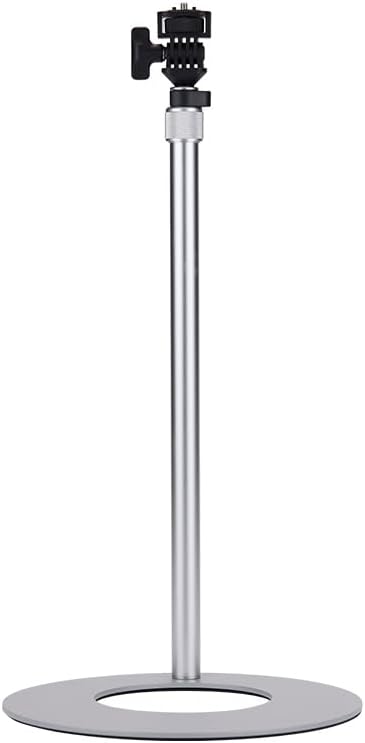
This image shows the Amaran Desk Stand fully assembled and extended to its maximum height, featuring the silver aluminum column and the circular weighted base.

А деталдуу view of the universal 1/4-20 inch screw mount at the top of the stand, showing the locking knob for adjusting the tilt angle of attached gear.
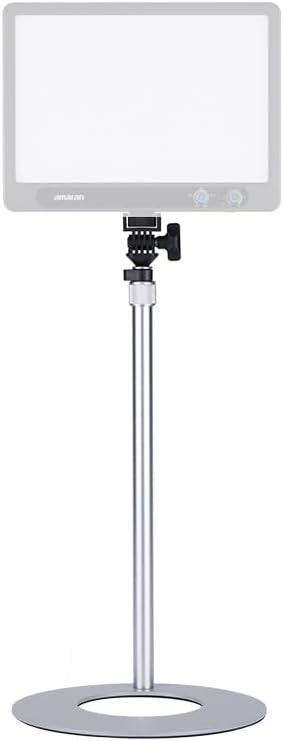
The Amaran Desk Stand is shown with an amaran Verge light mounted, illustrating how the stand supports compatible lighting equipment for desktop use.
Иштөө нускамалары
The amaran Desk Stand is designed for straightforward operation:
- Бийиктигин тууралоо: To adjust the height, gently twist the collar on the telescopic column to loosen it, then slide the upper section to your desired height. Twist the collar back to tighten and secure the column. The stand can be adjusted from 55cm (1.79ft) to 87cm (2.83ft).
- Эңкейүүнү тууралоо: Loosen the locking knob on the 1/4-20 inch mount to change the angle of your attached device. Once the desired angle is achieved, tighten the knob firmly to lock it in place.
- Кабелдик башкаруу: Utilize the included cable management clip to route and secure any cables, preventing clutter and ensuring a clean setup.
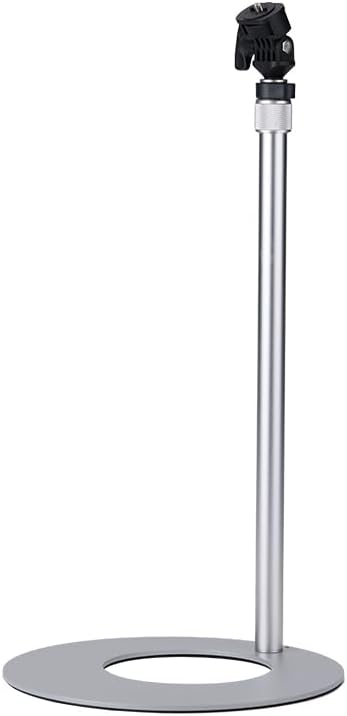
The Amaran Desk Stand is shown here at its minimum height, demonstrating its compact form factor suitable for various desktop setups.
Техникалык тейлөө
To ensure the longevity and optimal performance of your amaran Desk Stand, follow these simple maintenance guidelines:
- Тазалоо: Чаңды жана манжа издерин кетирүү үчүн стендди жумшак, кургак чүпүрөк менен сүртүңүз. Өжөр тактар үчүн бир аз сүртүңүзamp кездемени колдонсо болот, андан кийин дароо кургатуу. Абразивдүү тазалагычтардан же эриткичтерден качыңыз.
- Майлоо: The telescoping mechanism is designed for smooth operation. If you notice any stiffness over time, a small amount of silicone-based lubricant can be applied to the inner column sections, but this is rarely necessary.
- Сактагыч: When not in use, store the stand in a clean, dry environment away from extreme temperatures and humidity.
- Текшерүү: Periodically check all screws and locking mechanisms to ensure they are tight and secure. Do not overtighten.
Проблемаларды чечүү
If you encounter any issues with your amaran Desk Stand, please refer to the following common solutions:
- Стенд титиреп турат: Ensure the telescopic column is fully inserted into the base plate and the locking mechanism (if applicable) is tightened. Check that the stand is placed on a flat, stable surface.
- Height adjustment is stiff: Ensure the height adjustment collar is fully loosened before attempting to adjust the height. Clean the column sections to remove any debris.
- Gear is not secure on the mount: Verify that your device has a 1/4-20 inch screw thread. Ensure the device is twisted fully onto the stand's screw and the integrated locking wheel is tightened.
- Tilt adjustment is loose: Tighten the locking knob on the tilt mechanism firmly.
If the issue persists after attempting these solutions, please contact Amaran customer support for further assistance.
Техникалык шарттар
| Өзгөчөлүк | Спецификация |
|---|---|
| Модел | B0F29HCRGJ |
| Жөнгө салынуучу бийиктик диапазону | 55cm (1.79ft) to 87cm (2.83ft) |
| Монтаждоо бурагы | Universal 1/4-20 inch |
| Материал | Aluminum (column), Steel (base) |
| Элемент Салмагы | 4.4 фунт |
| Пакеттин өлчөмдөрү | 19.69 x 11.81 x 3.15 дюйм |
| Өндүрүүчү | Aputure |
Кепилдик жана колдоо
This product is covered by a manufacturer's warranty. For specific warranty terms and conditions, please refer to the documentation included with your purchase or visit the official Amaran webсайт. Коргоо пландары кеңейтилген камтуу үчүн да жеткиликтүү болушу мүмкүн.
For technical support, troubleshooting assistance, or warranty claims, please contact Amaran customer service through their official channels. Keep your purchase receipt and product model number (B0F29HCRGJ) handy when contacting support.


