Introduction
The Joyroom JR-JH1 Wireless Bluetooth Headphones with Active Noise Cancellation are designed to provide high-quality audio, advanced noise cancellation, and exceptional comfort. With a sleek, foldable design and long-lasting battery, these headphones are suitable for various environments, including home, office, and travel. Enjoy an immersive audio experience with the JR-JH1, featuring intuitive controls and powerful 40mm drivers.
Пакеттин мазмуну
- Joyroom JR-JH1 Wireless Bluetooth Headphones
- User Manual
- Кулак жаздыкчалары (алдын ала орнотулган)
- Charging Cable (USB-C, not explicitly listed but implied for charging)
- Travel Case (implied from description)
Продукт бүттүview
Familiarize yourself with the components of your Joyroom JR-JH1 headphones.
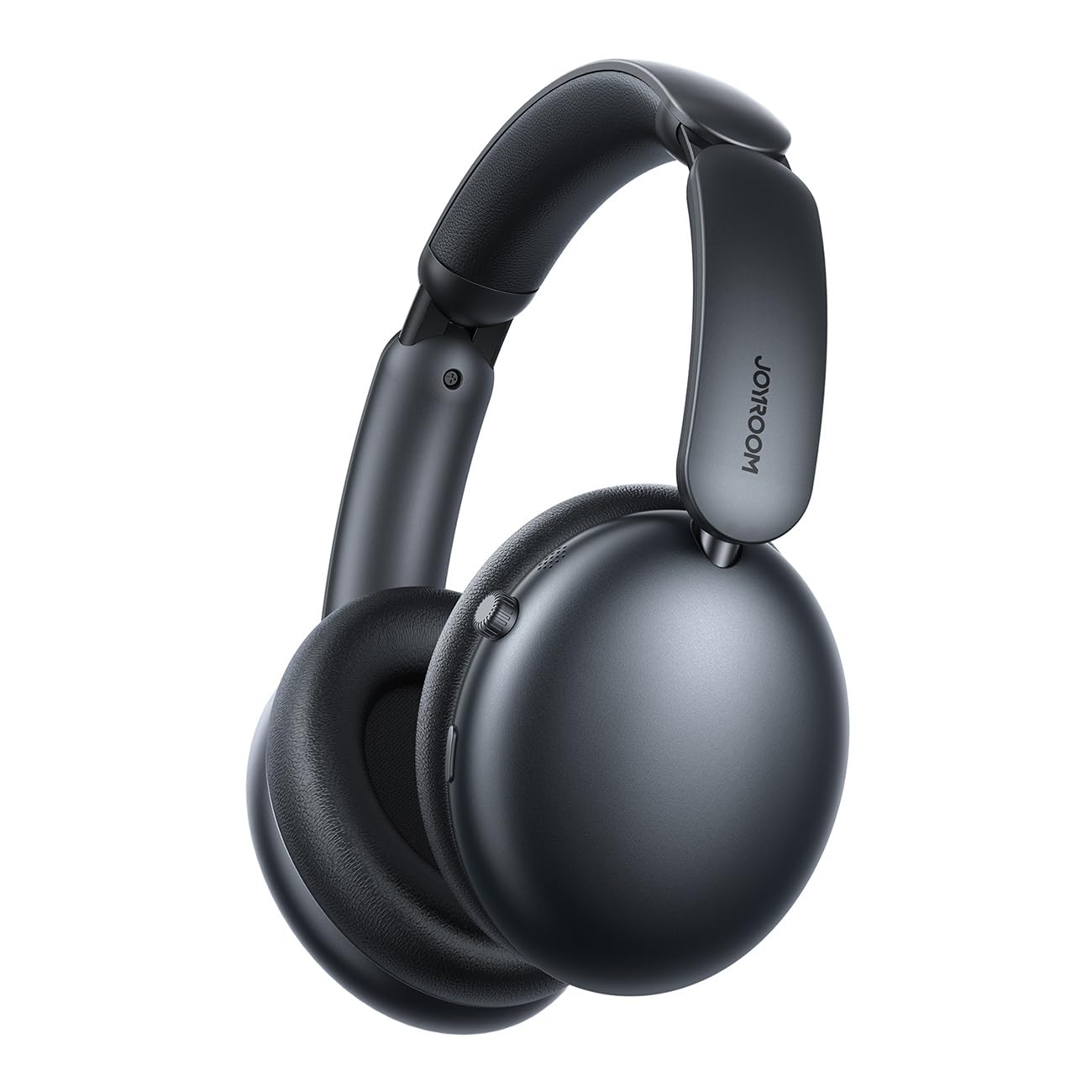
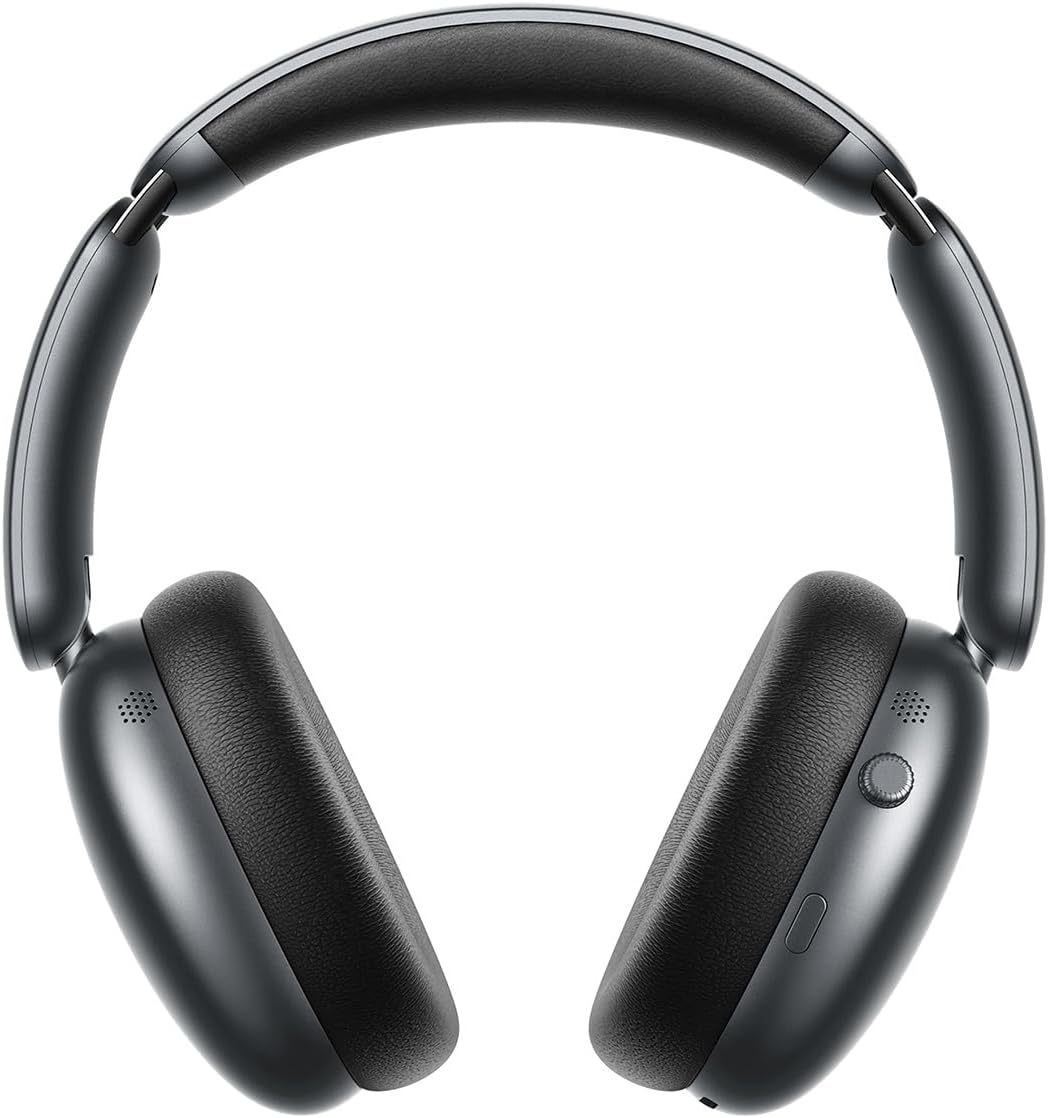
1-сүрөт: Фронт view of the Joyroom JR-JH1 headphones, showcasinкулакчындар жана жөнгө салынуучу баш боо.
2-сүрөт: Side view of the Joyroom JR-JH1 headphones, highlighting the digital crown and other control buttons on the earcup.

3-сүрөт: Төмөнкү view of the Joyroom JR-JH1 headphones, illustrating the charging port and any auxiliary input ports.
The headphones feature soft memory foam ear cushions and an automatically adjustable headband for extended comfort. The foldable design allows for easy portability and storage in the included travel case.
Жайгашуу
1. Наушниктерди заряддоо
Before first use, fully charge your headphones. A full charge takes approximately 1.5 to 2 hours.
- Connect the charging cable to the charging port on the headphones (refer to Figure 3 for port location).
- Кабелдин экинчи учун USB кубат булагына туташтырыңыз (мисалы, дубал адаптери, компьютердин USB порту).
- LED индикатору кубаттоо абалын көрсөтөт (мисалы, кызыл - кубаттоо үчүн, көк - толук заряддалган үчүн).
2. Bluetooth Жупташтыруу
Pair your headphones with your device to enable wireless audio.
- Наушниктердин заряддалганын жана өчүрүлгөнүн текшериңиз.
- Press and hold the Power button (usually located on one of the earcups) until the LED indicator flashes rapidly (e.g., blue and red alternately), indicating pairing mode.
- On your device (smartphone, tablet, laptop, etc.), go to Bluetooth settings and turn Bluetooth on.
- Издөө available devices. Select "JR-JH1" from the list.
- Туташкандан кийин, кулакчындардагы LED индикатору, адатта, катуу көк жарыкты көрсөтөт же жай күйөт.
The headphones use Bluetooth 5.4 for a stable and efficient connection. They are compatible with desktop computers, tablet computers, laptops, mobile phones, and game controllers.
Иштөө нускамалары
Күйгүзүү/өчүрүү
- Күйгүзүү: LED индикатору күйгөнгө чейин Кубат баскычын болжол менен 3 секунд басып туруңуз.
- Өчүрүү: LED индикатору өчмөйүнчө кубат баскычын болжол менен 5 секунд басып туруңуз.
Музыканы ойнотуу
- Ойнотуу/тындыруу: Көп функциялуу баскычты басыңыз (көбүнчө Кубат баскычы же атайын ойнотуу/тындыруу баскычы).
- Үнүн жогорулатуу/төмөндөтүү: Rotate the digital crown upwards to increase volume, downwards to decrease volume.
- Кийинки трек: Көп функциялуу баскычты эки жолу басыңыз.
- Мурунку трек: Көп функциялуу баскычты үч жолу басыңыз.
Чалууларды башкаруу
- Чалууга жооп берүү/аяктоо: Көп функциялуу баскычты бир жолу басыңыз.
- Чакырууну четке кагуу: Көп функциялуу баскычты 2 секунд басып туруңуз.
Активдүү Шумду Жоюу (ANC)
The JR-JH1 features Hybrid Active Noise Cancellation, reducing ambient noise by up to -40dB.
- ANCти иштетүү/өчүрүү: Press the dedicated ANC button (refer to product diagram for location). The LED indicator for ANC will illuminate when active.
- Ачыктык режими: Some models may feature a transparency mode. If available, a short press of the ANC button might cycle through ANC On, Transparency Mode, and ANC Off.

4-сүрөт: жарылды view illustrating the internal components, including the 40mm drivers and ANC technology.
Техникалык тейлөө
Тазалоо
- Use a soft, dry cloth to clean the exterior of the headphones.
- Кулак жаздыкчалары үчүн, бир аз d менен акырын сүртүңүзamp чүпүрөк менен жууп, колдонуудан мурун толугу менен кургатуу керек. Катуу химиялык заттарды же абразивдүү материалдарды колдонбоңуз.
Сактагыч
- When not in use, store the headphones in their travel case to protect them from dust and damage.
- Ашыкча температурада же жогорку нымдуулукта сактоодон алыс болуңуз.
Проблемаларды чечүү
| Көйгөй | Мүмкүн себеп | Чечим |
|---|---|---|
| Кулакчындар күйбөйт. | Батарея аз. | Наушниктерди толук заряддаңыз. |
| Үн жок. | Not paired, volume too low, device issue. | Ensure headphones are paired. Increase headphone and device volume. Check device audio output settings. |
| Түзмөк менен жупташтыруу мүмкүн эмес. | Headphones not in pairing mode, device Bluetooth off, interference. | Put headphones in pairing mode. Ensure device Bluetooth is on. Move closer to the device. Turn off other Bluetooth devices. |
| ANC эффективдүү эмес. | ANC not activated, improper fit. | Ensure ANC is turned on. Adjust headphones for a snug fit over your ears. |
Техникалык шарттар
| Өзгөчөлүк | Деталь |
|---|---|
| Модел | JR-JH1 |
| Байланыш технологиясы | Зымсыз |
| Зымсыз байланыш | Bluetooth 5.4 |
| Noise Control | Hybrid Active Noise Cancellation (up to -40dB) |
| Айдоочулар | 40мм |
| Импеданс | 32 Ом |
| Сезимталдуулук | 110 дБ |
| Frequency Response | 2480 МГц |
| Заряддоо убактысы | Болжол менен 1.5 - 2 саат |
| Батареянын иштөө мөөнөтү (кадимки режим) | 120 саатка чейин |
| Батареянын иштөө мөөнөтү (ANC режими) | 70 саатка чейин |
| Башкаруу түрү | Button Control, Digital Crown |
| Кулак жайгаштыруу | Ашыкча кулак |
| Материал | Акрилонитрил бутадиен стирол (ABS) |
| Элемент Салмагы | 234 грамм |
| Сууга туруктуулук деңгээли | Сууга чыдамдуу эмес |
| Продукциянын өлчөмдөрү | 19.6 x 18.26 x 8 см |
| Өндүрүүчү | Joyroom |
| Келип чыккан өлкө | Кытай |
Коопсуздук маалыматы
- Кулакчындарды өтө жогорку температурага, нымдуулукка же суюктуктарга дуушар кылбаңыз.
- Угуу жөндөмүнө зыян келтирбөө үчүн узак убакыт бою катуу үн менен угуудан алыс болуңуз.
- Кулакчындарды бөлүктөргө бөлүүгө же өзгөртүүгө аракет кылбаңыз. Бул кепилдикти жокко чыгарып, зыян келтириши мүмкүн.
- Балдар жетпеген жерде сактаңыз.
Кепилдик жана колдоо
For warranty information and customer support, please refer to the warranty card included in your product packaging or visit the official Joyroom webсайт. Сатып алуу квитанциясын кепилдик дооматтары үчүн сатып алуунун далили катары сактаңыз.


