1. Киришүү
This manual provides instructions for the operation and maintenance of your RUIZU X02 Ultra Slim MP3 Music Player. Please read this manual thoroughly before using the device to ensure proper functionality and to maximize your user experience. The RUIZU X02 is a portable digital music player designed for audio playback, FM radio, voice recording, video viewing, and text reading.
2. Пакеттин мазмуну
Төмөндө тизмеленген нерселердин баары пакетиңизде бар экенин текшериңиз:
- RUIZU X02 MP3 ойноткучу
- User Manual
- Наушник
- USB заряддоо/дата кабели
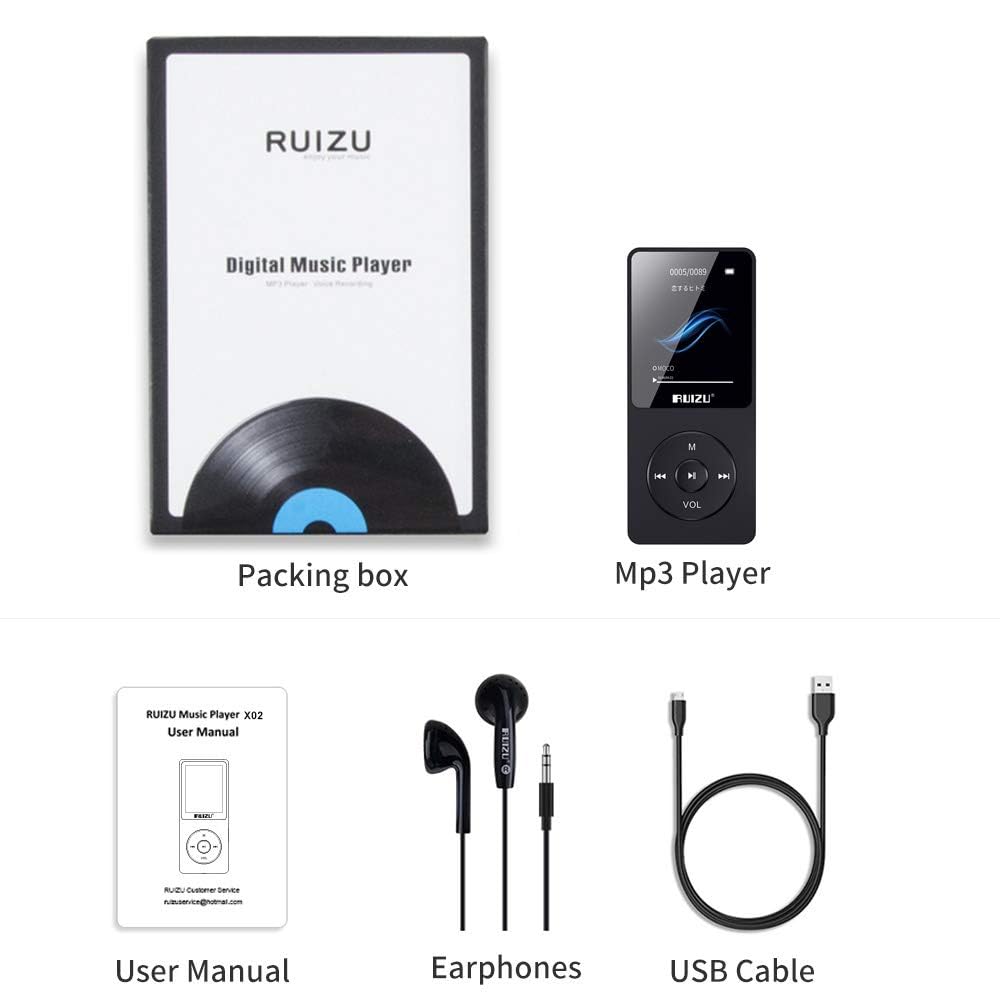
Image: Contents of the RUIZU X02 MP3 Player package, showing the player, user manual, earphones, and a USB cable.
3. Продукт бүтүп калдыview
The RUIZU X02 is an ultra-slim and lightweight device, weighing approximately 30g, designed for portability.

Image: The RUIZU X02 MP3 Player held in a hand, illustrating its compact and lightweight design.
Түзмөктүн жайгашуусу
Familiarize yourself with the buttons and ports on your device:
- Дисплей экраны: Shows menus, playback information, and other content.
- M баскычы: Menu/Return button.
- Ойнотуу/тындыруу баскычы: Center button for playback control and selection.
- Previous/Rewind Button: Navigate backward or rewind during playback.
- Next/Fast Forward Button: Navigate forward or fast forward during playback.
- VOL баскычы: Үндү көзөмөлдөө.
- Гарнитура уячасы: 3.5mm port for earphones.
- USB порт: Заряддоо жана маалыматтарды өткөрүү үчүн.
- Кубат которгучу: КҮЙГҮЗҮҮ/ӨЧҮРҮҮ жылдыргычы.
- Микро SD карта слоту: Кеңейтилүүчү сактагыч үчүн.
4. Орнотуу
4.1 Аппаратты заряддоо
Before first use, fully charge the MP3 player. A full charge typically takes 2-3 hours.
- Connect the small end of the USB cable to the player's USB port.
- USB кабелинин чоң учун USB кубат адаптерине (кошулмада жок) же компьютердин USB портуна туташтырыңыз.
- Экрандагы батареянын индикатору заряддоо абалын көрсөтөт.
- Толук заряддалгандан кийин, USB кабелин ажыратыңыз.
The device offers up to 80 hours of playback on a single charge.

Image: The RUIZU X02 MP3 Player screen indicating extended battery life of up to 80 hours.
4.2 Күйгүзүү/өчүрүү
- To power on, slide the power switch to the "ON" position.
- Өчүрүү үчүн, кубат которгучун "OFF" абалына жылдырыңыз.
4.3 Микро SD картаны салуу
The RUIZU X02 has 8GB of built-in memory and supports expandable storage up to 128GB via a Micro SD card.
- Ойноткучтун капталынан Micro SD карта уячасын табыңыз.
- Micro SD картаны ордуна чыкылдаган үн чыкканча акырындык менен уячага салыңыз. Картанын туура багытталганын текшериңиз.
- Алып салуу үчүн, картаны сыртка чыкканча акырын ичкери түртүңүз.

Image: The RUIZU X02 MP3 Player shown with a Micro SD card, indicating its expandable storage capability.
5. Негизги операция
5.1 Навигация
- колдонуу Мурунку жана Кийинки меню параметрлери аркылуу жылдыруу үчүн баскычтар.
- басыңыз Ойнотуу/Тыныгуу button (center) to select an option or confirm an action.
- басыңыз M button to go back to the previous menu or to access context-sensitive options during playback.
5.2 Музыканы ойнотуу
- Негизги менюдан "Музыка" бөлүмүн тандаңыз.
- Browse your music by Artist, Album, Songs, or Playlists.
- Select a song and press the Ойнотуу/Тыныгуу ойнотууну баштоо үчүн баскыч.
- Ойнотуу учурунда:
- Басыңыз Ойнотуу/Тыныгуу to pause or resume.
- Басыңыз Мурунку or Кийинки тректерди өткөрүп жиберүү.
- Узак басуу Мурунку or Кийинки артка же алдыга жылдыруу.
The RUIZU X02 supports multiple audio formats including MP3, WMA, APE, WAV, and FLAC.
5.3 Үндү тууралоо
Үнүн тууралоо үчүн:
- көпкө басыңыз ТОМ button to activate volume adjustment mode.
- While in volume adjustment mode, press the Мурунку button to decrease volume or the Кийинки үнүн жогорулатуу үчүн баскыч.
5.4 Экранды кулпулоо/кулпусун ачуу
Кокус баскычтарды басуунун алдын алуу үчүн:
- көпкө басыңыз M button to lock or unlock the screen.
5.5 Resume Playback
The player is designed to resume music playback from where it was last stopped, even after being turned off and on again.

Image: Visual guide for screen lock/unlock (long press M), resuming playback (automatic), and volume adjustment (long press VOL then use Previous/Next).
6. Өркүндөтүлгөн функциялар
6.1 FM радиосу
The RUIZU X02 includes a built-in FM radio tuner.
- Кулакчындар антенна катары кызмат кылгандыктан, алар туташтырылганын текшериңиз.
- Негизги менюдан "FM радиосун" тандаңыз.
- Use the menu options to auto-scan for stations or manually tune.
- Басыңыз Мурунку or Кийинки to switch between saved stations or adjust frequency.

Image: The RUIZU X02 MP3 Player screen showing the FM Radio interface with frequency indicators.
6.2 Диктофон
Орнотулган микрофонду колдонуп, аудио жаздырыңыз.
- From the main menu, select "Recorder".
- Choose "Start Voice Recording" to begin.
- Басыңыз Ойнотуу/Тыныгуу to pause/resume recording.
- Басыңыз M to save the recording and exit.
6.3 Видеону ойнотуу
Түзмөк видео ойнотууну колдойт. Видеонун бар экенин текшериңиз files are in a compatible format (e.g., AMV) and resolution for the 1.8-inch LCD screen.
- Негизги менюдан "Видео" бөлүмүн тандаңыз.
- Видеоңузду карап чыгып, тандаңыз file.
- Басыңыз Ойнотуу/Тыныгуу ойнотууну баштоо үчүн.
6.4 Text Reading
View текст files (e.g., TXT format) on the device.
- From the main menu, select "E-book" or "Text".
- Browse and select your text file.
- Use the navigation buttons to scroll through the text.
7. Компьютерге туташуу
To transfer music, videos, text files, or other data to your RUIZU X02:
- Ойноткучтун күйгүзүлгөнүн текшериңиз.
- Connect the player to your computer using the provided USB cable.
- Ойноткуч компьютериңизде алынуучу диск катары көрсөтүлөт.
- Сүйрөп барып таштаңыз files into the appropriate folders on the player (e.g., "Music" for audio fileс).
- Бир жолу file transfer is complete, safely eject the removable disk from your computer before disconnecting the USB cable.
8. Техникалык тейлөө
- Тазалоо: Аппаратты тазалоо үчүн жумшак, кургак чүпүрөктү колдонуңуз. Суюк тазалагычтардан же абразивдүү материалдардан алыс болуңуз.
- Сактагыч: Ойноткучту салкын, кургак жерде, күн нуру түз тийбеген жана өтө жогорку температурадан алыс сактаңыз.
- Батареяга кам көрүү: Батареянын иштөө мөөнөтүн узартуу үчүн, бат-баттан батарейканы толук зарядсыздандырбаңыз. Аппаратты узак убакыт бою колдонбосо дагы, үзгүлтүксүз заряддаңыз.
- Суу таасири: Бул аппарат суу өткөрбөйт. Суунун же жогорку нымдуулуктун таасиринен алыс болуңуз.
9. Кыйынчылыктарды
| Көйгөй | Чечим |
|---|---|
| Түзмөк күйбөйт. | Ensure the battery is charged. Connect to a power source and try again. Check the power switch is in the "ON" position. |
| Которуу мүмкүн эмес fileоюнчуга. | Ensure the USB cable is securely connected to both the player and the computer. Try a different USB port or cable. Ensure the player is recognized as a removable disk. |
| Наушниктен үн чыкпайт. | Check if earphones are properly plugged in. Ensure volume is not set to zero or muted. Try a different pair of earphones to rule out faulty earphones. |
| Экран жооп бербей жатат же катып калган. | Try turning the device off and then on again using the power switch. If unresponsive, allow the battery to fully discharge and then recharge. |
| FM радиосу иштебейт. | Ensure earphones are plugged in, as they serve as the antenna. Try auto-scanning for stations again. |
10. Техникалык шарттар
- Модел: X02
- Өндүрүүчү: РУИЗУ
- Өлчөмдөрү: 0.79 x 3.71 x 8.99 см
- Салмагы: Болжол менен 30 г
- Дисплей: 1.8 дюймдук LCD
- Ички сактагыч: 8 ГБ
- Кеңейтүүчү сактагыч: Up to 128 GB via Micro SD card
- Батарея: 420 мАч литий полимери
- Ойнотуу убактысы: Up to 80 hours (audio)
- Заряддоо убактысы: 2-3 саат
- Колдоого алынган аудио форматтары: MP3, WMA, APE, WAV, FLAC, M4A, DRM, ACELP, OGG
- Өзгөчөлүктөр: FM Radio, Voice Recorder, Video Playback, Text Reading
- Байланыш: USB (Note: Does not support Bluetooth function)
11. Кепилдик жана колдоо
Бул продукт сатып алынган күндөн тартып 7 күндүк кепилдик менен келет. Кепилдик дооматтары үчүн сатып алганыңызды тастыктаган документти сактап коюңуз.
For technical support or warranty inquiries, please refer to the contact information provided with your purchase documentation or visit the official RUIZU support webсайт.


