1. Киришүү
Thank you for choosing the AOFAR GX6 Golf Rangefinder. This device is designed to provide precise distance measurements for golf, hunting, archery, and shooting ranges. Equipped with advanced ED glass, 7x magnification, and a powerful lithium battery, the GX6 offers accuracy, durability, and convenience. This manual will guide you through the setup, operation, and maintenance of your new rangefinder to ensure optimal performance.

Image: The AOFAR GX6 Golf Rangefinder, showcasing its sleek design and blue-white color scheme.
Негизги өзгөчөлүктөрү:
- Laser Accuracy Measurement: ± 0.5 yards accuracy with 0.02 seconds measurement speed.
- 7X чоңойтуу: Provides clear and precise visuals for targeting.
- USB-C кайра заряддалуучу батарея: Up to 12,000 measurements on a single charge.
- Магниттик дизайн: N52 grade magnet for secure attachment to golf carts or bags.
- Flag Lock & Slope Compensation: Tactile vibration upon flag lock and adjustable slope function with LED indicator.
- Туруктуу жана суу өткөрбөйт: Made of ABS material & silicone with IPX4 waterproof rating.
2. Кутуда эмне бар
Upon unboxing your AOFAR GX6 Golf Rangefinder, please ensure all the following components are present:
- AOFAR GX6 Golf Rangefinder Unit
- C түрүндөгү кубаттоочу кабель
- Тазалоочу кездеме
- Колдонуучунун Колдонмосу (бул документ)
- Карабин
- Ташуу баштыгы
- High-grade Portable Rope
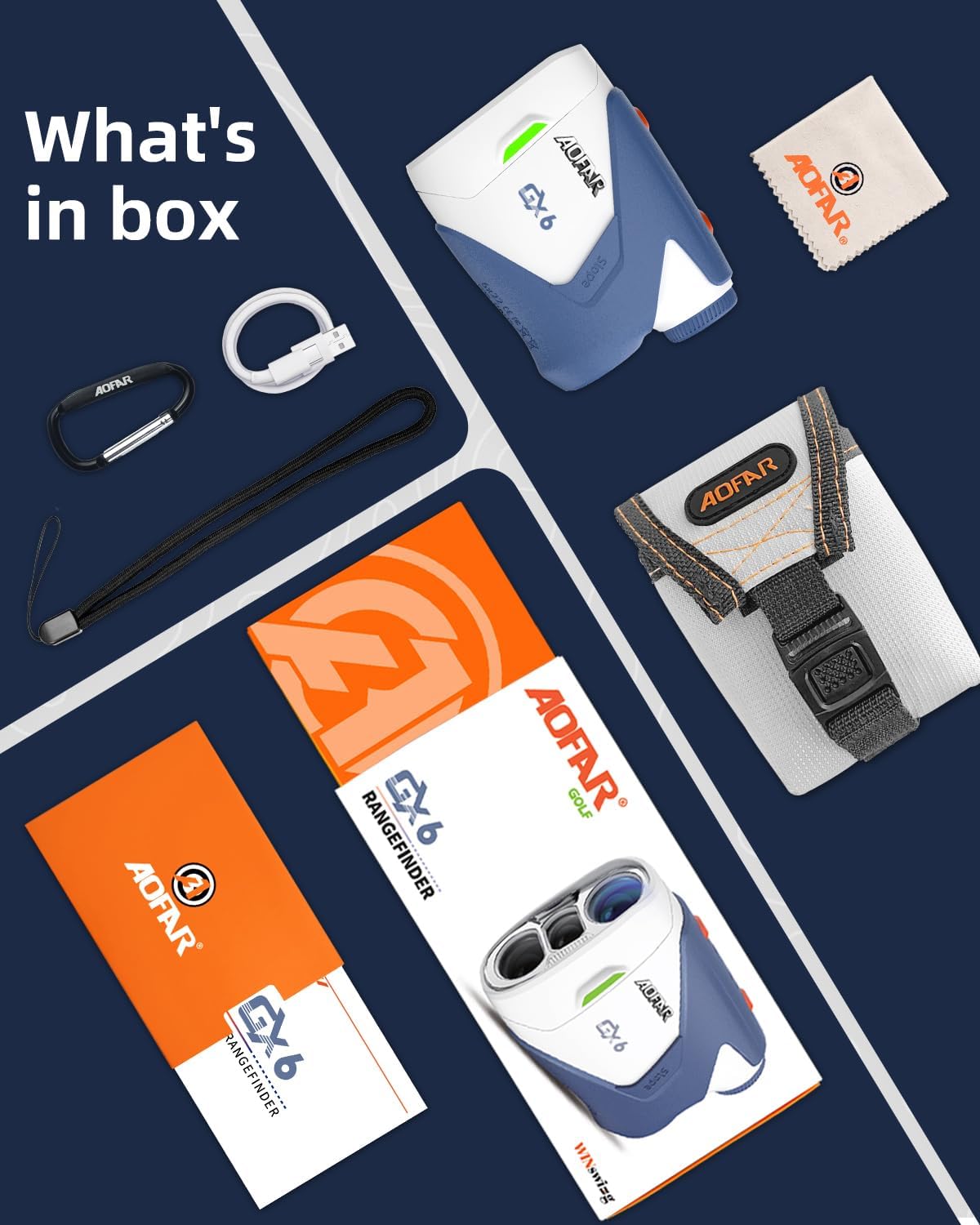
Image: All included accessories for the AOFAR GX6 Golf Rangefinder, neatly laid out.
3. Орнотуу
3.1 Аппаратты заряддоо
The AOFAR GX6 features a long-lasting USB-C rechargeable battery. Before first use, or when the battery indicator is low, charge the device using the provided Type-C charging cable.
- Locate the USB-C charging port on the side of the rangefinder.
- Insert the Type-C cable into the port.
- Кабелдин экинчи учун шайкеш келген USB кубат булагына (мисалы, компьютер, дубал адаптери) туташтырыңыз.
- The battery indicator on the display will show charging status. A full charge can provide up to 12,000 measurements.

Image: Close-up of the AOFAR GX6 Golf Rangefinder showing the USB-C charging port and cable connection.
3.2 Күйгүзүү/өчүрүү
To power on the rangefinder, simply press the Power button. The device will automatically enter sleep mode after a period of inactivity to conserve battery.
3.3 Selecting Measurement Units (Yards/Meters)
The GX6 can display measurements in either yards or meters.
- With the device powered on, press and hold the 'MODE' button for approximately 3 seconds.
- The unit will switch between yards (Y) and meters (M) on the display.
Video: A user demonstrating how to select measurement units (yards or meters) and activate/deactivate the slope function on the AOFAR GX6 Golf Rangefinder.
4. Иштөө нускамалары
4.1 Негизги аралыкты өлчөө
Бутага чейинки аралыкты өлчөө үчүн:
- Look through the eyepiece and aim the reticle (aiming circle) at your desired target.
- Кубат баскычын бир жолу басыңыз.
- The distance will be displayed on the LCD screen instantly.
4.2 Flag Lock & Vibration
The Flag Lock feature helps you accurately target the flagstick, even with background objects.
- Long-press the Power button to activate the flag targeting mode.
- Scan across the flagstick. The rangefinder will vibrate once it successfully locks onto the flag.
- The flag icon will appear on the LCD display, confirming the lock.

Image: The rangefinder's display showing a flag locked with a measurement, highlighting the 7X magnification capability.
4.3 Жантайыңкы компенсация
The GX6 includes a dedicated slope switch for easy on-the-fly adjustment, providing compensated distances based on terrain elevation. A green LED indicator lights up as an anti-cheat alert, ensuring tournament compliance when slope is off.
- To activate or deactivate slope compensation, slide the 'Slope' switch located on the side of the unit.
- When the green LED indicator is flashing, slope mode is OFF (tournament legal).
- When the green LED indicator stops flashing (solid or off, depending on model), slope mode is ON.

Image: Diagram illustrating how the AOFAR GX6's adaptive slope technology calculates ballistic distance, with an inset showing the physical slope switch and indicator light.
5. Техникалык тейлөө
5.1 Тазалоо
To maintain the clarity of the lenses and the overall condition of your rangefinder:
- Use the provided cleaning cloth to gently wipe the lenses and exterior surfaces.
- Avoid using abrasive materials or harsh chemicals that could damage the optics or casing.
5.2 Сактоо
When not in use, store the rangefinder in its carrying pouch in a cool, dry place, away from direct sunlight and extreme temperatures.
5.3 Гидроизоляция
The AOFAR GX6 has an IPX4 waterproof rating, meaning it is resistant to splashing water from any direction. While it can withstand rain or sweat, it should not be submerged in water.

Image: The AOFAR GX6 Golf Rangefinder with water droplets on its surface, emphasizing its IPX4 waterproof rating and magnetic attachment capability.
6. Кыйынчылыктарды
If you encounter any issues with your AOFAR GX6 Golf Rangefinder, please refer to the following common solutions:
- Дисплей/кубат жок: Батарея заряддалганын текшериңиз. USB-C кабелин туташтырып, кайра күйгүзүүдөн мурун, аны кеминде 30 мүнөт кубаттаңыз.
- Туура эмес окуулар: Ensure the lens is clean. Make sure you are aiming at a clear target and not through obstructions like thick fog or heavy rain, which can affect laser performance.
- Difficulty Locking onto Flag: Ensure you are in Flag Lock mode (long-press Power button). Try scanning slowly across the flagstick. Ensure there are no significant obstructions directly in front of or behind the flag.
- Unit Not Switching (Yards/Meters): Ensure you are pressing and holding the 'MODE' button for the correct duration (approx. 3 seconds). A quick press may activate other modes.
- Вибрация жок: Verify that the flag lock feature is active and that the device has successfully locked onto the flag.
If problems persist after attempting these solutions, please contact AOFAR customer service for further assistance.
7. Техникалык шарттар
| Өзгөчөлүк | Спецификация |
|---|---|
| Бренд | АОФАР |
| Модель аты | GX6 |
| Өлчөө тактыгы | ± 0.5 yards |
| Чоңойтуу | 7X |
| Макс диапазон | 1000 ярд |
| Батарея түрү | Кайра заряддалуучу литий (USB-C) |
| Суу өткөрбөйт рейтинги | IPX4 |
| Материал | Пластмасса, резина |
| Элемент Салмагы | 0.65 фунт |
| Продукциянын өлчөмдөрү (LxWxH) | 3.78" x 3.07" x 1.6" |
8. Кепилдик жана колдоо
The AOFAR GX6 Golf Rangefinder is backed by a 24 айлык кыйынчылыксыз кепилдик, ensuring peace of mind for your purchase. AOFAR is committed to providing lifetime customer service support for this product.
Колдоо кызматы менен байланышуу:
For any warranty claims, technical assistance, or product inquiries, please refer to the contact information provided on the AOFAR official website or your purchase documentation. Please have your model number (GX6) and proof of purchase ready when contacting support.


