1. Киришүү
This manual provides detailed instructions for the setup, operation, and maintenance of your Veout V1 Pro 16-inch 2.5K 144Hz Portable Gaming Monitor. Please read this manual thoroughly before using the product to ensure optimal performance and longevity. Keep this manual for future reference.

Image: The Veout V1 Pro monitor, showcasing its high-resolution and refresh rate capabilities.
2. Негизги өзгөчөлүктөрү
- 2.5K Ultra HD Display: 2560×1600 resolution with 188 PPI and a 16:10 aspect ratio for enhanced content efficiency. Features 8-bit color depth (16.7 million colors) and ΔE < 3 color accuracy.
- 144Hz High Refresh Rate + FreeSync: IPS panel with 100% sRGB gamut, 144Hz refresh rate, and AMD FreeSync technology for smooth visuals. 1ms fast response time, low-blue-light, and flicker-free technology for reduced eye fatigue. (Note: Max 120Hz via HDMI, 144Hz via USB-C).
- Ultra-Slim Aluminum Design: Weighs 1.58lbs and is 0.36 inches thick. Features a built-in aluminum stand adjustable from 0° to 75° and supports portrait mode.
- Жалпы шайкештик: Dual USB-C ports and Mini HDMI for plug-and-play connection to laptops, smartphones, PS4/5, Xbox, and Switch 1/2. Built-in speakers included.
- Global Certifications: Passed FCC, CE, RoHS, UKCA, KC, and PSE safety certifications. Holds original design patents and the MUSE Design Gold Award.
3. Кутуда эмне бар
Пакетте бардык буюмдар бар экенин текшериңиз:
- 1 x 16'' Portable Monitor
- 1 x USB-C - USB-A кабели
- 1 x USB-C - USB-C кабели
- 1 x Mini-HDMI - HDMI кабели
- 1 x 15W Power адаптер
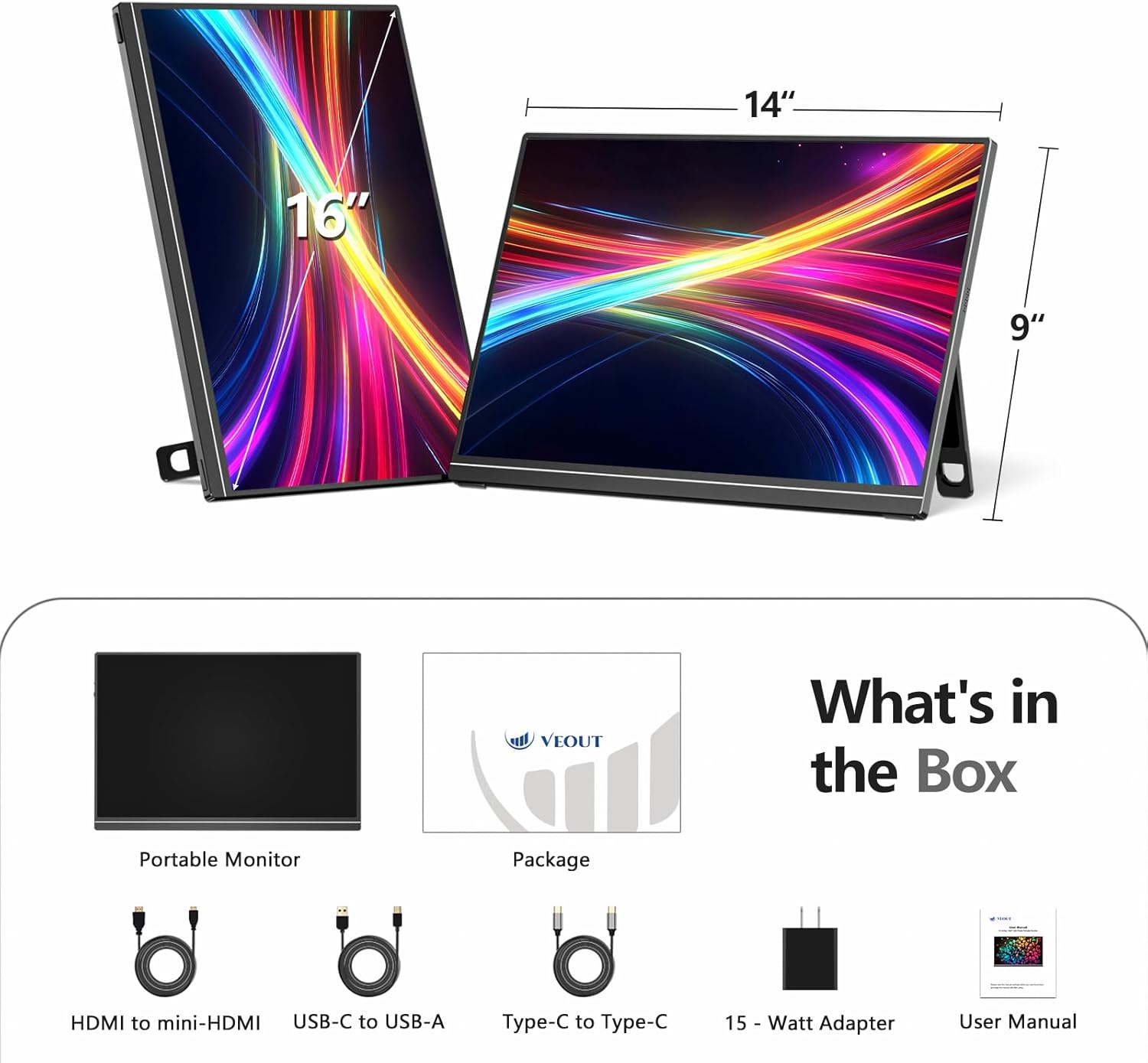
Image: All included accessories and the portable monitor.
4. Продукт бүтүп калдыview
4.1 Порттор жана башкаруу каражаттары
The Veout V1 Pro monitor features multiple ports for versatile connectivity and intuitive controls for easy adjustment.
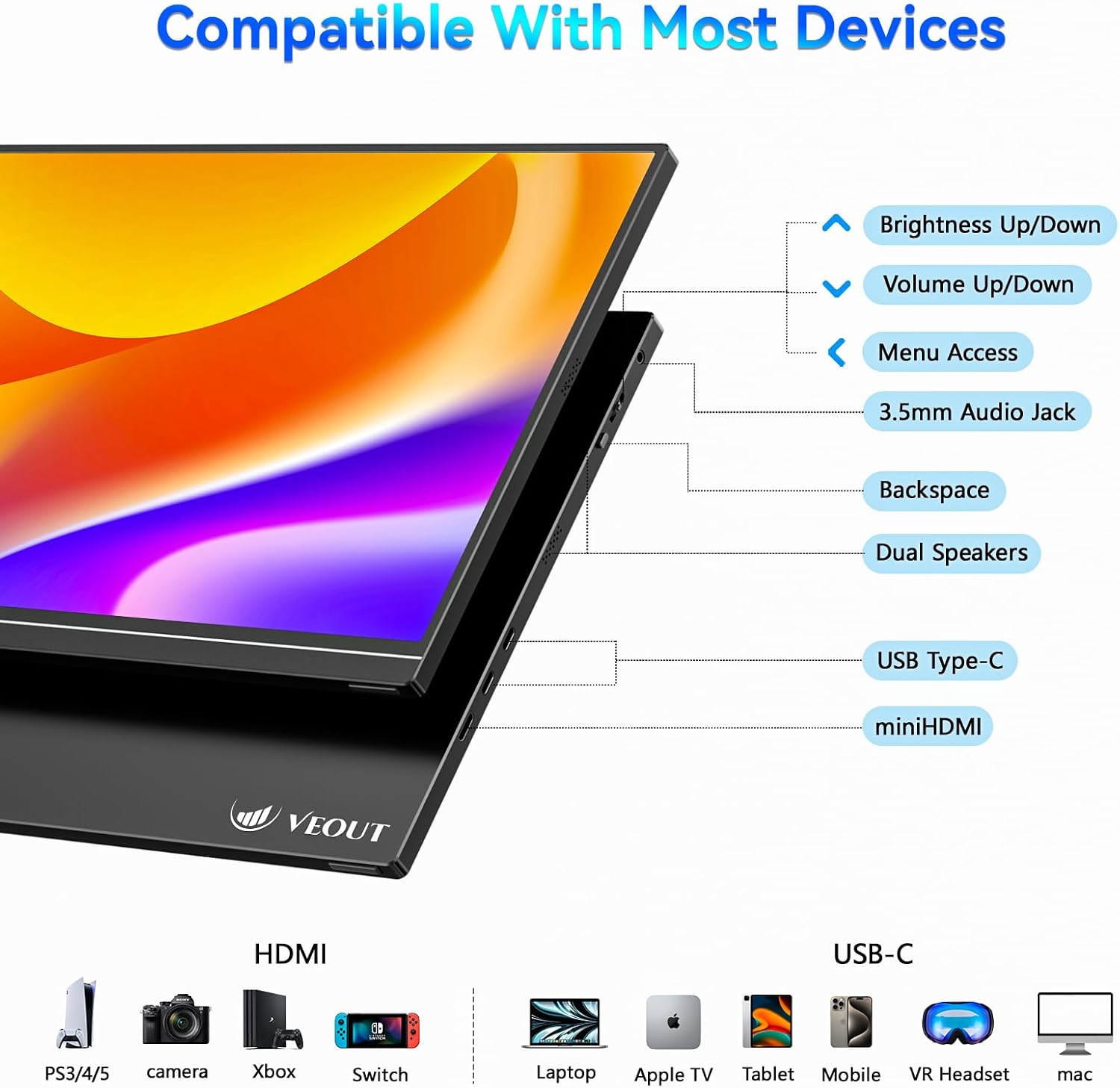
Сүрөт: деталдуу view of the monitor's ports and control buttons.
- Жарыктыкты жогорулатуу/төмөндөтүү: Экран жарыктыгын тууралайт.
- Үнүн жогорулатуу/төмөндөтүү: Controls the volume of the built-in speakers.
- Менюга кирүү: Navigates the on-screen display (OSD) menu.
- 3.5 мм аудио уячасы: Тышкы кулакчындарды же динамиктерди туташтыруу үчүн.
- Backspace: Used for navigation within the OSD menu.
- Кош сүйлөөчүлөр: Интеграцияланган аудио чыгаруу.
- USB Type-C (x2): Supports video signal, power delivery, and data transfer.
- Мини HDMI: For video input only.
4.2 Физикалык өзгөчөлүктөрү
The monitor is designed for portability and flexibility, featuring a built-in stand and support for multiple orientations.

Image: The monitor's adjustable stand and ability to rotate for landscape or portrait viewing.
- Жөнгө салынуучу стенд: The integrated aluminum stand allows for angle adjustments from 0° to 75°.
- Портрет режими: The monitor can be rotated 90° to function in portrait orientation, ideal for coding or document viewing.
- Алюминий корпусу: Durable and lightweight construction.
5. Орнотуу жана туташуу
The Veout V1 Pro monitor offers flexible connectivity options for various devices. Ensure your device supports the necessary video output standards.
5.1 Connecting to Laptops
For laptops with a full-featured USB-C port (supporting video signal and power delivery), a single USB-C to USB-C cable is sufficient for both power and display. For other laptops, use the Mini HDMI for video and a USB-C to USB-A cable with the power adapter for power.

Image: Connecting the monitor to a laptop using a single USB-C cable.
5.2 Connecting to Smartphones and Tablets
For smartphones and tablets with a full-featured USB-C port (supporting DP Alt Mode via USB-C 3.0+), a single USB-C to USB-C cable can provide display and power. Some phones may require an external power adapter. Avoid phones with USB-C 2.0-only ports.

Image: Phone compatibility and connection requirements for the portable monitor.
5.3 Connecting to Gaming Consoles
Connect gaming consoles like PS4/5, Xbox, and Nintendo Switch (docked mode) using the Mini HDMI to HDMI cable for video. Power may need to be supplied via a USB-C cable and the 15W power adapter.
5.4 Шайкештикти текшерүү
Before connecting, ensure your device has either a full-featured USB-C port (supporting video signal and power delivery) or a standard HDMI port for video transmission.

Image: Quick compatibility check for USB-C and HDMI ports.
6. Иштөө нускамалары
6.1 Дисплей орнотуулары
Use the control buttons on the monitor to access the On-Screen Display (OSD) menu. Here you can adjust settings such as brightness, contrast, color temperature, and input source. Refer to the 'Product Overview' section for button locations.
6.2 Orientation Modes
The monitor supports both landscape and portrait orientations. To switch modes, physically rotate the monitor and adjust the display settings on your connected device (e.g., laptop or smartphone) accordingly.
6.3 Оюн функциялары
Experience smooth gaming with the 144Hz refresh rate and AMD FreeSync technology, which helps eliminate screen tearing and stuttering. Ensure your connected device's graphics settings are configured to utilize these features.

Image: Visual comparison of 144Hz FreeSync versus 60Hz display during gaming.
6.4 Дисплей сапаты
The 2.5K Ultra HD IPS display offers sharp details, vibrant colors, and wide viewing angles. The matte screen reduces glare, enhancing readability in various lighting conditions.

Image: Comparison of 2.5K vs 1080p resolution, emphasizing pixel density and color accuracy.
Видео: Бүттүview of the Veout 2.5K/144Hz portable monitor, demonstrating its features and connectivity.
7. Техникалык тейлөө
- Тазалоо: Экранды тазалоо үчүн жумшак, мамыксыз чүпүрөктү колдонуңуз. Өжөр тактар үчүн, бир аз сүртүңүзampчүпүрөккө суу же экранды тазалоо эритмеси. Катуу химиялык заттардан алыс болуңуз.
- Сактагыч: When not in use, fold the stand and store the monitor in a protective sleeve or bag to prevent scratches and damage.
- Колдонуу: Мониторду этияттык менен кармаңыз. Аны түшүрүп албаңыз же экранга ашыкча басым жасабаңыз.
8. Кыйынчылыктарды
- Сигнал жок:
- Ensure cables are securely connected to both the monitor and the source device.
- Verify the source device is powered on and configured to output video.
- Check the monitor's OSD menu to ensure the correct input source is selected (Auto, USB-C1, USB-C2, HDMI).
- Confirm your device's USB-C port supports video output (DP Alt Mode).
- Кубат жок:
- If using a single USB-C cable, ensure the source device can provide sufficient power.
- Connect the monitor to the 15W power adapter using the USB-C to USB-A cable.
- Дисплейдин жымыңдашы/туруксуздугу:
- Кабелдик туташууларды текшериңиз.
- Reduce the refresh rate on your source device if experiencing issues, especially with HDMI connections (max 120Hz for HDMI).
- Ensure FreeSync is enabled/disabled as needed in the OSD menu or source device settings.
- Аудио жок:
- Adjust the monitor's volume via the control buttons.
- Баштапкы түзмөгүңүздөгү аудио чыгаруу жөндөөлөрүн текшериңиз.
- Ensure external speakers/headphones are properly connected to the 3.5mm audio jack.
9. Техникалык шарттар
| Өзгөчөлүк | Спецификация |
|---|---|
| Продукциянын өлчөмдөрү | 9.37 x 0.3 x 13.9 дюйм |
| Элемент Салмагы | 1.58 фунт |
| Элемент моделинин номери | V1Pro |
| Туруктуу экран дисплей өлчөмү | 16 дюйм |
| Аспект катышы | 16:10 |
| Резолюция | 2560 x 1600 пиксел (2.5K) |
| Сүрөттүн жарыктыгы | 300 Кандела (нитс) |
| Жалпы USB порттору | 2 (USB-C) |
| Screen Surface Description | Мт |
10. Кепилдик жана колдоо
The Veout V1 Pro monitor comes with a lifetime quality warranty. Enjoy 24/7 customer service and a 30-day free return policy. For technical assistance or warranty claims, please contact Veout customer support through the official channels.

Image: Warranty and support information.


