Introduction
This user manual provides important information for the safe and efficient operation of your Technaxx TX-315 10000mAh 3-in-1 Wireless Fast Charging Power Bank. Please read this manual thoroughly before using the device and keep it for future reference.
Коопсуздук нускамалары
- Кубат банкын экстремалдык температурага, тике күн нуруна же отко чыгарбаңыз.
- Аппаратты өзүңүз ажыратпаңыз, оңдобоңуз же өзгөртпөңүз. Бардык тейлөөлөрдү квалификациялуу кызматкерлерге тапшырыңыз.
- Power банкты суудан жана башка суюктуктардан алыс кармаңыз.
- Түзмөктү түшүрүп албаңыз, уруп албаңыз же катуу соккуга дуушар кылбаңыз.
- Заряддоодо же разряддоодо жакшы желдетүүнү камсыз кылыңыз.
- Балдар жетпеген жерде сактаңыз.
- Электр банкын электрондук калдыктар боюнча жергиликтүү эрежелерге ылайык жок кылыңыз.
Продукт бүттүview
Familiarize yourself with the components of your Technaxx TX-315 power bank:
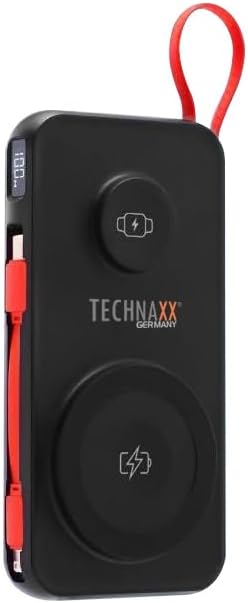
Image: The Technaxx TX-315 power bank, a black rectangular device with a red lanyard. It features a digital display on the side, a USB-C port, a USB-A port, a built-in red USB-C cable, a magnetic wireless charging pad for smartphones, and a smaller wireless charging pad for smartwatches. The Technaxx logo is visible on the front.
- Санариптик дисплей: Батареянын пайызын көрсөтөтtage.
- Magnetic Wireless Charging Pad (15W): Шайкеш смартфондор үчүн.
- Smartwatch Wireless Charging Pad (3W): For compatible smartwatches.
- USB-A Output Port (22.5W): For wired charging of various devices.
- USB-C Input/Output Port (20W PD): For charging the power bank or wired charging of devices.
- Орнотулган USB-C кабели: Аппараттарды заряддоо үчүн ыңгайлуу.
- Кубат баскычы: Activates the display and charging functions.
Жайгашуу
Power Bank заряддоо
- Connect the power bank to a USB wall charger (not included) using the built-in USB-C cable or a separate USB-C to USB-C cable via the USB-C port.
- Санариптик дисплей кубаттоонун жүрүшүн көрсөтүп, батареянын кубатталышынын пайызын көрсөтөтtage.
- Дисплейде "100%" көрсөтүлгөндө, Power Bank толук заряддалган болот.
Иштеп жатат
Charging Smartphones Wirelessly (15W)
- Кубат банкын иштетүү үчүн кубат баскычын басыңыз.
- Place your MagSafe-compatible or Qi-enabled smartphone onto the larger magnetic wireless charging pad. Ensure proper alignment for optimal charging.
- The phone's charging indicator will confirm charging has begun.
Charging Smartwatches Wirelessly (3W)
- Кубат банкын иштетүү үчүн кубат баскычын басыңыз.
- Place your compatible smartwatch onto the smaller wireless charging pad.
- The smartwatch's display will indicate that it is charging.
Wired Charging via USB-A or USB-C Ports
- Кубат банкын иштетүү үчүн кубат баскычын басыңыз.
- Connect your device to the USB-A port or the USB-C port using an appropriate charging cable.
- Power банк түзмөгүңүздү автоматтык түрдө кубаттай баштайт.
- The built-in USB-C cable can also be used for convenient wired charging.
Санариптик дисплейди түшүнүү
Санариптик дисплей учурдагы батареянын пайызын көрсөтөтtage of the power bank. This allows you to monitor the remaining power and know when to recharge the unit.
Техникалык тейлөө
- Power банкты жумшак, кургак чүпүрөк менен тазалаңыз. Абразивдүү тазалагычтарды же эриткичтерди колдонбоңуз.
- Power банкты күн тийбеген жана экстремалдык температурадан алыс, салкын, кургак жерде сактаңыз.
- Узак мөөнөткө колдонулбаса, батареянын ден соолугун сактоо үчүн кубат банкты жок дегенде үч айда бир жолу заряддап туруңуз.
Проблемаларды чечүү
| Көйгөй | Мүмкүн себеп | Чечим |
|---|---|---|
| Power банк заряддалбай жатат. | Cable not connected properly; charger not working; power bank battery depleted. | Check cable connections; try a different charger; allow power bank to charge for a few minutes. |
| Түзмөк кубат банкынан кубатталбай жатат. | Power bank not activated; device not compatible; cable faulty; power bank battery low. | Press power button; ensure device supports wireless/wired charging; try a different cable; recharge power bank. |
| Wireless charging is slow or intermittent. | Misalignment of device; thick phone case; foreign objects between device and pad. | Realign device on charging pad; remove thick phone case; remove any metal objects or cards. |
| Санарип дисплей иштебейт. | Power bank battery depleted; internal fault. | Recharge power bank; if issue persists, contact support. |
Техникалык шарттар
- Модель аты: TX-315
- Батарея сыйымдуулугу: 10000mAh
- Батарея клеткасынын курамы: Литий полимери
- Wireless Charging (Smartphone): 15W (Магниттик)
- Wireless Charging (Smartwatch): 3W
- USB-A чыгаруу: 22.5 Вт
- USB-C Киргизүү/Чыгуу: 20 Вт кубаттуулукту жеткирүү (PD)
- Продукциянын өлчөмдөрү: 144 x 73 x 16 mm (approx. 7.2L x 2W x 14Th centimetres)
- Элемент Салмагы: 250g (approx. 0.56 Pounds)
- Өндүрүүчү: Technaxx
- Келип чыккан өлкө: Кытай
Кепилдик жана колдоо
Your Technaxx TX-315 Power Bank comes with a standard manufacturer's warranty. For detailed warranty information, please refer to the warranty card included in the product packaging or visit the official Technaxx website. If you encounter any issues or require technical assistance, please contact Technaxx customer support or your retailer.
The product package includes the Powerbank 10000mAh TX-315 and this user manual.


