1. Киришүү
This manual provides essential instructions for the safe and efficient operation, maintenance, and troubleshooting of your FOSSiBOT F3600 Pro Portable Power Station and SP420W Foldable Solar Panel. Please read this manual thoroughly before using the product to ensure proper functionality and safety.

Image: The FOSSiBOT F3600 Pro Portable Power Station shown with a connected SP420W Foldable Solar Panel, illustrating the complete power generation and storage system.
2. Коопсуздук нускамалары
Травматизмди же буюмга зыян келтирбөө үчүн төмөнкү коопсуздук чараларын сактаңыз:
- Бөлүктү бөлбөөгө, оңдоп же өзгөртпөңүз.
- Аппаратты жылуулук булактарынын жанына же түз күн нурунун астында узак убакытка койбоңуз.
- Жамгырдын же нымдуулуктун таасиринен алыс болуңуз.
- Түпнуска же тастыкталган аксессуарларды гана колдонуңуз.
- Балдар жана үй жаныбарлары жетпеген жерде сактаңыз.
- Колдонуу жана кубаттоо учурунда туура желдетүүнү камсыз кылыңыз.
- Өрт чыккан учурда кургак порошок өрт өчүргүчтү колдонуңуз. Сууну колдонбоңуз.

Image: An internal diagram of the FOSSiBOT F3600 Pro highlighting various safety protection mechanisms such as overload, over-temperature, low-temperature, over-voltagд, аз көлөмдүүtage, over-current, short-circuit, over-charge, and over-discharge protection.
3. Пакеттин мазмуну
Баардык буюмдар пакетиңизге камтылганын текшериңиз:

Image: A visual representation of the standard packing list for the FOSSiBOT F3600 Pro, including the power station, AC charge cable, car charge cable, XT90 solar charge cable, leather handle sheath, cable storage bag, portable flashlight, flashlight USB cable, and user manual.
- FOSSiBOT F3600 Pro көчмө электр станциясы
- SP420W Foldable Solar Panel (if purchased as a bundle)
- AC заряддоо кабели
- Унаа заряддоо кабели
- XT90 Solar Charge Cable
- Leather Handle Sheath
- Кабель сактоочу баштык
- Портативдик кол чырак
- Flashlight USB Cable
- User Manual
4. Продукт бүтүп калдыview
4.1 Dimensions and Portability
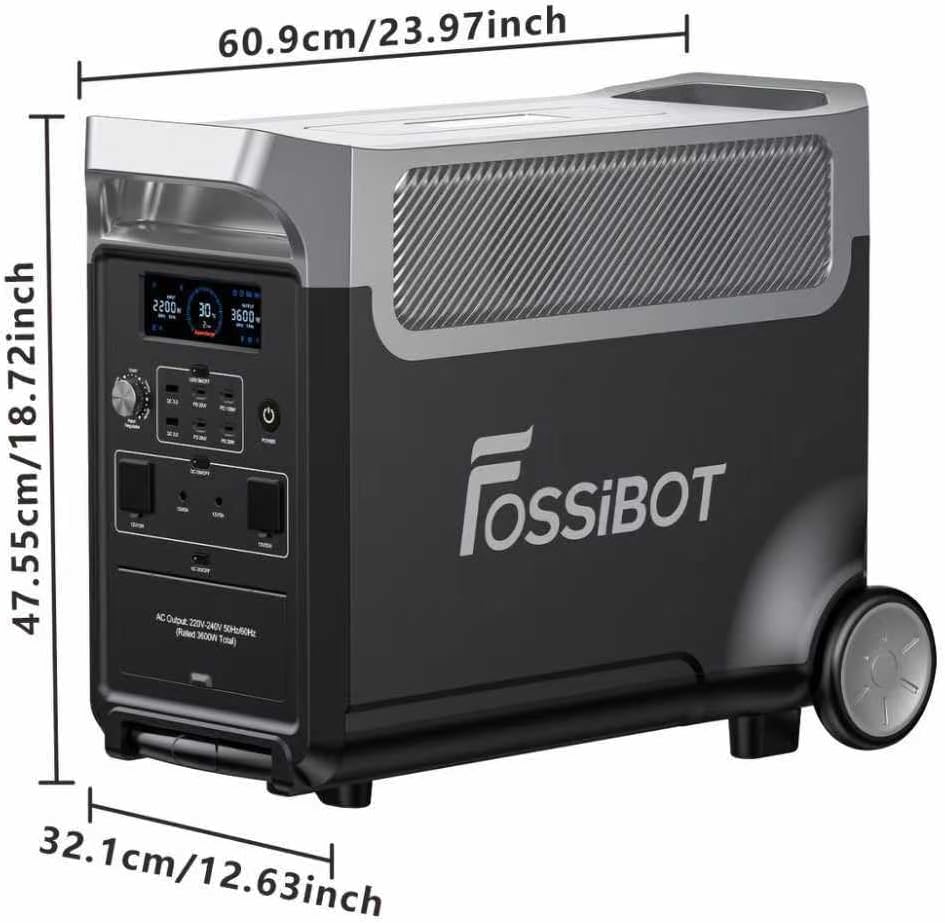
Image: A diagram showing the dimensions of the FOSSiBOT F3600 Pro Portable Power Station: 60.9 cm (23.97 inches) length, 32.1 cm (12.63 inches) width, and 47.55 cm (18.72 inches) height.

Image: A person pulling the FOSSiBOT F3600 Pro using its integrated wheels and extendable handle, demonstrating its portability. The image also indicates its weight and size compared to a smartphone.
The FOSSiBOT F3600 Pro is designed for portability with integrated wheels and an extendable handle, making it easy to transport despite its robust capacity.
4.2 Алдыңкы жана арткы панелдер

Image: A detailed diagram illustrating the various ports and features on the front and rear panels of the FOSSiBOT F3600 Pro. The front panel includes USB-C (PD 100W, PD 20W), USB-A (QC3.0), Cigarette Lighter, DC5521, XT60, and AC outlets. The rear panel features a magnetic flashlight, 3W LED lighting, AC charging input, XT90 solar/car charge input, overload protection switch, and parallel port.
4.3 Дисплей панели

Image: A detailed diagram of the FOSSiBOT F3600 Pro's display panel, indicating various indicators such as AC charging, XT90 interface, Bluetooth, WiFi, PD3.0 output, battery level indicator, AC output, DC (12V) output, USB output, expansion battery, battery percentage, remaining use/charge time, high/low-temperature protection, fan status, XT60 output, cigarette lighter output, LED light, input total power, and output total power.
5. Орнотуу
5.1 Алгачкы заряддоо
Before first use, fully charge the FOSSiBOT F3600 Pro using the provided AC charge cable. Connect the AC charge cable to the AC charging input port on the rear panel and plug it into a standard wall outlet. The display will indicate charging status.
5.2 Күн батареяларын туташтыруу
To charge using solar power, connect the SP420W Foldable Solar Panel(s) to the XT90 solar/car charge input port on the rear panel using the XT90 solar charge cable. Ensure the solar panels are placed in direct sunlight for optimal charging efficiency. Multiple solar panels can be connected in parallel for faster charging.
5.3 Колдонмо туташуусу
The FOSSiBOT F3600 Pro can be controlled and monitored via a mobile application:

Image: A FOSSiBOT F3600 Pro power station next to a person using a smartphone displaying the control app interface. The app shows real-time battery capacity, input/output power, and controls for various functions. A QR code for app download is also visible.
- Download the FOSSiBOT app from your device's app store or by scanning the QR code provided in the manual or on the product packaging.
- Смартфонуңузда Bluetooth жана Wi-Fi иштетиңиз.
- Open the app and follow the on-screen instructions to connect to your F3600 Pro.
- The app allows you to check real-time battery capacity, turn the machine on/off, set charging parameters, and control USB and DC outputs.
- Колдонмону жүктөп алуу шилтемеси: https://app.sydpower.com/
6. Иштөө нускамалары
6.1 Күйгүзүү/өчүрүү
Түзмөктү күйгүзүү же өчүрүү үчүн алдыңкы панелдеги негизги кубат баскычын басып, кармап туруңуз. Иштетилгенде дисплей күйөт.
6.2 AC чыгарууларды колдонуу
The F3600 Pro provides 3600W pure sine wave AC output, suitable for powering most household appliances. Press the AC power button to activate the AC outlets. Plug your devices into the appropriate AC outlets on the front panel.

Image: The FOSSiBOT F3600 Pro power station positioned in a home setting, connected to and powering various large appliances such as a refrigerator, washing machine, and oven, demonstrating its capability to handle significant loads.
6.3 DC жана USB чыгууларын колдонуу
Press the DC power button to activate the DC and USB outputs. Connect your devices to the USB-A, USB-C, DC5521, Cigarette Lighter, or XT60 ports as needed. The USB-C ports support PD100W fast charging, and USB-A ports support QC3.0.
6.4 Заряддоо ыкмалары
The F3600 Pro supports multiple charging methods:

Image: A graphic illustrating five different recharging methods for the FOSSiBOT F3600 Pro: AC + Solar (1.8 hours), AC Charge (3 hours), Solar Charge (2 hours), Generator Charge (4 hours), and Car Charging (40 hours).
- AC заряддоо: Connect to a wall outlet for up to 2200W input, fully charging in approximately 2 hours and 10 minutes.
- Күн кубаты: Connect solar panels (up to 2000W input) for a full charge in about 2 hours.
- Унаа заряддоо: Use the car charge cable for charging from a vehicle's 12V outlet.
- Генератор заряддоо: Connect to a compatible generator for charging.
- AC + Күн энергиясы менен кубаттоо: Combine AC and solar input for a maximum of 3500W, achieving a full charge in approximately 1.8 hours.
6.5 UPS функциясы
The F3600 Pro features a 10ms Uninterruptible Power Supply (UPS) function. When connected between your loading and a wall socket, it automatically switches to battery power within 10 milliseconds during a power outage, preventing data loss and protecting connected devices.

Image: The FOSSiBOT F3600 Pro power station connected to a desktop computer setup and a lamp, illustrating its UPS capability during a simulated power outage. The text highlights its non-stop 1500W UPS function with a <10ms switchover time.
6.6 Кеңейтүү батареясы
The F3600 Pro's capacity can be expanded from 3840Wh up to 11,520Wh by connecting additional battery packs via the parallel port on the rear panel. Refer to the expansion battery manual for detailed connection instructions.

Image: A FOSSiBOT F3600 Pro power station connected to multiple solar panels and two additional battery packs, demonstrating its expandable capacity from 3840Wh to 11520Wh for extended power needs.
7. Техникалык тейлөө
- Тазалоо: Түзмөктүн сыртын тазалоо үчүн кургак, жумшак чүпүрөктү колдонуңуз. Катуу химиялык заттарды же абразивдүү материалдарды колдонбоңуз.
- Сактагыч: Store the unit in a cool, dry place away from direct sunlight and extreme temperatures. For long-term storage, charge the battery to approximately 50-80% every 3-6 months to prolong battery life.
- Батареяга кам көрүү: The LiFePO4 battery is designed for over 4,000 cycles to 80% capacity. Avoid fully discharging the battery frequently to maximize its lifespan.
8. Кыйынчылыктарды
If you encounter issues with your FOSSiBOT F3600 Pro, refer to the following common solutions:
- Түзмөк күйбөй жатат: Батарея заряддалганын текшериңиз. Болбосо, кубаттоо үчүн AC розеткасына туташыңыз.
- Порттардан чыгуу жок: Check if the respective AC/DC/USB output buttons are activated. Ensure the device you are trying to power is within the unit's wattage чектөөлөр.
- Жай кубаттоо: Verify that charging cables are securely connected. For solar charging, ensure panels are in direct sunlight and clean. Check the input wattagд дисплейде.
- Ашыкча жүктөө эскертүүсү: Disconnect some devices to reduce the load. The unit will automatically reset after the overload is removed.
- Колдонмо туташуу көйгөйлөрү: Ensure Bluetooth and Wi-Fi are enabled on your phone and the unit. Try restarting both the app and the power station.
Туруктуу маселелер үчүн кардарларды колдоо кызматына кайрылыңыз.
9. Техникалык шарттар
| Өзгөчөлүк | Спецификация |
|---|---|
| Бренд | ФОССИБОТ |
| Модель аты | F3600PRO |
| Ватtage | 3600 ватт |
| Running Wattage | 3600 Ватт |
| Күйүүчү май түрү | Күн |
| Power Source | Батарея менен иштейт (LiFePO4) |
| Батарея сыйымдуулугу | 3840Wh (11,520Wh чейин кеңейтилиши мүмкүн) |
| AC Output | 3600W Pure Sine Wave (7200W Peak) |
| Жалпы электр розеткалары | 5 AC Outlets + Multiple DC/USB |
| Fast Charge | 1.8H (AC+Solar) |
| UPS функциясы | 10ms Switchover |
| Продукциянын өлчөмдөрү | 12.64"L x 18.72"W x 23.98"H |
| Өзгөчө өзгөчөлүк | Extra-Long Run Time, App Control |
10. Кепилдик жана колдоо
The FOSSiBOT F3600 Pro comes with a 5 жылдык кепилдик and lifetime technical support. For any questions or assistance, please contact FOSSIBOT customer service. We are committed to providing a satisfactory response within 24 hours.


