1. Киришүү
Thank you for choosing the TABWEE T80 10-inch Android Tablet. This manual provides essential information for setting up, operating, and maintaining your device. Please read it thoroughly before use to ensure optimal performance and safety.
The TABWEE T80 is a versatile Wi-Fi tablet featuring the latest Android 15 operating system with integrated AI capabilities. It boasts a vibrant 10.5-inch Incell IPS display, ample storage with 12GB RAM and 64GB ROM (expandable up to 2TB), and a long-lasting 6000mAh battery. With GMS certification, dual-band Wi-Fi, Bluetooth 5.0, and GPS, it is designed for both productivity and entertainment.
2. Коопсуздук маалыматы
- Аппаратты экстремалдык температурага, түз күндүн нуруна же жогорку нымдуулукка дуушар кылбаңыз.
- Планшетті түшүрүп алуудан же катуу соккуга кабылтуудан алыс болуңуз.
- Берилген заряддагычты жана аксессуарларды гана колдонуңуз.
- Аппаратты өз алдынча бөлүүгө же оңдоого аракет кылбаңыз. Жардам алуу үчүн кардарларды колдоо бөлүмүнө кайрылыңыз.
- Keep the tablet away from children and pets to prevent damage or injury.
3. Пакеттин мазмуну
Сураныч, пакетте төмөнкү нерселерди текшериңиз:
- TABWEE T80 планшети
- AC адаптер
- USB Type-C кабели
- User Manual
4. Продукт бүтүп калдыview
Familiarize yourself with the components of your TABWEE T80 tablet.

Сүрөт 4.1: Алдыңкы жана арткы view of the TABWEE T80 tablet, highlighting its sleek design and rear camera module.
Физикалык компоненттер:
- 10.5-inch Incell IPS Display: High-definition screen for vivid visuals.
- Алдыңкы камера (2 мегапиксел): Located on the top bezel for video calls and selfies.
- Арткы камера (5MP): Located on the back for capturing photos and videos.
- Кубат баскычы: On the side, used to turn the tablet on/off or wake/sleep the screen.
- Үн баскычтары: On the side, to adjust audio volume.
- USB Type-C порту: Заряддоо жана маалыматтарды өткөрүү үчүн.
- 3.5 мм гарнитура уячасы: For connecting wired headphones or external speakers.
- MicroSD картасынын уячасы: For storage expansion up to 2TB.
- Кош сүйлөөчүлөр: Located on the bottom edge for enhanced audio experience.
5. Орнотуу
5.1 Алгачкы заряддоо
Before first use, fully charge your tablet. Connect the USB Type-C cable to the tablet's charging port and the AC adapter to a power outlet. The battery indicator on the screen will show charging status.
5.2 Күйгүзүү/өчүрүү
- Күйгүзүү үчүн: TABWEE логотиби пайда болгонго чейин Кубат баскычын басып, кармап туруңуз.
- Өчүрүү үчүн: Кубат параметрлери менюсу чыкканга чейин Кубат баскычын басып, кармап туруңуз, андан кийин "Өчүрүү" дегенди тандаңыз.
- Уйку/ойгонуу үчүн: Кубат баскычын кыскача басыңыз.
5.3 Wi-Fi туташуусу
Интернетке туташуу үчүн:
- барыңыз Орнотуулар > Тармак жана интернет > Wi-Fi.
- Wi-Fi'ды күйгүзүңүз. Планшет жеткиликтүү тармактарды издейт.
- Тизмеден каалаган тармакты тандаңыз.
- Эгер суралса, сырсөздү киргизиңиз, андан кийин таптаңыз Туташуу.
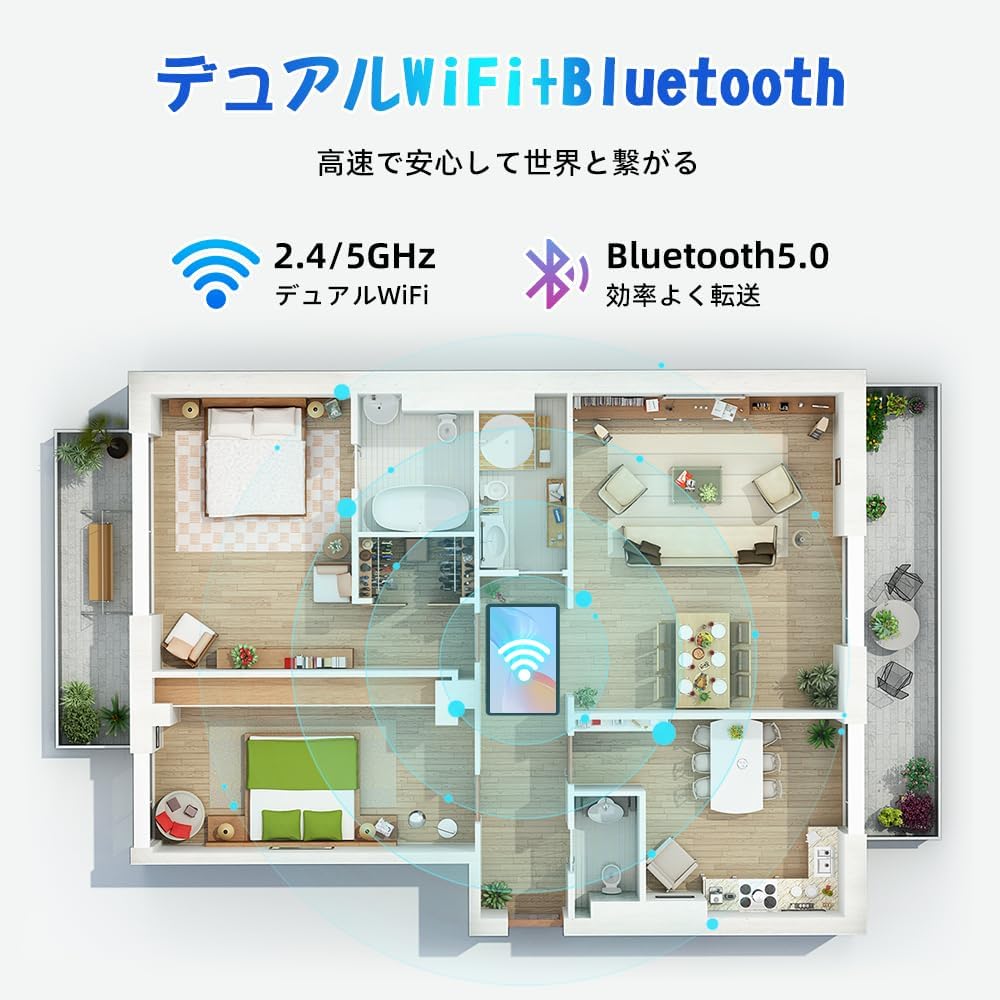
Figure 5.1: Diagram illustrating the tablet's dual-band 2.4G/5G Wi-Fi and Bluetooth 5.0 connectivity, ensuring fast and reliable connections throughout your home or office.
5.4 Google Каттоо эсебин орнотуу
As a GMS certified device, you can access Google Play Store and other Google services. During initial setup, you will be prompted to sign in with your Google account or create a new one. This is essential for downloading apps and syncing data.
5.5 MicroSD картасын орнотуу
To expand storage up to 2TB:
- Планшеттин капталынан MicroSD карта уячасын табыңыз.
- Insert the MicroSD card into the slot with the gold contacts facing down until it clicks into place.
- You may be prompted to format the card for use with the tablet.

Figure 5.2: Visual representation of the tablet's 12GB RAM and 64GB ROM, with support for up to 2TB MicroSD card expansion, allowing for vast storage of photos, videos, and music.
6. Иштөө нускамалары
6.1 Android 15 өзгөчөлүктөрү
Your tablet runs on Android 15, offering an intuitive and enhanced user experience with improved security, customization, and AI capabilities.

Figure 6.1: ашыкview of Android 15 features, including enhanced security and privacy, expanded customization options, improved AI functions, and new gesture controls for a smoother operation.
6.2 Дисплей жана Viewкирүү режимдери
The 10.5-inch Incell IPS display provides vibrant colors and wide viewing angles. Optimize your viewing experience and reduce eye strain with various display modes:

Figure 6.2: The 10.5-inch Incell IPS display offers a 1280x800 resolution and a 16:10 aspect ratio for a wide and efficient viewтажрыйбасы.

Figure 6.3: The tablet supports 1080P Full HD content, providing an immersive visual experience for movies and dramas from platforms like YouTube, Prime Video, Hulu, and HBO.

Сүрөт 6.4: Visual examples of different screen modes: Night mode for reduced blue light, Dark mode for eye comfort in low light, and Reader mode for a black-and-white paper-like display.
- Түнкү режим: Reduces blue light emissions for comfortable viewing in low light conditions. Access via Quick Settings or Display settings.
- Караңгы режим: Changes the system UI and supported apps to a dark theme, reducing eye strain and saving battery on OLED screens. Access via Display settings.
- Окурман режими: Optimizes the display for reading, often by converting to grayscale and adjusting contrast. Access via Display settings or specific reading apps.
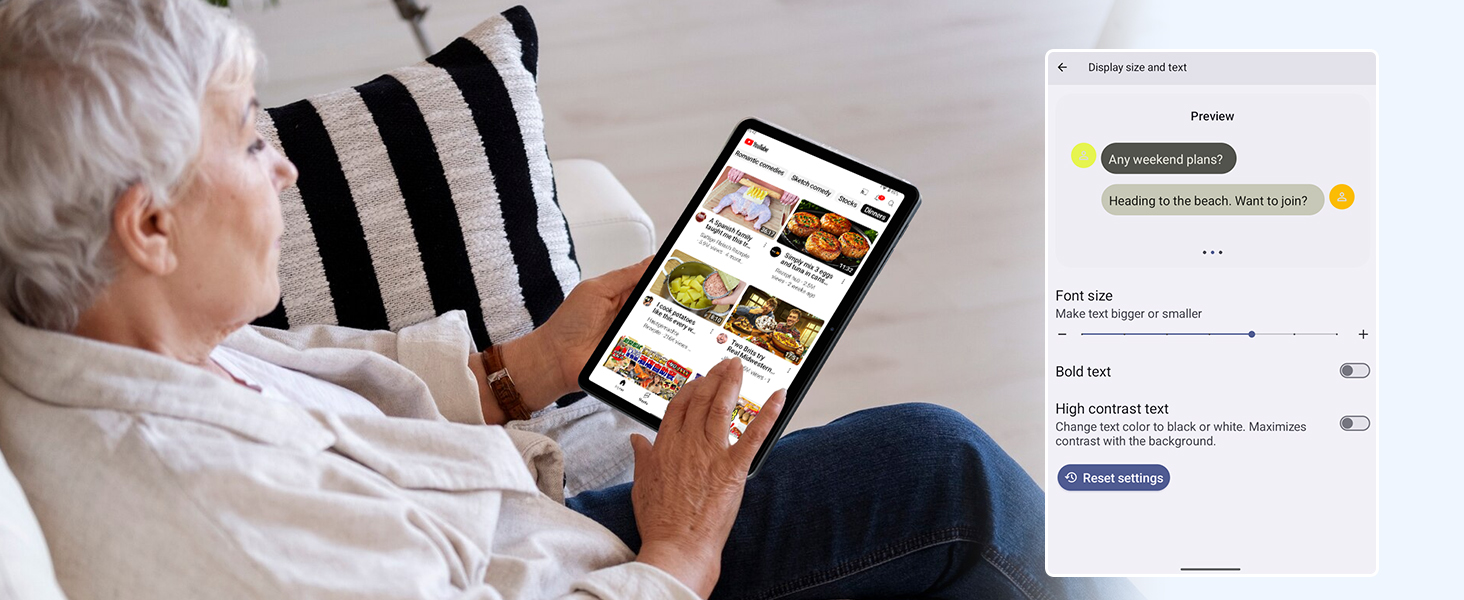
Figure 6.5: Screenshot showing display settings for adjusting text size and bold text, allowing users to customize readability.
6.3 Аткаруу
The TABWEE T80 is powered by a Unisoc T310 processor, ensuring smooth operation for daily tasks and multimedia consumption.
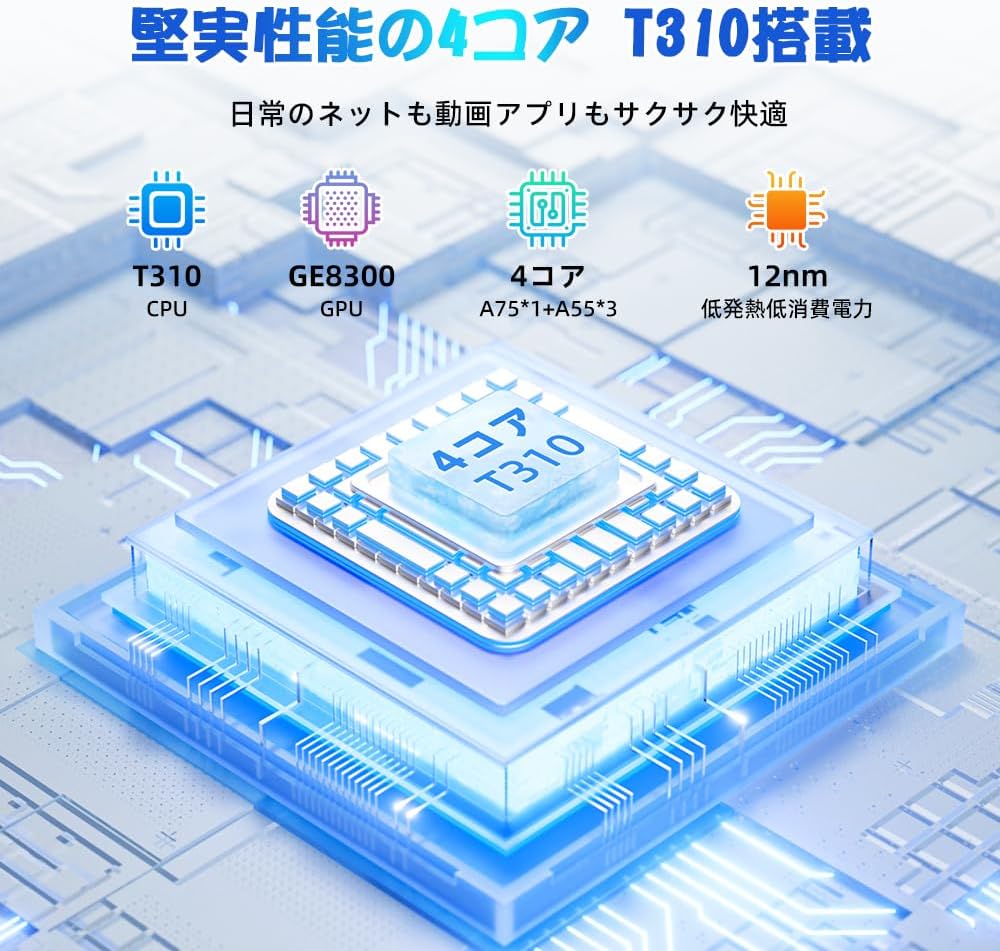
Figure 6.6: Diagram illustrating the T310 quad-core CPU architecture, featuring A75 and A55 cores, designed for efficient performance and low power consumption.

Figure 6.7: Comparison showing the Unisoc T310 processor's improved speed (up to 2.0 GHz) and lower power consumption compared to previous generation products.
6.4 Multitasking and Split Screen
For enhanced productivity, the tablet supports split-screen mode, allowing you to run two applications side-by-side.

Figure 6.8: Demonstration of the split-screen feature, allowing users to comfortably multitask by viewing two applications simultaneously, such as reading an e-book while checking messages.
- To activate split screen: Open an app, then swipe up slightly from the bottom and hold to reveal recent apps. Drag one app to the top or bottom of the screen, then select another app for the remaining space.
6.5 AI Features (Gemini AI)
Leverage the power of Gemini AI for enhanced productivity and convenience.

Figure 6.9: Visuals demonstrating Gemini AI 2.0 capabilities, including AI text-to-image generation, AI voice response, AI smart control, AI real-time conversation, and AI full-screen smart assistance.
Gemini AI can assist with real-time translation, smart text suggestions, and optimizing performance based on your usage habits. Explore AI-enhanced multi-tasking for learning, office work, and entertainment.
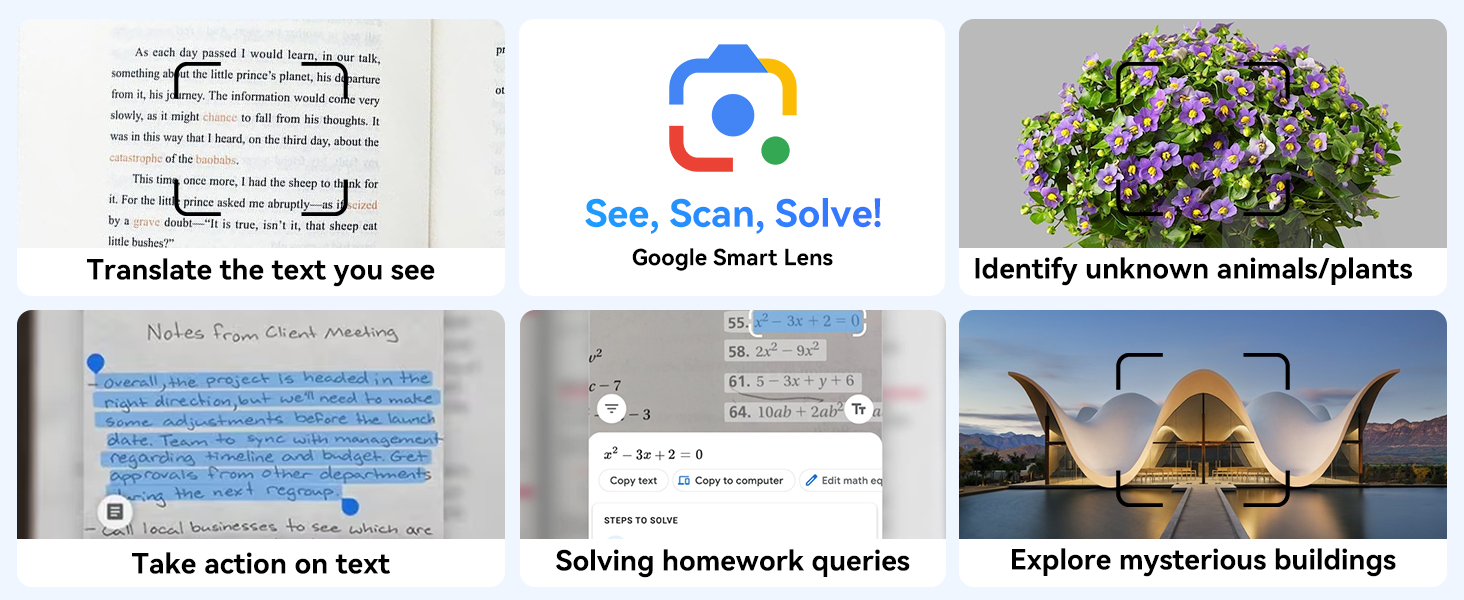
6.10-сүрөт: Мисamples of Google Smart Lens functions: translating text, identifying unknown objects/plants, taking action on text, solving homework queries, and exploring mysterious buildings.
6.6 Parental Controls (Kids Mode)
The tablet includes parental control features to ensure a safe environment for children.

Figure 6.11: Icons representing parental control features: usage time limits, break time settings, app usage restrictions, and content restrictions, all designed to protect children.
You can set time limits, restrict app access, and filter content. Navigate to Орнотуулар > Санариптик бакубаттуулук жана ата-эненин көзөмөлү to configure these features.
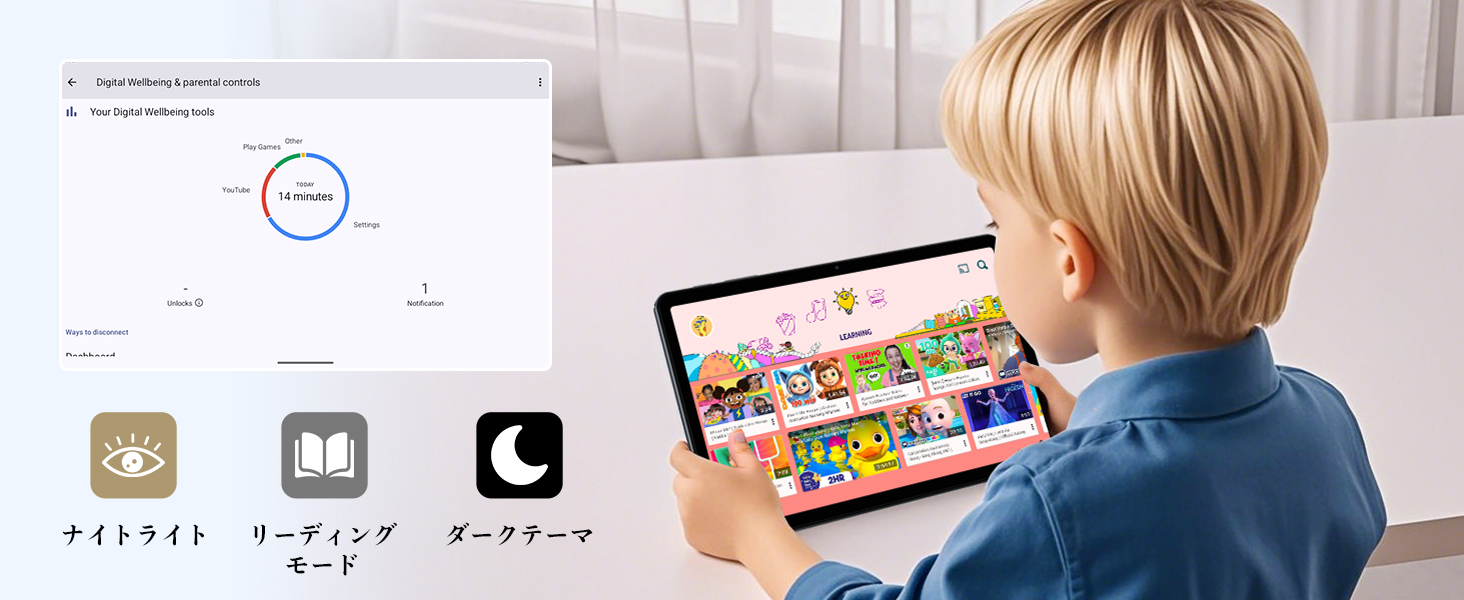
Figure 6.12: Screenshot of the Digital Wellbeing and parental controls interface, showing usage statistics and options for managing screen time and app access for children.
6.7 Зымсыз проекция
Mirror your tablet's screen to a compatible TV or monitor wirelessly.
- Ensure your TV/monitor supports wireless display (e.g., Miracast, Chromecast built-in).
- Планшетиңизден төмөнкүгө өтүңүз Орнотуулар > Туташкан түзмөктөр > Туташуу артыкчылыктары > Cast.
- Select your display device from the list to begin mirroring.
6.8 Камераны колдонуу
Планшет 2 МП алдыңкы камера жана 5 МП арткы камера менен жабдылган.

Figure 6.13: Illustration of the tablet's 2-megapixel front camera and 5-megapixel rear camera, capable of autofocus for clear photos and video calls.
Open the Camera app to take photos or record videos. Tap the shutter button to capture an image or the record button to start/stop video recording. You can switch between front and rear cameras using the camera switch icon.
6.9 аудио
The tablet features dual speakers for an immersive audio experience and a 3.5mm headphone jack for private listening.

Figure 6.14: Diagram showing the location of the two powerful speakers on the TABWEE T80, providing a deep and immersive audio experience.
Adjust volume using the physical volume buttons on the side of the tablet or through the on-screen volume slider.
6.10 GPS навигациясы
The integrated GPS system allows for accurate location tracking and navigation. Use pre-installed map applications or download your preferred navigation app from the Google Play Store.
7. Техникалык тейлөө
7.1 Тазалоо
Use a soft, lint-free cloth to clean the screen and body of the tablet. Do not use abrasive cleaners or solvents, as they may damage the surface.
7.2 Программалык камсыздоо жаңыртуулары
Regularly check for system updates to ensure your tablet has the latest features and security patches. Go to Орнотуулар > Система > Системаны жаңыртуу.
7.3 Батареяга кам көрүү
Батареянын иштөө мөөнөтүн узартуу үчүн:
- Батареяны бат-баттан толук кубаттап калуудан алыс болуңуз.
- Планшет толгондон кийин аны көпкө чейин заряддап турган абалда калтырбаңыз.
- Store the tablet in a cool, dry place when not in use for long periods.

Figure 7.1: Battery life estimates for the 6000mAh battery: 5 hours of web browsing, 4 hours of video playback, 4 hours of gaming, 21 hours of music, and 648 hours of standby time, supported by AI power-saving algorithms.
8. Кыйынчылыктарды
| Көйгөй | Мүмкүн себеп | Чечим |
|---|---|---|
| Планшет күйбөйт. | Аз батарея; системанын бузулушу. | Планшетті кеминде 30 мүнөт кубаттаңыз. Күйгүзүп кайра иштетүү үчүн Күйгүзүү баскычын 10-15 секунд басып туруңуз. |
| Wi-Fi'га туташпай жатат. | Incorrect password; router issue; out of range. | Wi-Fi сырсөзүн текшериңиз. Роутериңизди өчүрүп-күйгүзүңүз. Wi-Fi роутерине жакындаңыз. |
| Колдонмолор жай же бузулуп жатат. | Өтө көп колдонмолор иштеп жатат; аз сактоо. | Close background apps. Clear app cache. Free up storage space. |
| Экран жооп бербей жатат. | Убактылуу программалык ката. | Планшетті күч баскычын кармап туруп, мажбурлап өчүрүп-күйгүзүңүз. |
9. Техникалык шарттар
| Өзгөчөлүк | Деталь |
|---|---|
| Бренд | ТАБВИ |
| Модель аты | T80 Tablet Tabwee |
| Операция системасы | Android 15 (GMS тастыкталган) |
| Дисплей өлчөмү | 10.5 inches Incell IPS |
| Display Resolution | 1280x800 пиксел |
| CPU бренди | Unisoc |
| CPU ылдамдыгы | 2 ГГц |
| GPU Brand | ARM Mali-G57 |
| RAM | 12GB (4GB+8GB expansion) |
| Ички сактагыч | 64 ГБ |
| Кеңейтүүчү сактагыч | MicroSD картасы аркылуу 2 ТБ чейин |
| Батарея сыйымдуулугу | 6000mAh Lithium-ion Polymer |
| Алдыңкы камера | 2 депутат |
| Арткы камера | 5 депутат |
| Байланыш | 2.4G/5G Wi-Fi (802.11ac), Bluetooth 5.0, GPS |
| Порттар | USB Type-C, 3.5 мм гарнитура уячасы |
| Өлчөмдөр | 32.79 x 19.9 x 4.1 см |
| Салмагы | 910 г |
10. Кепилдик жана колдоо
Your TABWEE T80 tablet comes with a 2 жылдык өндүрүүчүнүн кепилдиги.
If you encounter any issues with your product, please contact us via email. We strive to respond promptly to ensure your satisfaction.
Колдоо кызматы менен кантип байланышса болот:
- Through your Amazon account: Go to Заказ тарыхы > Select the relevant order > Click Сатуучу менен байланышуу.
- Through the product page: On the product page, click on the seller's name (TABWEE Official Store) below the "Add to Cart" button, then click "Ask a question" on the top right.
Support hours: 9:00 AM - 6:00 PM (excluding holidays). We will reply as soon as possible.

Figure 10.1: Image representing customer support availability for assistance.


